1. ആമുഖം
വാങ്ങിയതിന് നന്ദി.asing the Denon AVR-488 5.1 Stereo Surround Sound Receiver. This receiver is designed to deliver high-quality audio and video performance for your home entertainment system. This manual provides detailed instructions for the proper setup, operation, and maintenance of your new receiver to ensure optimal performance and longevity.
Please read this manual thoroughly before connecting or operating your receiver. Keep this manual for future reference.
2. സജ്ജീകരണം
2.1 പായ്ക്ക് ചെയ്യലും പ്രാരംഭ പരിശോധനയും
Carefully remove the receiver from its packaging. Ensure all accessories are present and that the unit has not been damaged during transit. If any items are missing or damaged, contact your dealer immediately.
- Denon AVR-488 Receiver
- Remote Control (not pictured, but typically included)
- പവർ കോർഡ്
- എഎം ലൂപ്പ് ആന്റിന
- എഫ്എം ഇൻഡോർ ആന്റിന
2.2 ഫ്രണ്ട് പാനൽ ഓവർview
The front panel of the Denon AVR-488 provides access to essential controls and indicators for daily operation.
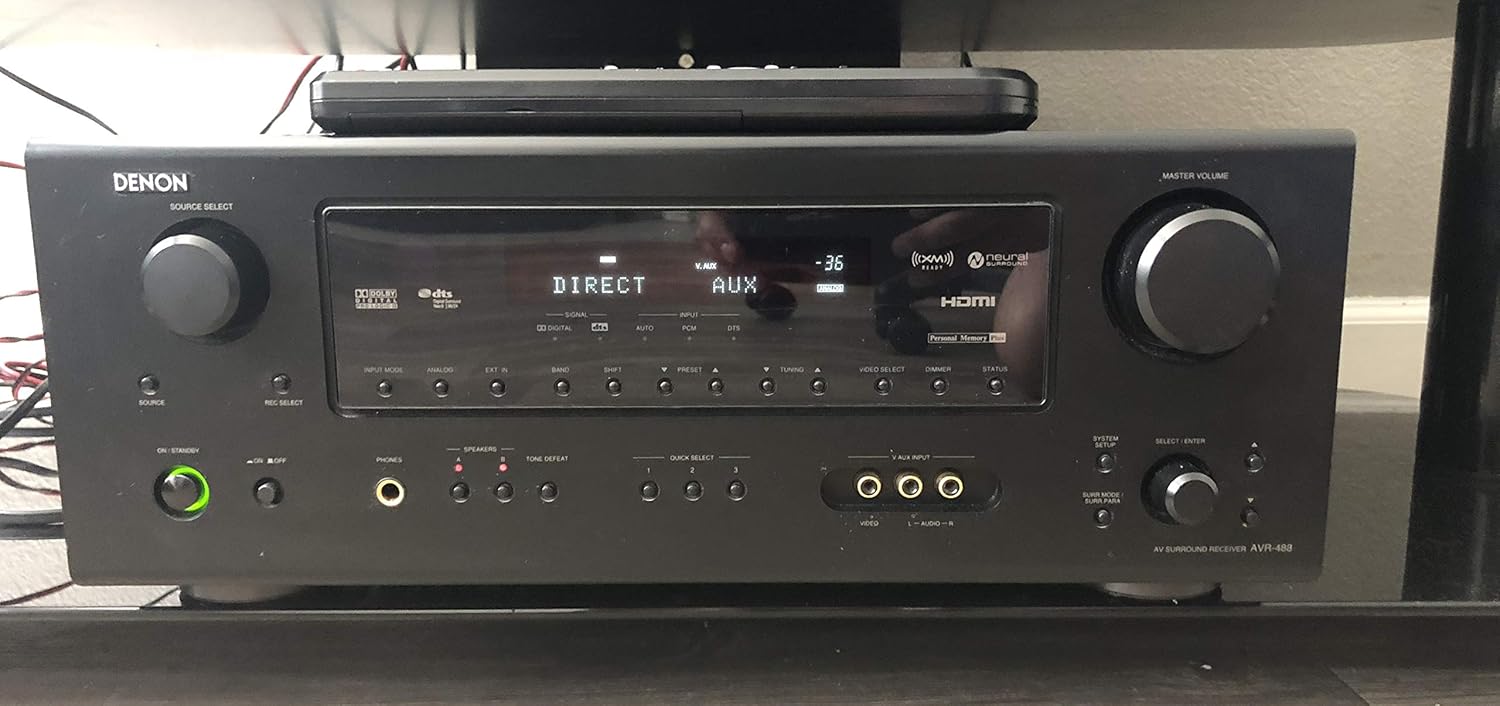
Figure 2.2.1: Front Panel of Denon AVR-488. This image displays the front of the Denon AVR-488 receiver, showing the main display, input selectors, volume knob, and various control buttons for source selection, tone control, and system setup. The power button is located on the lower left.
2.3 പിൻ പാനൽ കണക്ഷനുകൾ
The rear panel houses all the input and output terminals for connecting your audio and video components, as well as speakers.

Figure 2.3.1: Rear Panel of Denon AVR-488. This image illustrates the rear panel of the Denon AVR-488 receiver, detailing the extensive array of connectivity options including HDMI, component video, composite video, optical and coaxial digital audio inputs, analog audio inputs, speaker terminals for 5.1 channels, and antenna connections.
2.4 സ്പീക്കറുകൾ ബന്ധിപ്പിക്കുന്നു
The AVR-488 supports a 5.1 channel speaker configuration. Ensure correct polarity (+ to + and - to -) when connecting speakers.
- ഫ്രണ്ട് സ്പീക്കറുകൾ (ഇടത്/വലത്): Connect to the FRONT L/R terminals.
- സെന്റർ സ്പീക്കർ: Connect to the CENTER terminal.
- സറൗണ്ട് സ്പീക്കറുകൾ (L/R): Connect to the SURROUND L/R terminals.
- സബ്വൂഫർ: Connect an active subwoofer to the PRE OUT SUBWOOFER terminal using an RCA cable.
Note: Ensure speaker impedance matches the receiver's specifications (4-16 ohms for front/center/surround).
2.5 ഓഡിയോ/വീഡിയോ ഘടകങ്ങൾ ബന്ധിപ്പിക്കൽ
Connect your source devices (e.g., Blu-ray player, game console, cable box) to the appropriate input terminals.
- HDMI കണക്ഷനുകൾ: Use HDMI cables for devices with HDMI outputs (e.g., Blu-ray players, game consoles). Connect to HDMI IN 1 or HDMI IN 2. Connect HDMI OUT to your TV or projector.
- ഘടക വീഡിയോ കണക്ഷനുകൾ: For devices with component video outputs (Y, Pb, Pr), connect to COMPONENT VIDEO IN 1, 2, or 3.
- അനലോഗ് ഓഡിയോ കണക്ഷനുകൾ: Use RCA cables for devices like CD players or older VCRs. Connect to ANALOG AUDIO IN terminals (e.g., CD, DVD, VCR).
- ഡിജിറ്റൽ ഓഡിയോ കണക്ഷനുകൾ: For devices with optical or coaxial digital audio outputs, connect to OPTICAL IN or COAXIAL IN terminals.
- ആന്റിന കണക്ഷനുകൾ: Connect the supplied AM loop antenna and FM indoor antenna to their respective terminals for radio reception.
2.6 പവർ കണക്ഷൻ
After all other connections are made, plug the power cord into the AC INlet on the rear of the receiver, then into a wall outlet.
3. നിങ്ങളുടെ റിസീവർ പ്രവർത്തിപ്പിക്കുന്നു
3.1 അടിസ്ഥാന പ്രവർത്തനം
- പവർ ഓൺ/ഓഫ്: ഫ്രണ്ട് പാനലിലോ റിമോട്ട് കൺട്രോളിലോ ഉള്ള പവർ ബട്ടൺ അമർത്തുക.
- ഇൻപുട്ട് തിരഞ്ഞെടുക്കൽ: Use the SOURCE SELECT knob on the front panel or the input buttons on the remote control (e.g., CD, DVD, TV/CBL) to select the desired input source.
- വോളിയം നിയന്ത്രണം: Rotate the MASTER VOLUME knob on the front panel or use the VOLUME +/- buttons on the remote control to adjust the sound level.
- നിശബ്ദമാക്കുക: Press the MUTE button on the remote control to temporarily silence the audio. Press again to unmute.
3.2 ഓഡിയോ ക്രമീകരണങ്ങൾ
- സറൗണ്ട് മോഡുകൾ: Press the SURROUND MODE buttons on the remote to cycle through various surround sound modes (e.g., Dolby Digital, DTS, Stereo).
- ടോൺ നിയന്ത്രണം: Use the BASS and TREBLE controls (if available on remote or via menu) to adjust the bass and treble levels.
- Speaker Level Adjustment: Access the speaker setup menu (refer to on-screen display if available, or front panel menu) to adjust individual speaker levels for balanced sound.
3.3 Radio Operation (AM/FM Tuner)
- Select Tuner Input: Press the TUNER button on the remote or front panel.
- ട്യൂണിംഗ്: Use the TUNING +/- buttons to manually tune to a station. Use the PRESET +/- buttons to select preset stations.
- പ്രീസെറ്റിംഗ് സ്റ്റേഷനുകൾ: Tune to the desired station, then press and hold a MEMORY button (if available) or follow the on-screen instructions to save it as a preset.
4. പരിപാലനം
- വൃത്തിയാക്കൽ: മൃദുവായതും ഉണങ്ങിയതുമായ തുണി ഉപയോഗിച്ച് യൂണിറ്റ് തുടയ്ക്കുക. കഠിനമായ അഴുക്കിന്, dampen the cloth with a mild detergent solution and wipe gently. Do not use abrasive cleaners or solvents.
- വെൻ്റിലേഷൻ: Ensure adequate ventilation around the receiver. Do not block the ventilation holes on the top or sides of the unit. Avoid placing the receiver in an enclosed cabinet without proper airflow.
- പവർ കോർഡ്: Periodically check the power cord for any damage. If damaged, discontinue use and contact a qualified service technician.
5. പ്രശ്നപരിഹാരം
If you experience problems with your receiver, refer to the following table for common issues and their solutions.
| പ്രശ്നം | സാധ്യമായ കാരണം | പരിഹാരം |
|---|---|---|
| ശക്തിയില്ല | Power cord not connected; Power outlet faulty; Receiver in standby mode. | Ensure power cord is securely plugged in; Test outlet with another device; Press the POWER button. |
| ശബ്ദമില്ല | Incorrect input selected; Volume too low; Speakers not connected properly; Mute function active. | Select correct input source; Increase volume; Check speaker connections and polarity; Deactivate mute. |
| വീഡിയോ ഔട്ട്പുട്ട് ഇല്ല | Incorrect video input selected; Video cables not connected properly; TV input not selected correctly. | Select correct video input; Check all video cable connections; Ensure TV is on the correct input for the receiver. |
| റിമോട്ട് കൺട്രോൾ പ്രവർത്തിക്കുന്നില്ല | Batteries are dead or inserted incorrectly; Obstruction between remote and receiver; Remote sensor blocked. | Replace batteries, ensuring correct polarity; Remove any obstructions; Ensure remote sensor on receiver is clear. |
6 സ്പെസിഫിക്കേഷനുകൾ
The following are key specifications for the Denon AVR-488 receiver:
- ചാനലുകൾ: 5.1-ചാനൽ
- പവർ ഔട്ട്പുട്ട്: 75 watts per channel (x 5 channels)
- ഡീകോഡർ: Dolby Digital 5.1, Dolby Pro Logic II, DTS 5.1, DTS Neo6
- വീഡിയോ അപ്പ് കൺവേർഷൻ: 1080p
- എച്ച്ഡിഎംഐ: 2 In / 1 Out (HDMI 1.3a switching, No Audio Support)
- ഘടകം വീഡിയോ: 3 ഇൻ / 1 ഔട്ട്
- ഡിജിറ്റൽ ഒപ്റ്റിക്കൽ ഓഡിയോ: 2 ഇഞ്ച്
- Digital Coaxial Audio: 2 ഇഞ്ച്
- അനലോഗ് ഓഡിയോ: Multiple RCA inputs/outputs
- ഹെഡ്ഫോൺ ജാക്ക്: 1
- Multi Channel Input: 1 X Multichannel Analog Audio input
- റേഡിയോ: AM/FM Tuner, Satellite Radio Ready (XM)
- പ്രത്യേക സവിശേഷതകൾ: Denon's new audio technology for compressed audio formats, Deep Color up to 36-bit, xvYCC broader color space support, Discrete devices for ultimate HD video performance, Minimum signal path design, Direct Mechanical Ground, Dual power transformer, Denon customised block capacitor, Separate unit design.
- കണക്റ്റിവിറ്റി ടെക്നോളജി: Auxiliary, HDMI, RCA
- അനുയോജ്യമായ ഉപകരണങ്ങൾ: സ്മാർട്ട്ഫോൺ, സ്പീക്കർ
- ഇനം മോഡൽ നമ്പർ: Denon 5.1 Stereo Surround Sound Receiver
- ASIN: B004CSFHCW
- ആദ്യം ലഭ്യമായ തീയതി: നവംബർ 17, 2010
7. വാറൻ്റിയും പിന്തുണയും
Denon products are manufactured to the highest quality standards. For specific warranty information, please refer to the warranty card included with your product or visit the official Denon website. Warranty terms may vary by region and purchase date.
For technical support, service, or inquiries regarding your Denon AVR-488 receiver, please contact Denon customer support through their official website or the contact information provided in your product's packaging. When contacting support, please have your model number (AVR-488) and serial number ready.
Please note that product specifications and features are subject to change without notice.


