ആമുഖം
നിങ്ങളുടെ DIRECTV H24 HD സാറ്റലൈറ്റ് റിസീവറിന്റെ സജ്ജീകരണം, പ്രവർത്തനം, പരിപാലനം എന്നിവയ്ക്കുള്ള സമഗ്രമായ നിർദ്ദേശങ്ങൾ ഈ മാനുവൽ നൽകുന്നു. H24 റിസീവർ ഹൈ-ഡെഫനിഷൻ (MPEG-2, MPEG-4), സ്റ്റാൻഡേർഡ്-ഡെഫനിഷൻ (MPEG-2) പ്രോഗ്രാമിംഗ് നൽകുന്നതിനാണ് രൂപകൽപ്പന ചെയ്തിരിക്കുന്നത്, മെച്ചപ്പെടുത്തിയ ഒരു ഉപയോക്തൃ അനുഭവത്തിനായി വിപുലമായ സവിശേഷതകൾ വാഗ്ദാനം ചെയ്യുന്നു. viewing അനുഭവം. നിങ്ങളുടെ ഉപകരണം പ്രവർത്തിപ്പിക്കുന്നതിന് മുമ്പ് ദയവായി ഈ മാനുവൽ നന്നായി വായിക്കുക.
ബോക്സിൽ എന്താണുള്ളത്
നിങ്ങളുടെ DIRECTV H24 HD സാറ്റലൈറ്റ് റിസീവർ അൺപാക്ക് ചെയ്യുമ്പോൾ, ഇനിപ്പറയുന്ന എല്ലാ ഘടകങ്ങളും ഉണ്ടെന്ന് ഉറപ്പാക്കുക:
- DIRECTV H24 HD സാറ്റലൈറ്റ് റിസീവർ
- പവർ കേബിൾ
- ആക്സസ് കാർഡ്
- 6-അടി HDMI കേബിൾ
- RC66RX IR / RF അനുയോജ്യമായ റിമോട്ട് കൺട്രോൾ
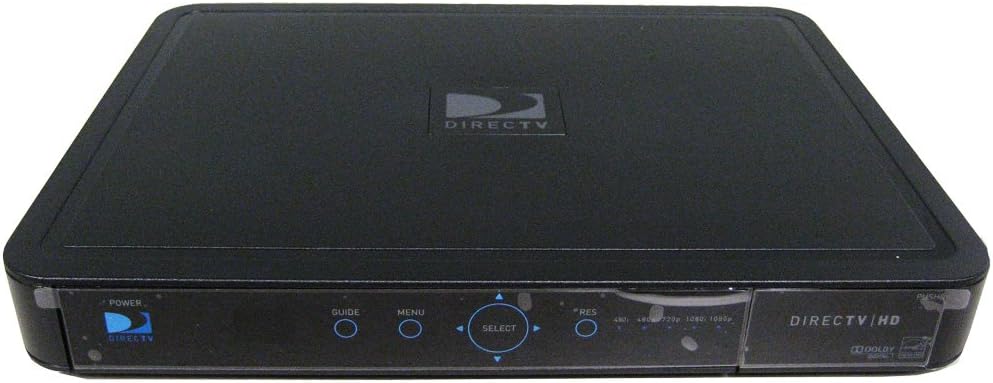
ചിത്രം: മുൻഭാഗം view DIRECTV H24 HD സാറ്റലൈറ്റ് റിസീവറിന്റെ. തിളങ്ങുന്ന ഫ്രണ്ട് പാനലുള്ള ഈ റിസീവർ കറുപ്പ് നിറത്തിലാണ് നിർമ്മിച്ചിരിക്കുന്നത്. പവർ, ഗൈഡ്, മെനു, ദിശാസൂചന അമ്പടയാളങ്ങളുള്ള വൃത്താകൃതിയിലുള്ള സെലക്ട് ബട്ടൺ എന്നിവ ദൃശ്യ നിയന്ത്രണങ്ങളിൽ ഉൾപ്പെടുന്നു. മുൻ പാനലിന്റെ വലതുവശത്ത് റെസല്യൂഷൻ സൂചകങ്ങളും (480i, 480p, 720p, 1080i, 1080p) ഉണ്ട്. മുകളിലെ പ്രതലത്തിൽ DIRECTV ലോഗോ വ്യക്തമായി പ്രദർശിപ്പിച്ചിരിക്കുന്നു.
സജ്ജമാക്കുക
1. നിങ്ങളുടെ ടെലിവിഷനുമായി ബന്ധിപ്പിക്കുന്നു
DIRECTV H24 റിസീവർ നിങ്ങളുടെ ടെലിവിഷനു വേണ്ടി ഒന്നിലധികം കണക്ഷൻ ഓപ്ഷനുകൾ വാഗ്ദാനം ചെയ്യുന്നു. നിങ്ങളുടെ ടിവിക്ക് ലഭ്യമായ ഏറ്റവും മികച്ച ഓപ്ഷൻ തിരഞ്ഞെടുക്കുക.
- HDMI കണക്ഷൻ (HD-ക്ക് ശുപാർശ ചെയ്യുന്നത്): നൽകിയിരിക്കുന്ന HDMI കേബിളിന്റെ ഒരു അറ്റം H24 റിസീവറിന്റെ പിൻഭാഗത്തുള്ള HDMI ഔട്ട്പുട്ട് പോർട്ടിലേക്കും മറ്റേ അറ്റം നിങ്ങളുടെ ടെലിവിഷനിലെ ഒരു HDMI ഇൻപുട്ട് പോർട്ടിലേക്കും ബന്ധിപ്പിക്കുക.
- കമ്പോണന്റ് വീഡിയോ (YPbPr) കണക്ഷൻ: H24 റിസീവറിന്റെ കമ്പോണന്റ് ഔട്ട്പുട്ടിൽ നിന്ന് ചുവപ്പ്, പച്ച, നീല എന്നീ ഘടക വീഡിയോ കേബിളുകൾ നിങ്ങളുടെ ടെലിവിഷനിലെ അനുബന്ധ ഇൻപുട്ട് പോർട്ടുകളിലേക്ക് ബന്ധിപ്പിക്കുക. കൂടാതെ, ശബ്ദത്തിനായി ചുവപ്പും വെള്ളയും RCA ഓഡിയോ കേബിളുകൾ ബന്ധിപ്പിക്കുക.
- കോമ്പോസിറ്റ് വീഡിയോ (RCA) കണക്ഷൻ: H24 റിസീവറിന്റെ കോമ്പോസിറ്റ് ഔട്ട്പുട്ടിൽ നിന്ന് മഞ്ഞ കോമ്പോസിറ്റ് വീഡിയോ കേബിൾ നിങ്ങളുടെ ടെലിവിഷനിലെ മഞ്ഞ വീഡിയോ ഇൻപുട്ടിലേക്ക് ബന്ധിപ്പിക്കുക. കൂടാതെ, ശബ്ദത്തിനായി ചുവപ്പും വെള്ളയും RCA ഓഡിയോ കേബിളുകൾ ബന്ധിപ്പിക്കുക.
- എസ്-വീഡിയോ കണക്ഷൻ: H24 റിസീവറിന്റെ S-Video ഔട്ട്പുട്ടിൽ നിന്ന് നിങ്ങളുടെ ടെലിവിഷനിലെ S-Video ഇൻപുട്ടിലേക്ക് ഒരു S-Video കേബിൾ ബന്ധിപ്പിക്കുക. കൂടാതെ, ശബ്ദത്തിനായി ചുവപ്പും വെള്ളയും RCA ഓഡിയോ കേബിളുകൾ ബന്ധിപ്പിക്കുക.
2. ഓഡിയോ സിസ്റ്റത്തിലേക്ക് കണക്റ്റുചെയ്യുന്നു (ഓപ്ഷണൽ)
മെച്ചപ്പെടുത്തിയ ഓഡിയോയ്ക്കായി, നിങ്ങളുടെ റിസീവറിനെ ഒരു ബാഹ്യ ഓഡിയോ സിസ്റ്റവുമായി ബന്ധിപ്പിക്കാൻ കഴിയും.
- ഒപ്റ്റിക്കൽ ഓഡിയോ: H24 റിസീവറിലെ ഡിജിറ്റൽ ഒപ്റ്റിക്കൽ ഔട്ട്പുട്ടിൽ നിന്ന് നിങ്ങളുടെ ഓഡിയോ റിസീവറിലേക്കോ സൗണ്ട്ബാറിലേക്കോ ഒരു ഒപ്റ്റിക്കൽ ഓഡിയോ കേബിൾ ബന്ധിപ്പിക്കുക.
- കോക്സിയൽ ഓഡിയോ: H24 റിസീവറിലെ ഡിജിറ്റൽ (കോക്സിയൽ) ഔട്ട്പുട്ടിൽ നിന്ന് നിങ്ങളുടെ ഓഡിയോ റിസീവറിലേക്കോ സൗണ്ട്ബാറിലേക്കോ ഒരു ഡിജിറ്റൽ കോക്സിയൽ ഓഡിയോ കേബിൾ ബന്ധിപ്പിക്കുക.
- സ്റ്റീരിയോ RCA ഓഡിയോ: H24 റിസീവറിലെ സ്റ്റീരിയോ (L/R, RCA) ഔട്ട്പുട്ടുകളിൽ നിന്നുള്ള ചുവപ്പും വെള്ളയും RCA ഓഡിയോ കേബിളുകൾ നിങ്ങളുടെ ഓഡിയോ റിസീവറിലേക്കോ ടെലിവിഷനിലേക്കോ ബന്ധിപ്പിക്കുക.
3. സാറ്റലൈറ്റ് ഡിഷിലേക്ക് കണക്റ്റുചെയ്യുന്നു
നിങ്ങളുടെ DIRECTV സാറ്റലൈറ്റ് ഡിഷിൽ നിന്ന് H24 റിസീവറിന്റെ പിൻഭാഗത്തുള്ള സാറ്റലൈറ്റ് ഇൻ പോർട്ടിലേക്ക് കോക്സിയൽ കേബിൾ ബന്ധിപ്പിക്കുക.
4. പവർ കണക്ഷൻ
മറ്റെല്ലാ കണക്ഷനുകളും ചെയ്തുകഴിഞ്ഞാൽ, പവർ കേബിൾ H24 റിസീവറുമായി ബന്ധിപ്പിച്ച് ഒരു സാധാരണ ഇലക്ട്രിക്കൽ ഔട്ട്ലെറ്റിലേക്ക് പ്ലഗ് ചെയ്യുക.
പ്രവർത്തന നിർദ്ദേശങ്ങൾ
അടിസ്ഥാന പ്രവർത്തനം
- പവർ ഓൺ/ഓഫ്: അമർത്തുക പവർ റിമോട്ട് കൺട്രോളിലോ റിസീവറിന്റെ മുൻ പാനലിലോ ഉള്ള ബട്ടൺ.
- ചാനൽ നാവിഗേഷൻ: ഉപയോഗിക്കുക ചാനൽ മുകളിലേക്ക് / താഴേക്ക് ബട്ടണുകൾ അമർത്തുക അല്ലെങ്കിൽ റിമോട്ടിന്റെ കീപാഡ് ഉപയോഗിച്ച് നേരിട്ട് ചാനൽ നമ്പർ നൽകുക.
- വഴികാട്ടി: അമർത്തുക ഗൈഡ് ഏഴ് ദിവസത്തെ അഡ്വാൻസ്ഡ് പ്രോഗ്രാം ഗൈഡ് ആക്സസ് ചെയ്യാൻ ബട്ടൺ അമർത്തുക. നിങ്ങൾക്ക് 7 ദിവസം മുമ്പ് വരെ ഷോകൾക്കായി തിരയാൻ കഴിയും.
- മെനു: അമർത്തുക മെനു സിസ്റ്റം ക്രമീകരണങ്ങൾ, മുൻഗണനകൾ, മറ്റ് സവിശേഷതകൾ എന്നിവ ആക്സസ് ചെയ്യുന്നതിനുള്ള ബട്ടൺ.
- തിരഞ്ഞെടുക്കുക: ദിശാസൂചന അമ്പടയാളങ്ങളും തിരഞ്ഞെടുക്കുക ഗൈഡിലും മെനുകളിലും ഉള്ള തിരഞ്ഞെടുപ്പുകൾ നാവിഗേറ്റ് ചെയ്യുന്നതിനും സ്ഥിരീകരിക്കുന്നതിനുമുള്ള ബട്ടൺ.
വിപുലമായ സവിശേഷതകൾ
- സ്ക്രീൻ ഫോർമാറ്റ്: മെനു ക്രമീകരണങ്ങൾ വഴി സ്ക്രീൻ ഫോർമാറ്റ് പൂർണ്ണ സ്ക്രീൻ, സ്ട്രെച്ച്ഡ്, ലെറ്റർബോക്സ്, പില്ലർ ബോക്സ് അല്ലെങ്കിൽ ക്രോപ്പ് മോഡിലേക്ക് ക്രമീകരിക്കുക.
- സ്പോർട്സ് സ്കോറുകൾ (ചുവപ്പ് ബട്ടൺ): നിങ്ങളുടെ റിമോട്ടിലെ ചുവന്ന ബട്ടൺ അമർത്തുക view ചാനൽ മാറ്റാതെ തന്നെ നിരവധി പ്രധാന ഗെയിമുകൾ.
- കോളർ ഐഡി: View നിങ്ങളുടെ പ്രാദേശിക ഫോൺ കമ്പനി നൽകുന്ന കോളർ ഐഡി വിവരങ്ങൾ ലോഗ് ചെയ്യുക (ലഭ്യമെങ്കിൽ, റിസീവറുമായി ഫോൺ ലൈൻ കണക്ഷൻ ആവശ്യമാണ്).
- രക്ഷാകർതൃ നിയന്ത്രണങ്ങൾ: ആക്ഷേപകരമായ പ്രോഗ്രാമിംഗ് നിയന്ത്രിക്കുന്നതിന് രക്ഷാകർതൃ നിയന്ത്രണങ്ങളും ലോക്കുകളും സജ്ജമാക്കുക. പ്രധാന മെനുവിലൂടെ ഈ സവിശേഷത ആക്സസ് ചെയ്യുക.
മെയിൻ്റനൻസ്
ശരിയായ അറ്റകുറ്റപ്പണി നിങ്ങളുടെ DIRECTV H24 റിസീവറിന്റെ ദീർഘായുസ്സും ഒപ്റ്റിമൽ പ്രകടനവും ഉറപ്പാക്കുന്നു.
- വൃത്തിയാക്കൽ: റിസീവറിന്റെ പുറംഭാഗം വൃത്തിയാക്കാൻ മൃദുവായതും ഉണങ്ങിയതുമായ തുണി ഉപയോഗിക്കുക. ദ്രാവക ക്ലീനറുകളോ ഉരച്ചിലുകളുള്ള വസ്തുക്കളോ ഉപയോഗിക്കരുത്.
- വെൻ്റിലേഷൻ: റിസീവറിന് മതിയായ വായുസഞ്ചാരം ലഭിക്കുന്നുണ്ടെന്ന് ഉറപ്പാക്കുക. യൂണിറ്റിന്റെ മുകളിലോ വശങ്ങളിലോ പിൻഭാഗത്തോ ഉള്ള വെന്റിലേഷൻ ദ്വാരങ്ങൾ തടയരുത്. വായുസഞ്ചാരത്തിന് തടസ്സമാകുന്ന അടച്ചിട്ട സ്ഥലങ്ങളിലോ മൃദുവായ പ്രതലങ്ങളിലോ റിസീവർ സ്ഥാപിക്കുന്നത് ഒഴിവാക്കുക.
- പവർ സൈക്കിൾ: റിസീവർ പ്രതികരിക്കുന്നില്ലെങ്കിൽ, പവർ ഔട്ട്ലെറ്റിൽ നിന്ന് 15 സെക്കൻഡ് നേരത്തേക്ക് അത് അൺപ്ലഗ് ചെയ്ത് വീണ്ടും പ്ലഗ് ഇൻ ചെയ്യാൻ ശ്രമിക്കുക.
ട്രബിൾഷൂട്ടിംഗ്
നിങ്ങളുടെ DIRECTV H24 റിസീവറിൽ നിങ്ങൾ നേരിട്ടേക്കാവുന്ന സാധാരണ പ്രശ്നങ്ങൾ ഈ വിഭാഗം അഭിസംബോധന ചെയ്യുന്നു.
| പ്രശ്നം | സാധ്യമായ കാരണം / പരിഹാരം |
|---|---|
| ചിത്രമില്ല / സിഗ്നലില്ല |
|
| ഓഡിയോ ഇല്ല |
|
| റിമോട്ട് കൺട്രോൾ പ്രവർത്തിക്കുന്നില്ല |
|
| റിസീവർ പ്രതികരിക്കുന്നില്ല |
|
| സജീവമാക്കൽ പ്രശ്നങ്ങൾ | 2019 ജനുവരി 1 മുതൽ, ഓൺലൈനായി വാങ്ങിയ റിസീവറുകൾ സ്വയം സജീവമാക്കാൻ DIRECTV ഉപഭോക്താക്കളെ അനുവദിക്കുന്നില്ല. നിങ്ങൾക്കായി ഒരു ആക്ടിവേഷൻ ഓർഡർ സൃഷ്ടിക്കുന്നതിന് നിങ്ങൾക്ക് ഒരു DIRECTV അംഗീകൃത ഡീലറെ ആവശ്യമുണ്ട്. ആക്ടിവേഷനുമായി ബന്ധപ്പെട്ട സഹായത്തിനായി DIRECTV ഉപഭോക്തൃ പിന്തുണയെയോ അംഗീകൃത ഡീലറെയോ ബന്ധപ്പെടുക. |
സ്പെസിഫിക്കേഷനുകൾ
| ഫീച്ചർ | വിശദാംശങ്ങൾ |
|---|---|
| മോഡൽ നമ്പർ | H24-100 |
| അളവുകൾ (L x W x H) | 9.4 x 15 x 2.6 ഇഞ്ച് |
| ഇനത്തിൻ്റെ ഭാരം | 6 പൗണ്ട് |
| വീഡിയോ ഔട്ട്പുട്ട് | 480i, 480p, 720p, 1080i ചിത്ര ഔട്ട്പുട്ട് |
| കണക്റ്റിവിറ്റി ടെക്നോളജി | ഇതർനെറ്റ്, HDMI |
| ഓഡിയോ put ട്ട്പുട്ട് മോഡ് | ചുറ്റുക |
| കണക്ഷൻ പോർട്ടുകൾ | 1 ഡിജിറ്റൽ ഒപ്റ്റിക്കൽ, 1 ഡിജിറ്റൽ (കോക്സിയൽ), 2 സ്റ്റീരിയോ (L/R, RCA), 1 HDMI, 1 കമ്പോണന്റ് (YPbPr), 1 S-വീഡിയോ, 2 കോമ്പോസിറ്റ് (RCA) |
| ഊർജ്ജ കാര്യക്ഷമത | 2010 ലെ എനർജി സ്റ്റാർ എക്സലൻസ് ഇൻ എനർജി എഫിഷ്യന്റ് പ്രൊഡക്റ്റ് ഡിസൈൻ അവാർഡ് - ഇപിഎ |
വാറൻ്റിയും പിന്തുണയും
വാറന്റി വിവരങ്ങൾക്കും സാങ്കേതിക പിന്തുണയ്ക്കും, സേവനം സജീവമാക്കുന്ന സമയത്ത് DIRECTV നൽകുന്ന ഡോക്യുമെന്റേഷൻ പരിശോധിക്കുക അല്ലെങ്കിൽ ഔദ്യോഗിക DIRECTV പിന്തുണ സന്ദർശിക്കുക. webസൈറ്റ്. DIRECTV നയത്തിലെ മാറ്റങ്ങൾ റിസീവർ ആക്ടിവേഷനെയും സേവനത്തെയും ബാധിച്ചേക്കാമെന്ന് ദയവായി ശ്രദ്ധിക്കുക. ഓൺലൈനായി വാങ്ങിയ റിസീവറുകൾ സജീവമാക്കുന്നതിന്, ഒരു അംഗീകൃത DIRECTV ഡീലർ ഒരു ആക്ടിവേഷൻ ഓർഡർ സൃഷ്ടിക്കേണ്ടതുണ്ട്.
നിയമപരമായ നിരാകരണം: 2019 ജനുവരി 1 മുതൽ, ഓൺലൈനായി വാങ്ങിയ റിസീവറുകൾ സ്വയം സജീവമാക്കാൻ DIRECTV ഉപഭോക്താക്കളെ അനുവദിക്കുന്നില്ല. നിങ്ങൾക്കായി ഒരു ആക്ടിവേഷൻ ഓർഡർ സൃഷ്ടിക്കുന്നതിന് നിങ്ങൾക്ക് DIRECTV അംഗീകൃത ഡീലർ ആവശ്യമാണ്.


