1. ആമുഖം
The Celestron LCD Handheld Digital Microscope is a portable device designed for detailed observation and digital image capture. It features a 2.4-inch color TFT LCD screen, a built-in 3 MP digital camera, and adjustable LED illumination. This manual provides essential information for setting up, operating, and maintaining your microscope.
ബോക്സിൽ എന്താണുള്ളത്
- LCD Handheld Digital Microscope
- സോഫ്റ്റ് കാരി കേസ്
- യുഎസ്ബി 2.0 കേബിൾ
2. ഉൽപ്പന്ന സവിശേഷതകൾ
- 2.4-inch full color TFT LCD screen for direct viewing.
- Built-in 3 MP digital camera for capturing images and videos.
- Optical zoom range of 1x to 3.7x, with magnification up to 54x (and maximum 150x).
- 128MB internal flash memory, expandable with an SD card up to 16GB.
- Adjustable LED illumination for clear viewing of specimens.
- USB 2.0 connectivity for transferring data to a computer.
3. Parts of the Microscope
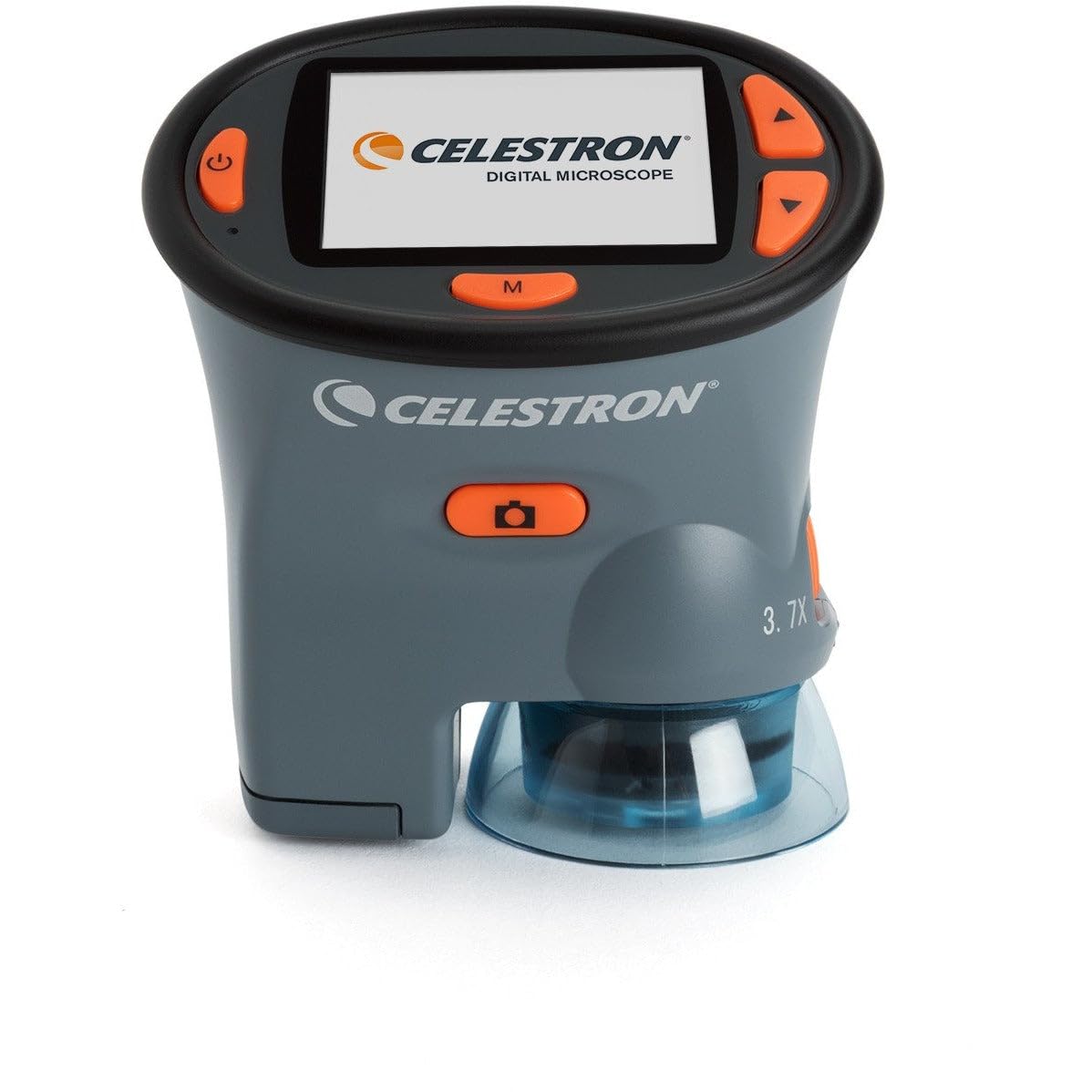
ചിത്രം 1: Celestron 3 MP LCD Handheld Digital Microscope. This image displays the front view of the microscope, highlighting the LCD screen, control buttons, and the objective lens at the bottom.
The microscope features a compact design with several key components:
- LCD സ്ക്രീൻ: The 2.4-inch display for live viewഇംഗും റീയുംviewപിടിച്ചെടുത്ത മാധ്യമങ്ങൾ.
- നിയന്ത്രണ ബട്ടണുകൾ: Located around the LCD screen for navigation, capture, and settings adjustments.
- ഒബ്ജക്റ്റീവ് ലെൻസ്: Located at the bottom, responsible for optical magnification.
- LED പ്രകാശം: Adjustable lights surrounding the objective lens to illuminate the specimen.
- Focus/Zoom Wheel: Typically located on the side for adjusting focus and magnification.
- ബാറ്ററി കമ്പാർട്ട്മെൻ്റ്: Located on the rear or bottom for AA batteries.
- SD കാർഡ് സ്ലോട്ട്: For inserting an SD card to expand storage capacity.
- USB പോർട്ട്: For connecting the microscope to a computer.
4. സജ്ജീകരണം
4.1 ബാറ്ററി ഇൻസ്റ്റാളേഷൻ
- Locate the battery compartment cover, usually on the back or bottom of the unit.
- തുറക്കാൻ കവർ സ്ലൈഡ് ചെയ്യുകയോ അൺക്ലിപ്പ് ചെയ്യുകയോ ചെയ്യുക.
- കമ്പാർട്ടുമെന്റിനുള്ളിൽ സൂചിപ്പിച്ചിരിക്കുന്നതുപോലെ ശരിയായ പോളാരിറ്റി (+/-) ഉറപ്പാക്കിക്കൊണ്ട് രണ്ട് (2) AA ബാറ്ററികൾ ഇടുക.
- ബാറ്ററി കമ്പാർട്ട്മെൻ്റ് കവർ സുരക്ഷിതമായി അടയ്ക്കുക.
കുറിപ്പ്: For optimal performance and battery life, use high-quality alkaline batteries. Rechargeable NiMH batteries may show low battery warnings prematurely due to their voltagഇ സവിശേഷതകൾ.
4.2 SD കാർഡ് ഇൻസ്റ്റാളേഷൻ (ഓപ്ഷണൽ)
- Locate the SD card slot on the side of the microscope.
- Insert an SD card (up to 16GB) into the slot with the metal contacts facing down, until it clicks into place.
- To remove, gently push the card inward until it clicks and ejects.
4.3 പവർ ഓൺ/ഓഫ്
- To power on, press and hold the Power button until the LCD screen illuminates.
- To power off, press and hold the Power button again until the screen turns off.
5. പ്രവർത്തന നിർദ്ദേശങ്ങൾ
5.1 മാഗ്നിഫിക്കേഷനും ഫോക്കസും ക്രമീകരിക്കൽ
- Place the specimen directly under the objective lens.
- Use the focus wheel (typically on the side) to bring the image into sharp focus on the LCD screen. Adjust slowly and deliberately.
- The microscope offers optical zoom from 1x to 3.7x, providing magnification up to 54x. Digital zoom may extend this to a maximum of 150x.
5.2 Adjusting LED Illumination
- Press the designated LED control button (often an 'Up' arrow or similar) to cycle through different brightness levels of the built-in LED lights.
- Select the illumination level that provides the clearest view നിങ്ങളുടെ മാതൃകയുടെ.
5.3 ഫോട്ടോകളും വീഡിയോകളും പകർത്തൽ
- Ensure the microscope is in the desired mode (photo or video). This is typically selected using the 'M' (Mode) button.
- Frame your subject on the LCD screen.
- To capture a photo, press the Capture button (often labeled 'OK' or with a camera icon). For best results, hold the button for approximately 4 seconds to minimize camera shake.
- To start/stop video recording, press the Capture button while in video mode.
- Captured media is saved to the internal memory or the inserted SD card.
5.4 മെനു നാവിഗേഷനും ക്രമീകരണങ്ങളും
- Press and hold the 'M' (Mode) button to enter the settings menu.
- Use the Up/Down arrow buttons to navigate through menu options. Some menus may require a long press (1-2 seconds) to move between tabs or fields.
- Press the Capture button to select an option or confirm a setting.
- To exit a menu, look for an 'Exit' option or press the 'M' button again. In some cases, a long press of the 'Up' button on the leftmost tab may exit the menu without changing the mode.
5.5 ഒരു കമ്പ്യൂട്ടറിലേക്ക് ബന്ധിപ്പിക്കുന്നു
- Ensure the microscope is powered off.
- Connect one end of the supplied USB 2.0 cable to the microscope's USB port and the other end to an available USB port on your Mac or PC.
- Power on the microscope. It should be recognized as a removable storage device.
- You can now access and download your captured images and videos from the microscope's memory.
6. പരിപാലനം
6.1 വൃത്തിയാക്കൽ
- Use a soft, lint-free cloth to clean the exterior of the microscope.
- For the LCD screen and objective lens, use a specialized lens cleaning cloth and solution. Avoid abrasive materials or harsh chemicals.
- Ensure the device is powered off and batteries are removed before cleaning.
6.2 സംഭരണം
- ദീർഘനേരം ഉപയോഗിക്കാത്തപ്പോൾ, ചോർച്ച തടയാൻ ബാറ്ററികൾ നീക്കം ചെയ്യുക.
- Store the microscope in its soft carry case in a cool, dry place, away from direct sunlight and extreme temperatures.
7. പ്രശ്നപരിഹാരം
7.1 ഉപകരണം ഓണാക്കുന്നില്ല
- ശരിയായ പോളാരിറ്റി ഉപയോഗിച്ച് ബാറ്ററികൾ ശരിയായി ചേർത്തിട്ടുണ്ടോയെന്ന് പരിശോധിക്കുക.
- പുതിയ AA ആൽക്കലൈൻ ബാറ്ററികൾ ഉപയോഗിച്ച് മാറ്റിസ്ഥാപിക്കുക.
- പവർ ബട്ടൺ ആവശ്യത്തിന് അമർത്തിപ്പിടിച്ചിട്ടുണ്ടെന്ന് ഉറപ്പാക്കുക.
7.2 Short Battery Life / Low Battery Warning
- The microscope is optimized for alkaline batteries. Rechargeable NiMH batteries may trigger low battery warnings earlier due to their lower nominal voltage.
- Reduce LCD brightness or turn off the auto-off feature in settings to conserve power.
7.3 Screen Flickering or Blanking
- Try formatting the internal storage via the settings menu.
- ബാറ്ററികൾ പൂർണ്ണമായും ചാർജ് ചെയ്തിട്ടുണ്ടെന്നോ മാറ്റിസ്ഥാപിച്ചിട്ടുണ്ടെന്നോ ഉറപ്പാക്കുക.
- ഉപകരണം പുനരാരംഭിക്കുക.
7.4 Buttons Unresponsive or Difficult to Use
- Ensure firm and deliberate presses on the buttons.
- For menu navigation, some actions (like moving between tabs or fields) may require a longer press (1-2 seconds).
7.5 Image Not Clear / Difficulty Focusing
- Adjust the focus wheel slowly and carefully.
- Ensure adequate LED illumination for the specimen.
- Note that the microscope has a limited depth of field; only a single plane will be in sharp focus at high magnification.
8 സ്പെസിഫിക്കേഷനുകൾ
- മോഡൽ നമ്പർ: 44310
- ഉൽപ്പന്ന അളവുകൾ: 4 x 2 x 3 ഇഞ്ച്
- ഇനത്തിൻ്റെ ഭാരം: 6.5 ഔൺസ് (0.19 കിലോഗ്രാം)
- LCD സ്ക്രീൻ: 2.4-inch full color TFT
- ഡിജിറ്റൽ ക്യാമറ: 3 എം.പി
- ഒപ്റ്റിക്കൽ സൂം: 1x മുതൽ 3.7x വരെ
- മാഗ്നിഫിക്കേഷൻ: Up to 54x (Optical), Maximum 150x
- ആന്തരിക മെമ്മറി: 128എംബി
- SD കാർഡ് പിന്തുണ: 16 ജിബി വരെ
- പ്രകാശം: ക്രമീകരിക്കാവുന്ന LED
- ഊർജ്ജ സ്രോതസ്സ്: 2 AA ബാറ്ററികൾ
- കണക്റ്റിവിറ്റി: USB 2.0
- മെറ്റീരിയൽ: പ്ലാസ്റ്റിക്
- നിറം: കറുപ്പ്
9. വാറൻ്റിയും പിന്തുണയും
For warranty information and technical support, please refer to the documentation included with your purchase or visit the official Celestron webസൈറ്റ്. വാറന്റി ക്ലെയിമുകൾക്കായി നിങ്ങളുടെ വാങ്ങലിന്റെ തെളിവ് സൂക്ഷിക്കുക.


