ആമുഖം
The Logitech Z906 5.1 Surround Sound Speaker System is designed to deliver an immersive audio experience, allowing you to hear every detail in your Dolby Digital and DTS soundtracks as intended by the studio. This THX-certified home theater speaker system provides continuous 500 watts of power, with the capability to reach a peak of 1,000 watts, ensuring rich audio and thunderous bass for a truly impactful sound experience.
It offers flexible setup options, allowing connection of up to six devices including computers, music players, TVs, and game consoles. The compact control console and wireless remote provide easy sound control, enabling instant personalization of your surround sound experience.
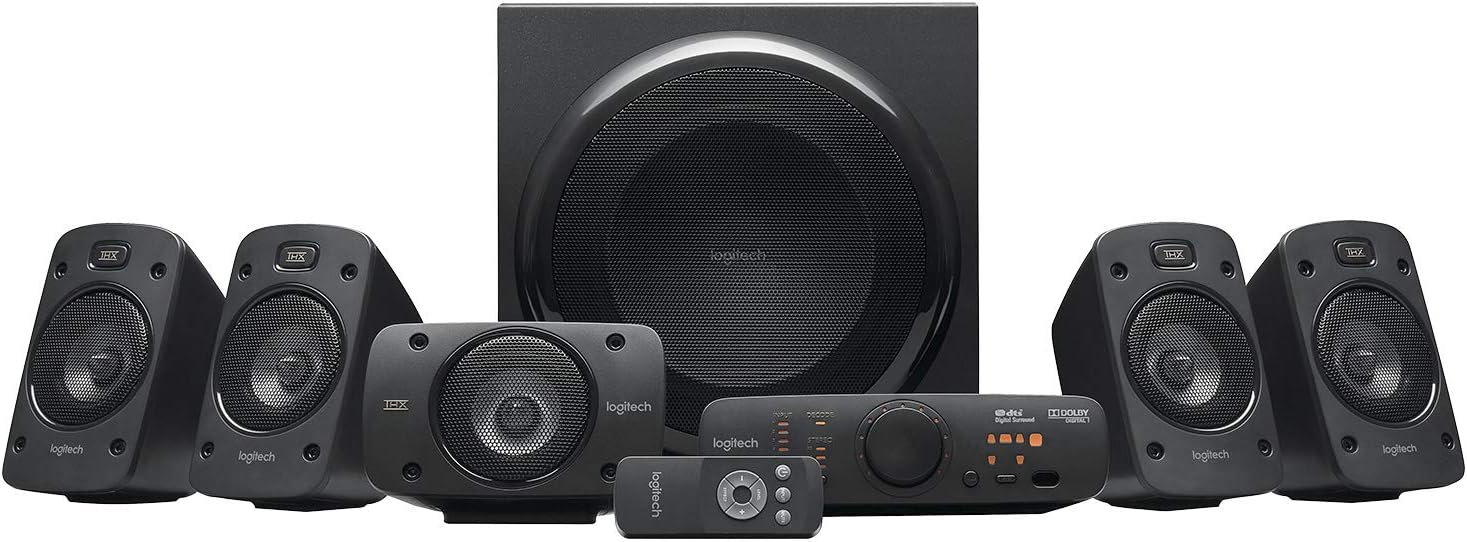
Image: The complete Logitech Z906 5.1 Surround Sound Speaker System, including the subwoofer, five satellite speakers, control console, and remote control.
ബോക്സിൽ എന്താണുള്ളത്
Upon unpacking your Logitech Z906 system, please ensure all the following components are present:
- സബ് വൂഫർ
- Five Satellite Speakers (four satellites and one center channel speaker)
- കൺട്രോൾ കൺസോൾ
- വയർലെസ് റിമോട്ട് കൺട്രോൾ
- സ്പീക്കർ കേബിളുകൾ
- 3.5 എംഎം ഓഡിയോ കേബിൾ
- ഉപയോക്തൃ ഡോക്യുമെൻ്റേഷൻ

Image: All components of the Logitech Z906 system laid out, including the subwoofer, satellite speakers, control console, remote, and cables, alongside its retail packaging.
സജ്ജമാക്കുക
Follow these steps to set up your Logitech Z906 speaker system for optimal performance:
- സ്പീക്കർ സ്ഥാനം: Position the subwoofer on the floor, ideally in a corner for enhanced bass. Place the center channel speaker directly in front of your listening position, usually below or above your display. The front left and right satellite speakers should be placed equidistant from your display and at ear level. The rear left and right satellite speakers should be placed behind your listening position, also at ear level.

Image: A typical 5.1 surround sound setup with Logitech Z906 speakers, showing the front left, center, and front right speakers positioned around a television.
- Connect Speakers to Subwoofer: Connect each satellite speaker to the corresponding color-coded spring clips on the rear of the subwoofer. Ensure correct polarity (red to red, black to black).

ചിത്രം: ക്ലോസ്-അപ്പ് view of the rear panel of the Logitech Z906 subwoofer, highlighting the various audio input ports and speaker wire terminals.
- Connect Control Console: Plug the control console cable into the "CONSOLE" port on the subwoofer.

Image: The Logitech Z906 control console, featuring input selection buttons, volume knob, and sound effect controls.
- ഓഡിയോ ഉറവിടങ്ങൾ ബന്ധിപ്പിക്കുക: Use the appropriate cables (optical, coaxial, RCA, or 3.5mm) to connect your devices (PC, TV, game console, etc.) to the corresponding input ports on the subwoofer or control console. The system supports up to six devices.
- പവർ ഓൺ: Plug the subwoofer's power cord into a wall outlet. Turn on the system using the power button on the control console.
സിസ്റ്റം പ്രവർത്തിപ്പിക്കുന്നു
The Logitech Z906 offers intuitive controls for managing your audio experience:
- കൺട്രോൾ കൺസോൾ: Use the input buttons (Input 1-6, Aux) to select your desired audio source. The large dial controls the master volume. Use the "Level" button to adjust individual speaker levels (front, rear, center, subwoofer) and the "Effect" button to cycle through sound modes (2.1, 4.1, 3D).

Image: The control console of the Logitech Z906, displaying various input options and controls for sound customization.
- വയർലെസ് റിമോട്ട് കൺട്രോൾ: The included remote provides convenient access to all major functions from a distance, including power, input selection, volume, and sound effects.

Image: The compact wireless remote control for the Logitech Z906 system, featuring buttons for power, input, level, and effect adjustments.
- ശബ്ദ മോഡുകൾ:
- 2.1 Stereo: Ideal for music, distributing audio to the front left/right speakers and subwoofer.
- 4.1 Surround: Expands stereo sound to include rear speakers, creating a more enveloping experience.
- 3D സറൗണ്ട്: Utilizes all 5.1 channels for an immersive, room-filling sound, especially effective for movies and games.
Official Product Video: Logitech Z906 Overview
വീഡിയോ: ഒരു ഉദ്യോഗസ്ഥൻview of the Logitech Z906 5.1 Speaker Surround Sound System, demonstrating its features and capabilities.
മെയിൻ്റനൻസ്
നിങ്ങളുടെ ലോജിടെക് Z906 സ്പീക്കർ സിസ്റ്റത്തിന്റെ ദീർഘായുസ്സും ഒപ്റ്റിമൽ പ്രകടനവും ഉറപ്പാക്കാൻ, ഈ ലളിതമായ അറ്റകുറ്റപ്പണി മാർഗ്ഗനിർദ്ദേശങ്ങൾ പാലിക്കുക:
- Keep the speakers and subwoofer clean by wiping them with a soft, dry cloth. Avoid using liquid cleaners or abrasive materials.
- Ensure proper ventilation for the subwoofer, as it contains the amplifier. Do not block any vents.
- Protect the speakers from extreme temperatures, humidity, and direct sunlight.
- Handle speaker cables carefully to prevent damage, which can affect sound quality.
ട്രബിൾഷൂട്ടിംഗ്
If you encounter issues with your Logitech Z906 system, try the following common troubleshooting steps:
- ശബ്ദമില്ല:
- Check if the system is powered on and the volume is turned up.
- Verify that the correct input source is selected on the control console.
- Ensure all cables are securely connected to the subwoofer, speakers, and audio source.
- Test with a different audio source to rule out source device issues.
- വികലമായ ശബ്ദം:
- Lower the volume on both the speaker system and the audio source.
- Check for loose or damaged speaker cables.
- ഓഡിയോ ഉറവിടം ഓവർഡ്രൈവൺ സിഗ്നൽ അയയ്ക്കുന്നില്ലെന്ന് ഉറപ്പാക്കുക.
- സറൗണ്ട് സൗണ്ട് ഇല്ല:
- Confirm that your audio source is outputting a 5.1 signal (e.g., Dolby Digital or DTS).
- Ensure the system is set to a surround sound effect mode (e.g., 3D) on the control console.
- Check individual speaker levels to ensure no channels are muted or set too low.
For more detailed troubleshooting or complex issues, please refer to the official user manual or contact Logitech support.
സ്പെസിഫിക്കേഷനുകൾ
| ഫീച്ചർ | വിശദാംശങ്ങൾ |
|---|---|
| ബ്രാൻഡ് | ലോജിടെക് |
| മോഡലിൻ്റെ പേര് | Z906 |
| സ്പീക്കർ തരം | ഉപഗ്രഹം |
| മൗണ്ടിംഗ് തരം | മതിൽ മൗണ്ട് |
| മെറ്റീരിയൽ | പ്ലാസ്റ്റിക് |
| സറൗണ്ട് സൗണ്ട് ചാനൽ കോൺഫിഗറേഷൻ | 6.1 (Note: System is 5.1, but configuration might refer to internal processing or compatibility) |
| സ്പീക്കർ പരമാവധി ഔട്ട്പുട്ട് പവർ | 1000 വാട്ട്സ് (പീക്ക്) |
| സബ് വൂഫർ പവർ | 165 വാട്ട്സ് |
| Satellite Power | 4 x 67 W |
| ഫ്രീക്വൻസി പ്രതികരണം | 35 Hz |
| കണക്റ്റിവിറ്റി ടെക്നോളജി | ഓക്സിലറി, വയർഡ് |
| ഓഡിയോ put ട്ട്പുട്ട് മോഡ് | ചുറ്റുക |
| അനുയോജ്യമായ ഉപകരണങ്ങൾ | MP3 Player, Gaming Console, Television, Personal Computer |
| കൺട്രോളർ തരം | റിമോട്ട് കൺട്രോൾ |
| ഇനത്തിൻ്റെ ഭാരം | 19.6 പൗണ്ട് (ഏകദേശം 8891.61 ഗ്രാം) |
| ഉൽപ്പന്ന അളവുകൾ | 15.2"D x 17"W x 17.3"H |
| THX സർട്ടിഫൈഡ് | അതെ |
| Dolby Digital & DTS Digital Certified | അതെ |

Image: Detailed dimensions of the Logitech Z906 subwoofer and satellite speakers.
വാറൻ്റിയും പിന്തുണയും
The Logitech Z906 5.1 Surround Sound Speaker System comes with a പരിമിത വാറൻ്റി. For specific warranty terms, conditions, and duration, please refer to the official warranty documentation included with your product or visit the Logitech support webസൈറ്റ്.
For technical support, product registration, or to find answers to frequently asked questions, please visit the official Logitech support portal. You can also find contact information for customer service there.
അധിക വിഭവങ്ങൾ
For a comprehensive guide and detailed instructions, you can download the official User Manual in PDF format:


