1. ആമുഖം
The Grandstream GXP2100 is an enterprise-grade IP phone designed for business communication. It features support for four lines, a backlit graphical LCD, and various programmable keys to enhance user experience. This manual provides detailed instructions for the installation, configuration, and operation of your GXP2100 IP phone.
2. പാക്കേജ് ഉള്ളടക്കം
Upon unpacking your Grandstream GXP2100, verify that all items are present and in good condition. The standard package typically includes:
- Grandstream GXP2100 IP Phone Unit
- Handset with coiled cord
- ഫോൺ സ്റ്റാൻഡ്
- ഇഥർനെറ്റ് കേബിൾ
- പവർ അഡാപ്റ്റർ
- Quick Installation Guide (this manual provides more detail)
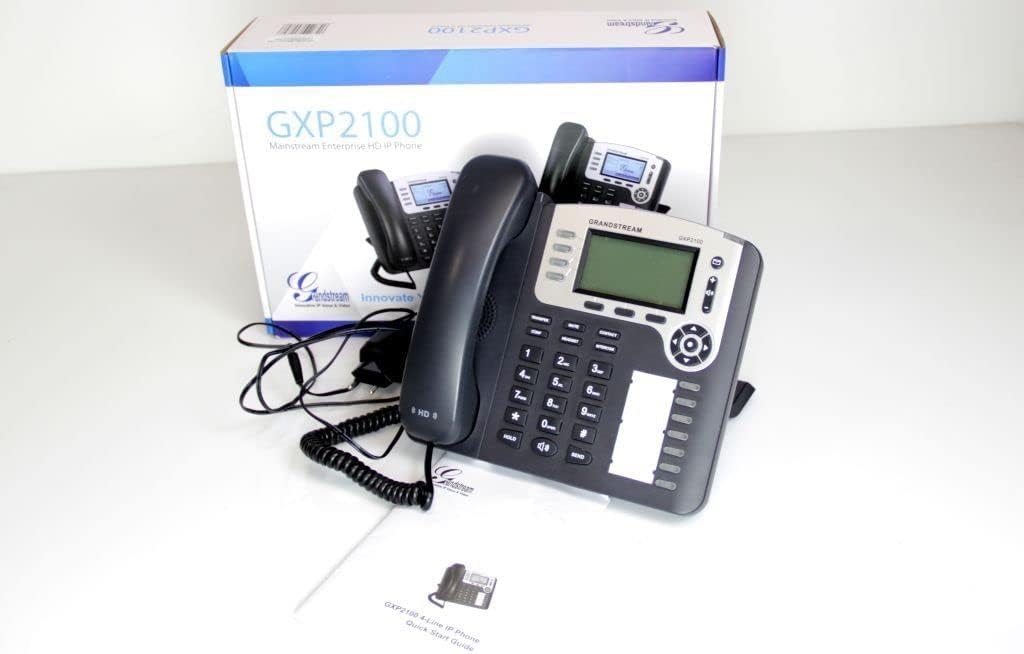
Image 2.1: Grandstream GXP2100 IP Phone unit, handset, coiled cord, power adapter, Ethernet cable, and quick start guide, displayed with its retail packaging.
3. ഉൽപ്പന്ന സവിശേഷതകൾ
The GXP2100 IP phone offers a range of features designed for efficient business communication:
- ലൈൻ കീകൾ: 4 dual-color line keys supporting up to 4 SIP accounts.
- സോഫ്റ്റ് കീകൾ: 3 XML programmable context-sensitive soft keys for dynamic functions.
- BLF Extension Keys: 7 dual-color BLF (Busy Lamp Field) extension keys, supporting up to 11 call appearances.
- കോൺഫറൻസ് കോളിംഗ്: Up to 5-way conference capability.
- ഓഡിയോ നിലവാരം: HD wideband audio and a superb full-duplex hands-free speakerphone with advanced acoustic echo cancellation.
- നെറ്റ്വർക്ക് കണക്റ്റിവിറ്റി: Dual network ports with integrated Power over Ethernet (PoE).
- ഫോണ്നമ്പറുകള് അടങ്ങിയ പുസ്തകം: Automated phone book synchronization with directory servers using XML.
- അപേക്ഷകൾ: Integrated real-time web applications (e.g., weather, stock, currency, RSS news).
- സുരക്ഷ: Advanced security protection for privacy.
- വിന്യാസം: Supports automated provisioning for easy deployment.

ചിത്രം 3.1: മുൻഭാഗം view of the Grandstream GXP2100 IP Phone, highlighting the display, keypad, and function buttons.
4. സജ്ജീകരണം
4.1 ശാരീരിക ബന്ധം
Follow these steps to connect your GXP2100 IP phone:
- ഹാൻഡ്സെറ്റ് ബന്ധിപ്പിക്കുക: Plug the coiled cord into the handset port on the side of the phone and into the handset.
- ഹെഡ്സെറ്റ് ബന്ധിപ്പിക്കുക (ഓപ്ഷണൽ): If using a headset, plug it into the dedicated headset port.
- നെറ്റ്വർക്കിലേക്ക് കണക്റ്റ് ചെയ്യുക:
- If using PoE: Connect one end of the Ethernet cable to the LAN port on the phone and the other end to a PoE-enabled switch or hub.
- If not using PoE: Connect one end of the Ethernet cable to the LAN port on the phone and the other end to your network switch/router. Then, connect the power adapter to the phone's power jack and to an electrical outlet.
- പിസിയിലേക്ക് കണക്റ്റുചെയ്യുക (ഓപ്ഷണൽ): If you wish to connect a computer through the phone, connect an Ethernet cable from the PC port on the phone to your computer's Ethernet port.

ചിത്രം 4.1: വശം view of the Grandstream GXP2100 IP Phone, showing the various connection ports for handset, headset, LAN, and PC.
4.2 പ്രാരംഭ കോൺഫിഗറേഷൻ
After physical connection, the phone will attempt to obtain an IP address via DHCP. You can access the phone's web configuration interface for detailed setup:
- ഐപി വിലാസം നേടുക: അമർത്തുക മെനു button on the phone, navigate to നില, പിന്നെ നെറ്റ്വർക്ക് നില to find the phone's IP address.
- പ്രവേശനം Web ഇൻ്റർഫേസ്: എ തുറക്കുക web browser on a computer connected to the same network and enter the phone's IP address in the address bar.
- ലോഗിൻ: Enter the administrator username and password (default values are typically 'admin' for both, refer to your network administrator or Grandstream documentation for specific defaults).
- Configure SIP Accounts: എന്നതിലേക്ക് നാവിഗേറ്റ് ചെയ്യുക അക്കൗണ്ടുകൾ section to configure your SIP account details provided by your VoIP service provider. This includes SIP Server, SIP User ID, Authenticate ID, and Password.
- Save and Apply: After making changes, save and apply the configuration. The phone may reboot.
5. പ്രവർത്തന നിർദ്ദേശങ്ങൾ
5.1 അടിസ്ഥാന കോൾ പ്രവർത്തനങ്ങൾ
- ഒരു കോൾ ചെയ്യുന്നു:
- ഹാൻഡ്സെറ്റ് എടുക്കുക, അമർത്തുക സ്പീക്കർ button, or press an available ലൈൻ താക്കോൽ.
- ആവശ്യമുള്ള നമ്പർ ഡയൽ ചെയ്യുക.
- അമർത്തുക അയയ്ക്കുക button or wait a few seconds for automatic dialing.
- ഒരു കോളിന് മറുപടി നൽകുന്നു:
- ഹാൻഡ്സെറ്റ് എടുക്കുക.
- ഫ്ലാഷിംഗ് അമർത്തുക ലൈൻ താക്കോൽ.
- അമർത്തുക സ്പീക്കർ ബട്ടൺ.
- ഒരു കോൾ അവസാനിപ്പിക്കുന്നു: ഹാൻഡ്സെറ്റ് തൂക്കിയിടുക അല്ലെങ്കിൽ അമർത്തുക സ്പീക്കർ button if using speakerphone.
5.2 Advanced Call Functions
- പിടിക്കുക: ഒരു സജീവ കോൾ സമയത്ത്, അമർത്തുക പിടിക്കുക button. The line key will flash. To resume, press the flashing ലൈൻ താക്കോൽ.
- കൈമാറ്റം:
- ഒരു സജീവ കോൾ സമയത്ത്, അമർത്തുക കൈമാറ്റം soft key. The active call will be put on hold.
- നിങ്ങൾ കോൾ കൈമാറാൻ ആഗ്രഹിക്കുന്ന നമ്പർ ഡയൽ ചെയ്യുക.
- അമർത്തുക കൈമാറ്റം soft key again to complete the transfer (blind transfer) or wait for the party to answer and announce the call before pressing കൈമാറ്റം (attended transfer).
- സമ്മേളനം:
- ഒരു സജീവ കോൾ സമയത്ത്, അമർത്തുക കോൺഫ് soft key. The active call will be put on hold.
- Dial the number of the next participant and press അയയ്ക്കുക.
- രണ്ടാമത്തെ കക്ഷി ഉത്തരം നൽകിയാൽ, അമർത്തുക കോൺഫ് soft key again to establish the conference call. Repeat for additional participants (up to 5-way).
- നിശബ്ദമാക്കുക: അമർത്തുക നിശബ്ദമാക്കുക കോളിനിടയിൽ നിങ്ങളുടെ മൈക്രോഫോൺ മ്യൂട്ട് ചെയ്യാൻ ബട്ടൺ അമർത്തുക. അൺമ്യൂട്ട് ചെയ്യാൻ വീണ്ടും അമർത്തുക.
- സ്പീക്കർഫോൺ: അമർത്തുക സ്പീക്കർ സ്പീക്കർഫോൺ മോഡ് ഓൺ അല്ലെങ്കിൽ ഓഫ് ആക്കാനുള്ള ബട്ടൺ.
- BLF Keys: The BLF (Busy Lamp Field) keys can be programmed to monitor the status of other extensions. A green light indicates idle, red indicates busy, and flashing red indicates ringing. Pressing a BLF key can initiate a call to that extension or pick up a ringing call.
- സോഫ്റ്റ് കീകൾ: The three soft keys below the LCD display change their function based on the phone's current state (e.g., during a call, idle, or in a menu). Their current function is displayed on the LCD directly above them.
6. പരിപാലനം
- വൃത്തിയാക്കൽ: Use a soft, dry cloth to clean the phone's surface. Avoid abrasive cleaners or solvents.
- ഫേംവെയർ അപ്ഡേറ്റുകൾ: Grandstream periodically releases firmware updates to improve performance and add features. Firmware updates are typically performed via the phone's web interface. Consult your network administrator or Grandstream's official support resources for the latest firmware and update procedures. Manual firmware updates often require downloading files from the manufacturer and hosting them on a local web സെർവർ.
- പരിസ്ഥിതി വ്യവസ്ഥകൾ: Operate the phone within recommended temperature and humidity ranges to ensure optimal performance and longevity.
7. പ്രശ്നപരിഹാരം
This section addresses common issues you might encounter with your GXP2100 IP phone.
| പ്രശ്നം | സാധ്യമായ കാരണം | പരിഹാരം |
|---|---|---|
| ഫോൺ പവർ ഓൺ ആകുന്നില്ല. | No power from adapter or PoE switch. |
|
| ഡയൽ ടോൺ ഇല്ല / കോളുകൾ വിളിക്കാനോ സ്വീകരിക്കാനോ കഴിയില്ല. | Network connectivity issue, SIP account not registered, incorrect configuration. |
|
| One-way audio (you can hear, but the other party cannot, or vice-versa). | Network firewall/NAT issues, incorrect audio codec settings. |
|
| Phone frequently loses registration. | Unstable network connection, SIP server issues, incorrect registration expiration. |
|
8 സ്പെസിഫിക്കേഷനുകൾ
Key technical specifications for the Grandstream GXP2100 IP Business Phone:
| ആട്രിബ്യൂട്ട് | മൂല്യം |
|---|---|
| മോഡൽ നമ്പർ | GXP2100 |
| ബ്രാൻഡ് | ഗ്രാൻഡ് സ്ട്രീം |
| ഉൽപ്പന്ന അളവുകൾ (L x W x H) | 8.7 x 8.3 x 3.6 ഇഞ്ച് |
| ഇനത്തിൻ്റെ ഭാരം | 2.4 പൗണ്ട് |
| നിറം | ചാരനിറം |
| ടെലിഫോൺ തരം | കോർഡഡ് |
| പവർ ഉറവിടം | കോർഡഡ് ഇലക്ട്രിക് (PoE ശേഷിയുള്ളത്) |
| ഡയലർ തരം | ഒറ്റ കീപാഡ് |
| ഉത്തരം നൽകുന്ന സിസ്റ്റം തരം | ഡിജിറ്റൽ |
| കോൺഫറൻസ് കോൾ ശേഷി | 5-വഴി |
| മൾട്ടിലൈൻ പ്രവർത്തനം | Multi-Line Operation (4 lines) |
| ASIN | B004PAS3SM |
| ആദ്യ തീയതി ലഭ്യമാണ് | ഫെബ്രുവരി 9, 2011 |
9. വാറൻ്റിയും പിന്തുണയും
For warranty information, technical support, or further assistance with your Grandstream GXP2100 IP Phone, please refer to the official Grandstream website or contact your product vendor. Keep your purchase receipt and product serial number handy when seeking support.
Official Grandstream Webസൈറ്റ്: www.grandstream.com


