1. ആമുഖം
This manual provides detailed instructions for the installation, operation, and maintenance of your JVC KDR820BT Wireless Bluetooth Dual USB-CD Receiver. Please read this manual thoroughly before using the unit to ensure proper operation and to prevent damage.
The JVC KDR820BT is designed to provide versatile audio playback and communication features in your vehicle. It includes built-in Bluetooth for hands-free calling and audio streaming, dual USB ports for device connectivity, and CD playback capabilities. The unit also features a customizable display with variable color options.
2. പാക്കേജ് ഉള്ളടക്കം
Verify that all items are present in the package before beginning installation:
- JVC KDR820BT Head Unit
- Wireless Remote Control (RM-RK52)
- യുഎസ്ബി ബ്ലൂടൂത്ത് അഡാപ്റ്റർ
- വയർഡ് മൈക്രോഫോൺ
- വയറിംഗ് ഹാർനെസ്
- മൌണ്ടിംഗ് ഹാർഡ്വെയർ
- ഉടമയുടെ മാനുവൽ (ഈ പ്രമാണം)
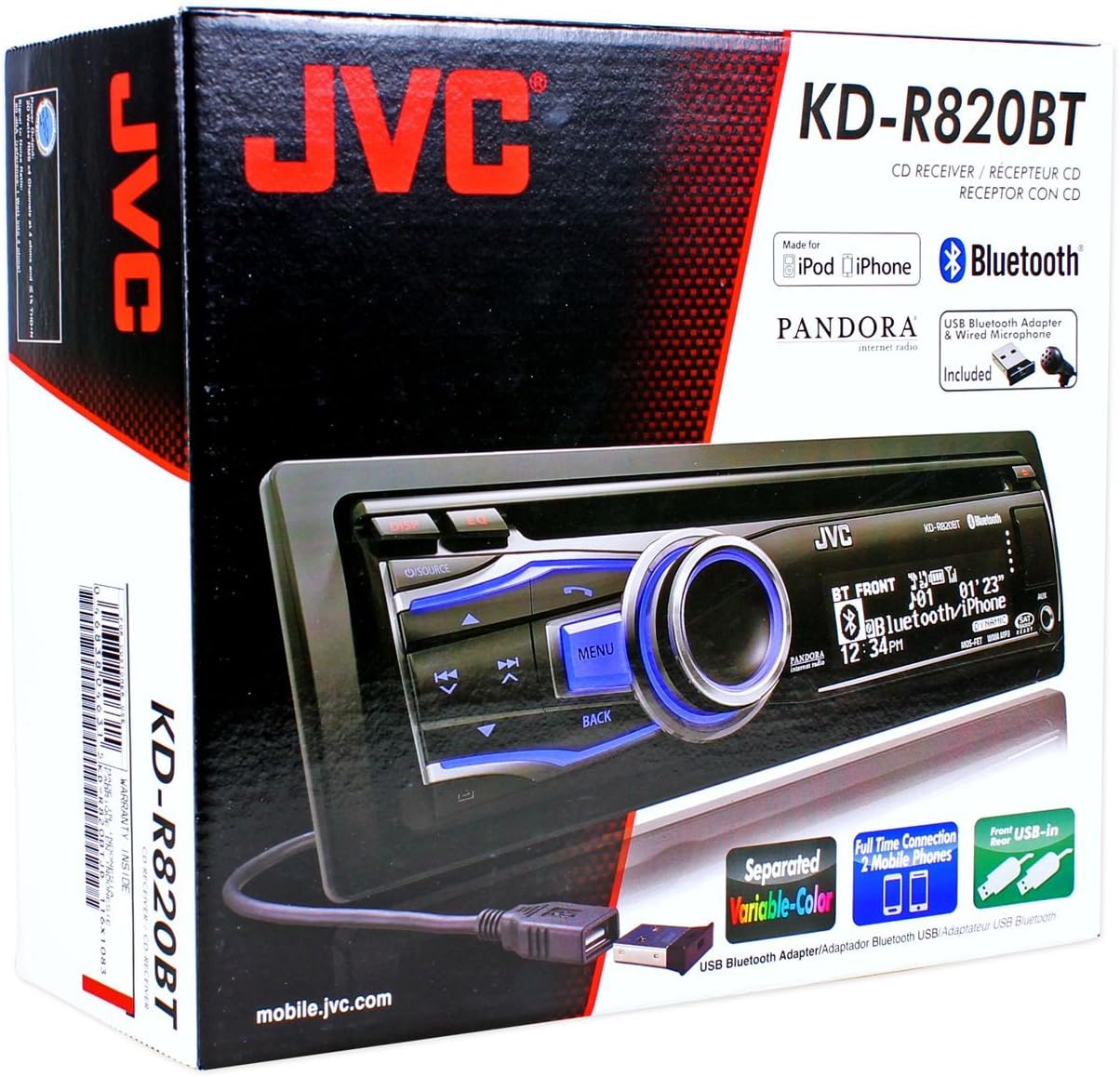
Figure 2.1: JVC KDR820BT Product Packaging. The box illustrates the main unit, remote, USB Bluetooth adapter, and wired microphone.
3. ഇൻസ്റ്റലേഷൻ
Professional installation is recommended. Ensure the vehicle's battery is disconnected before starting installation to prevent electrical damage.
3.1 വയറിംഗ് കണക്ഷനുകൾ
Connect the wiring harness to the vehicle's electrical system and speakers. Refer to your vehicle's wiring diagram for specific connections.
- മഞ്ഞ വയർ: സ്ഥിരമായ 12V പവറിലേക്ക് കണക്റ്റ് ചെയ്യുക.
- റെഡ് വയർ: Connect to switched 12V accessory power.
- ബ്ലാക്ക് വയർ: വാഹന ചേസിസ് ഗ്രൗണ്ടുമായി ബന്ധിപ്പിക്കുക.
- നീല/വെള്ള വയർ: പവർ ആൻ്റിനയുമായി ബന്ധിപ്പിക്കുക അല്ലെങ്കിൽ ampലൈഫയർ റിമോട്ട് ടേൺ-ഓൺ ലീഡ്.
- സ്പീക്കർ വയറുകൾ: വാഹന സ്പീക്കറുകളുമായി ബന്ധിപ്പിക്കുക (ശരിയായ പോളാരിറ്റി ഉറപ്പാക്കുക).
- RCA Pre-out Jacks: ബാഹ്യ കണക്ഷൻ ഉറപ്പാക്കാൻ ampലിഫയറുകൾ (മുൻവശം, പിൻഭാഗം, സബ് വൂഫർ).
- മൈക്രോഫോൺ ഇൻപുട്ട്: Connect the supplied wired microphone for hands-free calling.
- USB പോർട്ടുകൾ: Front USB for general connectivity, Rear USB for additional devices or the Bluetooth adapter.

Figure 3.1: Rear Panel Connections. This image displays the rear of the receiver with its wiring harness, RCA pre-outs, and antenna input.
3.2 യൂണിറ്റ് മൌണ്ട് ചെയ്യുന്നു
Install the mounting sleeve into the vehicle's dashboard opening. Secure the unit by sliding it into the sleeve until it locks into place. Attach the trim ring.
3.3 Connecting the Bluetooth Adapter
The supplied USB Bluetooth adapter must be connected to one of the USB ports (front or rear) for Bluetooth functionality. For a cleaner installation, the rear USB port is often preferred.
4. പ്രാരംഭ സജ്ജീകരണം
After installation, reconnect the vehicle battery. The unit will power on. Follow these steps for initial configuration:
- പ്രാരംഭ പവർ ഓൺ: അമർത്തുക ഉറവിടം യൂണിറ്റ് ഓണാക്കാനുള്ള ബട്ടൺ.
- ക്ലോക്ക് ക്രമീകരണം: Access the system menu to set the current time.
- ഓഡിയോ ക്രമീകരണങ്ങൾ: Adjust basic audio settings such as bass, treble, balance, and fader.
- ഡിസ്പ്ലേ വർണ്ണം: Customize the display and button illumination colors using the variable color settings.
5. പ്രവർത്തന നിർദ്ദേശങ്ങൾ

ചിത്രം 5.1: മുൻവശത്തെ പാനൽ മുകളിൽview. This image shows the main controls and display of the JVC KDR820BT.

Figure 5.2: Receiver with Remote Control. The image displays the head unit and the included wireless remote control (RM-RK52).
5.1 അടിസ്ഥാന നിയന്ത്രണങ്ങൾ
- Power/Source Button: Press to turn on/off or change audio source (FM/AM, CD, USB, Bluetooth Audio, AUX).
- വോളിയം നോബ്: Rotate to adjust volume. Press to mute/pause audio.
- മെനു ബട്ടൺ: Access system settings and advanced options.
- ബാക്ക് ബട്ടൺ: Return to the previous menu or display.
- Skip/Seek Buttons: Navigate tracks, radio stations, or menu options.
5.2 റേഡിയോ പ്രവർത്തനം (AM/FM)
- അമർത്തുക ഉറവിടം to select FM or AM.
- ഉപയോഗിക്കുക അന്വേഷിക്കുക buttons to find stations automatically.
- സ്വമേധയാ ട്യൂൺ ചെയ്യാൻ, അമർത്തിപ്പിടിക്കുക അന്വേഷിക്കുക ബട്ടണുകൾ.
- To store a preset, tune to the desired station, then press and hold a preset number button (1-6).
5.3 സിഡി പ്ലേബാക്ക്
- Insert a CD into the disc slot. The unit will automatically switch to CD source and begin playback.
- ഉപയോഗിക്കുക ഒഴിവാക്കുക ട്രാക്കുകൾ മാറ്റാനുള്ള ബട്ടണുകൾ.
- അമർത്തുക വോളിയം നോബ് to pause/play.
- അമർത്തുക പുറത്താക്കുക button to remove the CD.
5.4 USB Device Playback
- Connect a USB device (flash drive, iPod/iPhone, digital audio player) to either the front or rear USB port.
- അമർത്തുക ഉറവിടം USB തിരഞ്ഞെടുക്കാൻ.
- ഉപയോഗിക്കുക ഒഴിവാക്കുക ട്രാക്കുകൾ നാവിഗേറ്റ് ചെയ്യുന്നതിനുള്ള ബട്ടണുകൾ.
- അമർത്തുക മെനു button to browse folders and files.
5.5 ബ്ലൂടൂത്ത് പ്രവർത്തനങ്ങൾ
Ensure the USB Bluetooth adapter is connected to the unit.
5.5.1 ഒരു ബ്ലൂടൂത്ത് ഉപകരണം ജോടിയാക്കൽ
- നിങ്ങളുടെ മൊബൈൽ ഉപകരണത്തിൽ ബ്ലൂടൂത്ത് ഓണാക്കുക.
- On the JVC KDR820BT, select the Bluetooth source.
- ഇതിനായി തിരയുക available devices on your mobile phone. Select "JVC unit" (or similar) from the list.
- Enter the PIN code (usually "0000") if prompted.
- Once paired, the Bluetooth indicator on the receiver will illuminate. The unit supports connecting two phones simultaneously.
5.5.2 ഹാൻഡ്സ്-ഫ്രീ കോളിംഗ്
- ഒരു കോൾ ചെയ്യുന്നു: Use your phone's voice dial feature (if supported) or dial directly from your phone. The audio will transfer to the receiver.
- ഒരു കോളിന് മറുപടി നൽകുന്നു: അമർത്തുക ഫോൺ button on the receiver when an incoming call is detected.
- ഒരു കോൾ അവസാനിപ്പിക്കുന്നു: അമർത്തുക ഫോൺ കോൾ അവസാനിപ്പിക്കാൻ വീണ്ടും ബട്ടൺ ചെയ്യുക.
- Phone Book Access: The unit supports Phone Book Access Profile (PBAP) for transferring contacts.
5.5.3 ബ്ലൂടൂത്ത് ഓഡിയോ സ്ട്രീമിംഗ്
- Select Bluetooth Audio as the source.
- Play audio from your paired mobile device. The receiver will stream the audio wirelessly.
- ഉപയോഗിക്കുക ഒഴിവാക്കുക buttons on the receiver to control playback (play/pause, skip track).
- The unit supports Pandora Internet Radio control from an iPhone.
5.6 ശബ്ദ ക്രമീകരണങ്ങൾ
- 3-Band Parametric iEQ: Access the sound menu to adjust the equalizer settings for customized audio output.
- MOS-FET 50W x 4 Ampജീവപര്യന്തം: Provides powerful audio output.
- TI/Burr-Brown 24-bit DAC: Ensures high-quality digital-to-analog audio conversion.
5.7 ഡിസ്പ്ലേ ക്രമീകരണങ്ങൾ
- Separated Variable Color: Customize the illumination color of the keys and LCD panel from over 30,000 choices. Access this setting through the system menu.
- തെളിച്ച നിയന്ത്രണം: Adjust display brightness for day and night viewing.
6. പരിപാലനം
- യൂണിറ്റ് വൃത്തിയാക്കൽ: മുൻവശത്തെ പാനൽ തുടയ്ക്കാൻ മൃദുവായതും ഉണങ്ങിയതുമായ തുണി ഉപയോഗിക്കുക. കഠിനമായ അഴുക്കിന്, dampതുണിയിൽ വെള്ളം ഒഴിക്കുക. അബ്രാസീവ് ക്ലീനറുകളോ ലായകങ്ങളോ ഒഴിവാക്കുക.
- CD Player Care: Keep the disc slot free of dust and debris. Use only clean, scratch-free CDs.
- മുഖംമൂടി നീക്കംചെയ്യൽ: The detachable faceplate can be removed for security. Store it in a protective case.
7. പ്രശ്നപരിഹാരം
Review the following common issues and solutions before seeking service.
| പ്രശ്നം | സാധ്യമായ കാരണം / പരിഹാരം |
|---|---|
| ശക്തിയില്ല | Check power and ground wiring connections. Ensure the vehicle's ignition is on. Check vehicle fuses. |
| ശബ്ദമില്ല | Check speaker wiring. Ensure volume is not muted or too low. Verify the power antenna/remote wire is connected if using an external ampജീവൻ. |
| Bluetooth echo during calls | Adjust microphone gain settings. Reposition the microphone away from reflective surfaces (e.g., windshield). Reduce the receiver's volume during calls. |
| ബ്ലൂടൂത്ത് ഉപകരണം ജോടിയാക്കാൻ കഴിയില്ല | Ensure the USB Bluetooth adapter is securely connected. Make sure Bluetooth is enabled on your mobile device and the receiver is in pairing mode. Delete previous pairings from your phone and try again. |
| Unit loses settings after power off | The yellow constant 12V power wire may not be connected correctly or is losing power. This can also occur if the vehicle battery is disconnected. |
| Display text is truncated or difficult to read | The display has limited character space. Some long names may be truncated. There is no option to increase scroll speed for folder/file പേരുകൾ. |
| Buttons or rotary knob are unresponsive | Ensure the faceplate is securely attached. Clean around the buttons to remove any debris. If the issue persists, it may indicate a hardware malfunction. |
8 സ്പെസിഫിക്കേഷനുകൾ
| ഫീച്ചർ | സ്പെസിഫിക്കേഷൻ |
|---|---|
| മോഡൽ നമ്പർ | KDR820BT |
| ഔട്ട്പുട്ട് പവർ | MOS-FET 50W x 4 (20W RMS x 4) |
| ഡിഎസി | TI/Burr-Brown 24-bit |
| ഇക്വലൈസർ | 3-Band Parametric iEQ |
| കണക്റ്റിവിറ്റി | Bluetooth, Dual USB (Front & Rear), AUX Input |
| ബ്ലൂടൂത്ത് സവിശേഷതകൾ | Hands-Free Call, Audio Streaming, Phone Book Access Profile, Text Message Receipt Notification, Connects 2 Phones |
| മീഡിയ പ്ലേബാക്ക് | CD, MP3, WMA, WAV |
| ഡിസ്പ്ലേ തരം | LCD with Separated Variable Color |
| പ്രീamp വാല്യംtage | 2 വോൾട്ട് |
| ചേസിസ് വലിപ്പം | Full-DIN |
| അളവുകൾ (W x H x D) | 7.19 x 2.06 x 6.25 ഇഞ്ച് (ഏകദേശം) |
| ഭാരം | 4 പൗണ്ട് (ഏകദേശം) |
| പിന്തുണയ്ക്കുന്ന ഇന്റർനെറ്റ് സേവനങ്ങൾ | Pandora Internet Radio |
| നിയന്ത്രണ രീതി | Remote Control, Android (via USB) |
9. വാറൻ്റിയും പിന്തുണയും
JVC products are manufactured to high-quality standards. For specific warranty information, please refer to the warranty card included with your product or visit the official JVC webവാറന്റി ക്ലെയിമുകൾക്കുള്ള വാങ്ങലിന്റെ തെളിവായി നിങ്ങളുടെ വാങ്ങൽ രസീത് സൂക്ഷിക്കുക.
For technical support, service, or inquiries regarding your JVC KDR820BT receiver, please contact JVC customer service or visit their official support channels. Contact information can typically be found on the JVC webസൈറ്റ് അല്ലെങ്കിൽ ഉൽപ്പന്ന പാക്കേജിംഗിൽ.