ആമുഖം
The Genaray Torpedo LED Bi-Color Focusing Flood Light is a versatile and powerful lighting solution designed for both studio and on-location use. Its compact form factor, variable beam spread, and bi-color capabilities make it an essential tool for photographers and videographers. This manual provides detailed instructions for the setup, operation, and maintenance of your Torpedo LED light.
സുരക്ഷിതവും ഒപ്റ്റിമൽ പ്രകടനവും ഉറപ്പാക്കാൻ ഉൽപ്പന്നം ഉപയോഗിക്കുന്നതിന് മുമ്പ് ദയവായി ഈ മാനുവൽ നന്നായി വായിക്കുക. ഭാവി റഫറൻസിനായി ഈ മാനുവൽ സൂക്ഷിക്കുക.
ഉൽപ്പന്നം കഴിഞ്ഞുview & പ്രധാന സവിശേഷതകൾ
The Torpedo LED light features a robust design with advanced functionalities:
- ഫ്രെസ്നെൽ ലെൻസ്: Offers an adjustable beam spread from a wide 75° flood to a tight 15° spot, ideal for various lighting scenarios.
- Bi-Color Output: Color temperature is adjustable from 3200K (warm tungsten) to 5600K (daylight), providing flexibility to match ambient light or other fixtures.
- ഉയർന്ന വർണ്ണ കൃത്യത: Boasts high CRI (Color Rendering Index) and TLCI (Television Lighting Consistency Index) ratings of 95.8/98, ensuring accurate color rendition.
- സ്റ്റെപ്ലെസ്സ് ഡിമ്മിംഗ്: Brightness can be continuously adjusted from 1% to 100% for precise light control.
- ഒന്നിലധികം പവർ ഓപ്ഷനുകൾ: Can be powered by the included multi-voltage AC adapter or optional 7.4V NP-F style batteries, and includes a D-Tap cable for V-mount or Gold mount batteries.
- കാര്യക്ഷമമായ തണുപ്പിക്കൽ: Features a thermo-controlled fan that activates when needed, extending LED life to 50,000 hours while operating quietly.
- Light Modifiers: Comes with detachable barndoors for beam shaping, and includes diffusers and color filters for light quality customization.
- Integrated Umbrella Channel: The mounting bracket includes a channel for attaching photographic umbrellas.
ഘടകങ്ങളും ബോക്സിലുള്ള കാര്യങ്ങളും
അൺപാക്ക് ചെയ്യുമ്പോൾ, ഇനിപ്പറയുന്ന എല്ലാ ഇനങ്ങളും ഉണ്ടെന്ന് ഉറപ്പാക്കുക:
- Genaray Torpedo LED Bi-Color Focusing Flood Light Unit
- മൾട്ടി-വോളിയംtagഇ എസി അഡാപ്റ്റർ
- ഡി-ടാപ്പ് കേബിൾ
- Detachable Barndoors
- Diffusers (2x)
- Color Filter Set
- ചുമക്കുന്ന കേസ്
- ഉപയോക്തൃ മാനുവൽ (ഈ പ്രമാണം)

Figure 1: The Genaray Torpedo LED Bi-Color Focusing Flood Light with its barndoors attached, showcasing its compact design and robust build.
സജ്ജമാക്കുക
Follow these steps to set up your Torpedo LED light:
- വെളിച്ചം സ്ഥാപിക്കൽ:
Attach the Torpedo light to a standard light stand using the integrated mounting bracket. Secure it by tightening the locking knob on the stand mount. Adjust the tilt angle of the light using the side locking knobs on the yoke.
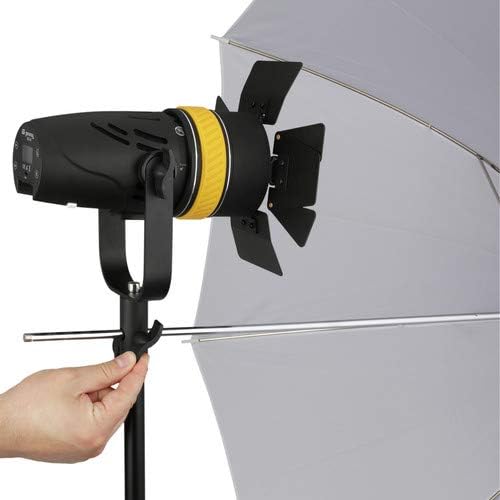
Figure 2: The Torpedo LED light mounted on a light stand, demonstrating its compatibility with standard studio equipment and an umbrella.
- Attaching Barndoors:
Align the barndoors with the front of the light fixture and secure them using the integrated clips or screws. Ensure they are firmly attached before operation.

ചിത്രം 3: മുൻഭാഗം view of the Torpedo light with its four-leaf barndoors fully opened, ready for beam shaping.
- പ്രകാശത്തെ ശക്തിപ്പെടുത്തുന്നു:
- എസി പവർ: Connect the included multi-voltage AC adapter to the power input port on the light and then plug it into a wall outlet.
- ബാറ്ററി പവർ (ഓപ്ഷണൽ): For portable use, insert compatible 7.4V NP-F style batteries into the battery slots on the rear of the unit. Alternatively, connect a V-mount or Gold mount battery using the provided D-Tap cable. Note: Only use 7.4V NP-F batteries with this unit.
പ്രവർത്തന നിർദ്ദേശങ്ങൾ
Familiarize yourself with the control panel located on the rear of the light unit.
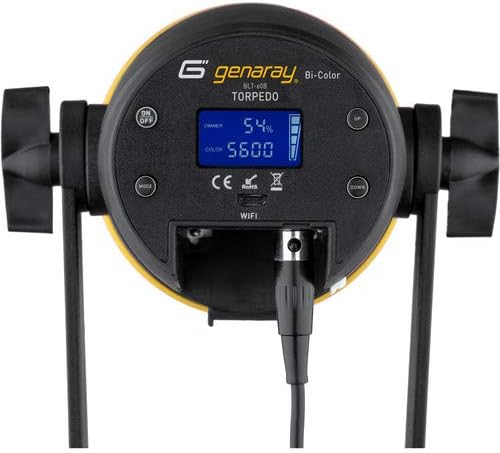
ചിത്രം 4: വിശദമായി view of the Torpedo LED light's control panel, showing the display, power button, mode button, and adjustment buttons for dimmer and color.
1. പവർ ഓൺ/ഓഫ്
അമർത്തുക ഓൺ/ഓഫ് button located on the control panel to power the light on or off. The display will illuminate when the unit is active.
2. തെളിച്ചം ക്രമീകരിക്കൽ (മങ്ങൽ)
ഉപയോഗിക്കുക UP ഒപ്പം താഴേക്ക് buttons next to the "DIMMER" indicator on the display to adjust the light intensity from 1% to 100%. The current dimming percentage will be shown on the display.
3. വർണ്ണ താപനില ക്രമീകരിക്കൽ
അമർത്തുക മോഡ് button to switch to color temperature adjustment mode. Use the UP ഒപ്പം താഴേക്ക് buttons next to the "COLOR" indicator to change the color temperature between 3200K and 5600K. The selected Kelvin value will be displayed.
4. Focusing the Beam (Fresnel Lens)
The Torpedo light features an adjustable Fresnel lens. Rotate the yellow ring located near the front of the light fixture to adjust the beam spread. Rotate clockwise for a tighter spot (15°) and counter-clockwise for a wider flood (75°).
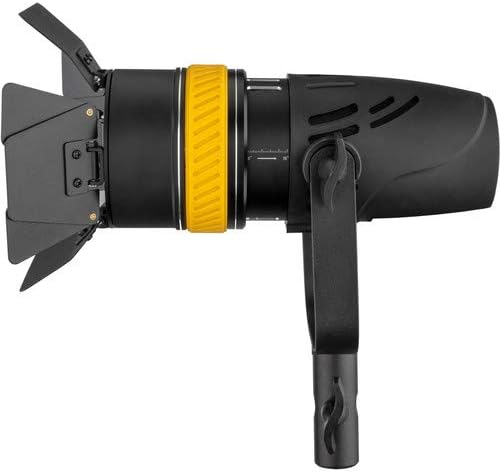
ചിത്രം 5: സൈഡ് പ്രോfile of the Torpedo light, highlighting the yellow focusing ring that adjusts the beam from flood to spot.
5. Using Barndoors and Filters
The included barndoors can be used to shape the light beam and prevent spill. Adjust each leaf individually to control the light spread. The light also supports the use of diffusers and color filters (included) which can be inserted into the accessory slot at the front of the light to modify light quality and color.
മെയിൻ്റനൻസ്
Proper maintenance ensures the longevity and optimal performance of your Genaray Torpedo LED light:
- വൃത്തിയാക്കൽ: Use a soft, dry cloth to clean the exterior of the light. For the Fresnel lens, use a lens cleaning solution and a microfiber cloth to avoid scratches. Do not use harsh chemicals or abrasive cleaners.
- ഫാൻ പരിപാലനം: The light features a thermo-controlled fan. Ensure the ventilation slots are not obstructed to allow proper airflow. Do not attempt to clean the internal fan yourself; if issues arise, contact customer support.
- സംഭരണം: When not in use, store the light in its carrying case in a cool, dry place, away from direct sunlight and excessive humidity.
- ബാറ്ററി കെയർ: If using optional batteries, follow the manufacturer's guidelines for charging, discharging, and storing them. Remove batteries if the light will not be used for an extended period.
ട്രബിൾഷൂട്ടിംഗ്
If you encounter issues with your Torpedo LED light, refer to the table below for common problems and solutions:
| പ്രശ്നം | സാധ്യമായ കാരണം | പരിഹാരം |
|---|---|---|
| ലൈറ്റ് ഓണാക്കില്ല. | No power supply; AC adapter or battery not connected/charged; Power button not pressed. | Ensure AC adapter is securely plugged in or batteries are charged and correctly inserted. Press the ON/OFF button. |
| അപ്രതീക്ഷിതമായി വെളിച്ചം മിന്നിമറയുകയോ മങ്ങുകയോ ചെയ്യുന്നു. | Low battery power; Loose power connection; Overheating. | Recharge or replace batteries. Check all power connections. Ensure ventilation slots are clear. |
| തെളിച്ചമോ വർണ്ണ താപനിലയോ ക്രമീകരിക്കാൻ കഴിയില്ല. | Incorrect mode selected; Control panel malfunction. | Press the MODE button to cycle through adjustment modes. If issue persists, contact support. |
| Fan is loud or constantly running. | High ambient temperature; Obstructed ventilation; Internal issue. | Ensure adequate ventilation around the light. Operate in a cooler environment if possible. If persistent, contact support. |
സ്പെസിഫിക്കേഷനുകൾ
| ഫീച്ചർ | വിശദാംശങ്ങൾ |
|---|---|
| മോഡൽ നമ്പർ | BLT-60B |
| പ്രകാശ സ്രോതസ്സ് | 60W COB LED Array |
| തുല്യമായ ഔട്ട്പുട്ട് | 300W Tungsten Fixture |
| ബീം ആംഗിൾ | Adjustable 15° (spot) to 75° (flood) |
| വർണ്ണ താപനില | 3200K to 5600K (Bi-Color) |
| CRI/TLCI Rating | 95.8 / 98 |
| മങ്ങുന്നു | 1% മുതൽ 100% വരെ സ്റ്റെപ്ലെസ്സ് |
| പവർ ഇൻപുട്ട് | AC 100-240V, 50/60Hz (via AC adapter) |
| ബാറ്ററി അനുയോജ്യത | 7.4V NP-F style batteries (optional), V-mount/Gold mount via D-Tap (optional) |
| എൽഇഡി ആയുർദൈർഘ്യം | 50,000 മണിക്കൂർ |
| തണുപ്പിക്കൽ | Thermo-controlled fan |
| അളവുകൾ | 8 x 3.7 inches (approximate, light unit only) |
| പാക്കേജ് അളവുകൾ | 15.4 x 9.5 x 5.8 ഇഞ്ച് |
| ജല പ്രതിരോധ നില | വാട്ടർ റെസിസ്റ്റൻ്റ് അല്ല |
വാറൻ്റിയും പിന്തുണയും
Genaray products are designed for reliability and performance. For information regarding warranty coverage, technical support, or service inquiries, please refer to the warranty card included with your product or visit the official Genaray webസൈറ്റ്. വാറന്റി ക്ലെയിമുകൾക്കായി നിങ്ങളുടെ വാങ്ങലിന്റെ തെളിവ് സൂക്ഷിക്കുക.
For further assistance, you may contact Genaray customer support directly.


