
1. ആമുഖം
This user manual provides comprehensive instructions for the safe and efficient operation of your Kerbl Digital Table Scale, Model 29923. Designed for precise and reliable weighing, this scale features a robust stainless steel platform and a convenient piece counting function, making it suitable for various applications in workshops, warehouses, shipping centers, or small retail businesses.
The Kerbl Digital Table Scale is engineered for non-calibrated weighing, offering quick and dependable results for commercial use. Please read this manual thoroughly before operating the device to ensure proper usage and to maximize its lifespan.

Image 1.1: The Kerbl Digital Table Scale 29923, featuring a large weighing platform and a clear digital display.
2 സുരക്ഷാ വിവരങ്ങൾ
To ensure safe operation and prevent damage to the device or injury to yourself, please observe the following safety guidelines:
- Do not exceed the maximum weighing capacity of 30 kg. Overloading can damage the weighing mechanism.
- കൃത്യമായ അളവുകൾ ഉറപ്പാക്കാൻ സ്കെയിൽ ഒരു സ്ഥിരതയുള്ള, ലെവൽ ഉപരിതലത്തിൽ സ്ഥാപിക്കുക.
- Avoid exposing the scale to extreme temperatures, high humidity, or direct sunlight.
- Keep the scale away from strong electromagnetic fields, which can interfere with its electronic components.
- വെള്ളത്തിലോ മറ്റ് ദ്രാവകങ്ങളിലോ സ്കെയിൽ മുക്കരുത്. പരസ്യം ഉപയോഗിച്ച് വൃത്തിയാക്കുക.amp തുണി മാത്രം.
- This scale is not intended for legal-for-trade applications requiring calibration.
- Use only the original power adapter and charger provided with the scale.
- Do not attempt to disassemble or repair the scale yourself. Refer all servicing to qualified personnel.
3. പാക്കേജ് ഉള്ളടക്കം
അൺപാക്ക് ചെയ്യുമ്പോൾ, എല്ലാ ഘടകങ്ങളും ഉണ്ടെന്നും കേടുപാടുകൾ സംഭവിച്ചിട്ടില്ലെന്നും ദയവായി പരിശോധിക്കുക:
- 1 x Kerbl Digital Table Scale (up to 30kg)
- 1 x Power Adapter / Charger
- 1 x Rechargeable Battery (pre-installed or separate)
- 1 x ഉപയോക്തൃ മാനുവൽ
4. സജ്ജീകരണം
- അൺപാക്ക് ചെയ്യുന്നു: Carefully remove the scale and all accessories from the packaging. Retain the packaging for future storage or transport.
- പ്ലേസ്മെൻ്റ്: Place the scale on a firm, flat, and stable surface, free from vibrations and drafts. Ensure there is adequate space around the scale for operation.
- ലെവലിംഗ്: The scale is equipped with adjustable feet and a spirit level bubble to ensure accurate measurements. Adjust the feet until the bubble is centered within the circle of the spirit level.
- പവർ കണക്ഷൻ: Connect the power adapter to the scale's power input port and then plug it into a suitable electrical outlet. The scale can operate on AC power or its internal rechargeable battery. Ensure the battery is fully charged before initial use for optimal performance.
- പ്രാരംഭ പവർ ഓൺ: അമർത്തുക ഓൺ/ഓഫ് button to turn on the scale. The display will typically show a self-test sequence before settling at zero.
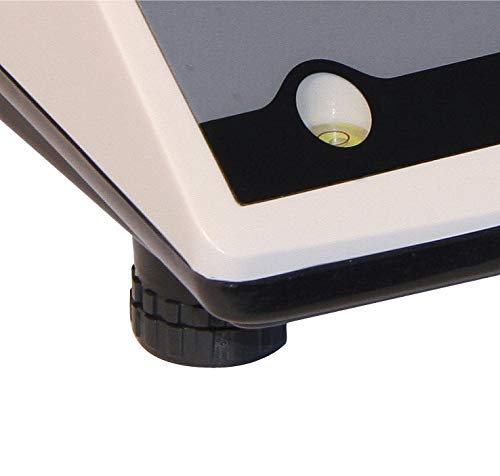
Image 4.1: Close-up of the adjustable leveling feet and integrated spirit level for precise setup.
5. ഓപ്പറേഷൻ
5.1 അടിസ്ഥാന തൂക്കം
- Ensure the scale is on a level surface and powered on, displaying "0.000" or "0.00" in the selected unit.
- Gently place the item to be weighed onto the center of the stainless steel platform.
- Wait for the display to stabilize. The weight will be shown in the current unit.
5.2 യൂണിറ്റ് പരിവർത്തനം
The scale supports multiple weighing units (kg, lb, ST, pcs). To change the unit:
- അമർത്തുക യൂണിറ്റ് button repeatedly to cycle through the available units (kg, lb, ST). The active unit will be indicated on the display.
5.3 ടാരെ ഫംഗ്ഷൻ
The Tare function allows you to subtract the weight of a container or packaging, so only the net weight of the contents is measured.
- Place the empty container onto the weighing platform. The display will show its weight.
- അമർത്തുക TARE button. The display will reset to "0.000" (or "0.00"), indicating the container's weight has been tared out.
- ഇനി, തൂക്കാനുള്ള സാധനങ്ങൾ പാത്രത്തിൽ വയ്ക്കുക. ഡിസ്പ്ലേയിൽ സാധനങ്ങളുടെ ഭാരം മാത്രമേ കാണിക്കൂ.
- To clear the tare, remove the container from the platform and press the TARE വീണ്ടും ബട്ടൺ.
5.4 Piece Counting Function
The piece counting function allows you to count a large number of identical items quickly.
- സ്കെയിൽ പൂജ്യത്തിലാണെന്ന് ഉറപ്പാക്കുക.
- അമർത്തുക മോഡ് button until "pcs" (pieces) is indicated on the display.
- Place a known sample quantity of items (e.g., 10, 20, 50, or 100 pieces) onto the platform.
- ഉപയോഗിക്കുക ZERO or യൂണിറ്റ് buttons (refer to specific model instructions if different) to select the sample quantity you placed. Confirm the sample അളവ്.
- ഒരിക്കൽ എസ്ample is set, remove the sample and then place the bulk quantity of items onto the platform. The display will show the total count of items.
- കൗണ്ടിംഗ് മോഡിൽ നിന്ന് പുറത്തുകടക്കാൻ, അമർത്തുക മോഡ് button again until a weight unit (kg, lb, ST) is displayed.
6. പരിപാലനം
6.1 വൃത്തിയാക്കൽ
- Always disconnect the scale from the power supply before cleaning.
- Wipe the stainless steel platform and the scale body with a soft, damp തുണി. ആവശ്യമെങ്കിൽ വീര്യം കുറഞ്ഞ ഡിറ്റർജൻ്റ് ഉപയോഗിക്കാം.
- Do not use abrasive cleaners, solvents, or harsh chemicals, as these can damage the surface and electronic components.
- Ensure no liquid enters the interior of the scale, especially around the display and buttons.
- Dry the scale thoroughly after cleaning.
6.2 ബാറ്ററി കെയർ
- ബാറ്ററി ലൈഫ് വർദ്ധിപ്പിക്കാൻ, ബാറ്ററി ഇടയ്ക്കിടെ പൂർണ്ണമായും ഡിസ്ചാർജ് ചെയ്യുന്നത് ഒഴിവാക്കുക.
- If the scale will not be used for an extended period, charge the battery periodically (e.g., every 3 months) to maintain its capacity.
- ഉപയോഗത്തിലില്ലാത്തപ്പോൾ സ്കെയിൽ തണുത്തതും വരണ്ടതുമായ സ്ഥലത്ത് സൂക്ഷിക്കുക.
7. പ്രശ്നപരിഹാരം
If you encounter issues with your Kerbl Digital Table Scale, please refer to the following common problems and their solutions:
| പ്രശ്നം | സാധ്യമായ കാരണം | പരിഹാരം |
|---|---|---|
| സ്കെയിൽ ഓണാക്കുന്നില്ല. | വൈദ്യുതിയില്ല, ബാറ്ററി ചാർജ് തീർന്നു, പവർ അഡാപ്റ്റർ തകരാറിലായി. | Check power connection. Charge the battery. Try a different outlet. |
| കൃത്യമല്ലാത്ത വായനകൾ. | Scale not level, unstable surface, drafts, calibration needed (not user-adjustable). | Ensure scale is level and on a stable surface. Avoid drafts. If issues persist, contact support. |
| Display shows "OVERLOAD" or "E". | ഭാരം പരമാവധി ശേഷി കവിയുന്നു. | Remove excess weight immediately. Do not exceed 30 kg. |
| ചില കോണുകളിൽ നിന്ന് ഡിസ്പ്ലേ വായിക്കാൻ പ്രയാസമാണ്. | Viewing angle issue with LCD/LED display. | നിങ്ങളുടെ ക്രമീകരിക്കുക viewing position to find an optimal angle for readability. This is a characteristic of some display types. |
| Scale restarts or fluctuates with minor disturbance. | Loose internal connection, unstable power, faulty unit. | Ensure power connection is secure. Avoid vibrations. If persistent, contact customer support. |
| Tare function not responding or slow. | Button malfunction, internal software issue. | Press the TARE button firmly. If unresponsive, try restarting the scale. If problem persists, contact support. |
8 സ്പെസിഫിക്കേഷനുകൾ
| ഫീച്ചർ | വിശദാംശങ്ങൾ |
|---|---|
| മോഡൽ നമ്പർ | 29923 |
| ബ്രാൻഡ് | കെർബിൾ |
| പരമാവധി ശേഷി | 30 കി.ഗ്രാം |
| പ്ലാറ്റ്ഫോം മെറ്റീരിയൽ | സ്റ്റെയിൻലെസ്സ് സ്റ്റീൽ |
| പ്ലാറ്റ്ഫോം അളവുകൾ (LxW) | 218 x 260 മി.മീ |
| ഉൽപ്പന്ന അളവുകൾ (LxWxH) | 31.5 x 26.4 x 11 cm (approx. 39 x 30.5 x 19 cm packaged) |
| ഇനത്തിൻ്റെ ഭാരം | 4 കിലോഗ്രാം |
| ഡിസ്പ്ലേ തരം | LED/LCD |
| പവർ ഉറവിടം | Rechargeable Battery (DC 6V 4Ah) / AC Adapter (12V / 500mA) |
| പ്രത്യേക സവിശേഷതകൾ | Portable, Lightweight, Piece Counting Function, Tare Function |
| ശുപാർശ ചെയ്യുന്ന ഉപയോഗം | Versatile weighing needs (non-calibrated) |
| പ്രവർത്തന താപനില | -10 °C മുതൽ +50 °C വരെ |
9. വാറൻ്റിയും പിന്തുണയും
The Kerbl Digital Table Scale 29923 is covered by the manufacturer's standard warranty. Please refer to the warranty card included with your product or visit the official Kerbl webവിശദമായ വാറന്റി നിബന്ധനകൾക്കും വ്യവസ്ഥകൾക്കും സൈറ്റ്.
For technical support, troubleshooting assistance beyond what is provided in this manual, or warranty claims, please contact Kerbl customer service directly. Contact information can typically be found on the manufacturer's webസൈറ്റ് അല്ലെങ്കിൽ ഉൽപ്പന്ന പാക്കേജിംഗിൽ.
നിർമ്മാതാവ്: കെർബിൾ
ഏറ്റവും കാലികമായ പിന്തുണാ വിവരങ്ങൾക്ക്, ദയവായി സന്ദർശിക്കുക: www.kerbl.com


