ആമുഖം
വാങ്ങിയതിന് നന്ദി.asing the Denver CR-CD211 Radio Alarm Clock. This device combines a digital alarm clock with a radio tuner, a front-loading CD player, and a convenient time projection feature. This manual provides detailed instructions for setup, operation, and maintenance to ensure optimal performance and longevity of your product.
പ്രധാനപ്പെട്ട സുരക്ഷാ വിവരങ്ങൾ
- Read all instructions carefully before use and retain them for future reference.
- തീയോ വൈദ്യുതാഘാതമോ തടയാൻ യൂണിറ്റ് മഴയിലോ ഈർപ്പത്തിലോ തുറന്നുകാട്ടരുത്.
- പവർ കോർഡ് നുള്ളിയെടുക്കുകയോ നടക്കുകയോ ചെയ്തിട്ടില്ലെന്ന് ഉറപ്പാക്കുക.
- വെന്റിലേഷൻ തുറസ്സുകളൊന്നും തടയരുത്. നിർമ്മാതാവിന്റെ നിർദ്ദേശങ്ങൾക്കനുസൃതമായി ഇൻസ്റ്റാൾ ചെയ്യുക.
- നിർമ്മാതാവ് വ്യക്തമാക്കിയ അറ്റാച്ച്മെൻ്റുകൾ/ആക്സസറികൾ മാത്രം ഉപയോഗിക്കുക.
- മിന്നൽ കൊടുങ്കാറ്റുകളുടെ സമയത്തോ ദീർഘനേരം ഉപയോഗിക്കാത്ത സമയത്തോ ഈ ഉപകരണം അൺപ്ലഗ് ചെയ്യുക.
- യോഗ്യതയുള്ള സേവന ഉദ്യോഗസ്ഥർക്ക് എല്ലാ സേവനങ്ങളും റഫർ ചെയ്യുക. ഉപകരണം ഏതെങ്കിലും വിധത്തിൽ കേടുവരുമ്പോൾ സർവീസ് ആവശ്യമാണ്.
ഉൽപ്പന്നം കഴിഞ്ഞുview
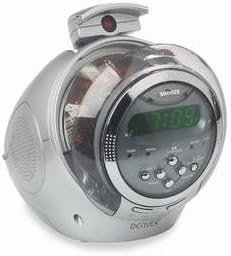
ചിത്ര വിവരണം: A silver-colored Denver CR-CD211 radio alarm clock. The device has a rounded, futuristic design with a clear plastic dome covering the CD player compartment. The front features a digital display showing '7:09' in green, surrounded by control buttons for functions like 'SNOOZE', 'ALARM', 'SET', 'TUNING', and 'VOLUME'. A small projector arm extends from the top, capable of rotating to project the time. A speaker grille is visible on the left side. The overall appearance is compact and modern, designed for a bedside table or desk.
The Denver CR-CD211 is a versatile bedside companion. Its key features include:
- ഡിജിറ്റൽ ക്ലോക്ക് ഡിസ്പ്ലേ: Clear, easy-to-read digital time display.
- FM/AM Radio Tuner: For listening to your favorite radio stations.
- Front-Loading CD Player: Compatible with standard audio CDs.
- ഇരട്ട അലാറം പ്രവർത്തനം: Wake up to radio or buzzer.
- സമയ പ്രൊജക്ഷൻ: Project the current time onto a wall or ceiling.
- സ്നൂസ് പ്രവർത്തനം: Temporarily pause your alarm.
സജ്ജമാക്കുക
1. പവർ കണക്ഷൻ
- Unpack the unit and place it on a stable, flat surface.
- Connect the AC power adapter (if included) or power cord to the DC IN jack on the back of the unit.
- Plug the other end of the power cord into a standard wall outlet. The display should light up.
- ഓപ്ഷണൽ ബാക്കപ്പ് ബാറ്ററികൾ: For maintaining time settings during power outages, locate the battery compartment (usually on the bottom or back) and insert 2 x AAA batteries (not included), observing correct polarity.
2. സമയം ക്രമീകരിക്കുന്നു
- അമർത്തിപ്പിടിക്കുക ടൈം സെറ്റ് button (or similar, refer to your unit's specific button layout). The hour digits will begin to flash.
- ഉപയോഗിക്കുക മണിക്കൂർ ഒപ്പം മിനിറ്റ് ബട്ടണുകൾ (അല്ലെങ്കിൽ ട്യൂണിംഗ് +/- buttons) to adjust the hour and minute respectively.
- അമർത്തുക ടൈം സെറ്റ് സമയം സ്ഥിരീകരിക്കാൻ വീണ്ടും.
പ്രവർത്തന നിർദ്ദേശങ്ങൾ
1. റേഡിയോ ഓപ്പറേഷൻ
- അമർത്തുക പവർ യൂണിറ്റ് ഓണാക്കാനുള്ള ബട്ടൺ.
- അമർത്തുക ഫങ്ഷൻ/മോഡ് button repeatedly until 'RADIO' or the radio frequency is displayed.
- ഉപയോഗിക്കുക ട്യൂണിംഗ് +/- നിങ്ങൾക്ക് ആവശ്യമുള്ള സ്റ്റേഷനിലേക്ക് സ്വമേധയാ ട്യൂൺ ചെയ്യാൻ ബട്ടണുകൾ.
- യാന്ത്രിക സ്കാനിംഗിനായി, അമർത്തിപ്പിടിക്കുക ട്യൂണിംഗ് +/- button for a few seconds. The radio will scan and stop at the next strong station.
- ഉപയോഗിച്ച് വോളിയം ക്രമീകരിക്കുക വോളിയം +/- ബട്ടണുകൾ.
2. സിഡി പ്ലെയർ പ്രവർത്തനം
- അമർത്തുക പവർ യൂണിറ്റ് ഓണാക്കാനുള്ള ബട്ടൺ.
- അമർത്തുക ഫങ്ഷൻ/മോഡ് button repeatedly until 'CD' is displayed.
- Gently open the CD compartment cover (if applicable) or insert a CD into the front-loading slot with the label side facing up.
- The CD player will automatically start playing the first track. If not, press the പ്ലേ/താൽക്കാലികമായി നിർത്തുക ബട്ടൺ.
- ഉപയോഗിക്കുക SKIP +/- ട്രാക്കുകൾക്കിടയിൽ നാവിഗേറ്റ് ചെയ്യാനുള്ള ബട്ടണുകൾ.
- അമർത്തുക പ്ലേ/താൽക്കാലികമായി നിർത്തുക പ്ലേബാക്ക് താൽക്കാലികമായി നിർത്താനോ പുനരാരംഭിക്കാനോ.
- അമർത്തുക നിർത്തുക പ്ലേബാക്ക് നിർത്താനുള്ള ബട്ടൺ.
3. അലാറം സജ്ജമാക്കുന്നു
The CR-CD211 typically features two independent alarms (Alarm 1 and Alarm 2).
- അമർത്തിപ്പിടിക്കുക അലാറം 1 സെറ്റ് ബട്ടൺ (അല്ലെങ്കിൽ അലാറം button and then select Alarm 1). The alarm hour digits will flash.
- ഉപയോഗിക്കുക മണിക്കൂർ ഒപ്പം മിനിറ്റ് ആവശ്യമുള്ള അലാറം സമയം സജ്ജമാക്കാൻ ബട്ടണുകൾ.
- അമർത്തുക അലാറം 1 സെറ്റ് സമയം സ്ഥിരീകരിക്കാൻ വീണ്ടും.
- Next, select the alarm source: Press the ALARM 1 MODE button (or similar) repeatedly to cycle through options: ബസർ, റേഡിയോ, അല്ലെങ്കിൽ ഓഫ്.
- വേണ്ടി ആവർത്തിക്കുക അലാറം 2 വേണമെങ്കിൽ.
4. സ്നൂസ് ഫംഗ്ഷൻ
അലാറം മുഴങ്ങുമ്പോൾ, വലിയ ബട്ടൺ അമർത്തുക സ്നൂസ് ചെയ്യുക button (usually located on top of the unit). The alarm will temporarily stop and sound again after approximately 9 minutes.
5. Time Projection
- Locate the projector arm on top of the unit.
- Adjust the angle of the projector arm to direct the time display onto a wall or ceiling.
- ഉപയോഗിക്കുക ഫോക്കസ് wheel (if available, usually on the projector arm) to sharpen the projected image.
- അമർത്തുക പ്രൊജക്ഷൻ ഓൺ/ഓഫ് button (or similar) to activate or deactivate the projection.
- Some models may have a ഫ്ലിപ്പ് button to rotate the projected image 180 degrees.
മെയിൻ്റനൻസ്
- വൃത്തിയാക്കൽ: മൃദുവായതും ഉണങ്ങിയതുമായ തുണി ഉപയോഗിച്ച് യൂണിറ്റ് തുടയ്ക്കുക. അബ്രാസീവ് ക്ലീനറുകളോ ലായകങ്ങളോ ഉപയോഗിക്കരുത്.
- CD Player Care: Handle CDs by their edges. Keep the CD compartment clean and free of dust. Do not attempt to clean the CD lens yourself.
- വെൻ്റിലേഷൻ: അമിതമായി ചൂടാക്കുന്നത് തടയാൻ വെന്റിലേഷൻ ഓപ്പണിംഗുകൾ തടഞ്ഞിട്ടില്ലെന്ന് ഉറപ്പാക്കുക.
ട്രബിൾഷൂട്ടിംഗ്
| പ്രശ്നം | സാധ്യമായ കാരണം | പരിഹാരം |
|---|---|---|
| യൂണിറ്റ് പവർ ഓണാക്കുന്നില്ല. | പവർ കോർഡ് ശരിയായി ബന്ധിപ്പിച്ചിട്ടില്ല. | യൂണിറ്റിലേക്കും മതിൽ ഔട്ട്ലെറ്റിലേക്കും പവർ കോർഡ് കണക്ഷൻ പരിശോധിക്കുക. |
| അലാറം മുഴങ്ങുന്നില്ല. | Alarm not set correctly; Alarm volume too low; Alarm mode set to OFF. | Verify alarm time and mode (Buzzer/Radio). Increase alarm volume. Ensure alarm is activated. |
| മോശം റേഡിയോ സ്വീകരണം. | ആന്റിന നീട്ടിയിട്ടില്ല അല്ലെങ്കിൽ ശരിയായി സ്ഥാപിച്ചിട്ടില്ല; ഇടപെടൽ. | Extend and adjust the position of the FM wire antenna. Try moving the unit to a different location away from other electronic devices. |
| സിഡി പ്ലേ ചെയ്യുകയോ ഒഴിവാക്കുകയോ ചെയ്യുന്നില്ല. | സിഡി വൃത്തികേടായതോ പോറലുള്ളതോ ആണ്; സിഡി തെറ്റായി ചേർത്തിരിക്കുന്നു; സിഡി ഫോർമാറ്റ് പിന്തുണയ്ക്കുന്നില്ല. | Clean the CD with a soft cloth. Re-insert the CD with the label side up. Ensure it is an audio CD. |
| Time projection is blurry or not visible. | Focus not adjusted; Projector angle incorrect; Room too bright. | Adjust the focus wheel on the projector. Reposition the projector arm. Ensure the room is sufficiently dark. |
സ്പെസിഫിക്കേഷനുകൾ
- ബ്രാൻഡ്: ഡെൻവർ
- മോഡൽ: CR-CD211
- ഊർജ്ജ സ്രോതസ്സ്: Electric (AC power adapter), Optional Battery Backup (AAA batteries, not included)
- ഡിസ്പ്ലേ തരം: ഡിജിറ്റൽ
- മെറ്റീരിയൽ: പ്ലാസ്റ്റിക്
- അളവുകൾ (ഏകദേശം): 26.8 x 20.8 x 20.2 സെ.മീ
- ഭാരം (ഏകദേശം): 1.7 കി.ഗ്രാം
- പ്രത്യേക സവിശേഷതകൾ: Radio, CD Player, Alarm Clock, Time Projection
വാറൻ്റിയും പിന്തുണയും
For warranty information and technical support, please refer to the warranty card included with your product or contact your local Denver retailer or service center. Keep your proof of purchase for warranty claims.


