ആമുഖം
This manual provides essential information for setting up, operating, maintaining, and troubleshooting your ASUS G53SX-DH71 Full HD 15.6-Inch Gaming Laptop. Please read this manual thoroughly to ensure proper use and to maximize the performance and longevity of your device.
ഉൽപ്പന്നം കഴിഞ്ഞുview
The ASUS G53SX-DH71 is a high-performance gaming laptop designed for immersive gaming experiences. It features an Intel Core i7 processor, NVIDIA GeForce GTX 560M graphics, and a 15.6-inch Full HD display.
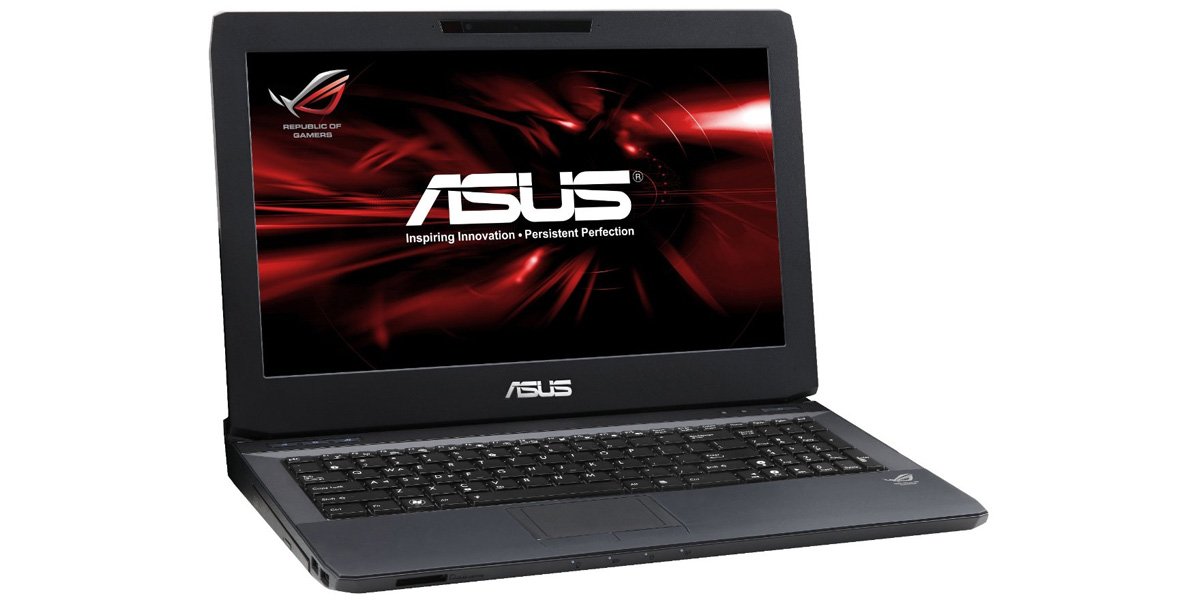
Figure 1: ASUS G53SX-DH71 Gaming Laptop.
സജ്ജീകരണ ഗൈഡ്
1 അൺപാക്കിംഗും പ്രാരംഭ പരിശോധനയും
- ലാപ്ടോപ്പും എല്ലാ അനുബന്ധ ഉപകരണങ്ങളും പാക്കേജിംഗിൽ നിന്ന് ശ്രദ്ധാപൂർവ്വം നീക്കം ചെയ്യുക.
- Verify that all components are present: laptop, power adapter, power cord, and any included documentation.
- ലാപ്ടോപ്പിന് എന്തെങ്കിലും ഭൗതിക കേടുപാടുകൾ സംഭവിച്ചിട്ടുണ്ടോ എന്ന് പരിശോധിക്കുക. കേടുപാടുകൾ കണ്ടെത്തിയാൽ, ഉടൻ തന്നെ നിങ്ങളുടെ റീട്ടെയിലറെ ബന്ധപ്പെടുക.
2. പവർ അഡാപ്റ്റർ ബന്ധിപ്പിക്കുന്നു
- പവർ കോർഡ് എസി അഡാപ്റ്ററിലേക്ക് ബന്ധിപ്പിക്കുക.
- എസി അഡാപ്റ്റർ ഒരു ഗ്രൗണ്ടഡ് ഇലക്ട്രിക്കൽ ഔട്ട്ലെറ്റിലേക്ക് പ്ലഗ് ചെയ്യുക.
- Connect the DC output plug of the AC adapter to the power input port on your laptop.
- Allow the battery to charge for at least 3 hours before initial use, even if the battery indicator shows a full charge.
3. ആദ്യ ബൂട്ടും ഓപ്പറേറ്റിംഗ് സിസ്റ്റം സജ്ജീകരണവും
- ലാപ്ടോപ്പ് ലിഡ് തുറന്ന് പവർ ബട്ടൺ അമർത്തുക.
- Follow the on-screen instructions to complete the Windows 7 Home Premium 64-bit operating system setup. This typically involves selecting language, region, accepting license agreements, and creating a user account.
- Connect to a Wi-Fi network when prompted to ensure the system can download necessary updates.
നിങ്ങളുടെ ലാപ്ടോപ്പ് പ്രവർത്തിപ്പിക്കുന്നു
കീബോർഡും ടച്ച്പാഡും
The laptop features a full-sized keyboard and a multi-touch touchpad. The keyboard includes a numeric keypad and backlit keys for use in low-light conditions. The touchpad supports gestures for navigation and control.

Figure 2: Keyboard and Touchpad detail.
- ഫംഗ്ഷൻ കീകൾ (Fn): Combine the Fn key with F1-F12 keys for various functions such as adjusting brightness, volume, or disabling the touchpad (Fn+F9).
- ടച്ച്പാഡ്: Use the touchpad for cursor control. Two physical buttons below the touchpad serve as left and right mouse clicks.
പവർ മാനേജുമെന്റ് മോഡുകൾ
Your laptop offers several power modes to optimize performance or battery life. These can typically be accessed via a dedicated button or through the operating system's power options.
- ഉയർന്ന പ്രകടനം: Maximizes system speed and responsiveness, ideal for gaming and demanding applications.
- ശാന്തമായ ഓഫീസ്: Reduces fan noise and power consumption for general productivity tasks.
- Entertainment (Theater): Optimizes display and audio settings for media consumption.
- ബാറ്ററി സേവർ: Extends battery life by reducing performance and background activity.
Audio and Graphics
The ASUS G53SX-DH71 is equipped with advanced audio and NVIDIA GeForce GTX 560M graphics for an immersive experience. Ensure drivers are up-to-date for optimal performance.
Video 1: Republic of Gamers product overview. This video highlights the laptop's gaming capabilities, 3D audio, and powerful graphics processing unit (GPU) with Intel Core i7 processor.
പരിപാലനവും പരിചരണവും
- വൃത്തിയാക്കൽ: Use a soft, lint-free cloth to clean the screen and exterior. Avoid harsh chemicals.
- ബാറ്ററി കെയർ: To prolong battery life, avoid fully discharging the battery frequently. Store the laptop in a cool, dry place if not used for extended periods.
- വെൻ്റിലേഷൻ: Ensure the laptop's ventilation openings are not blocked to prevent overheating.
ട്രബിൾഷൂട്ടിംഗ്
പൊതുവായ പ്രശ്നങ്ങളും പരിഹാരങ്ങളും
- പവർ ഇല്ല:
- ലാപ്ടോപ്പിലേക്കും പ്രവർത്തിക്കുന്ന പവർ ഔട്ട്ലെറ്റിലേക്കും എസി അഡാപ്റ്റർ സുരക്ഷിതമായി ബന്ധിപ്പിച്ചിട്ടുണ്ടെന്ന് ഉറപ്പാക്കുക.
- മറ്റൊരു ഉപകരണം പ്ലഗ് ഇൻ ചെയ്ത് പവർ ഔട്ട്ലെറ്റ് പ്രവർത്തനക്ഷമമാണെന്ന് ഉറപ്പാക്കുക.
- Check if the battery is completely drained. Allow it to charge for a while before attempting to power on.
- Screen Display Issues (e.g., white screen, black screen, pixelation):
- ലാപ്ടോപ്പ് പുനരാരംഭിക്കുക.
- Connect an external monitor to determine if the issue is with the laptop's display or the graphics card.
- ഗ്രാഫിക്സ് ഡ്രൈവറുകൾ അപ്ഡേറ്റ് ചെയ്തിട്ടുണ്ടെന്ന് ഉറപ്പാക്കുക.
- If the issue persists, it may indicate a hardware problem with the display cable or panel. Contact ASUS support for assistance.
- അമിത ചൂടാക്കൽ:
- Ensure ventilation vents are clear of obstructions.
- Use the laptop on a hard, flat surface rather than soft surfaces like beds or couches.
- Consider using a cooling pad.
- Clean dust from the vents using compressed air.
- മന്ദഗതിയിലുള്ള പ്രകടനം:
- Check power management settings and ensure the laptop is in "High Performance" mode when needed.
- ആവശ്യമില്ലാത്ത പശ്ചാത്തല ആപ്ലിക്കേഷനുകൾ അടയ്ക്കുക.
- ഒരു വൈറസ് സ്കാൻ പ്രവർത്തിപ്പിക്കുക.
- ഹാർഡ് ഡ്രൈവിൽ മതിയായ ഇടം ഉറപ്പാക്കുക.
സ്പെസിഫിക്കേഷനുകൾ
| ഫീച്ചർ | സ്പെസിഫിക്കേഷൻ |
|---|---|
| ബ്രാൻഡ് | ASUS |
| മോഡൽ നമ്പർ | G53SX-DH71 |
| സ്ക്രീൻ വലിപ്പം | 15.6 ഇഞ്ച് |
| സ്ക്രീൻ റെസല്യൂഷൻ | 1920 x 1080 പിക്സലുകൾ (ഫുൾ എച്ച്ഡി) |
| പ്രോസസ്സർ | Intel Core i7-2670QM (2.2 GHz) |
| റാം | 12 ജിബി ഡിഐഎംഎം (1333 മെഗാഹെട്സ്) |
| ഹാർഡ് ഡ്രൈവ് | 750 GB 7200 RPM Serial ATA |
| ഗ്രാഫിക്സ് കോപ്രൊസസർ | NVIDIA GeForce GTX 560M 2GB GDDR5 |
| ഓപ്പറേറ്റിംഗ് സിസ്റ്റം | വിൻഡോസ് 7 ഹോം പ്രീമിയം 64-ബിറ്റ് |
| വയർലെസ് തരം | 802.11 ബിജിഎൻ |
| USB 2.0 പോർട്ടുകൾ | 3 |
| USB 3.0 പോർട്ടുകൾ | 1 |
| Audio-out Ports | 1 |
| ഇനത്തിൻ്റെ ഭാരം | 2.1 പൗണ്ട് |
| ഉൽപ്പന്ന അളവുകൾ | 11.7 x 15.6 x 0.8 ഇഞ്ച് |
| നിറം | കറുപ്പ് |
| ബാറ്ററികൾ | 1 ലിഥിയം അയോൺ ബാറ്ററി (ഉൾപ്പെടുത്തിയിരിക്കുന്നു) |
വാറൻ്റിയും പിന്തുണയും
For warranty information and technical support, please refer to the documentation included with your product or visit the official ASUS support webസൈറ്റ്. വാറന്റി ക്ലെയിമുകൾക്കായി നിങ്ങളുടെ വാങ്ങലിന്റെ തെളിവ് സൂക്ഷിക്കുക.
- ASUS പിന്തുണ Webസൈറ്റ്: www.asus.com/support/
- ഉൽപ്പന്ന രജിസ്ട്രേഷൻ: Register your product online to receive updates and support.