1. ആമുഖം
The ABUS 787 Combination Key Storage Box provides a secure solution for storing keys and code cards. Designed for wall mounting, this robust metal box features a resettable 4-digit combination lock, offering convenience and security for home, office, or protected outdoor areas. This manual provides essential instructions for the proper setup, operation, and maintenance of your key storage box.

ചിത്രം 1: മുൻഭാഗം view of the ABUS 787 Combination Key Storage Box, showing the combination dials.
2. സജ്ജീകരണവും ഇൻസ്റ്റാളേഷനും
The ABUS 787 Key Storage Box is designed for surface mounting on a wall. It is suitable for installation indoors or in protected outdoor areas. Mounting hardware is included with the product.
- Choose a suitable location for installation. Ensure the surface is stable and can support the weight of the key box and its contents.
- Using the key box as a template, mark the positions for the mounting holes on the wall.
- അടയാളപ്പെടുത്തിയ സ്ഥാനങ്ങളിൽ പൈലറ്റ് ദ്വാരങ്ങൾ തുരത്തുക.
- Secure the key box to the wall using the provided mounting hardware. Ensure it is firmly attached.

Figure 2: The ABUS 787 Key Storage Box securely mounted on a brick wall.
3. Setting the Combination Code
The ABUS 787 features a 4-digit resettable combination lock, offering 10,000 possible codes. The factory default code is typically 0-0-0-0. Follow these steps to set or change your personal combination:
- Open the key storage box by entering the current combination (default 0-0-0-0) and sliding the release lever.
- Locate the reset lever on the inside of the door mechanism.
- Move the reset lever to the 'SET' position (usually by sliding it to the right or upwards).
- While the lever is in the 'SET' position, rotate the combination dials to your desired 4-digit code. Choose a memorable but secure code.
- Return the reset lever to the 'LOCK' position (usually by sliding it to the left or downwards).
- Close the key box door and scramble the dials to lock it.
- Test your new combination to ensure it opens the box correctly before closing it completely and scrambling the dials.

ചിത്രം 3: ക്ലോസപ്പ് view of the combination dials on the ABUS 787 Key Storage Box.
4. Operating the Key Storage Box
To access or store keys:
- Slide the protective cover upwards to reveal the combination dials.
- Enter your 4-digit combination by rotating the dials to align with your set code.
- Slide the release lever (typically located on the left side of the dials) downwards to open the front panel.
- The interior of the box features a removable hook for organizing and hanging keys. Place or retrieve your keys as needed.
- To close the box, ensure the keys are properly placed inside and close the front panel firmly until it clicks shut.
- Scramble the combination dials to secure the box and slide the protective cover back down.
The removable hook provides extra convenience for managing multiple keys or key rings.
5. പരിപാലനം
To ensure the longevity and reliable operation of your ABUS 787 Key Storage Box, follow these maintenance guidelines:
- വൃത്തിയാക്കൽ: Periodically wipe the exterior of the key box with a soft, damp cloth to remove dust and dirt. Avoid abrasive cleaners or solvents that could damage the finish.
- ലൂബ്രിക്കേഷൻ: If the combination dials or opening mechanism become stiff, apply a small amount of silicone-based lubricant to the moving parts. Do not use oil-based lubricants as they can attract dirt.
- പരിസ്ഥിതി സംരക്ഷണം: While the product is designed to be weather-resistant for protected outdoor areas, prolonged exposure to extreme weather conditions (heavy rain, direct sunlight, freezing temperatures) may affect its performance over time. Consider installing it under an overhang or in a sheltered spot if used outdoors.
- പരിശോധന: Regularly inspect the mounting screws and the overall integrity of the box to ensure it remains securely attached and free from damage.
6. പ്രശ്നപരിഹാരം
If you encounter issues with your ABUS 787 Key Storage Box, refer to the following common problems and solutions:
- തുറക്കാനുള്ള ബുദ്ധിമുട്ട്:
- Ensure the correct 4-digit combination is entered precisely.
- Verify that the release lever is fully engaged and slid downwards.
- Check for any obstructions or debris in the mechanism.
- Combination Dials are Stiff:
- ഡയലുകളിൽ ചെറിയ അളവിൽ സിലിക്കൺ അധിഷ്ഠിത ലൂബ്രിക്കന്റ് പുരട്ടുക.
- Clean any accumulated dirt or grime from around the dials.
- Unable to Reset Code:
- Confirm the box is open and the current combination is correctly entered before attempting to move the reset lever.
- Ensure the reset lever is fully moved to the 'SET' position before changing the dials and then fully returned to the 'LOCK' position.
- Box Not Closing Properly:
- Check that no keys or other items are obstructing the closing mechanism.
- Ensure the front panel is aligned correctly before pushing it shut.
ഈ ഘട്ടങ്ങൾ പ്രശ്നം പരിഹരിക്കുന്നില്ലെങ്കിൽ, കൂടുതൽ സഹായത്തിനായി പിന്തുണ വിഭാഗം പരിശോധിക്കുക.
7 സ്പെസിഫിക്കേഷനുകൾ
| ഫീച്ചർ | വിശദാംശങ്ങൾ |
|---|---|
| ബ്രാൻഡ് | ABUS |
| മോഡലിൻ്റെ പേര് | 787 സി |
| ലോക്ക് തരം | കോമ്പിനേഷൻ ലോക്ക് |
| മെറ്റീരിയൽ | ലോഹം |
| നിറം | കറുപ്പ് |
| ഇനത്തിന്റെ അളവുകൾ (L x W x H) | 1.75 x 3.16 x 4.72 ഇഞ്ച് |
| ഇനത്തിൻ്റെ ഭാരം | 10.9 ഔൺസ് |
| കീ ശേഷി | Up to 20 keys |
| മൗണ്ടിംഗ് തരം | മതിൽ മൗണ്ട് |
| പ്രത്യേക ഫീച്ചർ | Weather Resistant (for protected outdoor areas) |
| ബാറ്ററികൾ ആവശ്യമാണ് | ഇല്ല |
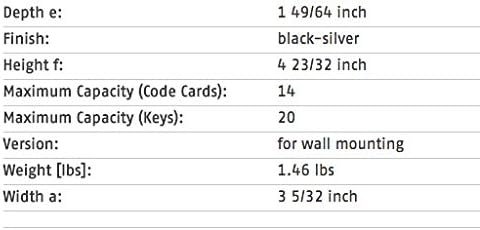
Figure 4: Manufacturer's specifications for the ABUS 787 Key Storage Box.
8. വാറൻ്റി വിവരങ്ങൾ
If an ABUS product fails to work properly due to a manufacturing defect, return it to ABUS postage prepaid, and we will return it repaired or replaced at our discretion. ABUS products are warranted for specific periods of time from date of purchase. Specific warranty periods appear on the packaging.
9. പിന്തുണ
For further assistance, technical support, or to inquire about specific warranty details, please visit the official ABUS website or contact their customer service department. ABUS is a reputable brand known for its reliable security solutions.


