1. ആമുഖം
This manual provides essential information for the proper installation, operation, and maintenance of the Cisco 2.4 GHz 2 dBi/5 GHz 4 dBi Dipole Antenna (Model: AIR-ANT2524DW-R). This dual-band antenna is designed to enhance wireless coverage and performance for compatible Cisco Access Points.
2. ഉൽപ്പന്നം കഴിഞ്ഞുview
The Cisco AIR-ANT2524DW-R is a white, dual-band dipole antenna featuring a 2 dBi gain for the 2.4 GHz band and a 4 dBi gain for the 5 GHz band. It utilizes an RP-TNC connector for secure attachment to compatible access points.
2.1 പ്രധാന സവിശേഷതകൾ
- ഡ്യുവൽ-ബാൻഡ് ഓപ്പറേഷൻ: Supports both 2.4 GHz and 5 GHz wireless frequencies.
- Optimized Gain: Provides 2 dBi gain at 2.4 GHz and 4 dBi gain at 5 GHz for improved signal strength.
- RP-TNC Connector: Ensures a reliable and standard connection to compatible devices.
- വിശാലമായ അനുയോജ്യത: Designed for use with Cisco Access Points including 1600, 1700, 2600, 2700, 3500, 3600, and 3700 Series.
- നിറം: White finish to blend with various environments.
2.2 പാക്കേജ് ഉള്ളടക്കം
- 1 x Cisco AIR-ANT2524DW-R Dipole Antenna
2.3 ഉൽപ്പന്ന ചിത്രങ്ങൾ

ചിത്രം 1: മുൻഭാഗം view of the Cisco dual-band dipole antenna, showing its white casing and RP-TNC connector.
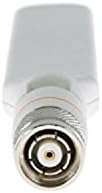
ചിത്രം 2: ക്ലോസപ്പ് view of the RP-TNC connector at the base of the antenna, designed for secure attachment.
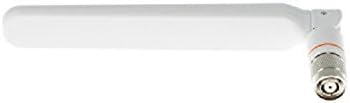
Figure 3: The antenna shown in an angled position, demonstrating its adjustable joint for optimal signal direction.

Figure 4: The antenna in a straight, upright position, illustrating its compact form factor.

Figure 5: A visual representation of the antenna's articulation, showing its range of motion for flexible positioning.

Figure 6: A diagram indicating the antenna's approximate length of 7.0 inches (17 cm).
3. സജ്ജീകരണം
Follow these steps to properly install your Cisco Dipole Antenna:
- Identify Compatible Access Point: Ensure your Cisco Access Point is one of the compatible models (1600, 1700, 2600, 2700, 3500, 3600, or 3700 Series) and has an available RP-TNC antenna port.
- ഉപകരണം ഓഫാക്കുക: For safety, power off the access point before attaching or detaching antennas.
- Align Connector: Carefully align the RP-TNC connector of the antenna with the corresponding port on the access point.
- സുരക്ഷിത കണക്ഷൻ: Gently screw the antenna onto the port until it is finger-tight. Do not overtighten, as this can damage the connector.
- ഓറിയന്റേഷൻ ക്രമീകരിക്കുക: Once secured, adjust the antenna's angle to achieve optimal signal coverage. Typically, a vertical orientation is recommended for omnidirectional coverage, but specific environments may benefit from slight angling.
- പവർ ഓൺ ഉപകരണം: Power on the access point and verify proper operation.
4. പ്രവർത്തിക്കുന്നു
Once installed, the Cisco Dipole Antenna operates passively to extend the wireless range and improve signal quality of your compatible Cisco Access Point. It supports simultaneous operation on both 2.4 GHz and 5 GHz bands, allowing your access point to efficiently manage traffic across both frequencies.
- The antenna automatically utilizes the appropriate frequency band (2.4 GHz or 5 GHz) based on the access point's configuration and client device capabilities.
- For best performance, ensure the antenna is positioned away from obstructions and sources of interference.
5. പരിപാലനം
The Cisco Dipole Antenna requires minimal maintenance. Follow these guidelines to ensure its longevity and optimal performance:
- വൃത്തിയാക്കൽ: Use a soft, dry cloth to gently wipe the antenna's surface. Do not use liquid cleaners or abrasive materials.
- പരിശോധന: Periodically check the antenna and its connection to the access point for any signs of damage or loose connections.
- പരിസ്ഥിതി: Ensure the antenna is used within its specified operating environment to prevent damage from extreme temperatures or moisture.
6. പ്രശ്നപരിഹാരം
നിങ്ങളുടെ ആന്റിനയിൽ പ്രശ്നങ്ങൾ അനുഭവപ്പെടുകയാണെങ്കിൽ, ഇനിപ്പറയുന്ന ട്രബിൾഷൂട്ടിംഗ് ഘട്ടങ്ങൾ പരിഗണിക്കുക:
| പ്രശ്നം | സാധ്യമായ കാരണം | പരിഹാരം |
|---|---|---|
| Poor Wi-Fi signal or limited range. | Antenna not securely connected. Incorrect antenna orientation. Interference from other devices or physical obstructions. | Ensure the antenna is tightly screwed into the access point. Adjust the antenna's angle and position for optimal coverage. Relocate the access point and antenna away from potential interference sources (e.g., microwaves, cordless phones) or large metal objects. |
| Antenna does not fit the access point. | Incorrect connector type. | Verify that your access point requires an RP-TNC connector. This antenna is designed for RP-TNC ports. Do not force the connection. |
| No improvement in signal after installation. | Access point not compatible. Antenna or access point malfunction. | Confirm your access point is listed as compatible (1600, 1700, 2600, 2700, 3500, 3600, 3700 Series). Test with a known working antenna if possible. If issues persist, contact Cisco support. |
7 സ്പെസിഫിക്കേഷനുകൾ
| ബ്രാൻഡ് | സിസ്കോ |
| മോഡൽ നമ്പർ | AIR-ANT2524DW-R |
| വയർലെസ് തരം | 2.4 GHz Radio Frequency (also supports 5 GHz) |
| ആന്റിന നേട്ടം | 2 dBi (2.4 GHz), 4 dBi (5 GHz) |
| കണക്റ്റർ തരം | ആർപി-ടിഎൻസി |
| നിറം | വെള്ള |
| ഇനത്തിൻ്റെ ഭാരം | 1.41 ഔൺസ് (ഏകദേശം 40 ഗ്രാം) |
| ഉൽപ്പന്ന അളവുകൾ (LxWxH) | Approx. 7.0 inches (17 cm) in length |
| അനുയോജ്യമായ ആക്സസ് പോയിൻ്റുകൾ | Cisco 1600, 1700, 2600, 2700, 3500, 3600, 3700 Series |
| യു.പി.സി | 796594479727, 882658459795, 012304762720, 796594388593, 803982749895 |
8. വാറൻ്റിയും പിന്തുണയും
വിശദമായ വാറന്റി വിവരങ്ങൾക്കും സാങ്കേതിക പിന്തുണയ്ക്കും, ദയവായി ഔദ്യോഗിക സിസ്കോ വെബ്സൈറ്റ് കാണുക. website or contact Cisco customer service. Keep your purchase receipt and product model number (AIR-ANT2524DW-R) readily available when seeking support.
സിസ്കോ പിന്തുണ: https://www.cisco.com/c/en/us/support/index.html


