ആമുഖം
This manual provides essential information for the safe and effective use of your Sony Cyber-shot DSC-WX50 digital camera. Please read it thoroughly before operating the camera and retain it for future reference. The DSC-WX50 is a compact digital camera featuring a 16.2 MP Exmor R CMOS sensor, 5x optical zoom, and Full HD 1080/60i video recording capabilities.
ബോക്സിൽ എന്താണുള്ളത്
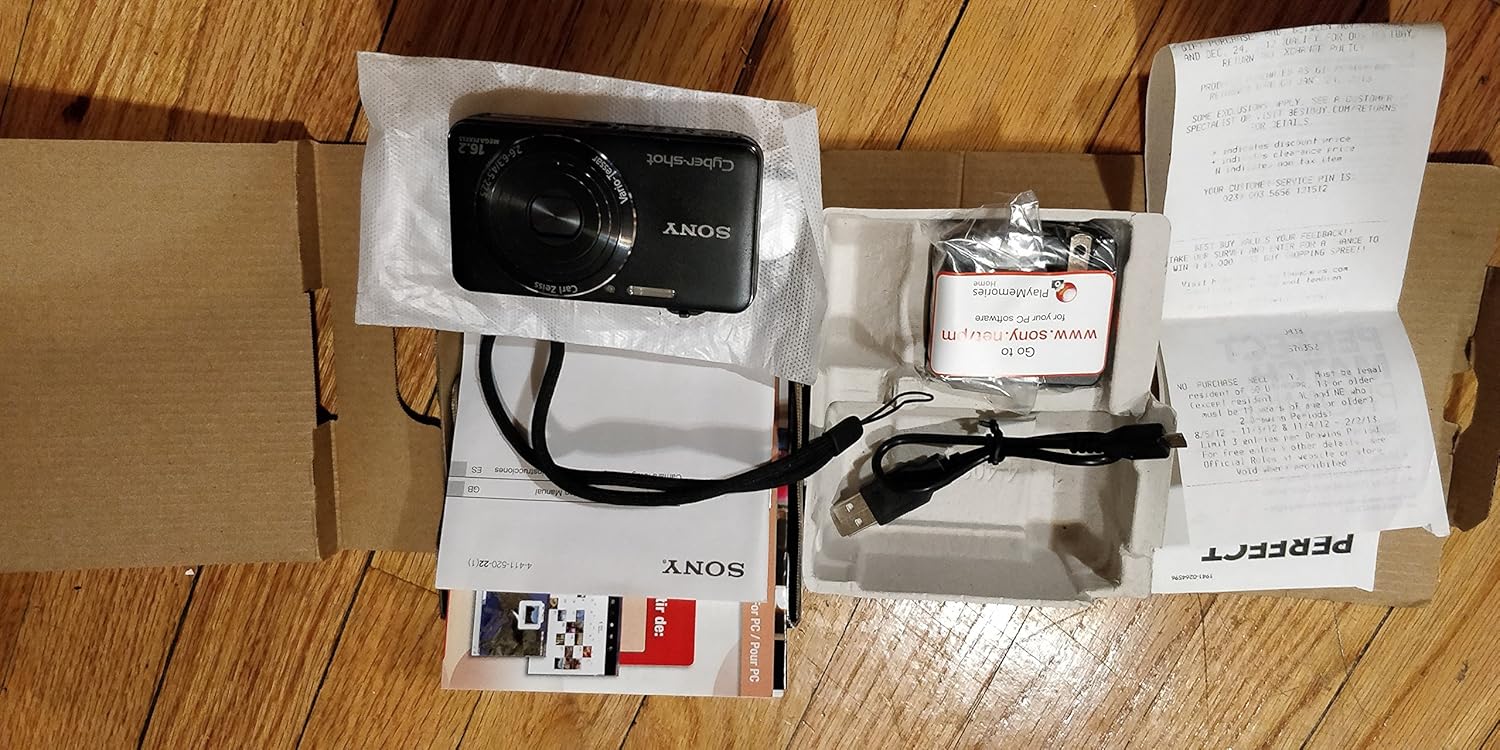
Carefully unpack your camera and ensure all items are present. The standard package contents include:
- Sony Cyber-shot DSC-WX50 Digital Camera
- റീചാർജ് ചെയ്യാവുന്ന ബാറ്ററി പായ്ക്ക്
- എസി അഡാപ്റ്റർ
- യുഎസ്ബി കണക്ഷൻ കേബിൾ
- റിസ്റ്റ് സ്ട്രാപ്പ്
- നിർദ്ദേശ മാനുവലുകളും ഡോക്യുമെന്റേഷനും
- HDMI Cable (Built-in Media)

Image: All contents of the Sony Cyber-shot DSC-WX50 package, including the camera, cables, and documentation, laid out.

ചിത്രം: അടുത്ത് view of the included accessories, such as the charger and USB cable, within their packaging.
സജ്ജമാക്കുക
1 ബാറ്ററി ചാർജ് ചെയ്യുന്നു
Before first use, fully charge the supplied battery pack. Connect the camera to the AC adaptor using the USB cable, then plug the AC adaptor into a wall outlet. The charge lamp ചാർജ് ചെയ്യുമ്പോൾ പ്രകാശിക്കുകയും പൂർത്തിയാകുമ്പോൾ ഓഫാകുകയും ചെയ്യും.
2. ബാറ്ററിയും മെമ്മറി കാർഡും ചേർക്കൽ
Open the battery/memory card cover on the bottom of the camera. Insert the charged battery pack firmly until it locks into place. Insert a compatible memory card (SD/SDHC/SDXC or Memory Stick Duo/Pro Duo/Pro-HG Duo) into the memory card slot until it clicks. Close the cover securely.

ചിത്രം: മുൻഭാഗം view of the Sony Cyber-shot DSC-WX50 camera, showing the lens and flash.
3. പ്രാരംഭ ക്രമീകരണങ്ങൾ
നിങ്ങൾ ആദ്യമായി ക്യാമറ ഓൺ ചെയ്യുമ്പോൾ, തീയതി, സമയം, സമയ മേഖല എന്നിവ സജ്ജമാക്കാൻ നിങ്ങളോട് ആവശ്യപ്പെടും. ഈ ക്രമീകരണങ്ങൾ പൂർത്തിയാക്കാൻ സ്ക്രീനിലെ നിർദ്ദേശങ്ങൾ പാലിക്കുക.
ക്യാമറ പ്രവർത്തിപ്പിക്കുന്നത്
പവർ ഓൺ/ഓഫ്
അമർത്തുക പവർ ക്യാമറ ഓണാക്കാനോ ഓഫാക്കാനോ ഉള്ള ബട്ടൺ. പവർ ഓൺ ചെയ്യുമ്പോൾ ലെൻസ് നീളും.
Basic Still Image Shooting (Intelligent Auto Mode)
- ക്യാമറ ഓണാക്കുക.
- മോഡ് ഡയൽ സജ്ജമാക്കുക ഇന്റലിജന്റ് ഓട്ടോ (പച്ച ക്യാമറ ഐക്കൺ).
- 2.7 ഇഞ്ച് എൽസിഡി സ്ക്രീനിൽ നിങ്ങളുടെ സബ്ജക്റ്റിനെ ഫ്രെയിം ചെയ്യുക.
- ഫോക്കസ് ചെയ്യുന്നതിന് ഷട്ടർ ബട്ടൺ പകുതി താഴേക്ക് അമർത്തുക. ഫോക്കസ് കൈവരിക്കുമ്പോൾ ഫോക്കസ് ഇൻഡിക്കേറ്റർ പച്ചയായി മാറും.
- ചിത്രം എടുക്കാൻ ഷട്ടർ ബട്ടൺ പൂർണ്ണമായും താഴേക്ക് അമർത്തുക.
ചിത്രം: പിൻഭാഗം view of the Sony Cyber-shot DSC-WX50, highlighting the 2.7-inch LCD screen and control buttons.
സൂം പ്രവർത്തനം
Use the zoom lever around the shutter button to adjust the focal length. The camera features 5x optical zoom and Clear Image Zoom for enhanced magnification without significant quality loss.
Video Recording (Full HD 1080/60i)
To record movies, press the dedicated സിനിമ button. Press it again to stop recording. The camera supports Full HD 1080/60i video in AVCHD format, allowing for high-quality video capture with Optical SteadyShot Active Mode for reduced blur.
Special Shooting Modes and Features
- സുപ്പീരിയർ ഓട്ടോ മോഡ്: Automatically detects 33 scenes and optimizes settings for dynamic pictures with reduced noise and improved clarity.
- Intelligent Sweep Panorama HR: Capture wide panoramic images by sweeping the camera. The camera stitches multiple frames automatically.
- 3D സ്റ്റിൽ ഇമേജും 3D സ്വീപ്പ് പനോരമയും: Create 3D images for viewഅനുയോജ്യമായ 3D ഡിസ്പ്ലേകളിൽ പ്രവർത്തിക്കുന്നു.
- ചിത്ര ഇഫക്റ്റ്: Apply creative filters to your photos, such as Toy Camera, Pop Color, Partial Color, and more.
- പശ്ചാത്തല ഡീഫോക്കസ്: Blurs the background to emphasize your subject, similar to DSLR effects.
- സോഫ്റ്റ് സ്കിൻ മോഡ്: പാടുകളുടെയും ചുളിവുകളുടെയും രൂപം കുറയ്ക്കുന്നതിലൂടെ ഛായാചിത്രങ്ങൾ മെച്ചപ്പെടുത്തുന്നു.
- Face Detection & Smile Shutter: Automatically detects faces and can trigger the shutter when a smile is detected.
- ആന്റി-ബ്ലിങ്ക് ഫംഗ്ഷൻ: Helps prevent photos with subjects blinking by capturing multiple shots.
- സ്വാഭാവിക മിന്നൽ: Corrects colors for more lifelike images when using flash.
- ചലനം കണ്ടെത്തൽ: ചലിക്കുന്ന വിഷയങ്ങളിലെ മങ്ങൽ കുറയ്ക്കുന്നതിന് ISO, ഷട്ടർ സ്പീഡ് എന്നിവ ക്രമീകരിക്കുന്നു.
- സ്വീപ്പ് മൾട്ടി ആംഗിൾ മോഡ്: Captures 15 images at different angles to create a 3D-like view ചരിഞ്ഞിരിക്കുമ്പോൾ ക്യാമറയുടെ LCD-യിൽ.
മെയിൻ്റനൻസ്
ക്യാമറ വൃത്തിയാക്കുന്നു
- ക്യാമറ ബോഡി: മൃദുവായതും ഉണങ്ങിയതുമായ തുണി ഉപയോഗിച്ച് തുടയ്ക്കുക. കഠിനമായ അഴുക്കിന്, ഒരു തുണി ഉപയോഗിച്ച് നേരിയ തോതിൽ തുടയ്ക്കുക.ampവെള്ളമോ നേരിയ ഡിറ്റർജന്റോ ഉപയോഗിച്ച് കഴുകിയ ശേഷം ഉണക്കി തുടയ്ക്കുക.
- ലെൻസ്: പൊടി നീക്കം ചെയ്യാൻ ലെൻസ് ബ്രഷ് ഉപയോഗിക്കുക, തുടർന്ന് ലെൻസ് ക്ലീനിംഗ് തുണി ഉപയോഗിച്ച് സൌമ്യമായി തുടയ്ക്കുക. നിങ്ങളുടെ വിരലുകൾ കൊണ്ട് ലെൻസ് പ്രതലത്തിൽ സ്പർശിക്കുന്നത് ഒഴിവാക്കുക.
- LCD സ്ക്രീൻ: മൃദുവായതും ഉണങ്ങിയതുമായ തുണി ഉപയോഗിച്ച് സൌമ്യമായി തുടയ്ക്കുക. സ്ക്രീനിൽ ശക്തമായി അമർത്തുന്നത് ഒഴിവാക്കുക.
ബാറ്ററി കെയർ
ബാറ്ററിയുടെ ആയുസ്സ് വർദ്ധിപ്പിക്കുന്നതിന്, ഉയർന്ന താപനിലയിൽ ബാറ്ററി തുറന്നുകാട്ടുന്നത് ഒഴിവാക്കുക. ഉപയോഗത്തിലില്ലാത്തപ്പോൾ തണുത്തതും വരണ്ടതുമായ സ്ഥലത്ത് ബാറ്ററി സൂക്ഷിക്കുക. ക്യാമറ കൂടുതൽ നേരം ഉപയോഗിക്കുന്നില്ലെങ്കിൽ, ബാറ്ററി നീക്കം ചെയ്യുക.
Memory Card Care
Always format new memory cards in the camera before first use. Avoid removing the memory card while the camera is writing data (indicated by a flashing access lamp) to prevent data corruption.
ട്രബിൾഷൂട്ടിംഗ്
നിങ്ങളുടെ ക്യാമറയിൽ പ്രശ്നങ്ങൾ നേരിടുകയാണെങ്കിൽ, ഇനിപ്പറയുന്ന പൊതുവായ പരിഹാരങ്ങൾ പരിശോധിക്കുക:
| പ്രശ്നം | പരിഹാരം |
|---|---|
| ക്യാമറ പവർ ഓൺ ചെയ്യുന്നില്ല. |
|
| "Writing to Memory card was incomplete" error. |
|
| ചിത്രങ്ങൾ അവ്യക്തമാണ്. |
|
| ഫ്ലാഷ് കത്തുന്നില്ല. |
|
കൂടുതൽ സഹായത്തിന്, ദയവായി സോണി ഉപഭോക്തൃ പിന്തുണയുമായി ബന്ധപ്പെടുക.
സ്പെസിഫിക്കേഷനുകൾ
| ഫീച്ചർ | വിശദാംശങ്ങൾ |
|---|---|
| ഫലപ്രദമായ സ്റ്റിൽ റെസല്യൂഷൻ | 16.2 എം.പി |
| ഫോട്ടോ സെൻസർ ടെക്നോളജി | ബിഎസ്ഐ സിഎംഒഎസ് |
| ഒപ്റ്റിക്കൽ സൂം | 5x |
| ഡിജിറ്റൽ സൂം | 20x |
| സ്ക്രീൻ വലിപ്പം | 2.7 ഇഞ്ച് |
| ഡിസ്പ്ലേ തരം | എൽസിഡി |
| ഇമേജ് സ്റ്റെബിലൈസേഷൻ | ഒപ്റ്റിക്കൽ സ്റ്റെഡിഷോട്ട് |
| വീഡിയോ റെസല്യൂഷൻ | Full HD 1080p (1080/60i AVCHD) |
| പിന്തുണച്ചു File ഫോർമാറ്റ് | JPEG (Exif 2.3), 3D: MPF, Video: MPEG-4, AVCHD |
| മെമ്മറി കാർഡ് അനുയോജ്യത | SD/SDHC/SDXC, മെമ്മറി സ്റ്റിക്ക് ഡ്യുവോ/പ്രോ ഡ്യുവോ/പ്രോ-HG ഡ്യുവോ |
| കണക്റ്റിവിറ്റി | HDMI, USB |
| കുറഞ്ഞ ഫോക്കൽ ലെങ്ത് | 25 മില്ലിമീറ്റർ |
| പരമാവധി ഫോക്കൽ ദൈർഘ്യം | 125 മില്ലിമീറ്റർ |
| പരമാവധി അപ്പേർച്ചർ | f/6.3 |
| കുറഞ്ഞ ഷട്ടർ സ്പീഡ് | 4 സെക്കൻഡ് |
| പരമാവധി ഷട്ടർ സ്പീഡ് | 1/1600 സെക്കൻഡ് |
| ഇനത്തിൻ്റെ ഭാരം | 0.26 പൗണ്ട് |
വാറൻ്റിയും പിന്തുണയും
വാറന്റി വിവരങ്ങൾക്കും ഉപഭോക്തൃ പിന്തുണയ്ക്കും, ദയവായി നിങ്ങളുടെ ഉൽപ്പന്നത്തിനൊപ്പം ഉൾപ്പെടുത്തിയിരിക്കുന്ന ഡോക്യുമെന്റേഷൻ പരിശോധിക്കുക അല്ലെങ്കിൽ ഔദ്യോഗിക സോണി പിന്തുണ സന്ദർശിക്കുക. webസൈറ്റ്. വാറന്റി ക്ലെയിമുകൾക്കായി നിങ്ങളുടെ വാങ്ങലിന്റെ തെളിവ് സൂക്ഷിക്കുക.
ഔദ്യോഗിക സോണി പിന്തുണ: www.sony.com/electronics/support


