1. ഉൽപ്പന്നം കഴിഞ്ഞുview
The Maxell LR41 (also known as 192 or AG3) is a mercury-free alkaline button cell battery designed for various small electronic devices. This manual provides essential information for the safe and effective use of these batteries.
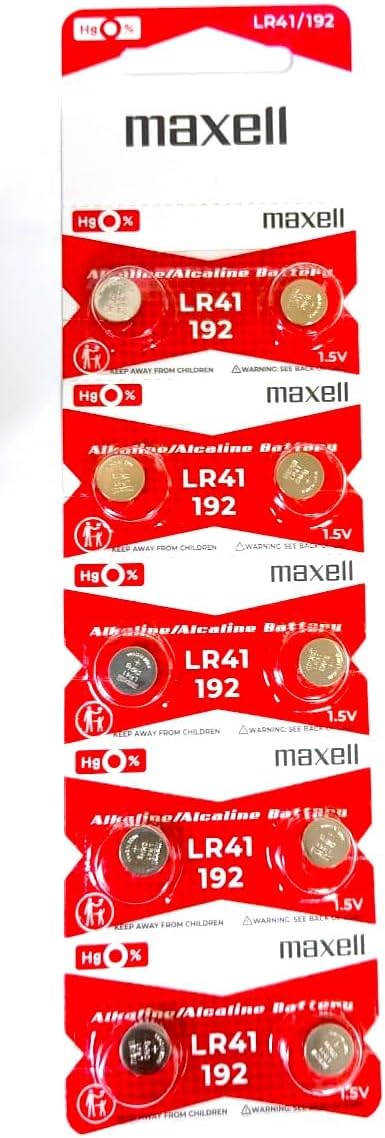
Image: A pack containing 10 Maxell LR41 alkaline button cell batteries, clearly showing the branding and battery type.
2. സുരക്ഷാ വിവരങ്ങളും മുന്നറിയിപ്പുകളും
WARNING: KEEP OUT OF REACH OF CHILDREN. SWALLOWING MAY LEAD TO SERIOUS INJURY OR DEATH.
- ശ്വാസംമുട്ടൽ അപകടം: These batteries are small and can be swallowed. Keep new and used batteries away from children.
- കെമിക്കൽ ബേൺ അപകടം: If swallowed, button cell batteries can cause severe internal chemical burns in as little as 2 hours, leading to death.
- Seek Medical Attention: ബാറ്ററി വിഴുങ്ങിയതായി സംശയിക്കുന്നുവെങ്കിൽ, ഉടൻ വൈദ്യസഹായം തേടുക.
- ശരിയായ നീക്കം ചെയ്യൽ: ബാറ്ററികൾ തീയിൽ കളയരുത്. അവ പൊട്ടിത്തെറിച്ചേക്കാം.
- റീചാർജ് ചെയ്യരുത്: These batteries are not rechargeable. Attempting to recharge them may cause leakage or explosion.
- ഡിസ്അസംബ്ലിംഗ് ചെയ്യരുത്: Do not disassemble, crush, or heat batteries above recommended temperatures.
- സംഭരണം: Store batteries in their original packaging until ready to use, and in a cool, dry place.

Image: The reverse side of the battery packaging, displaying important safety warnings, disposal instructions, and the product barcode (UPC: 4902580132682). For explanations of icons, refer to Maxell's official site.
3. സജ്ജീകരണവും ഇൻസ്റ്റാളേഷനും
Maxell LR41 batteries are commonly used in small electronic devices such as watches, calculators, small toys, and medical devices like thermometers.
- ബാറ്ററി കമ്പാർട്ട്മെന്റ് തിരിച്ചറിയുക: Locate the battery compartment on your device. Refer to your device's user manual for specific instructions.
- തുറന്ന കമ്പാർട്ട്മെന്റ്: Carefully open the battery compartment. This may require a small screwdriver or a coin, depending on the device.
- പഴയ ബാറ്ററി നീക്കം ചെയ്യുക (ബാധകമെങ്കിൽ): If replacing an old battery, remove it carefully. Note its orientation.
- പുതിയ ബാറ്ററി ഇടുക: Insert the new Maxell LR41 battery with the positive (+) side facing up or as indicated by the device's battery compartment markings. The positive side is typically the flat side with the battery's markings.
- കമ്പാർട്ട്മെന്റ് അടയ്ക്കുക: ബാറ്ററി കമ്പാർട്ട്മെൻ്റ് സുരക്ഷിതമായി അടയ്ക്കുക.

ചിത്രം: വിശദമായ ഒരു ചിത്രം view of a single Maxell LR41 button cell battery, showing its size and markings.
4. പ്രവർത്തന നിർദ്ദേശങ്ങൾ
Once installed correctly, the Maxell LR41 battery will power your compatible device. There are no specific operating instructions for the battery itself, as its function is to provide power to the device it is installed in.
- Ensure the device is turned off before battery installation or removal.
- Always use the correct battery type and size as specified by your device manufacturer.
- If the device does not power on after battery installation, check the battery orientation and ensure the contacts are clean.
5. പരിപാലനവും സംഭരണവും
- വൃത്തിയാക്കൽ: If battery contacts become dirty, wipe them with a clean, dry cloth. Do not use abrasive materials or liquids.
- സംഭരണം: Store unused batteries in their original packaging at room temperature, in a dry environment, away from direct sunlight and extreme temperatures.
- ഷോർട്ട് സർക്യൂട്ടുകൾ ഒഴിവാക്കുക: Do not store batteries loosely in a pocket or purse with metal objects like coins, paper clips, or keys, as this can cause a short circuit.
- നീക്കം ചെയ്യൽ: ഉപയോഗിച്ച ബാറ്ററികൾ പ്രാദേശിക നിയന്ത്രണങ്ങൾ അനുസരിച്ച് നിർമാർജനം ചെയ്യുക. പല സമൂഹങ്ങളിലും ബട്ടൺ സെൽ ബാറ്ററികൾ പുനരുപയോഗിക്കുന്നതിനുള്ള പരിപാടികളുണ്ട്.
6. പ്രശ്നപരിഹാരം
| പ്രശ്നം | സാധ്യമായ കാരണം | പരിഹാരം |
|---|---|---|
| ബാറ്ററി ഇൻസ്റ്റാൾ ചെയ്തതിന് ശേഷം ഉപകരണം ഓണാകുന്നില്ല. | Incorrect battery orientation, dirty contacts, or depleted battery. | Check battery polarity (+/-). Clean battery and device contacts with a dry cloth. Replace with a new battery if necessary. |
| Device powers on but quickly shuts off or performs erratically. | Battery is low on power or nearing end of life. | ബാറ്ററി പുതിയൊരെണ്ണം ഉപയോഗിച്ച് മാറ്റിസ്ഥാപിക്കുക. |
| Battery appears corroded or leaking. | Battery damage, improper storage, or extended use beyond its lifespan. | Immediately remove the battery using gloves. Clean the compartment carefully. Dispose of the battery properly. Do not touch leaked material. |
7 സ്പെസിഫിക്കേഷനുകൾ
- മോഡൽ നമ്പർ: LR41 (192, AG3)
- ബാറ്ററി തരം: ആൽക്കലൈൻ ബട്ടൺ സെൽ
- വാല്യംtage: 1.5V
- മെർക്കുറി ഫ്രീ: അതെ
- ഉൽപ്പന്ന അളവുകൾ: 0.04 x 0.04 x 0.04 inches (approximate, for single battery)
- ഇനത്തിൻ്റെ ഭാരം: 0.317 ഔൺസ് (പായ്ക്കിന്)
- ബാറ്ററി സെൽ കോമ്പോസിഷൻ: ആൽക്കലൈൻ
- ബാറ്ററി ശേഷി: 50 മില്ലിamp മണിക്കൂറുകൾ
- ശുപാർശ ചെയ്യുന്ന ഉപയോഗങ്ങൾ: Watch, calculators, small electronics
- നിർമ്മാതാവ്: മാക്സൽ
- ആദ്യം ലഭ്യമായ തീയതി: ജൂൺ 15, 2011
8. വാറൻ്റിയും പിന്തുണയും
Specific warranty information for Maxell LR41 batteries is typically provided on the product packaging or through the point of purchase. For detailed warranty terms or technical support, please refer to the official Maxell webസൈറ്റ് അല്ലെങ്കിൽ അവരുടെ ഉപഭോക്തൃ സേവനവുമായി നേരിട്ട് ബന്ധപ്പെടുക.
കൂടുതൽ വിവരങ്ങൾക്ക്, നിങ്ങൾക്ക് സന്ദർശിക്കാവുന്നതാണ് Maxell Store on Amazon.


