1. ആമുഖം
The ARRIS Touchstone DOCSIS 3.0 8x4 Embedded Multimedia Terminal Adaptor (E-MTA) TM822G is designed to deliver two lines of primary line Voice over IP (VoIP), ultra-high speed data access, and multiple battery pack options to support telephony service during power outages. This modem enables cable operators to offer data services at speeds greater than 300Mbps to their subscribers.
പ്രധാന സവിശേഷതകളിൽ ഇവ ഉൾപ്പെടുന്നു:
- DOCSIS 3.0 compliant PacketCable 1.0 and 1.5 compliant, with PacketCable 2.0 support via firmware upgrade.
- Flexible 8x4 downstream/upstream channel-bonding for superior throughput.
- Backwards compatible with DOCSIS 1.0, 1.1, and 2.0.
- Supports up to two lines of carrier-grade VoIP.
- Multiple Protocol Support: PacketCable (NCS) or Session Initiation Protocol (SIP).
- IPv4 or IPv6 addressing modes for DOCSIS CM layer.
2. സജ്ജീകരണം
2.1. അൺബോക്സിംഗും പ്രാരംഭ പരിശോധനയും
Carefully remove all components from the packaging. Ensure you have the ARRIS TM822G modem, power adapter, and any included cables. Inspect the modem for any visible damage.
2.2. ഭൗതിക ബന്ധങ്ങൾ
Follow these steps to connect your modem:
- ഏകോപന കേബിൾ: Connect one end of the coaxial cable to the cable wall outlet and the other end to the 'Cable In' port on the back of the modem. Ensure the connection is finger-tight.
- ഇഥർനെറ്റ് കേബിൾ: Connect one end of an Ethernet cable to one of the LAN ports on the back of the modem and the other end to your computer or wireless router.
- Telephone Line (for VoIP): If you have telephone service, connect your telephone line to the TEL1 or TEL2 port on the modem.
- പവർ അഡാപ്റ്റർ: Connect the power adapter to the 'Power' port on the modem and then plug it into an electrical outlet.
- ബാറ്ററി പായ്ക്ക് (ഓപ്ഷണൽ): If your model includes a battery pack for telephony service during power outages, install it according to the instructions provided with the battery.
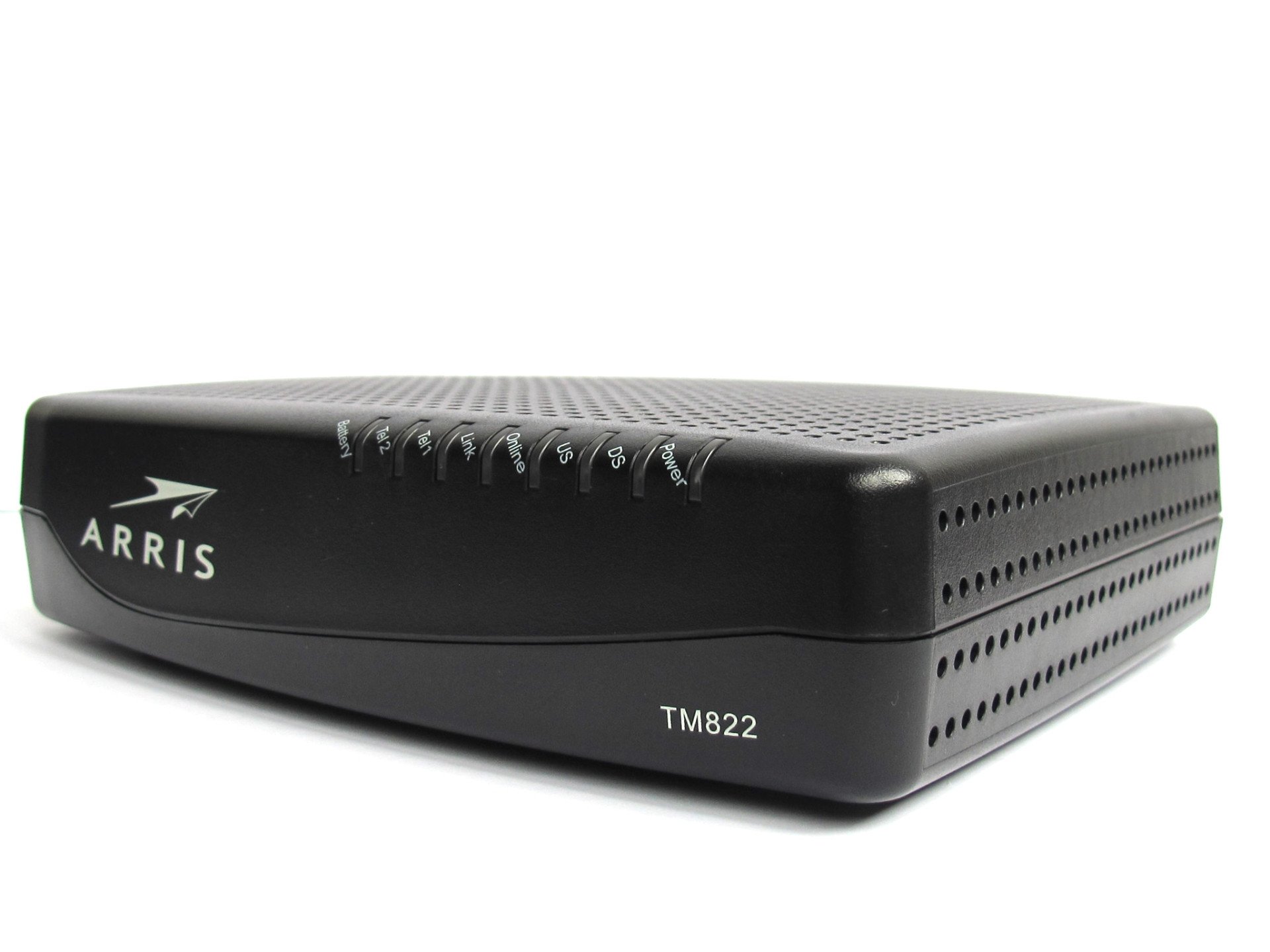
ചിത്രം 1: മുൻഭാഗം view of the ARRIS Touchstone TM822G modem, showing its compact design and status indicator lights.
Video 1: This video demonstrates the physical connections for an ARRIS modem, including coaxial, Ethernet, and power. It provides a visual guide for proper setup.
2.3. Modem Activation
After connecting the modem, allow a few minutes for it to power on and establish a connection. The status lights will indicate its progress. Once the modem is powered on, you will need to activate it with your Internet Service Provider (ISP).
- അനുയോജ്യത പരിശോധിക്കുക: വാങ്ങുന്നതിന് മുമ്പ്asing, always verify with your cable company for modem compatibility. Some regions or providers (e.g., Optimum or Spectrum) may not activate this specific model.
- ISP-യെ ബന്ധപ്പെടുക: Call your ISP's activation line. You will likely need to provide the MAC ID (Media Access Control Identifier) and Serial Number, which are usually found on a sticker on the modem.
- Self-Activation: Some ISPs offer an online self-activation portal. Connect a computer directly to the modem via Ethernet and open a web browser. You may be redirected to the activation page.
3. പ്രവർത്തിക്കുന്നു
3.1. Status Indicator Lights
The LED lights on the front panel of your TM822G modem provide information about its operational status:
- ശക്തി: പവർ സ്റ്റാറ്റസ് സൂചിപ്പിക്കുന്നു.
- DS (Downstream): Indicates downstream channel connectivity. A solid light means a stable connection.
- US (Upstream): Indicates upstream channel connectivity. A solid light means a stable connection.
- ഓൺലൈൻ: Indicates successful registration and internet connectivity.
- ലിങ്ക്: Indicates an active Ethernet connection to a device.
- Tel1/Tel2: Indicate the status of the telephone lines.
- ബാറ്ററി: Indicates the status of the optional battery backup.
3.2. ഇൻ്റർനെറ്റ് ആക്സസ്
Once the 'Online' light is solid, your modem is connected to the internet. You can now connect your devices (computers, smartphones, tablets) to your wireless router (if used) or directly to the modem via Ethernet to access the internet.
3.3. VoIP Service
If you have subscribed to VoIP service, ensure the 'Tel1' and/or 'Tel2' lights are solid. This indicates that your telephone lines are active. You can then make and receive calls using your connected telephone.
4. പരിപാലനം
To ensure optimal performance and longevity of your ARRIS TM822G modem, consider the following maintenance tips:
- പ്ലേസ്മെൻ്റ്: Place the modem in a well-ventilated area, away from direct sunlight, heat sources, and moisture. Avoid placing it in enclosed spaces.
- കേബിൾ പരിശോധന: Periodically check all cable connections (coaxial, Ethernet, power, telephone) to ensure they are secure and undamaged. Loose connections can lead to intermittent service.
- വൃത്തിയാക്കൽ: Gently clean the exterior of the modem with a soft, dry cloth. Do not use liquid cleaners or abrasive materials. Ensure ventilation holes are free from dust and obstructions.
- റീബൂട്ട് ചെയ്യുന്നു: If you experience connectivity issues, a simple power cycle (reboot) can often resolve them. Unplug the power adapter from the modem, wait 30 seconds, then plug it back in. Allow a few minutes for the modem to re-establish its connection.
- ഫേംവെയർ അപ്ഡേറ്റുകൾ: Firmware updates are typically managed automatically by your Internet Service Provider. Do not attempt to manually update the firmware unless instructed by your ISP.
5. പ്രശ്നപരിഹാരം
If you encounter issues with your ARRIS TM822G modem, refer to the following troubleshooting steps:
5.1. ഇൻ്റർനെറ്റ് കണക്ഷൻ ഇല്ല
- സ്റ്റാറ്റസ് ലൈറ്റുകൾ പരിശോധിക്കുക: Verify that the 'Power', 'DS', 'US', and 'Online' lights are solid. If any are blinking or off, check the corresponding connections.
- മോഡം റീബൂട്ട് ചെയ്യുക: Perform a power cycle as described in the Maintenance section.
- കേബിളുകൾ പരിശോധിക്കുക: Ensure all cables are securely connected. Try disconnecting and reconnecting them.
- ISP Outage: Check with your ISP for any known service outagനിങ്ങളുടെ പ്രദേശത്താണ്.
- ISP-യെ ബന്ധപ്പെടുക: If the issue persists, contact your ISP's technical support for assistance. They can check your modem's signal levels and activation status remotely.
5.2. Slow Internet Speeds
- Verify Plan: Confirm that your internet plan supports the speeds you expect.
- Test Directly: Connect a computer directly to the modem via Ethernet and run a speed test. This helps determine if the issue is with the modem or your router/Wi-Fi.
- Check Signal Levels: Your ISP can check the modem's signal levels. Poor signal quality can lead to reduced speeds.
- Router Performance: If using a separate router, ensure it is capable of handling your internet speeds and is properly configured.
5.3. VoIP Service Issues
- Check Tel Lights: Ensure the 'Tel1' and/or 'Tel2' lights are solid.
- ഫോൺ കണക്ഷൻ: Verify that your telephone is correctly plugged into the modem's telephone port.
- പവർ ഓtage: ഒരു ശക്തി ഉണ്ടെങ്കിൽ നീtage, ensure your battery backup is installed and charged.
- ISP-യെ ബന്ധപ്പെടുക: For persistent telephone issues, contact your ISP.
6 സ്പെസിഫിക്കേഷനുകൾ
| ഫീച്ചർ | വിശദാംശങ്ങൾ |
|---|---|
| ബ്രാൻഡ് | ARRIS |
| മോഡൽ നമ്പർ | TM822G (FBA_822G) |
| ഡോക്സിസ് പതിപ്പ് | 3.0 |
| ചാനൽ ബോണ്ടിംഗ് | 8x4 Downstream/Upstream |
| VoIP Lines | Up to two carrier-grade lines |
| കണക്റ്റിവിറ്റി ടെക്നോളജി | ഡോക്സിസ് |
| അനുയോജ്യമായ ഉപകരണങ്ങൾ | Laptop, Personal Computer, Router, Smartphone, Tablet |
| അളവുകൾ (LxWxH) | 4 x 9 x 9 ഇഞ്ച് |
| ഇനത്തിൻ്റെ ഭാരം | 2 പൗണ്ട് |
| നിറം | കറുപ്പ് |
| ബാറ്ററികൾ ആവശ്യമാണ് | 1 Lithium Polymer (for battery backup) |
7. വാറൻ്റിയും പിന്തുണയും
7.1. നിയമപരമായ നിരാകരണം
പ്രധാനപ്പെട്ടത്:
Please contact us before you place an order and ask for the MAC ID. We'll reserve a specific modem for you and provide you with the ID so that you may check with your ISP whether they would activate it. This way, we both can avoid hectic problems and resulting returns after purchase. Once you confirm the MAC with your ISP and place an order, returns with the reason "ISP didn't activate" will NOT be accepted.
7.2. നിർമ്മാതാവിൻ്റെ വാറൻ്റി
While it is legal for third parties to sell ARRIS modems, a marketplace seller on Amazon may not be an authorized retailer. Therefore, there might be no manufacturer warranty for the ARRIS modem when purchased from certain sellers. Please check the seller's warranty policy.
7.3. സാങ്കേതിക പിന്തുണ
For any technical issues or questions not covered in this manual, please contact your Internet Service Provider (ISP) or refer to the official ARRIS support webകൂടുതൽ സഹായത്തിനുള്ള സൈറ്റ്.


