ആമുഖം
This manual provides comprehensive instructions for the setup, operation, and maintenance of your Perixx PERIBOARD-409U Wired USB Mini Keyboard. Please read this manual thoroughly before using the product to ensure proper functionality and longevity.
പാക്കേജ് ഉള്ളടക്കം
- 1x Perixx PERIBOARD-409U Wired USB Mini Keyboard
- ഉപയോക്തൃ മാനുവൽ (ഈ പ്രമാണം)

Image: The Perixx PERIBOARD-409U keyboard shown with its retail packaging and included user manual.
സജ്ജീകരണ നിർദ്ദേശങ്ങൾ
- കീബോർഡ് ബന്ധിപ്പിക്കുക: Locate an available USB port on your computer. Insert the USB connector of the PERIBOARD-409U into the USB port.
- ഓട്ടോമാറ്റിക് ഡ്രൈവർ ഇൻസ്റ്റാളേഷൻ: The keyboard is a plug-and-play device. Your operating system (Windows 7, 8, or 10) will automatically detect and install the necessary drivers. No additional software installation is required.
- സ്ഥിരീകരണം: Once connected, the keyboard should be ready for immediate use. Test by typing in a text editor or browser.

Image: The Perixx PERIBOARD-409U keyboard featuring its integrated USB cable, ready for connection to a computer. The cable length is 5.9 ft (1.8 meters).
പ്രവർത്തന നിർദ്ദേശങ്ങൾ
The PERIBOARD-409U is a standard QWERTY layout keyboard designed for general office and computing tasks.
പ്രധാന സവിശേഷതകൾ:
- കോംപാക്റ്റ് ഡിസൈൻ: The keyboard measures approximately 12.40" x 5.79" x 0.79" (31.4 x 14.6 x 2 cm), making it suitable for limited desk space.
- വയർഡ് യുഎസ്ബി കണക്ഷൻ: Provides a stable and reliable connection with a 5.9 ft (1.8m) cable.
- Standard QWERTY Layout: Familiar key arrangement for ease of use.
- ഇൻഡിക്കേറ്റർ ലൈറ്റുകൾ: Features LED indicators for Num Lock, Caps Lock, and Scroll Lock.
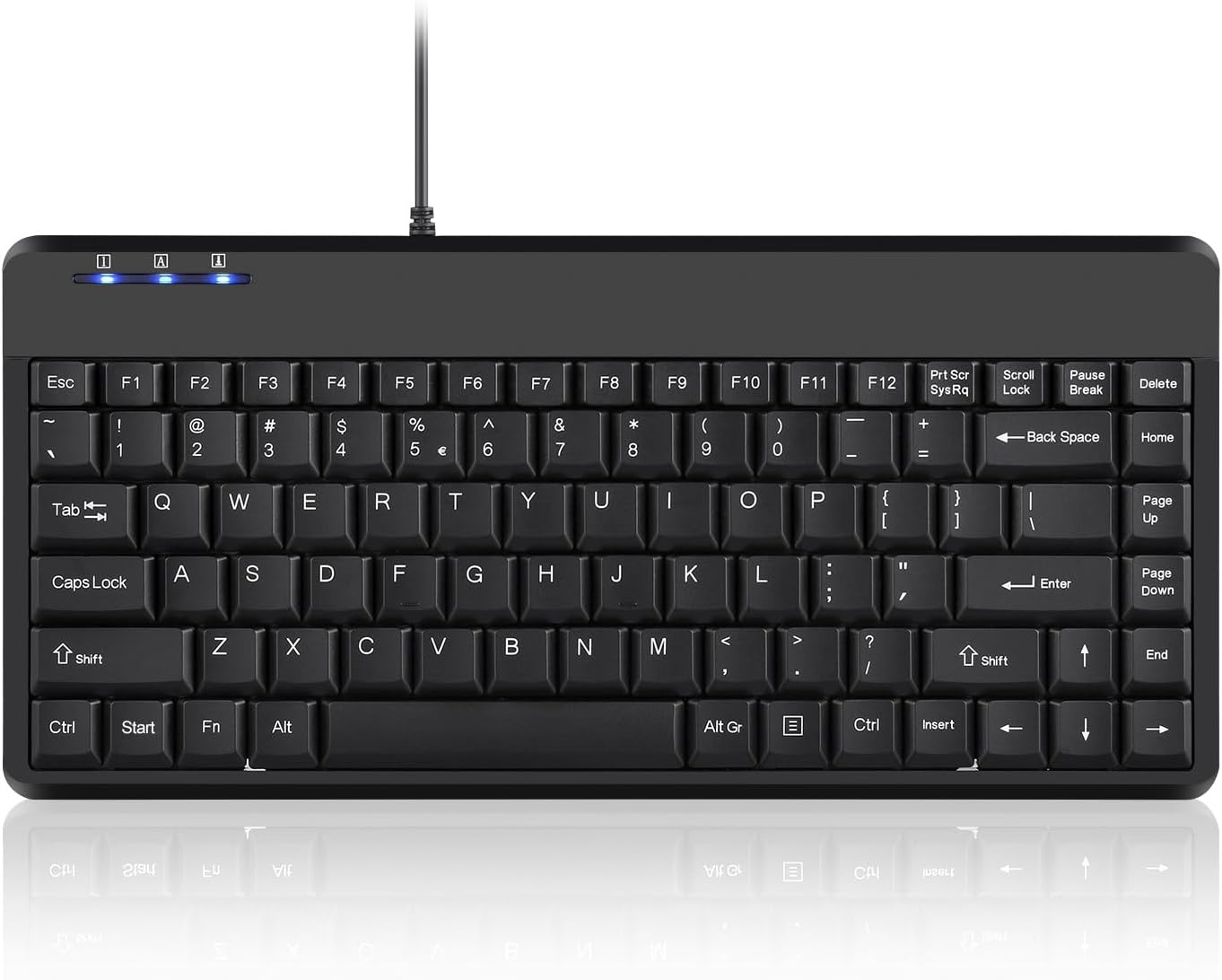
Image: A full top-down view of the Perixx PERIBOARD-409U keyboard, showcasing its compact QWERTY layout and indicator lights.

Image: A hand demonstrating typing on the Perixx PERIBOARD-409U keyboard, highlighting its suitability for accurate typing.

Image: The Perixx PERIBOARD-409U keyboard with overlaid dimensions, illustrating its compact size of 315mm width and 147mm depth, and a slim profile 21 മി.മീ.

ചിത്രം: ഒരു വശം view of the Perixx PERIBOARD-409U keyboard on a desk, emphasizing its slim and minimal design alongside a computer mouse.
ട്രബിൾഷൂട്ടിംഗ്
Issue: Double Lettering or Repeated Characters
If you experience issues with keys producing double letters or repeated characters, this can often be resolved by adjusting your computer's keyboard settings.
- Adjust Filter Keys (Windows):
- Open the "Control Panel".
- Click on "Ease of Access Center".
- Select "Make Keyboard Easier to Use".
- Check the box for "Turn on Filter Keys" under "Make it easier to type".
- Click "Apply" to save these settings.
- Adjust Keyboard Repeat Rate (Windows):
- Go to "Keyboard Properties" in the "Control Panel".
- Adjust the "Repeat rate" slider to a faster setting.
- Click "Apply" and then "OK".
Test the keyboard after making these adjustments. If the issue persists, please refer to the support section for further assistance.
സ്പെസിഫിക്കേഷനുകൾ
| ബ്രാൻഡ് | പെരിക്സക്സ് |
| മോഡൽ നമ്പർ | PERIBOARD-409U (Item model number: 10960) |
| കണക്റ്റിവിറ്റി ടെക്നോളജി | യുഎസ്ബി-എ (വയർഡ്) |
| കേബിൾ നീളം | 5.9 അടി (1.8 മീറ്റർ) |
| കീബോർഡ് വിവരണം | QWERTY |
| അനുയോജ്യമായ ഉപകരണങ്ങൾ | ലാപ്ടോപ്പ്, പി.സി |
| ഓപ്പറേറ്റിംഗ് സിസ്റ്റം അനുയോജ്യത | വിൻഡോസ് 7, 8, 10 |
| അളവുകൾ (LxWxH) | 12.40" x 5.79" x 0.79" (31.4 x 14.6 x 2 സെ.മീ) |
| ഇനത്തിൻ്റെ ഭാരം | 14.1 ഔൺസ് (ഏകദേശം 400 ഗ്രാം) |
| നിറം | കറുപ്പ് |
| മെറ്റീരിയൽ | പ്ലാസ്റ്റിക് |
മെയിൻ്റനൻസ്
To ensure the longevity and optimal performance of your Perixx PERIBOARD-409U keyboard, follow these maintenance guidelines:
- വൃത്തിയാക്കൽ: Use a soft, dry cloth to wipe the surface of the keyboard. For deeper cleaning, a slightly damp cloth with mild soap can be used, ensuring no liquid enters the key switches. Avoid abrasive cleaners or solvents.
- പൊടി നീക്കം: താക്കോലുകൾക്കിടയിൽ നിന്ന് പൊടിയും അവശിഷ്ടങ്ങളും നീക്കം ചെയ്യാൻ കംപ്രസ് ചെയ്ത വായു ഉപയോഗിക്കുക.
- ചോർച്ച ഒഴിവാക്കുക: ആന്തരിക ഘടകങ്ങൾക്ക് കേടുപാടുകൾ സംഭവിക്കാതിരിക്കാൻ കീബോർഡിൽ നിന്ന് ദ്രാവകങ്ങൾ അകറ്റി നിർത്തുക.
- സംഭരണം: When not in use, store the keyboard in a clean, dry environment away from extreme temperatures.
വാറൻ്റിയും പിന്തുണയും
The Perixx PERIBOARD-409U includes a 12 മാസ പരിമിത വാറൻ്റി from the date of purchase. This warranty covers manufacturing defects under normal use. It does not cover damage caused by misuse, accidents, unauthorized modifications, or external factors.
For technical support, warranty claims, or further assistance, please contact Perixx customer service through their official webഉൽപ്പന്നം വാങ്ങിയ സൈറ്റ് അല്ലെങ്കിൽ റീട്ടെയിലർ.


