ആമുഖം
വാങ്ങിയതിന് നന്ദി.asing the Karlsson Mini Flip Clock. This automatic flip clock combines classic design with modern functionality, providing an easy-to-read display of time, day, date, and year. This manual provides essential information for setting up, operating, and maintaining your clock to ensure optimal performance and longevity.
ഉൽപ്പന്നം കഴിഞ്ഞുview
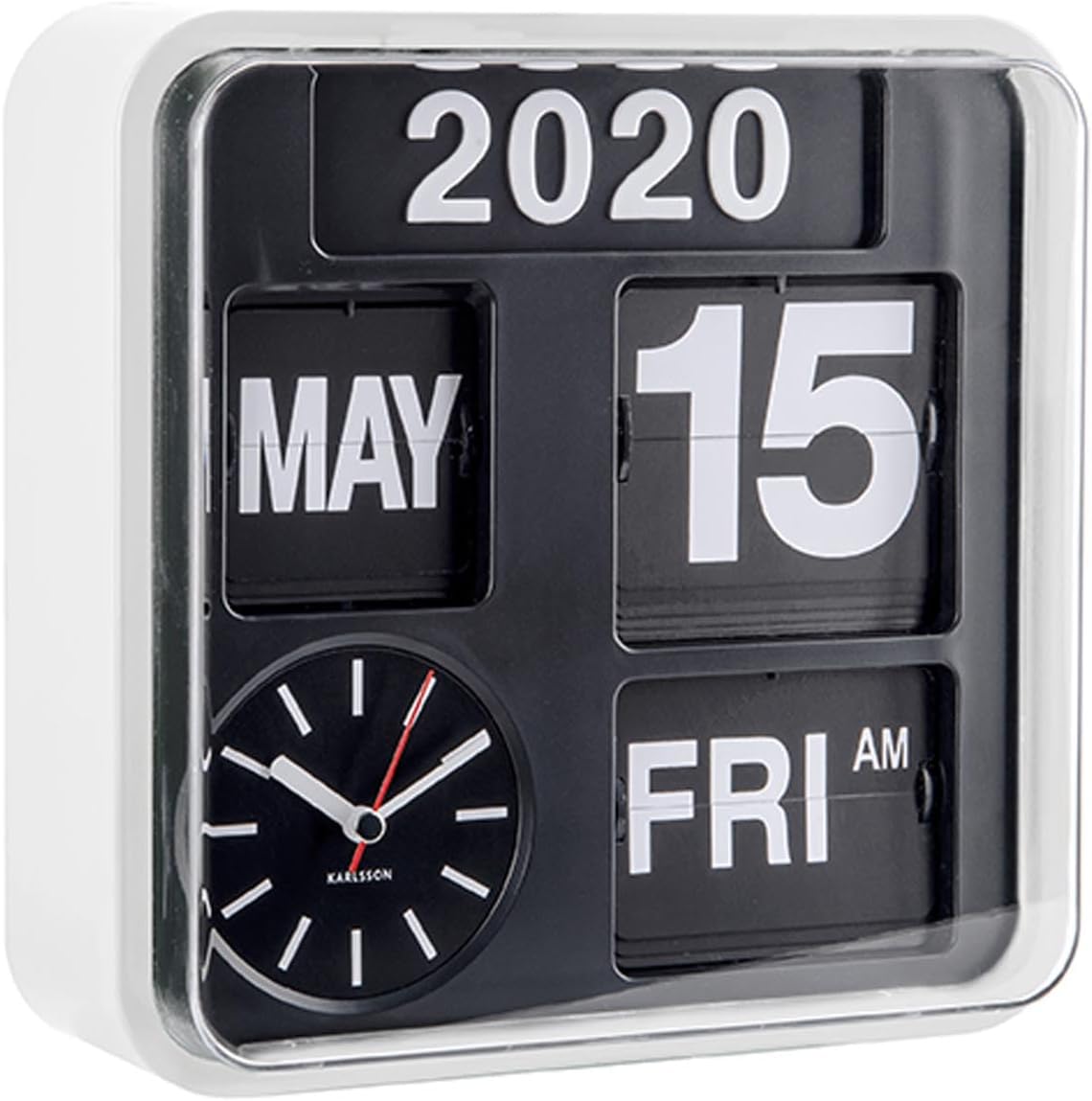
ചിത്രം 1: മുൻഭാഗം view of the Karlsson Mini Flip Clock, showing the time, day, date, and year display panels, along with the analog clock face.
The Karlsson Mini Flip Clock features a unique automatic flip mechanism for displaying the calendar information. It includes a traditional analog clock for timekeeping and separate panels for the year, month, date, and day of the week. The clock is designed for both wall mounting and table placement.
- Automatic Flip Mechanism: Displays day, date, and year.
- Analog Time Display: Features a red second hand for precise timekeeping.
- ഈടുനിൽക്കുന്ന സിasing: Constructed with a white plastic casing.
- ബഹുമുഖ പ്ലെയ്സ്മെന്റ്: Suitable for wall mounting or as a tabletop clock.
പാക്കേജ് ഉള്ളടക്കം
സജ്ജീകരണവുമായി മുന്നോട്ടുപോകുന്നതിനുമുമ്പ് എല്ലാ ഇനങ്ങളും ഉണ്ടെന്ന് ഉറപ്പാക്കുക:
- Karlsson Mini Flip Clock (Model: KA5364WH)
- Set of numbers for manual year adjustment
- ഉപയോക്തൃ മാനുവൽ (ഈ പ്രമാണം)
Note: 5 AA batteries are required for operation and are not included in the package.
സജ്ജമാക്കുക
1. ബാറ്ററി ഇൻസ്റ്റാളേഷൻ
- ക്ലോക്കിന്റെ പിൻഭാഗത്ത് ബാറ്ററി കമ്പാർട്ട്മെന്റ് കണ്ടെത്തുക.
- ബാറ്ററി കമ്പാർട്ട്മെൻ്റ് കവർ തുറക്കുക.
- കമ്പാർട്ടുമെന്റിനുള്ളിൽ സൂചിപ്പിച്ചിരിക്കുന്നതുപോലെ ശരിയായ പോളാരിറ്റി (+/-) ഉറപ്പാക്കിക്കൊണ്ട് 5 പുതിയ AA ബാറ്ററികൾ ഇടുക.
- ബാറ്ററി കമ്പാർട്ട്മെൻ്റ് കവർ സുരക്ഷിതമായി അടയ്ക്കുക.
2. പ്രാരംഭ സമയവും തീയതിയും ക്രമീകരണം
After battery installation, the clock will begin to operate. You will need to set the correct time and calendar details manually.
- സമയം ക്രമീകരിക്കുക:
Locate the time adjustment knob on the side or back of the clock. Rotate the knob to set the correct hour and minute. The analog clock will advance, and the flip mechanism for AM/PM will change accordingly.
- Setting the Date and Day:
The date and day flip automatically. To set them initially, you may need to manually advance the time until the correct date and day are displayed. There is typically a separate mechanism or button to advance the day/date if needed, or it will synchronize as the time is set. Refer to the specific markings on your clock for precise controls.
- വർഷം ക്രമീകരണം:
The year display is manual. Use the provided year numbers to set the current year. These numbers are typically inserted into slots on the year panel. This adjustment is usually only required once a year.
3 മൗണ്ടിംഗ് ഓപ്ഷനുകൾ

Figure 2: The Karlsson Mini Flip Clock displayed as a wall-mounted unit.
- വാൾ മൗണ്ട്: Use a suitable screw or hook (not included) in your desired wall location. Align the mounting slot on the back of the clock with the screw/hook and secure it firmly. Ensure the wall can support the clock's weight.
- ടേബിൾടോപ്പ്: Place the clock on any flat, stable surface.
പ്രവർത്തന നിർദ്ദേശങ്ങൾ
സമയപരിപാലനം
The analog clock continuously displays the current time. The red second hand provides a visual indication of continuous movement.
കലണ്ടർ പ്രവർത്തനം
The calendar panels automatically flip to display the correct day, date, and month. The AM/PM indicator also updates automatically with the time.
- Daily Flip: The day and date will flip over at midnight (12:00 AM).
- Monthly Flip: The month will flip over on the 1st of each new month.
- വർഷ ക്രമീകരണം: The year must be changed manually at the beginning of each new year using the provided year numbers.
മെയിൻ്റനൻസ്
- വൃത്തിയാക്കൽ: ക്ലോക്കിന്റെ സി തുടയ്ക്കുകasing and display panels with a soft, dry cloth. Do not use abrasive cleaners or solvents, as they may damage the finish.
- ബാറ്ററി മാറ്റിസ്ഥാപിക്കൽ: Replace all 5 AA batteries when the clock's movement becomes sluggish or stops. It is recommended to replace all batteries at the same time with new, high-quality alkaline batteries.
- പരിസ്ഥിതി: Avoid exposing the clock to extreme temperatures, direct sunlight for prolonged periods, or high humidity, as these conditions can affect its performance and lifespan.
ട്രബിൾഷൂട്ടിംഗ്
| പ്രശ്നം | സാധ്യമായ കാരണം | പരിഹാരം |
|---|---|---|
| Clock is not running or running slowly. | Low or dead batteries. Incorrect battery installation. | Replace all 5 AA batteries with new ones. Ensure batteries are inserted with correct polarity. |
| Date/Day display is incorrect. | Not set correctly during initial setup. | Manually advance the time until the correct date and day are displayed. Ensure the time is set accurately to allow for proper automatic flipping. |
| Year display is incorrect. | Year not manually updated. | Manually change the year numbers on the display panel to the current year. |
| Flip mechanism is stuck or not flipping smoothly. | Dust accumulation. Low battery power. | Gently clean the flip mechanism area with a soft brush or compressed air. Replace batteries if they are low. |
സ്പെസിഫിക്കേഷനുകൾ
| ഫീച്ചർ | വിശദാംശങ്ങൾ |
|---|---|
| ബ്രാൻഡ് | കാൾസൺ |
| മോഡൽ നമ്പർ | KA5364WH |
| നിറം | വെള്ള |
| ഡിസ്പ്ലേ തരം | Digital (Flip) and Analog |
| പ്രത്യേക ഫീച്ചർ | Calendar Display (Day, Date, Month, Year, AM/PM) |
| അളവുകൾ (W x H x D) | 24.5 x 24.5 x 10 cm (9.65"W x 9.65"H) |
| പവർ ഉറവിടം | ബാറ്ററി പവർ (5 x AA ബാറ്ററികൾ ആവശ്യമാണ്) |
| മെറ്റീരിയൽ | പ്ലാസ്റ്റിക് |
| മൗണ്ടിംഗ് തരം | Wall Mount / Tabletop |
| ഇനത്തിൻ്റെ ഭാരം | 1.18 കി.ഗ്രാം (2.6 പൗണ്ട്) |
| ചലനം കാണുക | ഓട്ടോമാറ്റിക് |
വാറൻ്റിയും പിന്തുണയും
Karlsson products are designed for quality and durability. For warranty information and support, please refer to the documentation provided with your purchase or visit the official Karlsson webസൈറ്റ്. ഏതെങ്കിലും വാറന്റി ക്ലെയിമുകൾക്ക് നിങ്ങളുടെ വാങ്ങലിന്റെ തെളിവ് സൂക്ഷിക്കുക.
For further assistance, you may contact Karlsson customer support through their official channels. Please have your model number (KA5364WH) ready when contacting support.
കുറിപ്പ്: വാറന്റി നിബന്ധനകളും വ്യവസ്ഥകളും പ്രദേശത്തിനും റീട്ടെയിലറിനും അനുസരിച്ച് വ്യത്യാസപ്പെടാം.


