ആമുഖം
The Electro-Harmonix Superego Synth Engine is a unique polyphonic granular synthesizer pedal designed for guitarists. It reinvents sample and hold, enabling fluid glissandos and the creation of oscillator-like synthesizer effects. This pedal allows you to sustain notes and chords indefinitely, tweak attack and decay characteristics, and integrate external effects into its dedicated effects loop for innovative sound design.
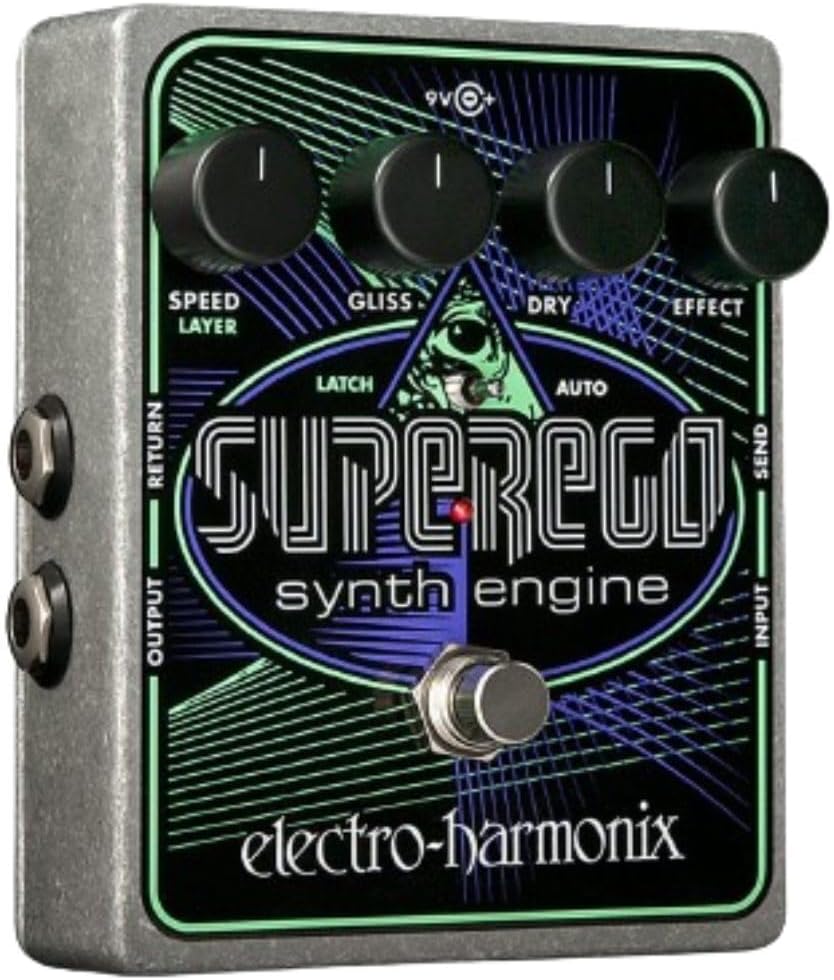
Figure 1: Electro Harmonix Superego Synth Engine Pedal
സജ്ജമാക്കുക
To begin using your Superego Synth Engine, follow these steps:
- പവർ കണക്ഷൻ: Connect the included 9.6VDC/200mA power adapter to the 9V power jack on the Superego. Ensure you use the correct power supply to prevent damage.
- ഇൻപുട്ട് കണക്ഷൻ: Connect your instrument (e.g., guitar) to the "INPUT" jack on the right side of the pedal using a standard 1/4-inch instrument cable.
- ഔട്ട്പുട്ട് കണക്ഷൻ: Connect the "OUTPUT" jack on the left side of the pedal to your amplifier or the next pedal in your signal chain using another 1/4-inch instrument cable.
- ഇഫക്റ്റ്സ് ലൂപ്പ് (ഓപ്ഷണൽ): The Superego features an effects loop. To utilize it, connect the "SEND" jack to the input of your desired effects pedal(s) and the output of that pedal(s) to the "RETURN" jack. This allows effects to be applied only to the wet (synthesized) signal.
Once connected, you can power on your amplifier and the Superego pedal to begin exploring its capabilities.
Operating the Superego Synth Engine
The Superego offers various modes and controls to shape your sound. Familiarize yourself with the main controls:
- സ്പീഡ്/ലെയർ നോബ്: Controls the attack and decay speed of the synthesized sound. In Latch mode, it also controls the layering effect.
- GLISS നോബ്: Adjusts the glissando (pitch slide) speed between sustained notes.
- ഡ്രൈ നോബ്: Controls the volume of your original, unprocessed instrument signal.
- എഫക്റ്റ് നോബ്: Controls the volume of the synthesized (wet) signal.
- Mode Switch (LATCH/MOMENT/AUTO): Selects the operational mode of the footswitch.
- കാൽ സ്വിച്ച്: Engages/disengages the effect and triggers various functions depending on the selected mode.
പ്രവർത്തന മോഡുകൾ
The Superego features three primary operational modes, selected via the toggle switch:
Momentary Mode (Middle Position)
In Momentary mode, the effect is active only while the footswitch is held down. Releasing the footswitch stops the effect. This mode is ideal for short bursts of sustain or quick synth accents.
Latch Mode (Left Position)
In Latch mode, pressing and releasing the footswitch sustains the current note or chord indefinitely. Pressing and releasing again stops the sustain. The "LAYER" function (controlled by the SPEED/LAYER knob) allows you to stack multiple sustained notes or chords on top of each other.
Auto Mode (Right Position)
Auto mode automatically captures and sustains notes or chords as you play, without needing to press the footswitch. The sensitivity of this capture can be adjusted. This mode is excellent for creating continuous synth pads or drones that follow your playing.
Demonstrations and Advanced Applications
The following video provides a comprehensive overview of the Superego's features and demonstrates various sound possibilities. Please note that external effects pedals are used in some demonstrations to showcase the versatility of the Superego's effects loop.
Video 1: Electro Harmonix Superego Synth Engine Overview
This video demonstrates the core functionalities of the Superego Synth Engine, including its granular synthesis capabilities, glissando control, and effects loop integration. It showcases various soundscapes achievable with the pedal, from angelic pads to pizzicato plucks and layered fuzz textures. The video also highlights how the auto-gliss and layering features can be used to create complex and evolving sounds.
Angelic Pads (Video Segment: 0:55 - 1:02)
This segment demonstrates how to create lush, sustained "angelic pad" sounds using the Superego in conjunction with a Neo Clone chorus pedal and a Stereo Memory Man with Hazarai delay. The Superego's sustain capabilities are central to building these ambient textures.
Pizzicato Pluck (Video Segment: 1:51 - 1:57)
Learn how to achieve a distinct pizzicato effect by adjusting the Speed and Gliss controls. This segment shows the Superego combined with a Micro POG (Polyphonic Octave Generator) and a Cathedral Stereo Reverb for a unique plucked string sound.
Auto-Gliss (Video Segment: 2:13 - 2:19)
This section illustrates the automatic glissando feature, allowing smooth pitch transitions between notes and chords without manual intervention. This creates a flowing, synth-like quality to sustained sounds.
Pulsing Ego (Video Segment: 2:54 - 3:01)
Discover how to create a pulsing effect by inserting a Pulsar tremolo pedal into the Superego's effects loop. This demonstrates the power of the effects loop to modify only the wet signal, leaving the dry signal unaffected.
Reverse Room (Video Segment: 3:29 - 3:35)
This segment showcases a "reverse room" sound, achieved by specific settings on the Superego. This effect creates a unique, swelling ambiance that can add depth to your guitar tone.
Layers (Video Segment: 4:00 - 4:07)
The layering capability of the Superego is highlighted here, demonstrating how to stack multiple notes and chords to build complex, dense soundscapes. This feature allows for rich harmonic textures that would be difficult to achieve otherwise.
The Orchestron (Video Segment: 4:48 - 4:55)
This final segment demonstrates how to emulate the sound of a vintage Vako Orchestron keyboard using the Superego's effects loop with a Small Stone phaser, Neo Clone chorus, and POG2 (Polyphonic Octave Generator). This showcases the pedal's ability to create orchestral textures.
മെയിൻ്റനൻസ്
The Electro-Harmonix Superego Synth Engine is designed for durability. To ensure its longevity and optimal performance, follow these maintenance guidelines:
- വൃത്തിയാക്കൽ: Use a soft, dry cloth to clean the pedal's exterior. Avoid abrasive cleaners or solvents, which can damage the finish.
- സംഭരണം: Store the pedal in a cool, dry place away from direct sunlight and extreme temperatures. If transporting, use a padded case to protect it from physical shock.
- വൈദ്യുതി വിതരണം: Always use the specified 9.6VDC/200mA power adapter. Using an incorrect power supply can cause irreversible damage and void your warranty.
- കണക്ഷനുകൾ: Periodically check all cable connections for tightness and wear. Loose connections can lead to signal loss or intermittent operation.
ട്രബിൾഷൂട്ടിംഗ്
If you encounter issues with your Superego Synth Engine, refer to the following common problems and solutions:
| പ്രശ്നം | സാധ്യമായ കാരണം | പരിഹാരം |
|---|---|---|
| No sound when engaged. | Incorrect power supply, loose cables, DRY knob too high, EFFECT knob too low. | Verify power supply, check all cable connections, adjust DRY and EFFECT knobs. |
| Effect is weak or inconsistent. | Low input signal, incorrect mode setting, GLISS or SPEED/LAYER settings. | Ensure strong input signal, check mode switch (Momentary, Latch, Auto), experiment with GLISS and SPEED/LAYER settings. |
| അനാവശ്യമായ ശബ്ദം അല്ലെങ്കിൽ മൂളൽ. | ഗ്രൗണ്ട് ലൂപ്പ്, തകരാറുള്ള കേബിളുകൾ, മറ്റ് ഇലക്ട്രോണിക്സിൽ നിന്നുള്ള ഇടപെടൽ. | Use isolated power supply, try different cables, move pedal away from power sources. |
| Effects loop not working. | Incorrect connections in the loop, faulty external pedal. | Ensure SEND/RETURN are correctly connected, test external pedal independently. |
If problems persist after attempting these solutions, please contact Electro-Harmonix customer support for further assistance.
സ്പെസിഫിക്കേഷനുകൾ
- മോഡൽ: SEGO
- അളവുകൾ: 7.25 x 3.25 x 6.2 ഇഞ്ച്
- ഇനത്തിൻ്റെ ഭാരം: 1.54 പൗണ്ട് (0.7 കിലോഗ്രാം)
- ശക്തി: 9.6VDC/200mA power adapter (included)
- ബാറ്ററി: Does not take battery
- ഹാർഡ്വെയർ ഇന്റർഫേസ്: 1/4-ഇഞ്ച് ഓഡിയോ
- സിഗ്നൽ ഫോർമാറ്റ്: അനലോഗ്
- നിറം: കറുപ്പ്
വാറൻ്റിയും പിന്തുണയും
Electro-Harmonix products are known for their quality and reliability. The Superego Synth Engine comes with a standard manufacturer's warranty covering defects in materials and workmanship. For specific warranty terms and conditions, please refer to the documentation included with your purchase or visit the official Electro-Harmonix webസൈറ്റ്.
For technical support, troubleshooting assistance, or service inquiries, please contact Electro-Harmonix customer service. You can often find detailed FAQs and support resources on their official webസൈറ്റ്:
Visit Electro-Harmonix Official Webസൈറ്റ്
A PDF user guide is also available for download: Superego User Guide (PDF)


