1. ആമുഖം
This manual provides essential information for the safe and efficient operation of your Xantrex C12 Solar Charge Controller. The C12 is a sophisticated 12-amp controller designed for charge, lighting, or load management in solar power systems. It features three-stage charging, user-definable voltage parameters, and automatic equalization to optimize battery performance and longevity. Please read this manual thoroughly before installation and use.
2 സുരക്ഷാ വിവരങ്ങൾ
Always observe the following safety precautions to prevent personal injury and damage to the controller or other equipment.
- എല്ലാ വയറിംഗും ശരിയായ വലിപ്പത്തിലാണെന്നും ശരിയായി ഇൻസുലേറ്റ് ചെയ്തിട്ടുണ്ടെന്നും ഉറപ്പാക്കുക.
- Always disconnect power from the solar array and battery before installing or servicing the controller.
- Install the controller in a dry, well-ventilated area, away from flammable materials.
- Do not attempt to open or repair the controller. Refer all servicing to qualified personnel.
- Wear appropriate personal protective equipment, including eye protection, when working with batteries.
3. പാക്കേജ് ഉള്ളടക്കം
പാക്കേജിൽ എല്ലാ ഇനങ്ങളും ഉണ്ടെന്ന് ഉറപ്പാക്കുക:
- Xantrex C12 Solar Charge Controller (1 unit)
- നിർദ്ദേശ മാനുവൽ (ഈ പ്രമാണം)
4. സജ്ജീകരണവും ഇൻസ്റ്റാളേഷനും
The Xantrex C12 controller is designed for quick and easy setup. Follow these general steps for installation:
- മൗണ്ടിംഗ്: Choose a suitable location for mounting the controller. It should be close to the battery, in a cool, dry, and well-ventilated area, protected from direct sunlight and moisture.
- ബാറ്ററി കണക്ഷൻ: Connect the battery to the controller's battery terminals first. Ensure correct polarity (positive to positive, negative to negative). This step is crucial for the controller to sense battery voltage.
- സോളാർ പാനൽ കണക്ഷൻ: Connect the solar panel array to the controller's solar input terminals. Again, observe correct polarity.
- ലോഡ് കണക്ഷൻ (ഓപ്ഷണൽ): If using the controller for load management, connect your DC loads to the designated load terminals. Ensure the total current draw of the loads does not exceed the controller's rated ampഇറേജ്.
- സ്ഥിരീകരണം: Double-check all connections for tightness and correct polarity before applying power.
പ്രധാനപ്പെട്ടത്: Always connect the battery first and disconnect it last. Failure to do so may damage the controller.
5. പ്രവർത്തന നിർദ്ദേശങ്ങൾ
The Xantrex C12 controller automatically manages the charging process and load distribution.
- മൂന്ന്-എസ്tagഇ ചാർജിംഗ്: The controller employs a three-stage charging algorithm (bulk, absorption, float) to efficiently charge your battery and prolong its lifespan.
- User-Definable Voltagഇ പരാമീറ്ററുകൾ: The C12 allows for customization of voltage setpoints to match specific battery types and requirements. Refer to the display indicators section for details on HVD (High Voltage Disconnect) and UVD (Low Voltage Disconnect) settings.
- യാന്ത്രിക സമവാക്യം: The controller can perform automatic equalization cycles, which are crucial for maintaining the health of flooded lead-acid batteries. The "EQUALIZE ACTIVATED" indicator will illuminate during this process.
- ലോഡ് നിയന്ത്രണം: When configured for load control, the controller will disconnect the load if the battery voltagഇ താഴ്ന്ന വോള്യത്തിന് താഴെയായി കുറയുന്നുtage Disconnect (LVD) threshold to protect the battery from deep discharge.
6. ഡിസ്പ്ലേ സൂചകങ്ങൾ
The front panel of the Xantrex C12 features an intuitive LED display to indicate battery status and operational modes.
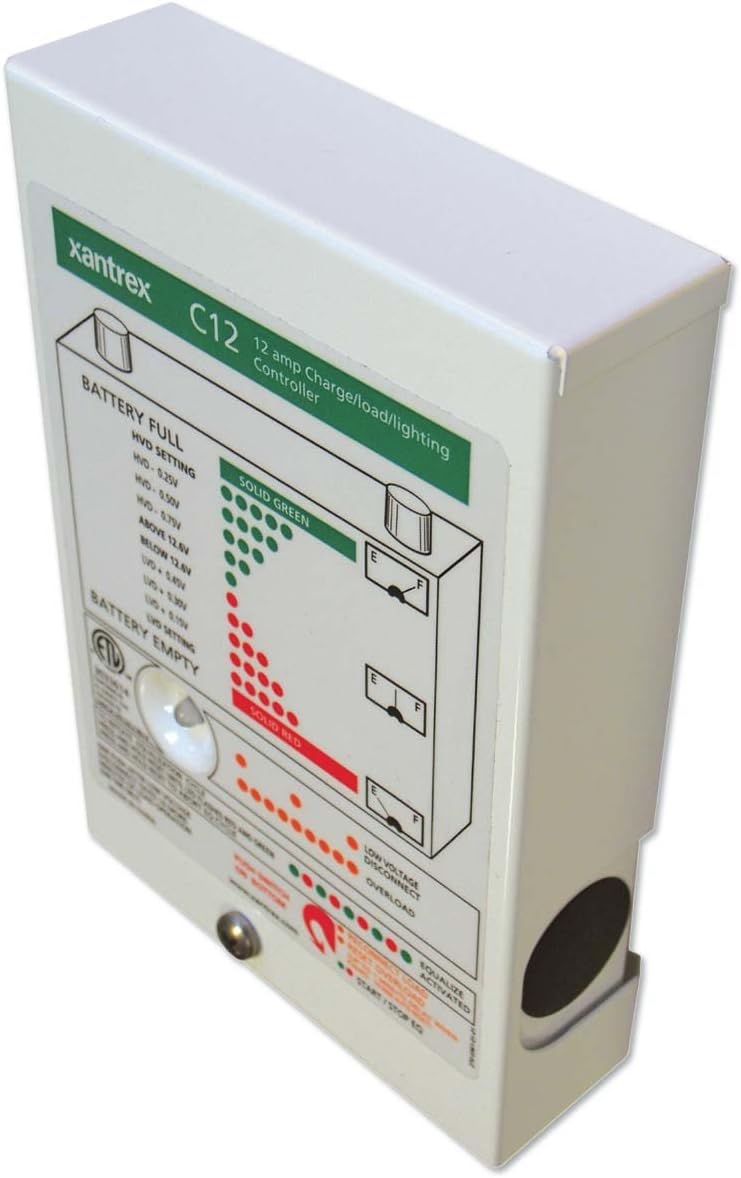
ചിത്രം 1: മുൻഭാഗം view of the Xantrex C12 Solar Charge Controller, showing the LED indicator panel.
The LED panel provides visual feedback on the system's status:
- BATTERY FULL (Solid Green LEDs): Indicates the battery is fully charged or near full. The specific voltage thresholds for High Voltage Disconnect (HVD) are displayed on the panel (e.g., HVD - 0.25V, HVD - 0.50V, HVD - 0.75V, ABOVE 12.8V).
- BATTERY EMPTY (Solid Red LEDs): Indicates the battery is discharged or near empty. The specific voltage thresholds for Low Voltage Disconnect (UVD) are displayed (e.g., BELOW 12.8V, UVD - 0.50V, UVD - 0.75V, UVD - 1.0V).
- കുറഞ്ഞ വോൾTAGE DISCONNECT (Orange/Red LEDs): ബാറ്ററി വോള്യം ആകുമ്പോൾ പ്രകാശിക്കുന്നുtage drops below a critical level, and the load has been disconnected to protect the battery.
- OVERLOAD (Orange/Red LEDs): Indicates that the connected load is drawing excessive current, potentially causing the controller to shut down the load output.
- EQUALIZE ACTIVATED (Green LED): Lights up when the automatic battery equalization cycle is active.
- START/STOP EQ (Button): A push-button located at the bottom of the panel to manually initiate or stop an equalization cycle.
7. പരിപാലനം
The Xantrex C12 Solar Charge Controller requires minimal maintenance.
- പതിവ് പരിശോധന: എല്ലാ വയറിംഗ് കണക്ഷനുകളുടെയും ഇറുകിയതയ്ക്കും നാശത്തിനും ഇടയ്ക്കിടെ പരിശോധിക്കുക.
- വൃത്തിയാക്കൽ: Keep the controller's exterior clean and free of dust. Use a dry cloth; do not use liquid cleaners.
- വെൻ്റിലേഷൻ: അമിതമായി ചൂടാകുന്നത് തടയാൻ വെന്റിലേഷൻ ദ്വാരങ്ങൾ തടസ്സപ്പെടുന്നില്ലെന്ന് ഉറപ്പാക്കുക.
8. പ്രശ്നപരിഹാരം
If you encounter issues with your Xantrex C12 controller, refer to the following common problems and solutions:
| പ്രശ്നം | സാധ്യമായ കാരണം | പരിഹാരം |
|---|---|---|
| No display/No power | Loose battery connection, reversed polarity, blown fuse (external) | Check battery connections and polarity. Inspect external fuses. |
| ബാറ്ററി ചാർജ് ചെയ്യുന്നില്ല | No solar input, reversed solar polarity, faulty solar panel, battery already full | Check solar panel connections and polarity. Verify solar panel output. Monitor battery status. |
| Load disconnected (Low Voltage Disconnect LED on) | ബാറ്ററി വോളിയംtagഇ വളരെ കുറവാണ് | Allow battery to charge. Reduce load. |
| Overload LED on | Excessive current draw from load | Reduce the connected load. Check for short circuits in the load wiring. |
If the problem persists after attempting these solutions, contact Xantrex customer support.
9 സ്പെസിഫിക്കേഷനുകൾ
| ഫീച്ചർ | വിശദാംശങ്ങൾ |
|---|---|
| ബ്രാൻഡ് | സാന്റ്രെക്സ് |
| മോഡൽ | C12 |
| Ampഉന്മേഷം | 12 Amps |
| വാല്യംtage | 12 വോൾട്ട് |
| ഡിസ്പ്ലേ തരം | LCD (LED indicators on front panel) |
| ഇനത്തിൻ്റെ ഭാരം | 1.35 പൗണ്ട് (0.61 കി.ഗ്രാം) |
| പാക്കേജ് അളവുകൾ | 6.7 x 4.8 x 1.8 ഇഞ്ച് (17 x 12.2 x 4.6 സെ.മീ) |
| മെറ്റീരിയൽ | മെറ്റൽ, പ്ലാസ്റ്റിക് |
| യു.പി.സി | 687873000520 |
10. വാറൻ്റിയും പിന്തുണയും
For detailed warranty information, please refer to the warranty card included with your product or visit the official Xantrex webസൈറ്റ്.
If you require technical assistance or have questions not covered in this manual, please contact Xantrex customer support through their official webസൈറ്റ് അല്ലെങ്കിൽ നിയുക്ത പിന്തുണാ ചാനലുകൾ.


