1. ആമുഖം
This manual provides essential information for the installation, operation, and maintenance of the Johnson Controls LP-NET152-010C LON Communication Card. This card is designed for use with FX15 and FX16 controllers and features an extended temperature range for robust performance in various environments.
Please read this manual thoroughly before attempting to install or operate the device to ensure proper function and safety.
2. ഉൽപ്പന്നം കഴിഞ്ഞുview
The LP-NET152-010C is a specialized LON communication card. It facilitates network communication for Johnson Controls FX15 and FX16 series controllers, enabling integration into larger building automation systems.
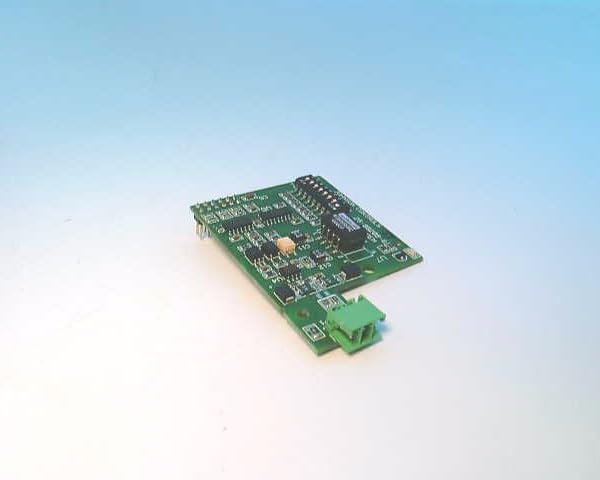
Figure 2.1: Johnson Controls LP-NET152-010C LON Communication Card. This image shows the green circuit board with various electronic components and a green terminal block connector on one end.
പ്രധാന സവിശേഷതകൾ:
- LON Communication Capability
- Extended Temperature Range Operation
- Designed for FX15 and FX16 Controllers
- Robust and Reliable Design
3 സുരക്ഷാ വിവരങ്ങൾ
Always observe the following safety precautions when handling, installing, or servicing the LP-NET152-010C card:
- പവർ വിച്ഛേദിക്കുക: Ensure all power to the FX15 or FX16 controller is disconnected before installing or removing the communication card.
- ESD മുൻകരുതലുകൾ: Use electrostatic discharge (ESD) protective measures (e.g., wrist strap, anti-static mat) when handling the card to prevent damage to sensitive electronic components.
- യോഗ്യതയുള്ള ഉദ്യോഗസ്ഥർ: Installation and servicing should only be performed by qualified and trained personnel.
- പരിസ്ഥിതി വ്യവസ്ഥകൾ: Operate the device within its specified extended temperature range and avoid exposure to excessive moisture or corrosive environments.
4. സജ്ജീകരണവും ഇൻസ്റ്റാളേഷനും
Follow these steps to properly install the LP-NET152-010C LON Communication Card into a compatible FX15 or FX16 controller:
- Prepare the Controller:
a. Power down the FX15 or FX16 controller completely and disconnect it from the power source.
b. Open the controller's enclosure to access the internal expansion slots.
- Handle the Card:
a. Wear an anti-static wrist strap and work on an anti-static surface.
b. Carefully remove the LP-NET152-010C card from its protective packaging, holding it by the edges.
- കാർഡ് ചേർക്കുക:
a. Locate the designated expansion slot within the FX15 or FX16 controller. Refer to the controller's specific manual for slot identification.
b. Align the card with the slot connector and gently but firmly press it into place until it is fully seated.
- സുരക്ഷിത കണക്ഷനുകൾ:
a. If applicable, secure the card with any retaining clips or screws provided by the controller's design.
b. Connect the LON network cables to the green terminal block on the LP-NET152-010C card. Ensure correct polarity and secure connections.
- അടച്ച് പവർ ഓൺ ചെയ്യുക:
a. Close the controller's enclosure.
b. Reconnect the power source to the FX15 or FX16 controller.
c. Verify that the controller powers on and recognizes the newly installed communication card.
5. പ്രവർത്തന നിർദ്ദേശങ്ങൾ
Once installed, the LP-NET152-010C card operates as an integral part of the FX15 or FX16 controller's communication system. Its primary function is to enable LON network connectivity.
നെറ്റ്വർക്ക് കോൺഫിഗറേഷൻ:
Configuration of the LON communication parameters (e.g., network address, domain, subnet) is typically performed through the FX15 or FX16 controller's programming interface or associated software. Refer to the specific controller's programming manual for detailed instructions on configuring LON network settings.
നില സൂചകങ്ങൾ:
The communication card may feature LED indicators to show its operational status. Consult the FX15/FX16 controller documentation for interpretation of these indicators, which typically include:
- പവർ/സ്റ്റാറ്റസ് LED: Indicates the card is powered and functioning correctly.
- പ്രവർത്തനം LED: Flashes to indicate data transmission or reception on the LON network.
6. പരിപാലനം
The LP-NET152-010C LON Communication Card is designed for long-term, reliable operation with minimal maintenance. However, periodic checks can help ensure optimal performance.
പൊതു പരിപാലനം:
- വിഷ്വൽ പരിശോധന: Periodically inspect the card and its connections for any signs of physical damage, loose wiring, or corrosion.
- പരിസ്ഥിതി പരിശോധന: പ്രവർത്തന അന്തരീക്ഷം നിർദ്ദിഷ്ട താപനിലയിലും ഈർപ്പത്തിലും പരിധിക്കുള്ളിൽ തുടരുന്നുവെന്ന് ഉറപ്പാക്കുക.
- വൃത്തിയാക്കൽ: If necessary, gently clean the card using a soft, dry, lint-free cloth. Do not use liquid cleaners or solvents. Ensure power is disconnected before cleaning.
No user-serviceable parts are contained within the communication card itself. Do not attempt to repair the card.
7. പ്രശ്നപരിഹാരം
This section provides basic troubleshooting steps for common issues related to the LP-NET152-010C LON Communication Card. For more complex issues, refer to the FX15/FX16 controller's troubleshooting guide or contact Johnson Controls technical support.
| പ്രശ്നം | സാധ്യമായ കാരണം | പരിഹാരം |
|---|---|---|
| Card not recognized by controller. |
|
|
| No LON network communication. |
|
|
| Status LED off. |
|
|
8 സ്പെസിഫിക്കേഷനുകൾ
| പരാമീറ്റർ | മൂല്യം |
|---|---|
| മോഡൽ നമ്പർ | LP-NET152-010C |
| അനുയോജ്യത | Johnson Controls FX15 and FX16 Controllers |
| ആശയവിനിമയ പ്രോട്ടോക്കോൾ | LON (Local Operating Network) |
| താപനില പരിധി | Extended (Specific range not provided, refer to controller manual for exact limits) |
| ഇനത്തിൻ്റെ ഭാരം | 14.4 ഔൺസ് (ഏകദേശം 408 ഗ്രാം) |
| നിർമ്മാതാവ് | ജോൺസൺ കൺട്രോൾസ് |
9. വാറൻ്റിയും സാങ്കേതിക പിന്തുണയും
For information regarding the warranty of the LP-NET152-010C LON Communication Card, please refer to the warranty documentation provided with your FX15 or FX16 controller, or contact Johnson Controls directly.
For technical assistance, installation queries, or troubleshooting beyond the scope of this manual, please contact Johnson Controls technical support or your authorized distributor.
Johnson Controls Contact Information:
Please visit the official Johnson Controls webഏറ്റവും പുതിയ കോൺടാക്റ്റ് വിശദാംശങ്ങൾക്കും പിന്തുണാ ഉറവിടങ്ങൾക്കുമുള്ള സൈറ്റ്.


