ആമുഖം
Welcome to the user manual for your Logitech C525 USB HD Webcam. നിങ്ങളുടെ ഉപകരണം സജ്ജീകരിക്കുന്നതിനും പ്രവർത്തിപ്പിക്കുന്നതിനും പരിപാലിക്കുന്നതിനും ആവശ്യമായ വിവരങ്ങൾ ഈ മാനുവൽ നൽകുന്നു. webcam, ensuring optimal performance for your video communication needs.

Figure 1: Logitech C525 USB HD Webcam. This image shows the compact design of the webcam with its lens and Logitech branding.
സജ്ജീകരണ ഗൈഡ്
നിങ്ങളുടെ Logitech C525 സജ്ജീകരിക്കാൻ ഈ ഘട്ടങ്ങൾ പാലിക്കുക Webക്യാം:
- ഉള്ളടക്കം അൺപാക്ക് ചെയ്യുക: Verify that your package includes the Camera Body, USB Cable, and this Manual. The webcam features a built-in USB cable for direct connection.
- കമ്പ്യൂട്ടറുമായി ബന്ധിപ്പിക്കുക: യുടെ USB കണക്റ്റർ പ്ലഗ് ചെയ്യുക webcam into an available USB port on your computer. The device is designed for plug-and-play functionality and should be recognized automatically by compatible operating systems.
- സ്ഥാനം Webക്യാം: The Logitech C525 features a versatile clip/stand that allows it to be securely mounted on top of a monitor, laptop screen, or placed on a flat surface. Adjust the angle for optimal viewing.
- Software Installation (if necessary): For full functionality and advanced settings, it is recommended to download and install the latest Logitech webcam software from the official Logitech support website. This is especially important for features like one-click upload to Facebook and YouTube.
- സിസ്റ്റം അനുയോജ്യത: Ensure your operating system is compatible. The webcam supports Windows 10 or later and Mac OSX 10.6+.
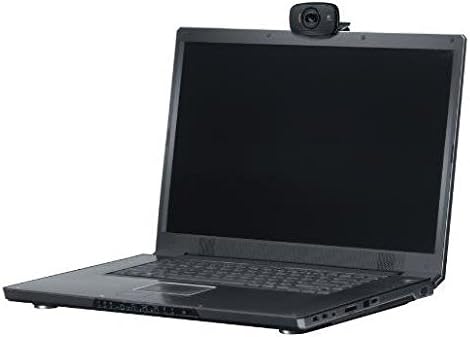
ചിത്രം 2: ലോജിടെക് C525 Webcam easily mounts on a laptop screen, demonstrating its compact and portable design.

Figure 3: This image highlights the operating system compatibility of the Logitech C525, supporting Windows 10 or later and Mac OSX 10.6+.
പ്രവർത്തന നിർദ്ദേശങ്ങൾ
ലോജിടെക് C525 Webcam is designed for intuitive use, providing high-definition video for various applications.
- വീഡിയോ കോളിംഗ്: ഉപയോഗിക്കുക webcam for HD 720p video calls on popular platforms. The autofocus feature ensures clear and sharp images even with movement.
- ഓട്ടോഫോക്കസ്: The integrated autofocus system automatically adjusts the lens to keep you in sharp focus, providing a clear image during video calls and recordings.
- HD Light Correction: ദി webcam features HD light correction, which automatically adjusts to dim lighting conditions, producing brighter and more contrasted images.
- ബിൽറ്റ്-ഇൻ മൈക്രോഫോൺ: ദി webcam includes a built-in microphone with noise-canceling capabilities, designed to reduce background noise for clearer audio during calls.
- 360-ഡിഗ്രി റൊട്ടേഷൻ: ദി webcam head can rotate 360 degrees horizontally, allowing you to easily adjust the camera angle without moving the entire device. It also offers vertical adjustment.
- Recording and Sharing: Capture video in MP4 format and audio in MP3 or WAV. The webcam supports one-click upload to platforms like Facebook and YouTube, simplifying content sharing.

Figure 4: Experience widescreen HD video calls with the Logitech C525, perfect for virtual meetings and connecting with friends and family.

ചിത്രം 5: ദി webcam's 360-degree rotation capability allows for flexible positioning and wider viewകോണുകൾ.

Figure 6: Fast autofocus ensures your image remains sharp and clear during dynamic video interactions.

Figure 7: HD Light Correction automatically adjusts to provide optimal lighting for your video, even in challenging environments.
പരിപാലനവും പരിചരണവും
To ensure the longevity and optimal performance of your Logitech C525 Webcam, ഈ ലളിതമായ പരിപാലന മാർഗ്ഗനിർദ്ദേശങ്ങൾ പാലിക്കുക:
- വൃത്തിയാക്കൽ: Gently wipe the lens with a soft, lint-free cloth. For the body of the webcam, use a slightly damp തുണി. കഠിനമായ രാസവസ്തുക്കളോ ഉരച്ചിലുകളോ ഉപയോഗിക്കുന്നത് ഒഴിവാക്കുക.
- സംഭരണം: ഉപയോഗത്തിലില്ലാത്തപ്പോൾ, പ്രത്യേകിച്ച് യാത്ര ചെയ്യുമ്പോൾ, മടക്കിക്കളയുക webcam into its compact form. This protects the lens and internal components. The webcam's design allows for easy portability.
- കേബിൾ മാനേജുമെന്റ്: Use the included cable wrap to keep the USB cable neatly organized and prevent tangling or damage.
- പരിസ്ഥിതി വ്യവസ്ഥകൾ: തുറന്നുകാട്ടുന്നത് ഒഴിവാക്കുക webcam to extreme temperatures, humidity, or direct sunlight for prolonged periods.

Figure 8: The Logitech C525 is portable and compact, making it easy to store and transport, protecting it from damage.
ട്രബിൾഷൂട്ടിംഗ്
നിങ്ങളുടെ Logitech C525-ൽ പ്രശ്നങ്ങൾ നേരിടുകയാണെങ്കിൽ Webcam, ഇനിപ്പറയുന്ന പരിഹാരങ്ങൾ പരീക്ഷിച്ചുനോക്കൂ:
- Webക്യാമറ കണ്ടെത്തിയില്ല:
- നിങ്ങളുടെ കമ്പ്യൂട്ടറിലെ പ്രവർത്തിക്കുന്ന ഒരു USB പോർട്ടിലേക്ക് USB കേബിൾ സുരക്ഷിതമായി പ്ലഗ് ചെയ്തിട്ടുണ്ടെന്ന് ഉറപ്പാക്കുക.
- മറ്റൊരു USB പോർട്ട് പരീക്ഷിക്കുക.
- നിങ്ങളുടെ കമ്പ്യൂട്ടർ പുനരാരംഭിക്കുക.
- നിങ്ങളുടെ കമ്പ്യൂട്ടറിന്റെ ഉപകരണ മാനേജർ (വിൻഡോസ്) അല്ലെങ്കിൽ സിസ്റ്റം വിവരങ്ങൾ (മാക്) പരിശോധിച്ച് webകാം ലിസ്റ്റ് ചെയ്തിട്ടുണ്ട്.
- മോശം വീഡിയോ നിലവാരം:
- Ensure the lens is clean and free of dust or smudges.
- Check your lighting conditions. The webcam has HD light correction, but sufficient ambient light is always beneficial.
- Verify that your internet connection is stable and fast enough for HD video streaming.
- നിങ്ങളുടെ അപ്ഡേറ്റ് webcam drivers and software from the official Logitech webസൈറ്റ്.
- ഓഡിയോ ഇല്ല അല്ലെങ്കിൽ മോശം ഓഡിയോ നിലവാരം:
- ഉറപ്പാക്കുക webcam's microphone is selected as the input device in your communication software settings (e.g., Zoom, Skype, Google Meet).
- Check microphone volume levels in your computer's sound settings.
- The built-in microphone is designed for noise cancellation, but excessive background noise may still affect clarity. Try to minimize ambient sounds.
- Compatibility Issues (e.g., Windows 11):
- While the product is generally compatible with Windows 10 and Mac OSX 10.6+, some users have reported compatibility challenges with newer operating systems like Windows 11, potentially related to driver allocation. Ensure you have the absolute latest drivers directly from Logitech's support page. If issues persist, consult Logitech support.
സ്പെസിഫിക്കേഷനുകൾ
| ഫീച്ചർ | വിശദാംശങ്ങൾ |
|---|---|
| ബ്രാൻഡ് | ലോജിടെക് |
| മോഡൽ നമ്പർ | C525 |
| വീഡിയോ ക്യാപ്ചർ റെസല്യൂഷൻ | 720p (എച്ച്ഡി) |
| ഫ്രെയിം റേറ്റ് | 30 fps (സെക്കൻഡിൽ ഫ്രെയിമുകൾ) |
| ഓട്ടോഫോക്കസ് | അതെ |
| പ്രത്യേക സവിശേഷതകൾ | Low Light Correction, 360-Degree Rotation |
| മൈക്രോഫോൺ | Built-in, Noise-Canceling |
| കണക്റ്റിവിറ്റി ടെക്നോളജി | USB |
| കേബിൾ നീളം | ഏകദേശം 5 അടി |
| അളവുകൾ (ഉൽപ്പന്നം) | 8.27 x 2.99 x 5.98 ഇഞ്ച് |
| ഇനത്തിൻ്റെ ഭാരം | 3.04 ഔൺസ് |
| അനുയോജ്യമായ ഓപ്പറേറ്റിംഗ് സിസ്റ്റങ്ങൾ | Windows 10 or later, Mac OSX 10.6+ |
| വീഡിയോ ക്യാപ്ചർ ഫോർമാറ്റ് | MP4 |
| പിന്തുണയ്ക്കുന്ന ഓഡിയോ ഫോർമാറ്റ് | MP3, WAV |

Figure 9: Packaging details confirming the Logitech C525's 720p HD resolution at 30 frames per second and autofocus capability.
വാറൻ്റി വിവരങ്ങൾ
Logitech products typically come with a limited hardware warranty. For specific details regarding the warranty period and terms for your Logitech C525 Webcam, please refer to the warranty card included in your product packaging or visit the official Logitech support webസൈറ്റ്. വാറന്റി ക്ലെയിമുകൾക്കായി നിങ്ങളുടെ വാങ്ങലിന്റെ തെളിവ് സൂക്ഷിക്കുക.
ഉപഭോക്തൃ പിന്തുണ
For further assistance, technical support, or to download the latest drivers and software for your Logitech C525 Webcam, please visit the official Logitech Support webസൈറ്റ്:
നിങ്ങൾക്ക് അവരുടെ സഹായകരമായ ഉറവിടങ്ങൾ, പതിവുചോദ്യങ്ങൾ, കമ്മ്യൂണിറ്റി ഫോറങ്ങൾ എന്നിവയും കണ്ടെത്താനാകും. webസൈറ്റ്.


