1. ആമുഖം
Thank you for choosing the Hama 95236 8-inch LCD Digital Photo Frame. This manual provides important information regarding the safe operation, setup, and maintenance of your device. Please read it thoroughly before using the product and keep it for future reference.
2. സുരക്ഷാ നിർദ്ദേശങ്ങൾ
- ഉപകരണം തുറക്കരുത്. തെറ്റായ അസംബ്ലി അല്ലെങ്കിൽ അറ്റകുറ്റപ്പണികൾ വൈദ്യുതാഘാതത്തിന് കാരണമായേക്കാം.
- ഉൽപ്പന്നത്തിന് കേടുപാടുകൾ സംഭവിച്ചാൽ അത് പ്രവർത്തിപ്പിക്കരുത്.
- അഴുക്ക്, ഈർപ്പം, അമിത ചൂടാക്കൽ എന്നിവയിൽ നിന്ന് ഉൽപ്പന്നത്തെ സംരക്ഷിക്കുക. വരണ്ട അന്തരീക്ഷത്തിൽ മാത്രം ഉപയോഗിക്കുക.
- ഉൽപ്പന്നം ഉപേക്ഷിക്കുകയോ ശക്തമായ വൈബ്രേഷനുകൾക്ക് വിധേയമാക്കുകയോ ചെയ്യരുത്.
- ഉൽപ്പന്നം അതിൻ്റെ ഉദ്ദേശ്യത്തിനായി മാത്രം ഉപയോഗിക്കുക.
- എല്ലാ ഇലക്ട്രിക്കൽ ഉൽപ്പന്നങ്ങളെയും പോലെ ഈ ഉൽപ്പന്നവും കുട്ടികൾക്ക് ലഭ്യമാകാതെ സൂക്ഷിക്കുക.
- പ്രാദേശികമായി ബാധകമായ ചട്ടങ്ങൾക്കനുസരിച്ച് പാക്കേജിംഗ് മെറ്റീരിയൽ ഉടനടി നീക്കം ചെയ്യുക.
3. പാക്കേജ് ഉള്ളടക്കം
പാക്കേജിൽ ഇനിപ്പറയുന്ന ഇനങ്ങൾ അടങ്ങിയിട്ടുണ്ടെന്ന് ദയവായി പരിശോധിക്കുക:
- Hama 95236 8-inch LCD Digital Photo Frame
- പവർ അഡാപ്റ്റർ
- ഉപയോക്തൃ മാനുവൽ (ഈ പ്രമാണം)
4. ഉൽപ്പന്നം കഴിഞ്ഞുview
നിങ്ങളുടെ ഡിജിറ്റൽ ഫോട്ടോ ഫ്രെയിമിന്റെ ഘടകങ്ങളും നിയന്ത്രണങ്ങളും പരിചയപ്പെടുക.
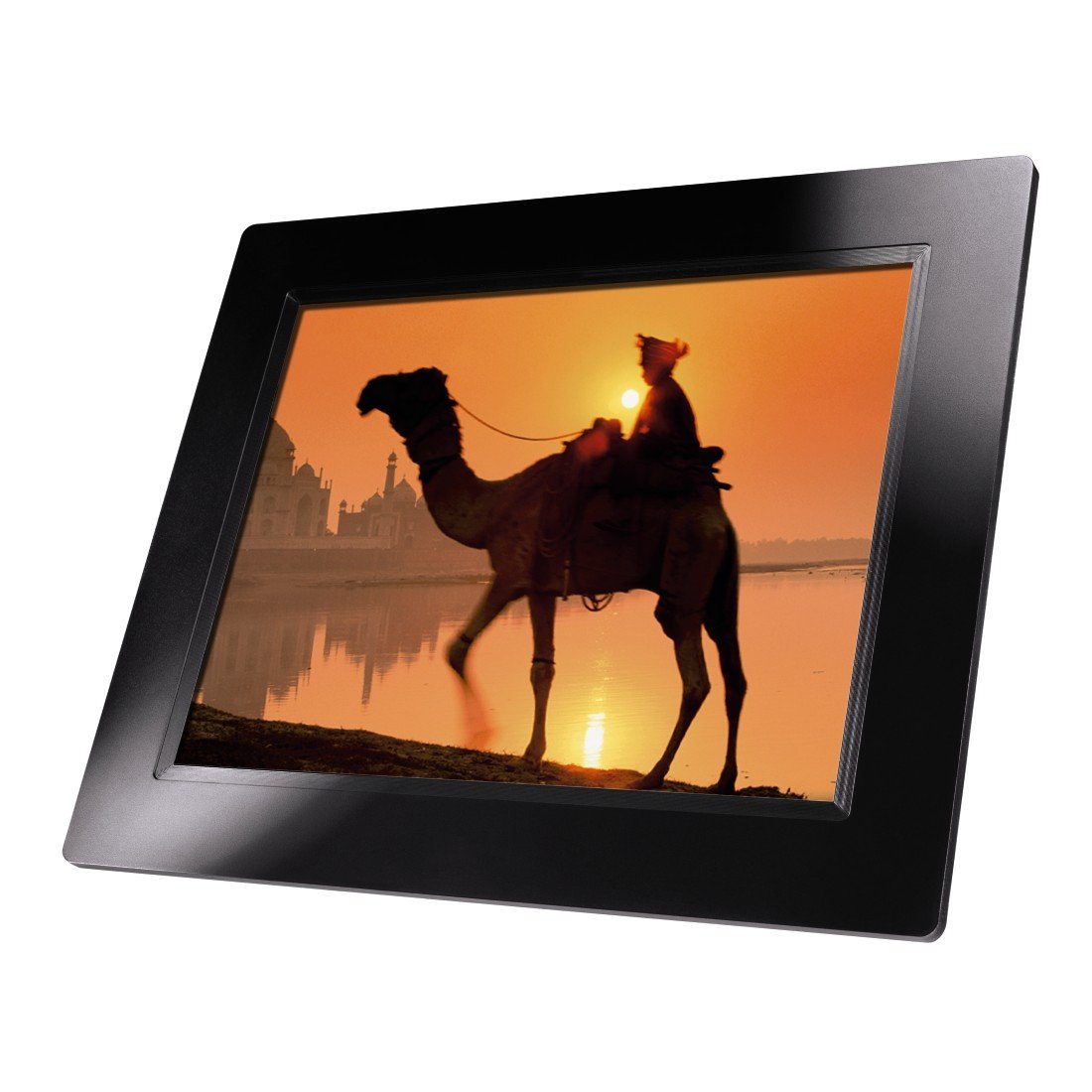
ചിത്രം 4.1: ഫ്രണ്ട് view of the Hama 95236 Digital Photo Frame, showing the 8-inch LCD screen.

ചിത്രം 4.2: വശം view of the digital photo frame, highlighting the various input ports including the SD/MMC/MS card slot, USB port, and DC IN power port.

ചിത്രം 4.3: പിൻഭാഗം view of the digital photo frame, showing the stand attachment point, ventilation grilles, and the control panel with power, navigation, and menu buttons.
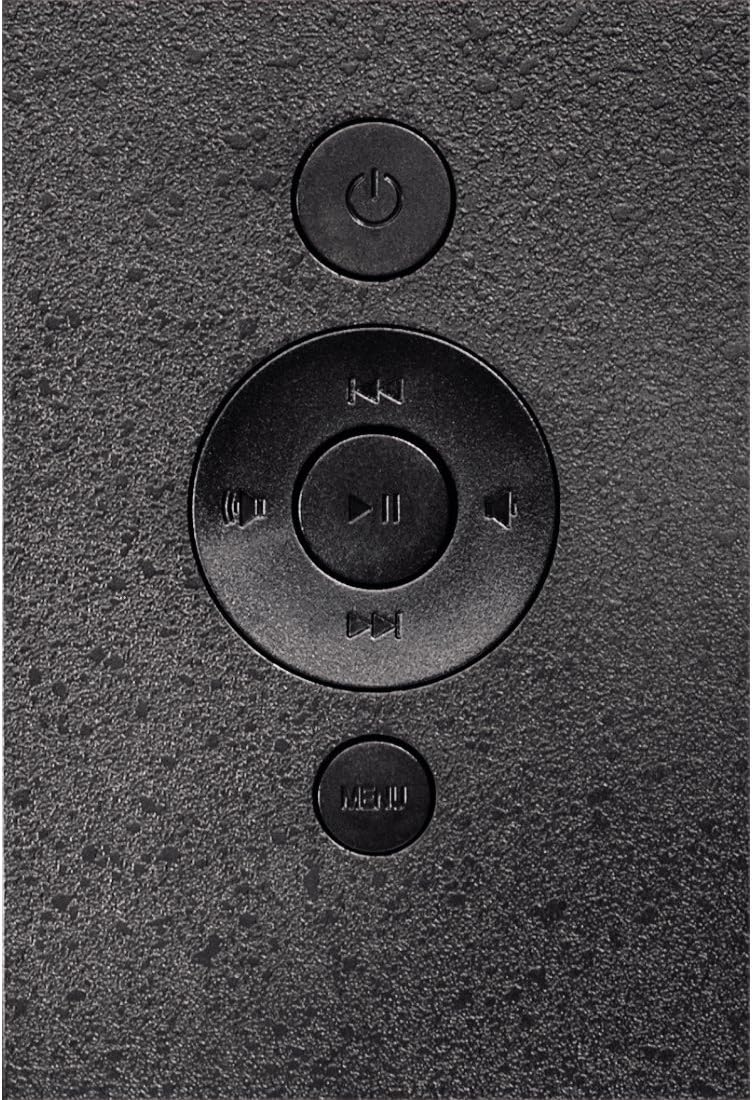
ചിത്രം 4.4: Close-up of the control buttons located on the back of the frame. These include the power button, directional navigation buttons (up, down, left, right), play/pause/enter button, and the menu button.
4.1. പോർട്ടുകളും നിയന്ത്രണങ്ങളും
- SD/MMC/MS Card Slot: For inserting memory cards to display photos and videos.
- USB പോർട്ട്: For connecting USB flash drives or other compatible USB storage devices.
- DC IN: Power input for connecting the provided power adapter.
- പവർ ബട്ടൺ: ഉപകരണം ഓണാക്കുകയോ ഓഫാക്കുകയോ ചെയ്യുന്നു.
- നാവിഗേഷൻ ബട്ടണുകൾ (മുകളിലേക്ക്/താഴേക്ക്/ഇടത്/വലത്): Used to navigate through menus and select options.
- Play/Pause/Enter Button: Confirms selections or controls media playback.
- മെനു ബട്ടൺ: ക്രമീകരണങ്ങൾക്കും ഓപ്ഷനുകൾക്കുമായി പ്രധാന മെനുവിലേക്ക് പ്രവേശിക്കുന്നു.
5. സജ്ജീകരണം
5.1. സ്റ്റാൻഡ് ഘടിപ്പിക്കൽ
Insert the metal stand into the designated slot on the back of the digital photo frame. Ensure it is securely fastened to provide stable support for the frame.
5.2. പവർ കണക്ഷൻ
- Connect the power adapter to the DC IN port on the back of the photo frame.
- അനുയോജ്യമായ ഒരു ഇലക്ട്രിക്കൽ ഔട്ട്ലെറ്റിലേക്ക് പവർ അഡാപ്റ്റർ പ്ലഗ് ചെയ്യുക.
- ഫ്രെയിം സാധാരണയായി യാന്ത്രികമായി പവർ ഓൺ ആകും അല്ലെങ്കിൽ പവർ ബട്ടൺ ഉപയോഗിച്ച് ഓണാക്കാം.
5.3. Inserting a Memory Card or USB Drive
The Hama 95236 supports SD/MMC/MS memory cards and USB flash drives.
- Locate the SD/MMC/MS card slot or the USB port on the side of the frame (refer to Figure 4.2).
- Carefully insert your memory card or USB drive into the corresponding slot/port. Ensure it is inserted correctly to avoid damage.
- The frame should automatically detect the storage device and prompt you to view its contents or start a slideshow.
6. പ്രവർത്തന നിർദ്ദേശങ്ങൾ
6.1. അടിസ്ഥാന നാവിഗേഷൻ
Use the navigation buttons on the back of the frame to move through menus and options. The Play/Pause/Enter button confirms your selection.
6.2 പ്രധാന മെനു
അമർത്തുക മെനു button to access the main menu. From here, you can select different modes and settings:
- ഫോട്ടോ: View photos in a slideshow or individually.
- സംഗീതം: ഓഡിയോ പ്ലേ ചെയ്യുക files.
- വീഡിയോ: വീഡിയോ പ്ലേ ചെയ്യുക files.
- Calendar/Clock: Display the calendar and time.
- ക്രമീകരണങ്ങൾ: Adjust various device parameters.
6.3. Photo Playback
- പ്രധാന മെനുവിൽ നിന്ന്, തിരഞ്ഞെടുക്കുക ഫോട്ടോ.
- Navigate to your desired folder or select all photos.
- അമർത്തുക പ്ലേ/താൽക്കാലികമായി നിർത്തുക/നൽകുക button to start the slideshow.
- During a slideshow, you can use the navigation buttons to skip photos or pause playback.
6.4. സിസ്റ്റം ക്രമീകരണങ്ങൾ
ആക്സസ് ചെയ്യുക ക്രമീകരണങ്ങൾ menu to customize your photo frame:
- ഡിസ്പ്ലേ ക്രെമീകരണങ്ങൾ: Adjust brightness, contrast, and display mode.
- സ്ലൈഡ്ഷോ ക്രമീകരണങ്ങൾ: Configure transition effects, display time per photo, and repeat mode.
- തീയതിയും സമയവും: നിലവിലെ തീയതിയും സമയവും സജ്ജമാക്കുക. Note: Some users have reported that date and time settings may reset after power loss.
- ഭാഷ: മെനു ഇന്റർഫേസിനായി നിങ്ങൾക്ക് ഇഷ്ടപ്പെട്ട ഭാഷ തിരഞ്ഞെടുക്കുക.
- സംഭരണ വിവരം: View details about connected storage devices.
7. പരിപാലനം
7.1. ഉപകരണം വൃത്തിയാക്കൽ
- വൃത്തിയാക്കുന്നതിന് മുമ്പ് എല്ലായ്പ്പോഴും വൈദ്യുതി വിതരണത്തിൽ നിന്ന് ഉപകരണം വിച്ഛേദിക്കുക.
- Clean the screen and exterior surfaces with a soft, dry, lint-free cloth.
- Do not use aggressive cleaning agents, solvents, or abrasive materials.
7.2. സംഭരണം
If storing the device for an extended period, disconnect it from power and store it in a cool, dry place away from direct sunlight and extreme temperatures.
8. പ്രശ്നപരിഹാരം
| പ്രശ്നം | സാധ്യമായ കാരണം | പരിഹാരം |
|---|---|---|
| ഉപകരണം ഓണാക്കില്ല. | പവർ അഡാപ്റ്റർ ബന്ധിപ്പിച്ചിട്ടില്ല അല്ലെങ്കിൽ തകരാറുണ്ട്. | Ensure the power adapter is securely connected to both the frame and the power outlet. Test the outlet with another device. |
| ചിത്രങ്ങളൊന്നും പ്രദർശിപ്പിച്ചിട്ടില്ല. | No memory card/USB drive inserted or files not supported. | Insert a compatible memory card or USB drive with supported image formats (e.g., JPEG). Check if the storage device is properly inserted. |
| Date and time reset after power off. | No internal battery backup for clock. | This model may not retain date/time settings without continuous power. Re-enter settings if necessary after power interruption. |
| Video playback is choppy or distorted. | Unsupported video format or high bitrate. | Ensure video files are in a supported format and resolution. Convert videos to a lower resolution or bitrate if issues persist. |
| ബട്ടണുകൾ പ്രതികരിക്കുന്നില്ല. | താൽക്കാലിക സോഫ്റ്റ്വെയർ തകരാർ. | Disconnect the power adapter, wait a few seconds, then reconnect it to restart the device. |
9 സ്പെസിഫിക്കേഷനുകൾ
| ഫീച്ചർ | വിശദാംശങ്ങൾ |
|---|---|
| മോഡൽ നമ്പർ | 00095236 |
| സ്ക്രീൻ വലിപ്പം | 8 ഇഞ്ച് |
| ഡിസ്പ്ലേ റെസല്യൂഷൻ | 800 x 600 പിക്സലുകൾ |
| വീക്ഷണാനുപാതം | 4:3 |
| ആന്തരിക സംഭരണം | 2 ജിബി (2048 എംബി) |
| കണക്റ്റിവിറ്റി | USB, SD/MMC/MS Card Slot |
| അളവുകൾ (L x W x H) | 2.6 x 22.2 x 17.8 സെ.മീ |
| ഭാരം | 550 ഗ്രാം |
| നിർമ്മാതാവ് | ഹമാ |
10. വാറൻ്റി വിവരങ്ങൾ
Hama GmbH & Co KG provides a manufacturer's warranty for this product. The specific terms and conditions of the warranty period and coverage are subject to the purchase date and the region of purchase. Please retain your proof of purchase (receipt) for any warranty claims.
For detailed warranty information, please refer to the official Hama webസൈറ്റിൽ പ്രവേശിക്കുക അല്ലെങ്കിൽ അവരുടെ ഉപഭോക്തൃ പിന്തുണയുമായി നേരിട്ട് ബന്ധപ്പെടുക.
11. ഉപഭോക്തൃ പിന്തുണ
Should you have any questions regarding this product, please contact Hama Customer Support:
- Webസൈറ്റ്: ഔദ്യോഗിക ഹമാ സന്ദർശിക്കുക website for FAQs, drivers, and further product information. www.hama.com
- ബന്ധപ്പെടുക: ഹമയിലെ കോൺടാക്റ്റ് വിഭാഗം കാണുക. website for phone numbers or email support in your region.
പിന്തുണയുമായി ബന്ധപ്പെടുമ്പോൾ നിങ്ങളുടെ മോഡൽ നമ്പറും (00095236) വാങ്ങിയതിന്റെ തെളിവും തയ്യാറാക്കി വയ്ക്കുക.


