ആമുഖം
This manual provides detailed instructions for the safe and efficient use of your Motorola Defy XT535 smartphone. Please read this manual thoroughly before operating your device to ensure proper functionality and to prevent damage.
സജ്ജമാക്കുക
പാക്കേജ് ഉള്ളടക്കം
നിങ്ങളുടെ പാക്കേജിൽ ഇനിപ്പറയുന്ന ഇനങ്ങൾ അടങ്ങിയിട്ടുണ്ടെന്ന് പരിശോധിക്കുക:
- Motorola Defy XT535 Phone
- ചാർജർ
- ഉപയോക്തൃ മാനുവൽ (ഈ പ്രമാണം)
Identifying Phone Components
Familiarize yourself with the key components of your Motorola Defy XT535.
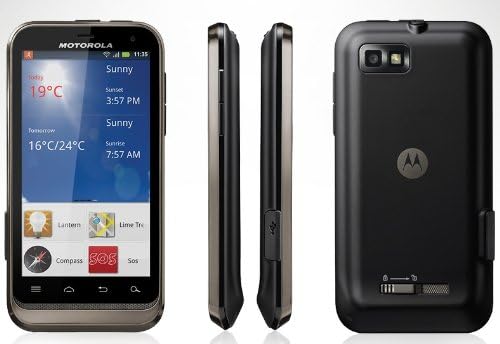
ചിത്രം: Motorola Defy XT535 showing front, side, and back views. This image helps identify the location of the display, buttons, ports, and camera.
- മുൻഭാഗം: 3.7-inch touchscreen display, front camera, earpiece.
- വലത് വശം: Volume buttons, power/lock button.
- ഇടത് വശം: മൈക്രോ യുഎസ്ബി പോർട്ട്.
- മുകളിൽ: 3.5എംഎം ഹെഡ്ഫോൺ ജാക്ക്.
- തിരികെ: 5MP camera, LED flash, speaker, battery cover.
Installing the SIM Card and Battery
- ഫോൺ ഓഫാണെന്ന് ഉറപ്പാക്കുക.
- Remove the back cover by gently prying it from the notch located at the bottom or side of the phone.
- ബാറ്ററി ഇതിനകം ഇൻസ്റ്റാൾ ചെയ്തിട്ടുണ്ടെങ്കിൽ, താഴത്തെ അറ്റത്ത് നിന്ന് ഉയർത്തി അത് നീക്കം ചെയ്യുക.
- Insert the SIM card into the SIM card slot with the gold contacts facing down and the cut corner aligned correctly. Push until it clicks into place.
- Insert the microSD card (optional) into its designated slot, ensuring proper orientation.
- Insert the battery, aligning the gold contacts on the battery with the contacts in the phone. Press down gently until it is secure.
- Replace the back cover, pressing firmly around the edges until it snaps into place.
ബാറ്ററി ചാർജ് ചെയ്യുന്നു
ആദ്യ ഉപയോഗത്തിന് മുമ്പ്, ഫോണിന്റെ ബാറ്ററി പൂർണ്ണമായും ചാർജ് ചെയ്യുക.
- Connect the charger to the micro USB port on the phone.
- ഒരു പവർ ഔട്ട്ലെറ്റിൽ ചാർജർ പ്ലഗ് ചെയ്യുക.
- ചാർജിംഗ് ഇൻഡിക്കേറ്റർ സ്ക്രീനിൽ ദൃശ്യമാകും.
- പൂർണ്ണമായി ചാർജ് ചെയ്തുകഴിഞ്ഞാൽ, ചാർജർ വിച്ഛേദിക്കുക.
പവർ ചെയ്യലും ഓഫും
- പവർ ഓണാക്കാൻ: മോട്ടറോള ലോഗോ ദൃശ്യമാകുന്നതുവരെ പവർ ബട്ടൺ അമർത്തിപ്പിടിക്കുക.
- പവർ ഓഫ് ചെയ്യാൻ: Press and hold the Power button until the phone options menu appears. Select "Power off" and confirm.
പ്രവർത്തന നിർദ്ദേശങ്ങൾ
അടിസ്ഥാന നാവിഗേഷൻ
Your Motorola Defy XT535 features a capacitive touchscreen for interaction.
- ടാപ്പ് ചെയ്യുക: Touch the screen once to open applications, select items, or press buttons.
- സ്പർശിച്ച് പിടിക്കുക: Touch and hold an item to access context-sensitive menus or move items.
- സ്വൈപ്പ്: Drag your finger across the screen to scroll through lists or switch between home screen panels.
- പിഞ്ച്: Use two fingers to zoom in or out on web pages, photos, and maps.

ചിത്രം: ഫ്രണ്ട് view of the Motorola Defy XT535 displaying the home screen with various icons and widgets. This illustrates the primary user interface.
കോളുകൾ ചെയ്യലും സ്വീകരിക്കലും
- ഒരു കോൾ ചെയ്യാൻ: Tap the Phone icon, enter the number using the dial pad, and tap the Call button.
- ഒരു കോളിന് ഉത്തരം നൽകാൻ: When the phone rings, swipe the green phone icon to the right.
- To Decline a Call: Swipe the red phone icon to the left.
സന്ദേശങ്ങൾ അയയ്ക്കുകയും സ്വീകരിക്കുകയും ചെയ്യുന്നു
- To Send a Message: Tap the Messaging icon, then tap "New message". Enter the recipient's number or select from contacts, type your message, and tap Send.
- To Read a Message: Tap the Messaging icon. Unread messages will be highlighted.
വൈഫൈയിലേക്ക് കണക്റ്റ് ചെയ്യുന്നു
- പോകുക ക്രമീകരണങ്ങൾ > വയർലെസ്സ് & നെറ്റ്വർക്കുകൾ > Wi-Fi ക്രമീകരണങ്ങൾ.
- Turn Wi-Fi on. The phone will scan for available networks.
- Tap on the desired network. If it is secured, enter the password and tap Connect.
ക്യാമറ ഉപയോഗിക്കുന്നത്
- ക്യാമറ ആപ്ലിക്കേഷൻ തുറക്കാൻ ക്യാമറ ഐക്കണിൽ ടാപ്പ് ചെയ്യുക.
- സ്ക്രീൻ ഉപയോഗിച്ച് നിങ്ങളുടെ ഷോട്ട് ഫ്രെയിം ചെയ്യുക a ആയി viewഫൈൻഡർ.
- ഒരു ഫോട്ടോ എടുക്കാൻ ഷട്ടർ ബട്ടൺ ടാപ്പ് ചെയ്യുക.
- To switch to video mode, tap the video icon. Tap the Record button to start/stop recording.
മെയിൻ്റനൻസ്
നിങ്ങളുടെ ഉപകരണം വൃത്തിയാക്കുന്നു
- ഫോണിന്റെ സ്ക്രീനും ബോഡിയും വൃത്തിയാക്കാൻ മൃദുവായ, ലിന്റ് രഹിത തുണി ഉപയോഗിക്കുക.
- അബ്രാസീവ് ക്ലീനറുകൾ, ലായകങ്ങൾ, അല്ലെങ്കിൽ എയറോസോൾ സ്പ്രേകൾ എന്നിവ ഉപയോഗിക്കുന്നത് ഒഴിവാക്കുക.
- Do not expose the phone to excessive moisture while cleaning.
ബാറ്ററി കെയർ
- ബാറ്ററി ലൈഫിനെ ബാധിച്ചേക്കാവുന്ന തീവ്രമായ താപനില ഒഴിവാക്കുക.
- Do not leave the phone connected to the charger for extended periods after it is fully charged.
- ബാറ്ററി നീക്കം ചെയ്യാവുന്നതാണെങ്കിൽ, അത് ശരിയായി സ്ഥാപിച്ചിട്ടുണ്ടെന്ന് ഉറപ്പാക്കുക.
സോഫ്റ്റ്വെയർ അപ്ഡേറ്റുകൾ
Periodically check for software updates to ensure optimal performance and security.
- പോകുക ക്രമീകരണങ്ങൾ > ഫോണിനെക്കുറിച്ച് > സിസ്റ്റം അപ്ഡേറ്റുകൾ.
- ലഭ്യമായ ഏതെങ്കിലും അപ്ഡേറ്റുകൾ പരിശോധിച്ച് ഇൻസ്റ്റാൾ ചെയ്യുന്നതിന് ഓൺ-സ്ക്രീൻ നിർദ്ദേശങ്ങൾ പാലിക്കുക.
ട്രബിൾഷൂട്ടിംഗ്
പൊതുവായ പ്രശ്നങ്ങളും പരിഹാരങ്ങളും
- ഫോൺ ഓണാക്കുന്നില്ല: ബാറ്ററി ചാർജ്ജ് ചെയ്തിട്ടുണ്ടെന്ന് ഉറപ്പാക്കുക. ചാർജർ കണക്റ്റ് ചെയ്ത് പവർ ഓൺ ചെയ്യാൻ ശ്രമിക്കുന്നതിന് മുമ്പ് കുറച്ച് മിനിറ്റ് കാത്തിരിക്കുക.
- Phone freezing or unresponsive: Perform a soft reset by pressing and holding the Power button for about 10-15 seconds until the phone restarts. If this does not work, remove and reinsert the battery (if applicable), then power on.
- മോശം സിഗ്നൽ അല്ലെങ്കിൽ നെറ്റ്വർക്ക് ഇല്ല: Check if the SIM card is correctly inserted. Move to an area with better network coverage. Restart the phone.
- വൈഫൈ കണക്ഷൻ പ്രശ്നങ്ങൾ: Ensure Wi-Fi is enabled on the phone and the router is working. Try forgetting the network and reconnecting.
- ബാറ്ററി പെട്ടെന്ന് തീർന്നു പോകുന്നു: Reduce screen brightness, close unused applications, turn off Wi-Fi/Bluetooth/GPS when not in use.
ഫാക്ടറി റീസെറ്റ്
A factory reset will erase all data from your phone's internal storage, including app data, photos, and settings. Back up important data before proceeding.
- പോകുക ക്രമീകരണങ്ങൾ > സ്വകാര്യത > ഫാക്ടറി ഡാറ്റ റീസെറ്റ്.
- ടാപ്പ് ചെയ്യുക ഫോൺ റീസെറ്റ് ചെയ്യുക.
- Confirm by tapping എല്ലാം മായ്ക്കുക.
സ്പെസിഫിക്കേഷനുകൾ
| മോഡൽ | Motorola Defy XT535 |
| ഓപ്പറേറ്റിംഗ് സിസ്റ്റം | ആൻഡ്രോയിഡ് 2.3 (ജിഞ്ചർബ്രെഡ്) |
| പ്രദർശിപ്പിക്കുക | 3.7-ഇഞ്ച് കപ്പാസിറ്റീവ് ടച്ച്സ്ക്രീൻ |
| റെസലൂഷൻ | 480 x 854 പിക്സലുകൾ |
| പിൻ ക്യാമറ | എൽഇഡി ഫ്ലാഷുള്ള 5 എംപി |
| മുൻ ക്യാമറ | അതെ |
| ആന്തരിക സംഭരണം | 2 ജിബി |
| കണക്റ്റിവിറ്റി | Wi-Fi, Bluetooth, GPS, 2G Cellular (GSM) |
| അളവുകൾ | ഏകദേശം 6.7 x 5.1 x 1.8 ഇഞ്ച് (പാക്കേജ് അളവുകൾ) |
| ഭാരം | ഏകദേശം 12 ഔൺസ് |
വാറൻ്റിയും പിന്തുണയും
For detailed warranty information, please refer to the separate warranty booklet included with your product or visit the official Motorola support webസൈറ്റ്. സാങ്കേതിക സഹായത്തിനോ കൂടുതൽ അന്വേഷണങ്ങൾക്കോ, ദയവായി മോട്ടറോള ഉപഭോക്തൃ പിന്തുണയുമായി ബന്ധപ്പെടുക.
മോട്ടറോള പിന്തുണ: www.motorola.com/us/support