1. ആമുഖവും അവസാനവുംview
The D-Link DGS-1210-28P is a 28-Port Gigabit Smart Managed PoE+ Switch designed for small to medium-sized businesses. It integrates advanced features for network functionality, security, and manageability. This switch supports the IEEE 802.3az Energy Efficient Ethernet standard and offers IPv6 management capabilities. It provides 24 PoE+ Gigabit ports and 4 Gigabit SFP optical ports, with a total PoE power budget of 193W.
This manual provides detailed instructions for the installation, configuration, and operation of your DGS-1210-28P switch.

ചിത്രം 1: മുൻഭാഗം view of the D-Link DGS-1210-28P Switch, showing 24 RJ45 ports and 4 SFP ports.
2. പാക്കേജ് ഉള്ളടക്കം
നിങ്ങളുടെ പാക്കേജിൽ ഇനിപ്പറയുന്ന ഇനങ്ങൾ അടങ്ങിയിട്ടുണ്ടെന്ന് പരിശോധിക്കുക:
- D-Link DGS-1210-28P 28-Port Gigabit Smart Managed PoE+ Switch
- പവർ കോർഡ്
- റാക്ക്മൗണ്ട് കിറ്റ് (ബ്രാക്കറ്റുകളും സ്ക്രൂകളും)
- റബ്ബർ അടി (ഡെസ്ക്ടോപ്പ് ഇൻസ്റ്റാളേഷനായി)
- ദ്രുത ഇൻസ്റ്റലേഷൻ ഗൈഡ്
- മാനുവലും സോഫ്റ്റ്വെയറും ഉള്ള CD-ROM
3. ഉൽപ്പന്ന സവിശേഷതകൾ
The DGS-1210-28P switch offers a robust set of features for enhanced network performance and security:
- 24 PoE+ Gigabit Ports: Delivers power and data over Ethernet, supporting up to 30W per port with a total power budget of 193W. Ideal for powering devices such as IP cameras, Wi-Fi access points, and VoIP phones.
- 4 Gigabit Combo SFP Ports: Provides flexible high-speed uplinks and long-distance fiber connectivity, enhancing network scalability.
- അവബോധജന്യമായ Web-അടിസ്ഥാന മാനേജ്മെൻ്റ്: Simplifies setup and management through a user-friendly graphical interface.
- Advanced Traffic Management (L2+ Features): Includes bandwidth control, Quality of Service (QoS), VLAN support, Port Mirroring, Link Aggregation, Spanning Tree Protocol (STP), IGMP Snooping, and static routing to optimize network performance and minimize congestion.
- സമഗ്ര സുരക്ഷ: Features Access Control List (ACL), 802.1X / RADIUS authentication, ARP Spoofing Prevention, and D-Link Safeguard Engine to protect against network attacks.
- Loopback Detection & Cable Diagnostics: Tools to quickly identify and resolve network cabling issues, ensuring stable connections.
- ഊർജ്ജ-കാര്യക്ഷമമായ പ്രവർത്തനം: Complies with IEEE 802.3az Energy Efficient Ethernet for reduced power consumption.
- Surveillance Mode with ONVIF Support & PD Alive: Streamlines IP surveillance network deployment by automatically detecting ONVIF-compliant devices and optimizing video traffic. PD Alive automatically reboots unresponsive PoE devices to minimize downtime.
- Nuclias Connect Management: Optional free software for centralized management of D-Link access points and DGS-1210 series switches.
- NDAA കംപ്ലയിന്റ്: Meets strict regulatory standards for government and high-security projects.
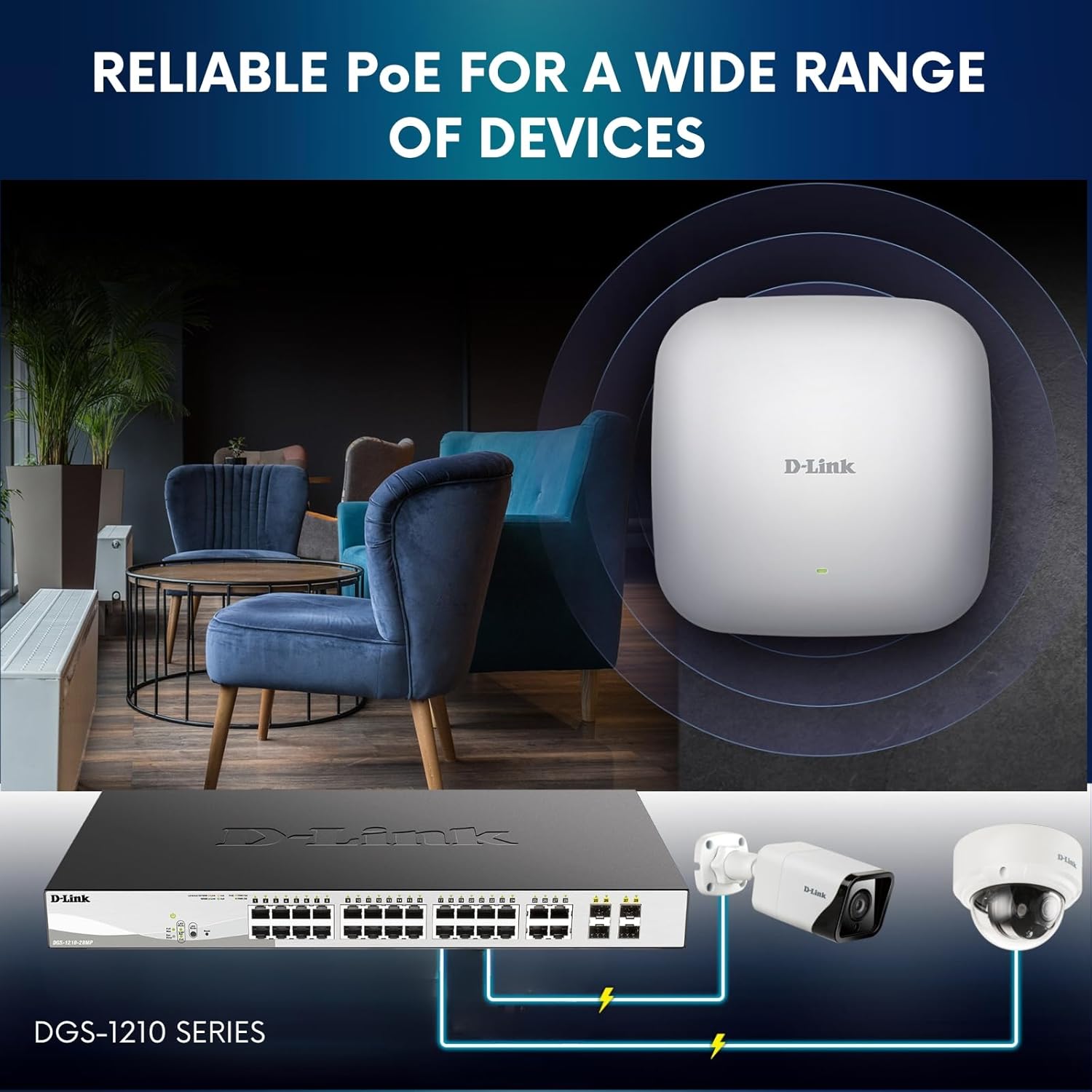
Figure 2: The DGS-1210-28P switch providing Power over Ethernet to various network devices.
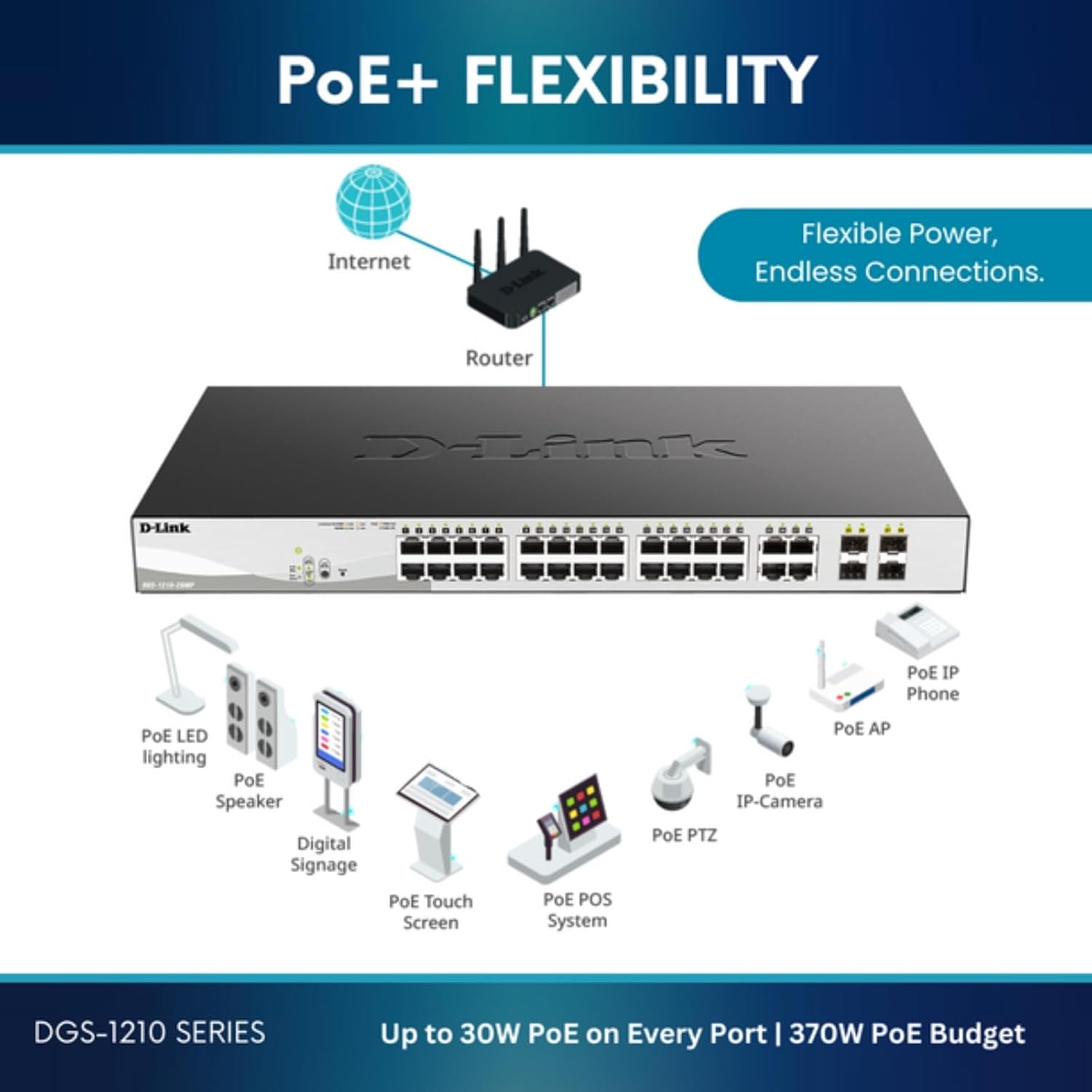
ചിത്രം 3: ഉദാamples of devices powered by PoE+ through the DGS-1210-28P switch.
4. സജ്ജീകരണ ഗൈഡ്
4.1 ഫിസിക്കൽ ഇൻസ്റ്റലേഷൻ
The DGS-1210-28P can be installed on a desktop or mounted in a standard 19-inch equipment rack.
ഡെസ്ക്ടോപ്പ് ഇൻസ്റ്റാളേഷൻ:
- ഉൾപ്പെടുത്തിയിരിക്കുന്ന റബ്ബർ പാദങ്ങൾ സ്വിച്ചിന്റെ അടിയിൽ ഘടിപ്പിക്കുക.
- Place the switch on a flat, stable surface with adequate ventilation.
റാക്ക്മൗണ്ട് ഇൻസ്റ്റാളേഷൻ:
- നൽകിയിരിക്കുന്ന സ്ക്രൂകൾ ഉപയോഗിച്ച് സ്വിച്ചിന്റെ വശങ്ങളിൽ രണ്ട് റാക്ക്മൗണ്ട് ബ്രാക്കറ്റുകൾ ഘടിപ്പിക്കുക.
- ഉചിതമായ റാക്ക് സ്ക്രൂകൾ (ഉൾപ്പെടുത്തിയിട്ടില്ല) ഉപയോഗിച്ച് സ്വിച്ച് ഒരു സാധാരണ 19 ഇഞ്ച് ഉപകരണ റാക്കിലേക്ക് സുരക്ഷിതമാക്കുക.
സ്വിച്ച് ഗ്രൗണ്ടിംഗ്:
For safety and proper operation, the switch must be properly grounded. Locate the grounding screw on the rear panel of the switch.
- Connect one end of a grounding cable (not included) to the grounding screw.
- Connect the other end of the grounding cable to a suitable grounding source, such as a grounded rack or building ground.

Figure 4: Rear panel of the DGS-1210-28P, highlighting the grounding point and power input.
4.2 ഉപകരണങ്ങൾ ബന്ധിപ്പിക്കുന്നു
- പവർ കണക്ഷൻ: Connect the AC power cord to the power input on the rear panel of the switch and then to a power outlet.
- നെറ്റ്വർക്ക് ഉപകരണങ്ങൾ: Connect network devices (computers, servers, access points, IP cameras) to the RJ45 ports (1-24) using standard Ethernet cables. For PoE-powered devices, ensure they are compatible with 802.3af/at standards.
- അപ്ലിങ്ക് കണക്ഷനുകൾ: Use the SFP ports (25-28) for high-speed fiber uplinks to other switches or network segments. Insert compatible SFP transceivers (not included) into the SFP slots, then connect fiber optic cables.
5. പ്രവർത്തന നിർദ്ദേശങ്ങൾ
5.1 പവർ ഓണാണ്
After connecting the power cord, the switch will automatically power on. The Power LED on the front panel will illuminate to indicate that the switch is receiving power.
5.2 LED സൂചകങ്ങൾ
മുൻവശത്തെ പാനൽ LED-കൾ സ്റ്റാറ്റസ് വിവരങ്ങൾ നൽകുന്നു:
- പവർ എൽഇഡി: പവർ സ്റ്റാറ്റസ് സൂചിപ്പിക്കുന്നു.
- Link/Act LED (per port): Solid green indicates a valid network link. Blinking green indicates network activity.
- PoE LED (per PoE port): Indicates PoE power status.
6. Management and Configuration
The DGS-1210-28P is a Smart Managed Switch, configurable via a web-based graphical user interface (GUI).
6.1 ആക്സസ് ചെയ്യുന്നു Web GUI
- Connect a computer to any of the switch's RJ45 ports.
- Configure your computer's IP address to be in the same subnet as the switch's default IP address (refer to the Quick Installation Guide for default IP).
- എ തുറക്കുക web ബ്രൗസറിൽ പോയി സ്വിച്ചിന്റെ ഐപി വിലാസം നൽകുക.
- ഡിഫോൾട്ട് ഉപയോക്തൃനാമവും പാസ്വേഡും ഉപയോഗിച്ച് ലോഗിൻ ചെയ്യുക (ക്വിക്ക് ഇൻസ്റ്റലേഷൻ ഗൈഡ് കാണുക).
6.2 Key Configuration Areas
ഉള്ളിൽ web GUI, you can configure various network settings:
- VLAN-കൾ: Create and manage Virtual Local Area Networks for network segmentation.
- സേവനത്തിൻ്റെ ഗുണനിലവാരം (QoS): നിർണായക ആപ്ലിക്കേഷനുകൾക്കായി നെറ്റ്വർക്ക് ട്രാഫിക്കിന് മുൻഗണന നൽകുക.
- പോർട്ട് മിററിംഗ്: Monitor network traffic by mirroring it to a designated port.
- ലിങ്ക് സമാഹരണം: ബാൻഡ്വിഡ്ത്തും ആവർത്തനവും വർദ്ധിപ്പിക്കുന്നതിന് ഒന്നിലധികം ഫിസിക്കൽ ലിങ്കുകൾ ഒരൊറ്റ ലോജിക്കൽ ലിങ്കിലേക്ക് സംയോജിപ്പിക്കുക.
- സുരക്ഷാ സവിശേഷതകൾ: Configure Access Control Lists (ACLs), 802.1X authentication, and ARP Spoofing Prevention.
- Surveillance Mode: Activate this mode to optimize the switch for IP surveillance systems, including ONVIF device detection and Auto Surveillance VLAN.

ചിത്രം 5: Web interface showing options for Standard and Surveillance Modes.

Figure 6: PD Alive feature automatically reboots unresponsive PoE devices.
6.3 Nuclias Connect Management
For centralized management of multiple D-Link devices, the DGS-1210-28P can be integrated with D-Link's free Nuclias Connect software. This software allows for scalable and flexible control over your network infrastructure.

Figure 7: Nuclias Connect software for comprehensive network management.
7. പരിപാലനം
7.1 ഫേംവെയർ അപ്ഡേറ്റുകൾ
ഡി-ലിങ്ക് പിന്തുണ ഇടയ്ക്കിടെ പരിശോധിക്കുക. website for the latest firmware versions. Firmware updates can provide new features, performance improvements, and security enhancements. Follow the instructions provided with the firmware download for the update process.
7.2 വൃത്തിയാക്കൽ
Ensure the switch is powered off and disconnected from all cables before cleaning. Use a soft, dry cloth to wipe the exterior of the switch. Do not use liquid or aerosol cleaners.
7.3 പരിസ്ഥിതി പരിഗണനകൾ
Operate the switch within the specified temperature range (up to 40°C or 104°F) and ensure proper airflow to prevent overheating.
8. പ്രശ്നപരിഹാരം
8.1 വൈദ്യുതിയില്ല
If the Power LED is off:
- Verify the power cord is securely connected to the switch and a working power outlet.
- പ്രവർത്തനക്ഷമതയ്ക്കായി പവർ സ്രോതസ്സ് (ഔട്ട്ലെറ്റ്, പവർ സ്ട്രിപ്പ്) പരിശോധിക്കുക.
8.2 നെറ്റ്വർക്ക് കണക്റ്റിവിറ്റി ഇല്ല
If a device is not connecting to the network:
- Check the Link/Act LED for the connected port. If it's off, verify the Ethernet cable connection and cable integrity.
- Use the switch's built-in Cable Diagnostics tool via the web GUI to test the connected cable.
- ബന്ധിപ്പിച്ചിരിക്കുന്ന ഉപകരണം ഓണാക്കിയിട്ടുണ്ടെന്നും ശരിയായി കോൺഫിഗർ ചെയ്തിട്ടുണ്ടെന്നും ഉറപ്പാക്കുക.
8.3 PoE Device Not Powering On
If a PoE-powered device is not receiving power:
- Check the PoE LED for the connected port.
- Verify the device is 802.3af/at compliant.
- Ensure the switch's total PoE power budget (193W) is not exceeded.
- Utilize the PD Alive feature, if enabled, to automatically reboot unresponsive PoE devices.
9 സ്പെസിഫിക്കേഷനുകൾ
| ഫീച്ചർ | സ്പെസിഫിക്കേഷൻ |
|---|---|
| മോഡൽ നമ്പർ | ഡിജിഎസ് -1210-28 പി |
| ഉൽപ്പന്ന അളവുകൾ | 17.32"L x 9.84"W x 1.73"H |
| ഇനത്തിൻ്റെ ഭാരം | 10 പൗണ്ട് |
| വാല്യംtage | 240 വോൾട്ട് |
| പരമാവധി പവർ | 193W (PoE Budget) |
| ഉയർന്ന താപനില റേറ്റിംഗ് | 40 ഡിഗ്രി സെൽഷ്യസ് |
| ഇൻ്റർഫേസ് തരം | RJ45, SFP |
| ഡാറ്റ കൈമാറ്റ നിരക്ക് | സെക്കൻഡിൽ 1000 മെഗാബൈറ്റുകൾ |
| തുറമുഖങ്ങളുടെ എണ്ണം | 24 (PoE+) + 4 (SFP) |
| കേസ് മെറ്റീരിയൽ | ലോഹം |
10. വാറൻ്റിയും പിന്തുണയും
10.1 ആജീവനാന്ത സംരക്ഷണം
The D-Link DGS-1210-28P switch is backed by D-Link's Lifetime Protection, providing long-term confidence in the product's quality and reliability. Refer to the D-Link website or the warranty card included with your product for full terms and conditions.
10.2 സാങ്കേതിക പിന്തുണ
For technical assistance, product documentation, or firmware updates, please visit the official D-Link support website. You can find contact information for D-Link technical support in your region on their webസൈറ്റ്.


