1. ആമുഖം
The Tripp Lite N052-048 is a 48-port Category 5e (CAT5e) patch panel designed for structured cabling systems. It features 110-type termination and meets EIA/TIA TSB-40 Cat5e connecting hardware specifications. The panel supports both EIA/TIA 568A and 568B wiring schemes, indicated by color coding. Its 19-inch rackmount design optimizes space, and clear numbering on both front and back facilitates easy cable identification and management.
2. ഉൽപ്പന്ന സവിശേഷതകൾ
- 48 RJ45 Ports: Provides connectivity for up to 48 CAT5e network cables.
- 110-Type Termination: Utilizes standard 110-type insulation displacement connectors (IDCs) for reliable cable termination.
- EIA/TIA 568A/B Color Coding: Clearly marked for both T568A and T568B wiring standards to ensure correct cable installation.
- 19-inch Rackmount Design: Compatible with standard 19-inch equipment racks, optimizing space in network installations.
- Clear Port Numbering: Numbered ports on both the front and rear of the panel simplify cable identification and management.
- CAT5e Compliance: Meets and exceeds EIA/TIA TSB-40 Cat5e connecting hardware specifications for optimal network performance.
3. സജ്ജീകരണവും ഇൻസ്റ്റാളേഷനും
Proper installation ensures optimal performance and longevity of your patch panel. Follow these steps carefully:
3.1 റാക്ക് മൗണ്ടിംഗ്
- ലൊക്കേഷൻ തിരഞ്ഞെടുക്കുക: Choose an appropriate 19-inch equipment rack or cabinet with sufficient space and ventilation.
- സുരക്ഷിത പാനൽ: Align the mounting ears of the N052-048 patch panel with the rack posts. Use appropriate rack screws (not included) to securely fasten the panel to the rack. Ensure the panel is level and stable.
3.2. Cable Termination (110-Type)
The N052-048 uses 110-type insulation displacement connectors (IDCs) for terminating CAT5e cables. A 110 impact tool is required for this process.
- കേബിൾ തയ്യാറാക്കുക: Strip approximately 1 to 1.5 inches of the outer jacket from the CAT5e cable. Be careful not to nick the inner wire insulation.
- Untwist Pairs: Carefully untwist the wire pairs as little as possible, maintaining the twists close to the jacket.
- Identify Wiring Standard: Refer to the color-coded labels on the rear of the patch panel for either EIA/TIA 568A or 568B wiring. Choose one standard and apply it consistently throughout your installation.
- Terminate Wires: Place each individual wire into its corresponding slot on the 110-type IDC block according to the chosen wiring standard. Use a 110 impact tool to punch down each wire firmly. The impact tool will seat the wire and trim any excess.
- Verify Termination: Visually inspect each termination to ensure the wire is properly seated and trimmed.
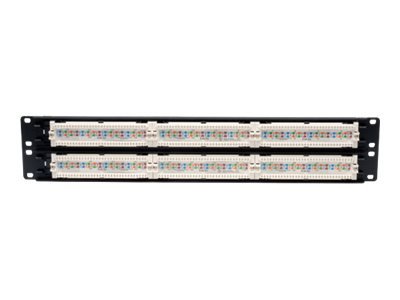
ചിത്രം 1: പിൻഭാഗം view of the Tripp Lite N052-048 patch panel, illustrating the 110-type termination blocks where individual network wires are punched down. The color-coded labels for EIA/TIA 568A and 568B wiring standards are visible.
3.3. കേബിൾ മാനേജ്മെന്റ്
Utilize cable ties or other cable management accessories to organize and secure the terminated cables on the rear of the patch panel. This helps prevent strain on the terminations and maintains a tidy installation.
4. ഓപ്പറേഷൻ
Once installed and terminated, the patch panel serves as a central connection point for your network.
- ഉപകരണങ്ങൾ ബന്ധിപ്പിക്കുക: Use standard RJ45 patch cables to connect network devices (e.g., computers, switches, routers) to the front ports of the patch panel.
- തുറമുഖങ്ങൾ തിരിച്ചറിയുക: The clear numbering on the front of the panel corresponds to the terminated cables on the rear, allowing for easy identification of network connections.
- ഫ്ലെക്സിബിൾ കണക്റ്റിവിറ്റി: The patch panel allows for flexible reconfiguration of network connections by simply moving patch cables between ports without needing to re-terminate permanent cabling.

ചിത്രം 2: ഫ്രണ്ട് view of the Tripp Lite N052-048 48-Port CAT5e patch panel, displaying the numbered RJ45 ports ready for patch cable connections.
5. പരിപാലനം
The Tripp Lite N052-048 patch panel requires minimal maintenance to ensure continued reliable performance.
- പതിവ് പരിശോധന: Periodically inspect the patch panel and connected cables for any signs of damage, loose connections, or excessive dust accumulation.
- വൃത്തിയാക്കൽ: Use a soft, dry cloth to gently clean the exterior of the panel. Avoid using harsh chemicals or abrasive materials. For RJ45 ports, use specialized compressed air or cleaning tools if necessary, ensuring no residue is left behind.
- കേബിൾ മാനേജുമെന്റ്: Ensure that cable management remains organized to prevent strain on ports and cables, which can lead to intermittent connectivity issues.
6. പ്രശ്നപരിഹാരം
If you experience network connectivity issues related to the patch panel, consider the following troubleshooting steps:
- കണക്റ്റിവിറ്റി ഇല്ല:
- Verify that both ends of the patch cable are securely connected to the patch panel and the network device.
- Check the integrity of the patch cable by testing it with a known working cable.
- Inspect the 110-type terminations on the rear of the panel for the affected port. Ensure all wires are properly seated and trimmed according to the 568A/B standard.
- Use a cable tester to check for continuity, shorts, or miswires on the terminated cable run.
- ഇടയ്ക്കിടെയുള്ള കണക്റ്റിവിറ്റി:
- Check for loose patch cable connections.
- Examine the terminated wires for any signs of corrosion or damage.
- Ensure proper cable management to avoid excessive bending or strain on cables.
- കുറഞ്ഞ നെറ്റ്വർക്ക് വേഗത:
- Confirm that all components in the network path (cables, switches, network cards) are rated for the desired speed (e.g., Gigabit Ethernet).
- Verify that the cable terminations are correct and that there are no split pairs or excessive untwisting of wires, which can degrade signal quality.
7 സ്പെസിഫിക്കേഷനുകൾ
| സ്പെസിഫിക്കേഷൻ | വിശദാംശങ്ങൾ |
|---|---|
| മോഡൽ നമ്പർ | N052-048 |
| തുറമുഖങ്ങൾ | 48 x RX45 |
| കേബിൾ തരം | CAT5e (Category 5e) |
| അവസാനിപ്പിക്കൽ തരം | 110-type IDC |
| വയറിംഗ് മാനദണ്ഡങ്ങൾ | EIA/TIA 568A & 568B |
| റാക്ക് വലിപ്പം | 19-inch Rackmount |
| ഇനത്തിൻ്റെ ഭാരം | 2.4 പൗണ്ട് |
| നിർമ്മാതാവ് | ട്രിപ്പ് ലൈറ്റ് |
8. പിന്തുണയും വാറണ്ടിയും
For technical support, warranty information, or further assistance with your Tripp Lite N052-048 patch panel, please contact Tripp Lite customer service or visit their official webസൈറ്റ്.
- Tripp Lite Official Webസൈറ്റ്: www.tripplite.com
- കസ്റ്റമർ സർവീസ്: Refer to the Tripp Lite website for current contact information, including phone numbers and support hours.
വാറന്റി ക്ലെയിമുകൾക്കായി നിങ്ങളുടെ വാങ്ങൽ രസീത് സൂക്ഷിക്കുക.


