1. ആമുഖം
This user manual provides detailed instructions for the proper setup, operation, calibration, maintenance, and troubleshooting of your Oakton WD-35613-82 Ion 6+ Handheld Meter Kit. To ensure accurate measurements and extend the lifespan of your device, please read this manual thoroughly before use and retain it for future reference.
2. ഉൽപ്പന്നം കഴിഞ്ഞുview
The Oakton Ion 6+ is a versatile handheld meter designed for precise pH and ion measurements. This kit includes essential components for immediate use in various applications.
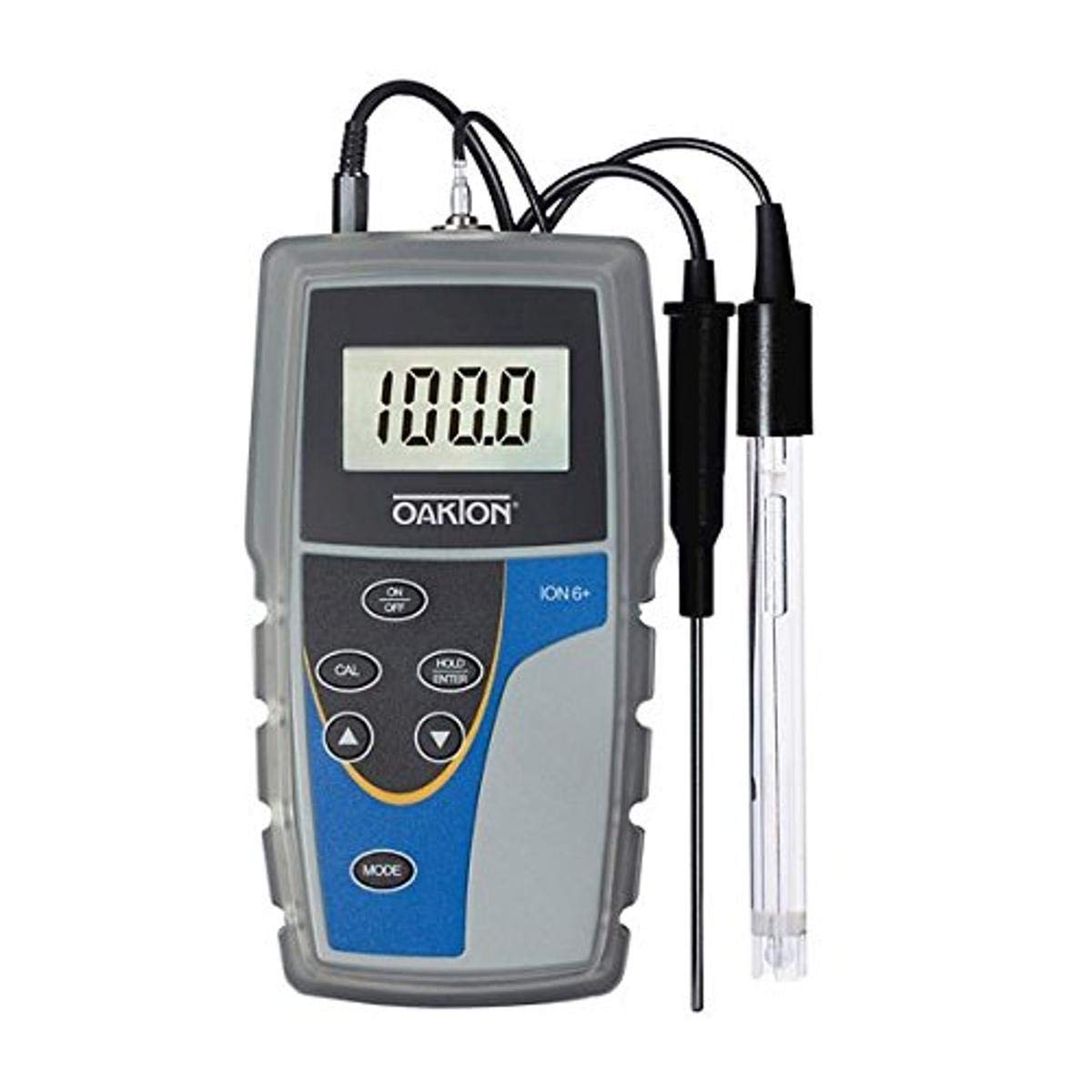
This image displays the Oakton Ion 6+ handheld meter, a gray and blue device with a digital display showing '100.0'. It has control buttons for ON/OFF, CAL, HOLD/ENTER, MODE, and arrow keys. Two probes are connected to the top: a black temperature probe and a clear pH/ATC probe.
3. കിറ്റ് ഉള്ളടക്കം
Your Oakton WD-35613-82 Ion 6+ Handheld Meter Kit typically includes the following items:
- Oakton Ion 6+ Handheld Meter
- pH ഇലക്ട്രോഡ്
- ATC (Automatic Temperature Compensation) probe
- സംരക്ഷണ റബ്ബർ ബൂട്ട്
- pH ബഫർ പരിഹാരങ്ങൾ
- Solution bottles
- Rinse bottle
- ബാറ്ററികൾ
- ചുമക്കുന്ന കേസ്
4. സജ്ജീകരണം
Follow these steps for initial setup of your meter:
- ബാറ്ററികൾ ഇൻസ്റ്റാൾ ചെയ്യുക: Open the battery compartment on the back of the meter and insert the specified batteries, observing correct polarity.
- കണക്ട് പ്രോബുകൾ: Carefully connect the pH electrode and the ATC probe to their respective ports at the top of the meter. Ensure connections are secure.
- Prepare Electrodes: If the pH electrode is dry, condition it according to the electrode's specific instructions (usually by soaking in storage solution or buffer for a period).
5. ഓപ്പറേഷൻ
To take a measurement with your Ion 6+ meter:
- പവർ ഓൺ: അമർത്തുക ഓൺ/ഓഫ് മീറ്റർ ഓണാക്കാനുള്ള ബട്ടൺ.
- മോഡ് തിരഞ്ഞെടുക്കുക: അമർത്തുക മോഡ് button to cycle through available measurement modes (e.g., pH, mV, Ion). Select the desired mode.
- കാലിബ്രേറ്റ് ചെയ്യുക: Perform a calibration as described in Section 6 before taking critical measurements.
- Immerse Probe: Rinse the electrode with distilled water and immerse it into the sample solution. Ensure the electrode tip is fully submerged.
- അളവ് വായിക്കുക: Allow the reading on the display to stabilize. The meter will typically indicate stability.
- വായന തുടരുക: അമർത്തുക HOLD/ENTER ഡിസ്പ്ലേയിൽ നിലവിലെ റീഡിംഗ് ഫ്രീസ് ചെയ്യാൻ ബട്ടൺ അമർത്തുക. റിലീസ് ചെയ്യാൻ വീണ്ടും അമർത്തുക.
- പവർ ഓഫ്: അമർത്തുക ഓൺ/ഓഫ് button to turn off the meter after use.
6. കാലിബ്രേഷൻ
Regular calibration is crucial for accurate measurements. Refer to the specific instructions for your pH electrode and buffer solutions for the exact calibration procedure. Generally, calibration involves:
- Prepare Buffers: Use fresh, appropriate pH buffer solutions (e.g., pH 4.01, 7.00, 10.00).
- കാലിബ്രേഷൻ മോഡ് നൽകുക: With the meter on and in pH mode, press the CAL ബട്ടൺ.
- Calibrate Points: Immerse the electrode in the first buffer solution. The meter will automatically recognize the buffer and calibrate. Repeat for subsequent buffer solutions as prompted by the meter.
- കാലിബ്രേഷൻ സ്ഥിരീകരിക്കുക: Once all points are calibrated, the meter will typically confirm successful calibration.
7. പരിപാലനം
Proper maintenance ensures optimal performance and longevity of your meter and probes:
- ഇലക്ട്രോഡ് ക്ലീനിംഗ്: Regularly clean the pH electrode according to its specific instructions, especially if readings become sluggish or inaccurate.
- ഇലക്ട്രോഡ് സംഭരണം: Store the pH electrode in its designated storage solution or a suitable buffer when not in use. Never store it dry.
- Meter Cleaning: Wipe the meter body with a damp തുണി. ഉരച്ചിലുകളുള്ള ക്ലീനറുകളോ ലായകങ്ങളോ ഉപയോഗിക്കരുത്.
- ബാറ്ററി മാറ്റിസ്ഥാപിക്കൽ: Replace batteries promptly when the low battery indicator appears to prevent data loss or meter malfunction.
8. പ്രശ്നപരിഹാരം
If you encounter issues with your Oakton Ion 6+ meter, consider the following:
- ശക്തിയില്ല: ബാറ്ററി ഇൻസ്റ്റാളേഷൻ പരിശോധിച്ച് ബാറ്ററികൾ പുതിയതാണെന്ന് ഉറപ്പാക്കുക.
- അസ്ഥിരമായ വായനകൾ: Ensure the electrode is properly conditioned and clean. Recalibrate the meter. Check for air bubbles around the electrode.
- കൃത്യമല്ലാത്ത വായനകൾ: Calibrate the meter with fresh, accurate buffer solutions. Check the condition of the pH electrode; it may need cleaning or replacement. Ensure the ATC probe is connected and functioning correctly.
- പിശക് സന്ദേശങ്ങൾ: Refer to the specific error codes in the full product manual (if available) or contact technical support.
9 സ്പെസിഫിക്കേഷനുകൾ
| ഫീച്ചർ | വിശദാംശങ്ങൾ |
|---|---|
| മോഡൽ നമ്പർ | WD-35613-82 |
| നിർമ്മാതാവ് | ഓക്ടൺ ഉപകരണങ്ങൾ |
| പാക്കേജ് അളവുകൾ | 7 x 4 x 3 ഇഞ്ച് |
| പാക്കേജ് ഭാരം | 5 പൗണ്ട് |
| മാതൃരാജ്യം | യുണൈറ്റഡ് സ്റ്റേറ്റ്സ് |
| ASIN | B00AM2302G |
10. വാറൻ്റിയും പിന്തുണയും
For warranty information, technical support, or service inquiries, please contact OAKTON Instruments directly or refer to their official website. Keep your purchase receipt and model number handy when contacting support.


