1. ആമുഖവും അവസാനവുംview
The Eaton Tripp Lite OMNI1500LCDT 1500VA Uninterruptible Power Supply (UPS) provides comprehensive power protection for your electronic equipment. This unit safeguards against power outages, voltage fluctuations, and surges, ensuring continuous operation and protecting sensitive devices. It features a 1500VA/810W capacity, 10 outlets, Automatic Voltage Regulation (AVR), and an intuitive LCD screen for real-time status monitoring.
This manual provides essential information for the safe and efficient installation, operation, and maintenance of your OMNI1500LCDT UPS.
2. സുരക്ഷാ നിർദ്ദേശങ്ങൾ
Please read and follow all safety instructions carefully to prevent injury or damage to the unit and connected equipment.
- ഇലക്ട്രിക്കൽ സുരക്ഷ: യുപിഎസ് ഒരു ഗ്രൗണ്ടഡ് എസി പവർ ഔട്ട്ലെറ്റിലേക്ക് ബന്ധിപ്പിക്കുക. ഗ്രൗണ്ടിംഗ് പ്രോംഗ് നീക്കം ചെയ്യരുത്.
- ഇൻഡോർ ഉപയോഗത്തിന് മാത്രം: This UPS is designed for indoor use in a controlled environment. Avoid exposure to moisture, extreme temperatures, or direct sunlight.
- വെൻ്റിലേഷൻ: യുപിഎസിന് ചുറ്റും മതിയായ വായുസഞ്ചാരം ഉറപ്പാക്കുക. വെന്റിലേഷൻ ദ്വാരങ്ങൾ തടയരുത്.
- ബാറ്ററി കൈകാര്യം ചെയ്യൽ: Batteries contain hazardous materials. Refer to local regulations for proper disposal. Only replace batteries with Tripp Lite RBC51 or equivalent.
- സേവനം: There are no user-serviceable parts inside the UPS except for the battery. Refer all servicing to qualified service personnel.
- ഓവർലോഡ്: Do not overload the UPS. Ensure the total wattage of connected equipment does not exceed the UPS capacity (810W).
3. പാക്കേജ് ഉള്ളടക്കം
നിങ്ങളുടെ പാക്കേജിൽ ഇനിപ്പറയുന്ന ഇനങ്ങൾ അടങ്ങിയിട്ടുണ്ടെന്ന് പരിശോധിക്കുക:
- OMNI1500LCDT UPS Unit
- യുഎസ്ബി കമ്മ്യൂണിക്കേഷൻ കേബിൾ
- പവർ കോർഡ് (NEMA 5-15P)

4. സവിശേഷതകൾ
The OMNI1500LCDT UPS offers a range of features designed for optimal power protection:
- 810W Battery Backup: Provides temporary battery power during outages to allow for safe system shutdown.
- 10 ഔട്ട്ലെറ്റുകൾ: Includes both battery backup/surge protected and surge-only protected outlets.
- ഓട്ടോമാറ്റിക് വോളിയംtagഇ റെഗുലേഷൻ (AVR): ബ്രൗൺഔട്ടുകളും ഓവർവോൾട്ടും ശരിയാക്കുന്നുtages (between 92V and 150V) to a safe 120V without using battery power.
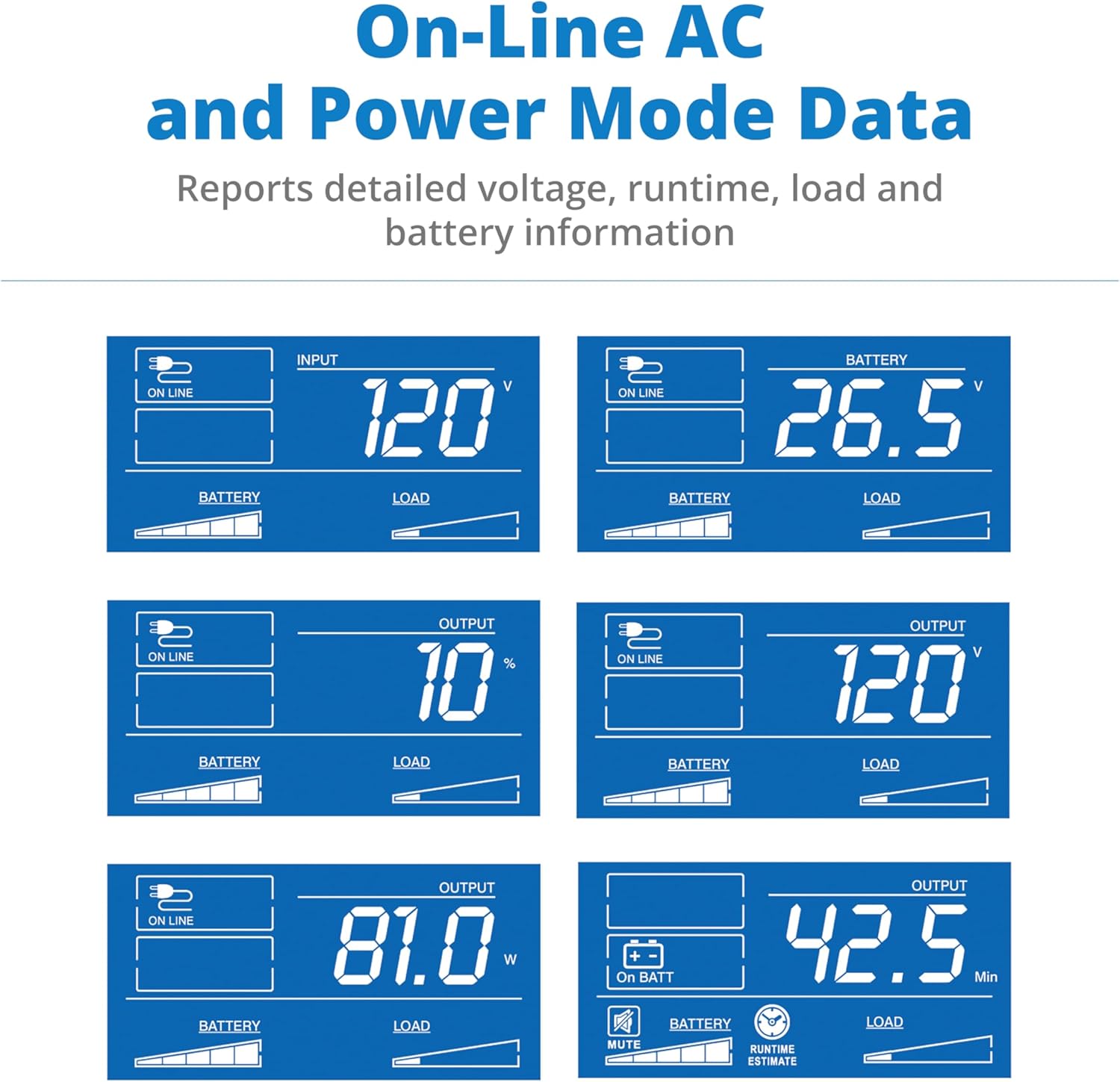
- LCD സ്ക്രീൻ: Displays real-time power information including battery runtime, wattage load, overload status, AVR status, input voltage, ബാറ്ററി നില എന്നിവ.
- സർജ് സംരക്ഷണം: 650 joules of surge protection for connected equipment.
- Dataline Protection: 100 Mbps Ethernet RJ45 port protection and Telephone/DSL RJ11 port dataline protection.
- User-Replaceable Batteries: Internal batteries (Tripp Lite RBC51) can be easily replaced by the user.

5. സജ്ജീകരണം
5.1 പ്ലേസ്മെൻ്റ്
Place the UPS in a cool, dry indoor environment, away from direct sunlight, heat sources, and excessive moisture. Ensure sufficient space around the unit for proper ventilation.
5.2 പവറുമായി ബന്ധിപ്പിക്കുന്നു
- Connect the UPS power cord (NEMA 5-15P) to a grounded wall outlet.
- Allow the UPS to charge for 24 hours before initial use to ensure maximum battery runtime.
5.3 ബന്ധിപ്പിക്കുന്ന ഉപകരണങ്ങൾ
The OMNI1500LCDT features 10 outlets on its rear panel:
- Battery Backup and Surge-Protected Outlets: Connect critical equipment such as computers, monitors, and network devices to these outlets to ensure continuous power during outages.
- സർജ്-പ്രൊട്ടക്റ്റഡ് ഔട്ട്ലെറ്റുകൾ: Connect non-critical equipment like printers or scanners to these outlets for surge protection only. These outlets do not provide battery backup.
Additionally, connect your Ethernet or telephone lines to the respective RJ45/RJ11 ports for dataline surge protection.

5.4 യുഎസ്ബി കമ്മ്യൂണിക്കേഷൻ പോർട്ട്
Connect the included USB cable from the UPS to your computer's USB port. This allows your computer to communicate with the UPS for automatic shutdown during extended power outages and to monitor UPS status using power management software (available from Tripp Lite's webസൈറ്റ്).
6. ഓപ്പറേഷൻ
6.1 പവർ ഓൺ/ഓഫ്
- പവർ ഓണാക്കാൻ: Press and hold the power button for approximately 2 seconds until you hear a beep. The LCD screen will illuminate.
- പവർ ഓഫ് ചെയ്യാൻ: Press and hold the power button for approximately 2 seconds until the UPS powers down.
6.2 എൽസിഡി ഡിസ്പ്ലേ മനസ്സിലാക്കൽ
The LCD screen provides critical operational information. Use the 'TEST' button to cycle through display modes and the 'MUTE' button to silence alarms or select options.

6.3 ഓട്ടോമാറ്റിക് വോളിയംtagഇ റെഗുലേഷൻ (AVR)
The UPS automatically detects and corrects minor voltage fluctuations (brownouts and overvoltages) without switching to battery power. This extends battery life and provides stable power to your devices.
6.4 Battery Backup Function
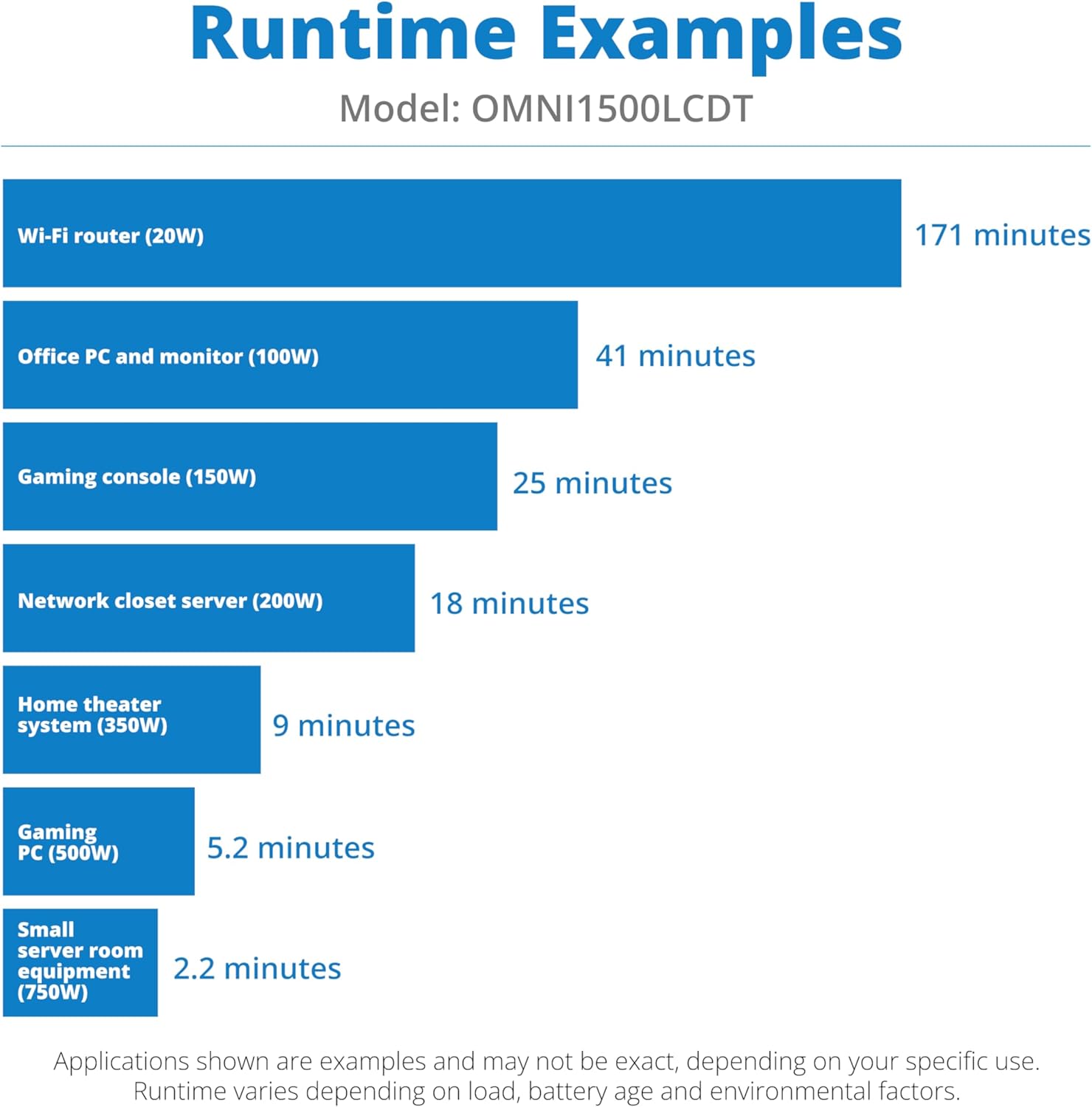
ഒരു വൈദ്യുതി സമയത്ത് outage, the UPS will automatically switch to battery power, providing continuous power to connected equipment on the battery backup outlets. An audible alarm will sound, and the LCD will indicate 'On Batt'. The duration of battery backup depends on the load connected.
7. പരിപാലനം
7.1 ബാറ്ററി മാറ്റിസ്ഥാപിക്കൽ
The OMNI1500LCDT uses two user-replaceable Tripp Lite RBC51 batteries. Batteries typically last 3-5 years under normal conditions. Replace batteries when the UPS indicates a battery fault or when runtime significantly decreases.
- Power off the UPS and disconnect it from the wall outlet.
- Refer to the detailed battery replacement instructions provided with the replacement battery kit or on the Tripp Lite webസൈറ്റ്.
- പ്രാദേശിക നിയന്ത്രണങ്ങൾ അനുസരിച്ച് പഴയ ബാറ്ററികൾ നശിപ്പിക്കുക.

7.2 വൃത്തിയാക്കൽ
യുപിഎസിന്റെ പുറംഭാഗം മൃദുവായതും ഉണങ്ങിയതുമായ തുണി ഉപയോഗിച്ച് ഇടയ്ക്കിടെ വൃത്തിയാക്കുക. ലിക്വിഡ് അല്ലെങ്കിൽ എയറോസോൾ ക്ലീനറുകൾ ഉപയോഗിക്കരുത്. വെന്റിലേഷൻ ഓപ്പണിംഗുകൾ പൊടിയിൽ നിന്നും അവശിഷ്ടങ്ങളിൽ നിന്നും മുക്തമാണെന്ന് ഉറപ്പാക്കുക.
7.3 Runtime Expectations
The battery runtime varies significantly based on the connected load. The following chart provides estimated runtimes for common devices:
8. പ്രശ്നപരിഹാരം
If you encounter issues with your OMNI1500LCDT UPS, refer to the following common problems and solutions:
| പ്രശ്നം | സാധ്യമായ കാരണം | പരിഹാരം |
|---|---|---|
| യുപിഎസ് ഓണാകുന്നില്ല. | Not connected to AC power; Battery not connected or discharged. | Ensure UPS is plugged into a live, grounded outlet. Allow 24 hours for initial battery charge. Check battery connections. |
| യുപിഎസ് തുടർച്ചയായി ബീപ്പ് ചെയ്യുന്നു. | Overload condition; Battery low or faulty. | Reduce connected load. Check LCD for battery status; replace battery if necessary. |
| കുറഞ്ഞ ബാറ്ററി റൺടൈം. | Overload; Battery nearing end of life. | Reduce connected load. Replace battery (Tripp Lite RBC51). |
| ഔട്ട്ലെറ്റുകളിലേക്ക് വൈദ്യുതിയില്ല. | UPS off; Circuit breaker tripped. | Turn on UPS. Check and reset the circuit breaker on the rear panel. |
For further assistance, contact Tripp Lite technical support.
9 സ്പെസിഫിക്കേഷനുകൾ
Detailed specifications for the OMNI1500LCDT UPS:
- മോഡൽ: OMNI1500LCDT
- ശേഷി: 1500VA / 810W
- ഇൻപുട്ട് വോളിയംtage: 120V എസി
- Putട്ട്പുട്ട് വോളിയംtage: 120V എസി
- ഔട്ട്ലെറ്റുകൾ: 10 (5 Battery Backup/Surge, 5 Surge Only)
- സർജ് സംരക്ഷണം: 650 ജൂൾസ്
- ഓട്ടോമാറ്റിക് വോളിയംtagഇ റെഗുലേഷൻ (AVR): ബ്രൗൺഔട്ടുകളും ഓവർവോൾട്ടും ശരിയാക്കുന്നുtages between 92V and 150V
- ബാറ്ററി തരം: Sealed Lead Acid (2 x 12V, user-replaceable RBC51)
- റീചാർജ് സമയം: പൂർണ്ണ ഡിസ്ചാർജ് കഴിഞ്ഞ് 4-6 മണിക്കൂർ മുതൽ 90% വരെ
- ആശയവിനിമയ തുറമുഖങ്ങൾ: USB, RJ45 (Ethernet), RJ11 (Telephone/DSL)
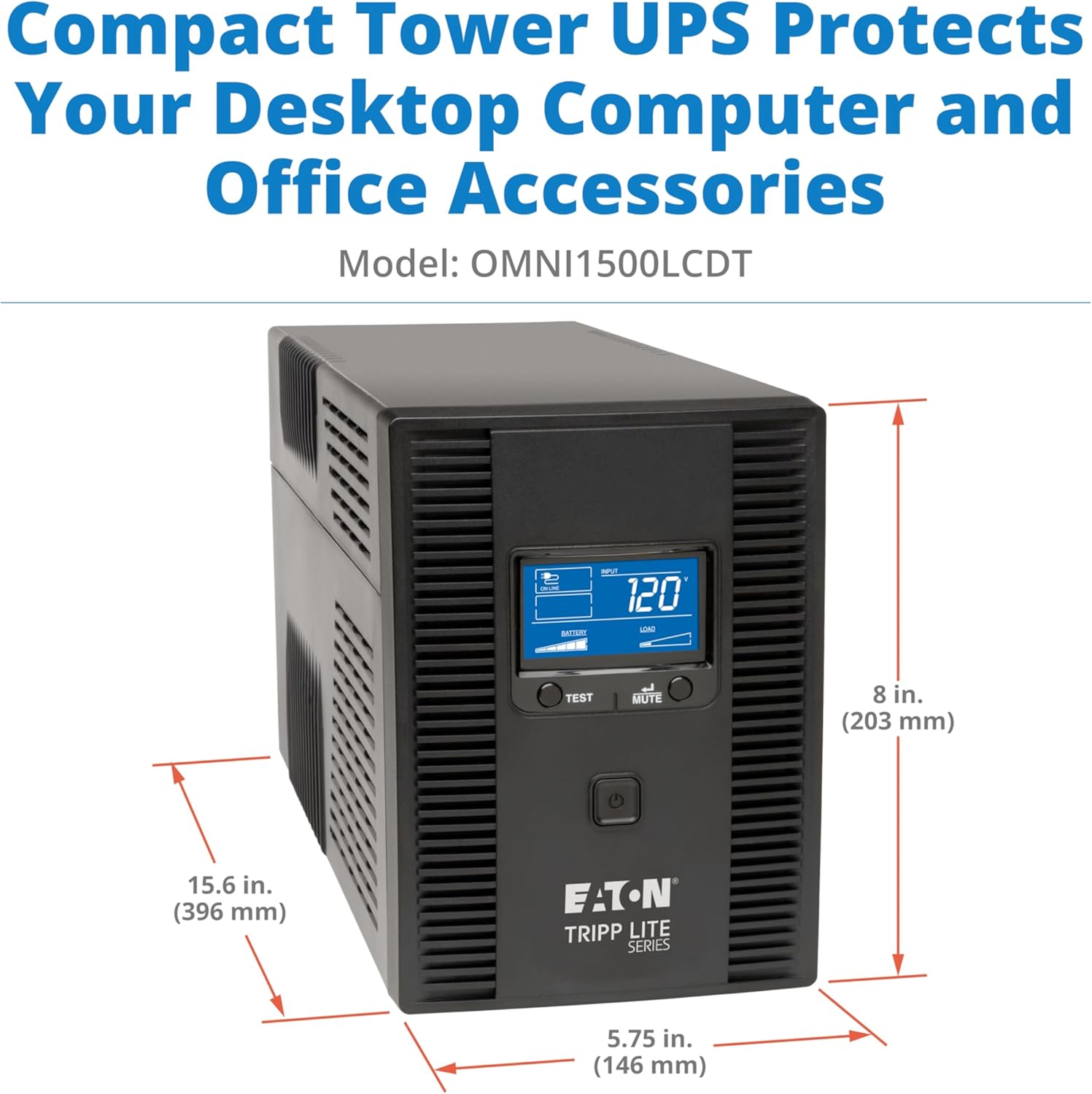
- അളവുകൾ (H x W x D): 8 x 5.75 x 15.6 ഇഞ്ച് (203 x 146 x 396 മിമി)
- ഭാരം: 24.6 പൗണ്ട് (11.16 കി.ഗ്രാം)
- പ്രവർത്തന താപനില: 32°F മുതൽ 104°F വരെ (0°C മുതൽ 40°C വരെ)
10. വാറൻ്റിയും പിന്തുണയും
10.1 ഉൽപ്പന്ന വാറന്റി
The Eaton Tripp Lite OMNI1500LCDT UPS is protected by a 3 വർഷത്തെ പരിമിത നിർമ്മാതാവിന്റെ വാറന്റി. സാധാരണ ഉപയോഗത്തിലുള്ള മെറ്റീരിയലുകളിലെയും നിർമ്മാണത്തിലെയും വൈകല്യങ്ങൾ ഈ വാറന്റി ഉൾക്കൊള്ളുന്നു. വാറന്റി ക്ലെയിമുകൾക്കായി നിങ്ങളുടെ വാങ്ങലിന്റെ തെളിവ് സൂക്ഷിക്കുക.
10.2 Connected Equipment Insurance
ഈ ഉൽപ്പന്നത്തിൽ ഒരു ഉൾപ്പെടുന്നു $250,000 Ultimate Connected Equipment Insurance policy. This policy provides coverage for equipment damaged by power surges while properly connected to the UPS. Refer to the warranty documentation included with your product for full terms and conditions.
10.3 സാങ്കേതിക പിന്തുണ
For technical assistance, troubleshooting, or warranty inquiries, please contact Eaton's expert technical team. Support is available via phone, web, or email. Visit the official Tripp Lite by Eaton webബന്ധപ്പെടാനുള്ള വിവരങ്ങൾക്കും അധിക ഉറവിടങ്ങൾക്കുമായി സൈറ്റ്.


