1. ആമുഖം
This manual provides comprehensive instructions for the setup, operation, and maintenance of your Zenith ZB410MB Microban 4-Device Universal Remote Control. This remote is designed to control up to four different audio/video components, including TVs, VCRs/DVDs, Satellite receivers, and Cable boxes. It features Microban antimicrobial technology and oversized, rubberized buttons for enhanced usability.
2. ഉൽപ്പന്ന സവിശേഷതകൾ
- Controls up to 4 devices: TV, VCR/DVD, Satellite, and Cable.
- Integrated Microban antimicrobial technology for product protection.
- Oversized, rubberized 12mm buttons for improved tactile feedback and ease of use.
- HD Dot button for off-air digital use and select cable systems.
- Extensive code library for compatibility with over 400 TV manufacturers and major brands.
3. റിമോട്ട് കൺട്രോൾ ലേഔട്ട്
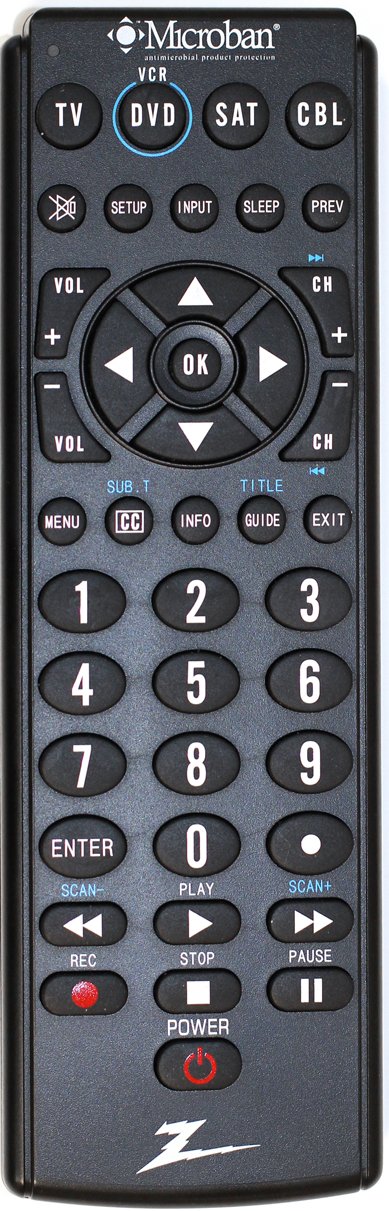
The image above displays the Zenith ZB410MB Microban 4-Device Universal Remote Control. It features a black casing with clearly labeled, large, rubberized buttons. The top section includes device selection buttons (TV, DVD, SAT, CBL) and function keys like SETUP, INPUT, SLEEP, and PREV. The central area contains navigation and OK buttons, flanked by Volume and Channel controls. Below this are numerical keys (0-9), MENU, CC, INFO, GUIDE, and EXIT buttons. The bottom section includes playback controls (SCAN-, PLAY, SCAN+, REC, STOP, PAUSE) and a POWER button.
കീ ബട്ടൺ പ്രവർത്തനങ്ങൾ:
- Device Select Buttons (TV, DVD, SAT, CBL): Press to select the device you wish to control.
- പവർ: തിരഞ്ഞെടുത്ത ഉപകരണം ഓൺ അല്ലെങ്കിൽ ഓഫ് ചെയ്യുന്നു.
- സജ്ജമാക്കുക: Used for programming the remote.
- ഇൻപുട്ട്: Selects video input sources on your TV.
- VOL (+/-): വോളിയം ക്രമീകരിക്കുന്നു.
- CH (+/-): ചാനലുകൾ മാറ്റുന്നു.
- ശരി / നാവിഗേഷൻ അമ്പടയാളങ്ങൾ: Confirms selections and navigates menus.
- മെനു: Accesses the menu of the selected device.
- CC (Closed Caption): Toggles closed captions.
- വിവരം: പ്രോഗ്രാം വിവരങ്ങൾ പ്രദർശിപ്പിക്കുന്നു.
- ഗൈഡ്: ഇലക്ട്രോണിക് പ്രോഗ്രാം ഗൈഡ് തുറക്കുന്നു.
- പുറത്ത്: Exits menus or guides.
- Number Pad (0-9, ENTER): നേരിട്ടുള്ള ചാനൽ എൻട്രിക്കും മറ്റ് സംഖ്യാ ഇൻപുട്ടുകൾക്കും.
- Playback Controls (REC, STOP, PLAY, PAUSE, SCAN-, SCAN+): Controls functions for VCRs/DVDs.
4. സജ്ജീകരണം
4.1. ബാറ്ററി ഇൻസ്റ്റാളേഷൻ
Your remote control requires two AAA batteries (not included).
- Remove the battery compartment cover on the back of the remote by sliding it downwards.
- കമ്പാർട്ടുമെന്റിനുള്ളിൽ സൂചിപ്പിച്ചിരിക്കുന്നതുപോലെ (+) ഉം (-) ഉം ടെർമിനലുകളുമായി പൊരുത്തപ്പെടുന്ന രണ്ട് AAA ബാറ്ററികൾ ഇടുക.
- ബാറ്ററി കമ്പാർട്ട്മെന്റ് കവർ ക്ലിക്ക് ചെയ്യുന്നതുവരെ തിരികെ സ്ഥലത്തേക്ക് സ്ലൈഡുചെയ്ത് മാറ്റിസ്ഥാപിക്കുക.
4.2. നിങ്ങളുടെ റിമോട്ട് പ്രോഗ്രാമിംഗ്
To control your devices, the remote must be programmed with the correct codes. Refer to the code list provided with your remote or available online for specific brand codes. If a code is not found, use the Code Search Method.
4.2.1. Code Entry Method
- നിങ്ങൾ പ്രോഗ്രാം ചെയ്യാൻ ആഗ്രഹിക്കുന്ന ഉപകരണം ഓണാക്കുക (ഉദാ: ടിവി, ഡിവിഡി പ്ലെയർ).
- അമർത്തിപ്പിടിക്കുക സജ്ജമാക്കുക button until the red indicator light illuminates.
- Press and release the device button you want to program (e.g., TV, ഡിവിഡി). The red indicator light will blink once and then remain lit.
- Enter the 3-digit code for your device's brand using the number pad.
- If the code is valid, the red indicator light will turn off. If the light blinks and stays on, the code is invalid; re-enter the code or try another code for your brand.
- ഉപകരണത്തിലേക്ക് റിമോട്ട് ചൂണ്ടി അമർത്തുക പവർ button. If the device turns off, the programming was successful. If not, repeat the steps with the next code listed for your brand.
4.2.2. Code Search Method
Use this method if you cannot find a code for your device or if the entered codes do not work.
- നിങ്ങൾ പ്രോഗ്രാം ചെയ്യാൻ ആഗ്രഹിക്കുന്ന ഉപകരണം ഓണാക്കുക.
- അമർത്തിപ്പിടിക്കുക സജ്ജമാക്കുക button until the red indicator light illuminates.
- Press and release the device button you want to program (e.g., TV, ഡിവിഡി). The red indicator light will blink once and then remain lit.
- അമർത്തുക പവർ button repeatedly (approximately every 2 seconds) until your device turns off. This may take several presses as the remote cycles through codes.
- ഉപകരണം ഓഫായിക്കഴിഞ്ഞാൽ, ഉടൻ അമർത്തുക പ്രവേശിക്കുക button to save the code. The red indicator light will turn off.
- Test the remote's functions (e.g., volume, channel). If all functions work, programming is complete. If not, repeat the process, as you may have passed the correct code.
5. പ്രവർത്തന നിർദ്ദേശങ്ങൾ
5.1. Device Selection
Before operating any device, you must select the correct device mode on the remote. Press the corresponding device button (TV, ഡിവിഡി, SAT, അല്ലെങ്കിൽ സിബിഎൽ) once. The red indicator light will flash once to confirm the selection.
5.2. അടിസ്ഥാന പ്രവർത്തനങ്ങൾ
- പവർ ഓൺ/ഓഫ്: അമർത്തുക പവർ button to turn the selected device on or off.
- വോളിയം നിയന്ത്രണം: ഉപയോഗിക്കുക VOL+ ഒപ്പം വോളിയം - വോളിയം കൂട്ടാനോ കുറയ്ക്കാനോ ഉള്ള ബട്ടണുകൾ.
- ചാനൽ മാറ്റം: ഉപയോഗിക്കുക CH + ഒപ്പം CH - buttons to change channels sequentially. For direct channel entry, use the number pad.
5.3. പ്രത്യേക പ്രവർത്തനങ്ങൾ
- മെനു നാവിഗേഷൻ: അമർത്തുക മെനു to access the device's on-screen menu. Use the navigation arrows and OK button to move through and select options.
- വഴികാട്ടി: അമർത്തുക ഗൈഡ് to display the electronic program guide (if supported by your device).
- വിവരങ്ങൾ: അമർത്തുക വിവരം വരെ view details about the current program or selected item.
- അടഞ്ഞ അടിക്കുറിപ്പ്: അമർത്തുക CC to activate or deactivate closed captions.
- പ്ലേബാക്ക് നിയന്ത്രണങ്ങൾ: When in DVD/VCR mode, use കളിക്കുക, താൽക്കാലികമായി നിർത്തുക, നിർത്തുക, REC, SCAN- (റിവൈൻഡ്), കൂടാതെ SCAN+ (fast forward) for media playback.
6. പരിപാലനം
- വൃത്തിയാക്കൽ: Wipe the remote control with a soft, dry cloth. Do not use abrasive cleaners or solvents. The Microban technology is integrated into the product and does not require special cleaning for its antimicrobial properties.
- ബാറ്ററി മാറ്റിസ്ഥാപിക്കൽ: Replace batteries when the remote's range decreases or the indicator light fails to illuminate consistently. Always replace both batteries simultaneously with new AAA batteries.
- സംഭരണം: Store the remote in a dry place away from extreme temperatures.
7. പ്രശ്നപരിഹാരം
| പ്രശ്നം | സാധ്യമായ കാരണം | പരിഹാരം |
|---|---|---|
| ഉപകരണം റിമോട്ട് പ്രവർത്തിപ്പിക്കുന്നില്ല. | Incorrect device mode selected. Batteries are low or dead. Remote not programmed correctly. Obstruction between remote and device. | Press the correct device button (TV, DVD, SAT, CBL). Replace batteries. Reprogram the remote using Code Entry or Code Search. Ensure a clear line of sight. |
| ചില ബട്ടണുകൾ പ്രവർത്തിക്കുന്നില്ല. | Remote not fully compatible with all device functions. Incorrect code programmed. | Try other codes for your device brand. Some advanced functions may not be supported by universal remotes. |
| Red indicator light does not illuminate. | ബാറ്ററികൾ കുറവാണ് അല്ലെങ്കിൽ തീർന്നിരിക്കുന്നു. | ബാറ്ററികൾ മാറ്റിസ്ഥാപിക്കുക. |
| Device turns off during Code Search before I can press ENTER. | You pressed the POWER button too slowly. | Repeat the Code Search method, pressing the POWER button more quickly once the device turns off. |
8 സ്പെസിഫിക്കേഷനുകൾ
- മോഡൽ: ZB410MB
- ബ്രാൻഡ്: സെനിത്ത്
- പിന്തുണയ്ക്കുന്ന ഉപകരണങ്ങൾ: 4 (TV, VCR/DVD, Satellite, Cable)
- അളവുകൾ: 1.38 x 4.33 x 10.91 ഇഞ്ച്
- ഇനത്തിൻ്റെ ഭാരം: 5.9 ഔൺസ്
- ബാറ്ററികൾ: 2 x AAA (ഉൾപ്പെടുത്തിയിട്ടില്ല)
- പ്രത്യേക സവിശേഷത: Microban Antimicrobial Technology
- നിറം: കറുപ്പ്
9. വാറൻ്റിയും പിന്തുണയും
For warranty information or technical support, please refer to the documentation included with your purchase or contact Zenith customer service. Specific warranty terms may vary by region and retailer.


