പ്രധാനപ്പെട്ട സുരക്ഷാ മുന്നറിയിപ്പുകൾ
മുന്നറിയിപ്പ്: To reduce the risk of injury, always observe the following safety precautions.
- Do not touch the cutting element while the tool is in operation.
- Ensure the tool is properly grounded or double-insulated.
- Keep hands and body parts away from the cutting area.
- Disconnect the tool from the power supply when not in use or during maintenance.
- Always wear appropriate personal protective equipment, including eye protection, long trousers, and sturdy footwear.
- Keep bystanders, especially children and pets, at a safe distance (at least 15 meters) from the operating area.
- Inspect the area for debris before starting.
ഉൽപ്പന്നം കഴിഞ്ഞുview
The BLACK+DECKER GL8033-QS is an 800W corded grass trimmer designed for efficient lawn and garden maintenance. It features a 33cm cutting width and a powerful motor positioned at the top for improved ergonomics.
- 800W മോട്ടോർ: Top-mounted for enhanced balance and ergonomic use.
- E-Drive Gear System: Provides consistent cutting efficiency across various grass types.
- 180° പിവറ്റിംഗ് ഹെഡ്: Allows for easy conversion between trimming and edging functions.
- ക്രമീകരിക്കാവുന്ന ഹാൻഡിൽ: Second handle adjustable to 5 positions for user comfort and control.
- Integrated Cable Retention: Prevents accidental disconnection of the power cable.
- Guide Wheel: Assists in precise edging along flowerbeds and pathways.
- കട്ടിംഗ് വേഗത: 7000 rpm for effective grass cutting.

ചിത്രം 1: ഓവർview of the BLACK+DECKER GL8033-QS Corded Grass Trimmer.
സജ്ജീകരണ നിർദ്ദേശങ്ങൾ
1. അസംബ്ലി
The trimmer requires minimal assembly. Carefully remove all components from the packaging.
- ഗാർഡിനെ അറ്റാച്ചുചെയ്യുക: നൽകിയിരിക്കുന്ന ഫാസ്റ്റനറുകൾ ഉപയോഗിച്ച് സേഫ്റ്റി ഗാർഡ് ട്രിമ്മർ ഹെഡിൽ ഉറപ്പിക്കുക. അവശിഷ്ടങ്ങളിൽ നിന്ന് സംരക്ഷിക്കാൻ അത് ദൃഢമായി സ്ഥാപിച്ചിട്ടുണ്ടെന്ന് ഉറപ്പാക്കുക.
- ഷാഫ്റ്റ് കൂട്ടിച്ചേർക്കുക: Connect the two sections of the shaft. Ensure the curved pole is oriented correctly. Tighten any screws or clampകണക്ഷൻ സുരക്ഷിതമാക്കാൻ s.
- Install the Second Handle: Slide the adjustable second handle onto the shaft. Position it for comfortable operation and tighten the locking mechanism.

Figure 2: Ensure the cable retainer is properly attached to manage the power cord.
2. ക്രമീകരണങ്ങൾ
- ക്രമീകരണം കൈകാര്യം ചെയ്യുക: The second handle can be adjusted to 5 different positions. Loosen the adjustment knob, move the handle to your desired position for balance and comfort, then retighten the knob.
- Telescopic Shaft Adjustment: Adjust the length of the telescopic shaft to suit your height for optimal posture during operation.
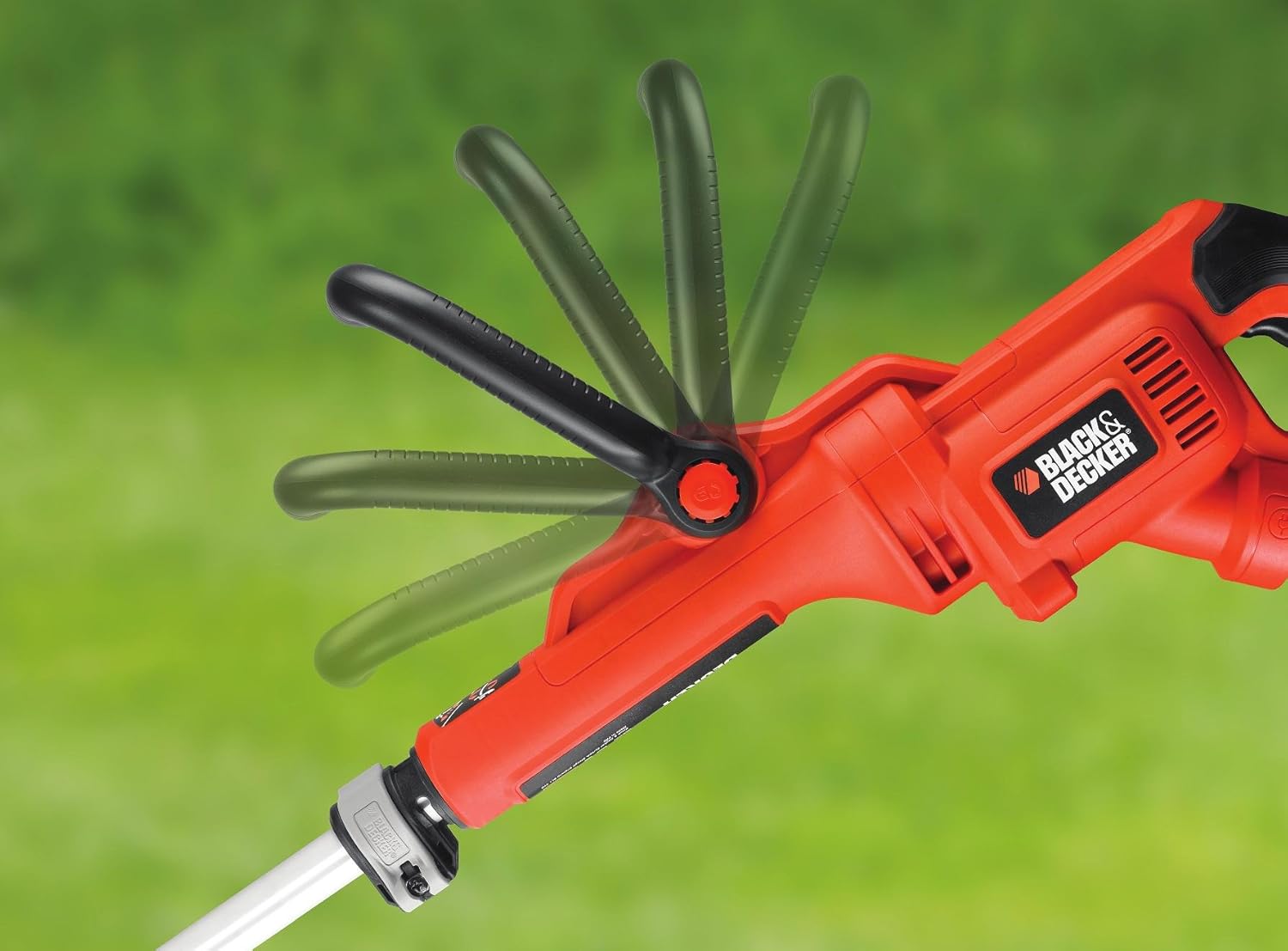
Figure 3: The secondary handle can be adjusted for ergonomic comfort.
പ്രവർത്തന നിർദ്ദേശങ്ങൾ
1. ആരംഭിക്കുന്നതും നിർത്തുന്നതും
- പവർ ബന്ധിപ്പിക്കുക: Plug the trimmer into a suitable power outlet. Use an outdoor-rated extension cord if necessary, ensuring it is secured by the integrated cable retention feature.
- ആരംഭിക്കുക: Press the safety lock-off button and then squeeze the trigger switch to start the trimmer.
- നിർത്തുക: Release the trigger switch to stop the trimmer. Always unplug the tool after use.
2. പുല്ല് വെട്ടിമാറ്റൽ
Hold the trimmer firmly with both hands. Maintain a comfortable distance from the cutting head.
- Move the trimmer slowly and steadily across the area to be cut.
- Avoid hitting hard objects like stones, fences, or walls, as this can damage the cutting line and the tool.
- For best results, cut tall grass in stages, starting from the top.

ചിത്രം 4: പൊതുവായ പുല്ല് മുറിക്കലിനായി ട്രിമ്മർ പ്രവർത്തിപ്പിക്കുന്നു.

Figure 5: The cutting head efficiently trims grass.
3. എഡ്ജിംഗ് ഫംഗ്ഷൻ
The trimmer head can pivot 180° to convert into an edger.
- Pivot Head: Release the locking mechanism near the trimmer head and rotate the head 180° until it locks into the edging position.
- Use Guide Wheel: Engage the guide wheel (if applicable) to assist in maintaining a straight line along edges of paths or flowerbeds.
- അരികുകൾ: Walk slowly, guiding the trimmer along the edge. The guide wheel helps maintain a consistent cutting depth.

Figure 6: The trimmer head pivots 180 degrees for precise edging.

Figure 7: The guide wheel assists in maintaining a straight line during edging.
4. Automatic Line Feed
This trimmer features an automatic line feed system. The cutting line will automatically extend as it wears down. If the line does not feed, briefly tap the trimmer head on the ground while the motor is running to advance the line.
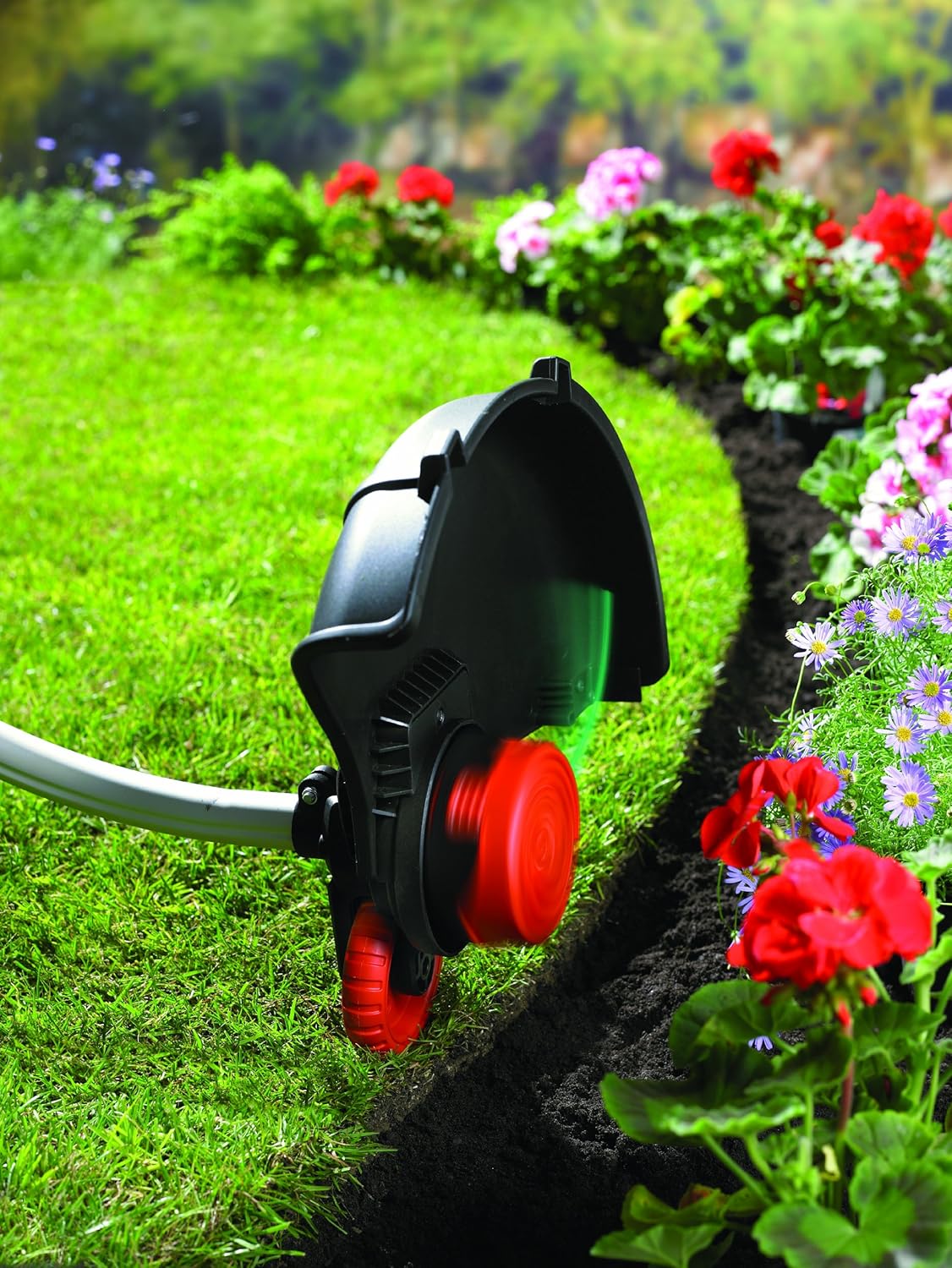
Figure 8: The automatic line feed system ensures continuous cutting.
മെയിൻ്റനൻസ്
Regular maintenance ensures optimal performance and extends the life of your trimmer. Always unplug the tool before performing any maintenance.
1. ലൈൻ മാറ്റിസ്ഥാപിക്കൽ
When the cutting line runs out, it needs to be replaced.
- വൈദ്യുതി വിതരണത്തിൽ നിന്ന് ട്രിമ്മർ വിച്ഛേദിക്കുക.
- Remove the spool cap and the empty spool from the trimmer head.
- Insert a new pre-wound spool or manually wind new line onto the existing spool according to the instructions provided with the replacement line. Ensure the line is properly secured and extends through the eyelets.
- സ്പൂൾ ക്യാപ്പ് മാറ്റി സ്ഥാപിക്കുക, അത് സ്ഥലത്ത് ക്ലിക്കുകൾ ചെയ്യുന്നുണ്ടെന്ന് ഉറപ്പാക്കുക.
2. വൃത്തിയാക്കൽ
- After each use, clean the trimmer housing with a damp തുണി. കഠിനമായ രാസവസ്തുക്കളോ ഉരച്ചിലുകളുള്ള ക്ലീനറുകളോ ഉപയോഗിക്കരുത്.
- Remove any grass clippings or debris from the cutting head and guard to prevent buildup and ensure proper function.
- വെൻ്റിലേഷൻ ഓപ്പണിംഗുകൾ തടസ്സങ്ങളിൽ നിന്ന് വ്യക്തമാണെന്ന് ഉറപ്പാക്കുക.
3. സംഭരണം
- ട്രിമ്മർ കുട്ടികൾക്ക് ലഭ്യമാകാതെ, വരണ്ടതും സുരക്ഷിതവുമായ സ്ഥലത്ത് സൂക്ഷിക്കുക.
- സംഭരണ സമയത്ത് പവർ കോർഡ് കേടുപാടുകളിൽ നിന്ന് സംരക്ഷിക്കുക.
ട്രബിൾഷൂട്ടിംഗ്
| പ്രശ്നം | സാധ്യമായ കാരണം | പരിഹാരം |
|---|---|---|
| ട്രിമ്മർ ആരംഭിക്കുന്നില്ല. | വൈദ്യുതി വിതരണം ഇല്ല. Safety lock-off not engaged. | പവർ കണക്ഷനും സർക്യൂട്ട് ബ്രേക്കറും പരിശോധിക്കുക. Ensure safety lock-off button is pressed before squeezing the trigger. |
| Cutting line does not feed automatically. | ലൈൻ കുഴഞ്ഞിരിക്കുന്നു അല്ലെങ്കിൽ ശൂന്യമാണ്. Spool cap not properly seated. | Disconnect power, remove spool cap, untangle line or replace spool. Ensure spool cap is securely fastened. |
| Motor runs but line does not cut. | Line is too short or broken. Line is worn out. | Advance the line by tapping the head or replace the spool. |
| അമിതമായ വൈബ്രേഷൻ. | കേടായ കട്ടിംഗ് ഹെഡ് അല്ലെങ്കിൽ അസന്തുലിതമായ ലൈൻ. | Disconnect power, inspect cutting head for damage. Replace line if unevenly worn. |
സാങ്കേതിക സവിശേഷതകൾ
| മോഡൽ നമ്പർ | ജിഎൽ8033-ക്യുഎസ് |
| ശക്തി | 800 വാട്ട്സ് |
| കട്ടിംഗ് വീതി | 33 സെ.മീ |
| വാല്യംtage | 230 വോൾട്ട് |
| വേഗത | 7000 ആർപിഎം |
| ഭാരം | 3.73 കിലോഗ്രാം |
| ചരട് നീളം | 2 മീറ്റർ |
| അളവുകൾ (L x W x H) | 14.2 x 12.8 x 29.5 സെ.മീ |
| പവർ ഉറവിടം | കോർഡഡ് ഇലക്ട്രിക് |
| നിർമ്മാതാവ് | ബ്ലാക്ക്+ഡെക്കർ |
| മാതൃരാജ്യം | ചൈന |
വാറൻ്റി വിവരങ്ങൾ
BLACK+DECKER products are manufactured to high-quality standards and are guaranteed for a period of 24 months from the date of purchase against faulty materials or workmanship. This guarantee does not affect your statutory rights. For full terms and conditions, please refer to the official BLACK+DECKER webസൈറ്റ് അല്ലെങ്കിൽ ഉപഭോക്തൃ പിന്തുണയുമായി ബന്ധപ്പെടുക.
ഉപഭോക്തൃ പിന്തുണ
Should you have any questions about your BLACK+DECKER GL8033-QS Corded Grass Trimmer, require technical assistance, or need to order replacement parts, please visit the official BLACK+DECKER webസൈറ്റ് അല്ലെങ്കിൽ അവരുടെ ഉപഭോക്തൃ സേവന വിഭാഗവുമായി ബന്ധപ്പെടുക.
- Webസൈറ്റ്: www.blackanddecker.com
- ബന്ധപ്പെടാനുള്ള വിവരങ്ങൾ: നിങ്ങളുടെ പ്രാദേശിക BLACK+DECKER നെ റഫർ ചെയ്യുക webപ്രാദേശിക കോൺടാക്റ്റ് നമ്പറുകൾക്കും പിന്തുണ ഓപ്ഷനുകൾക്കുമുള്ള സൈറ്റ്.