1. ഉൽപ്പന്നം കഴിഞ്ഞുview
The Mount-It! MI-6524 is a compact and durable wall mount designed for small to medium-sized LCD/LED screens. It features a slim, low-profile design and a tilting mechanism for optimal viewing angles. This mount is suitable for various environments including bedrooms, offices, living rooms, and RVs.
പ്രധാന സവിശേഷതകൾ:
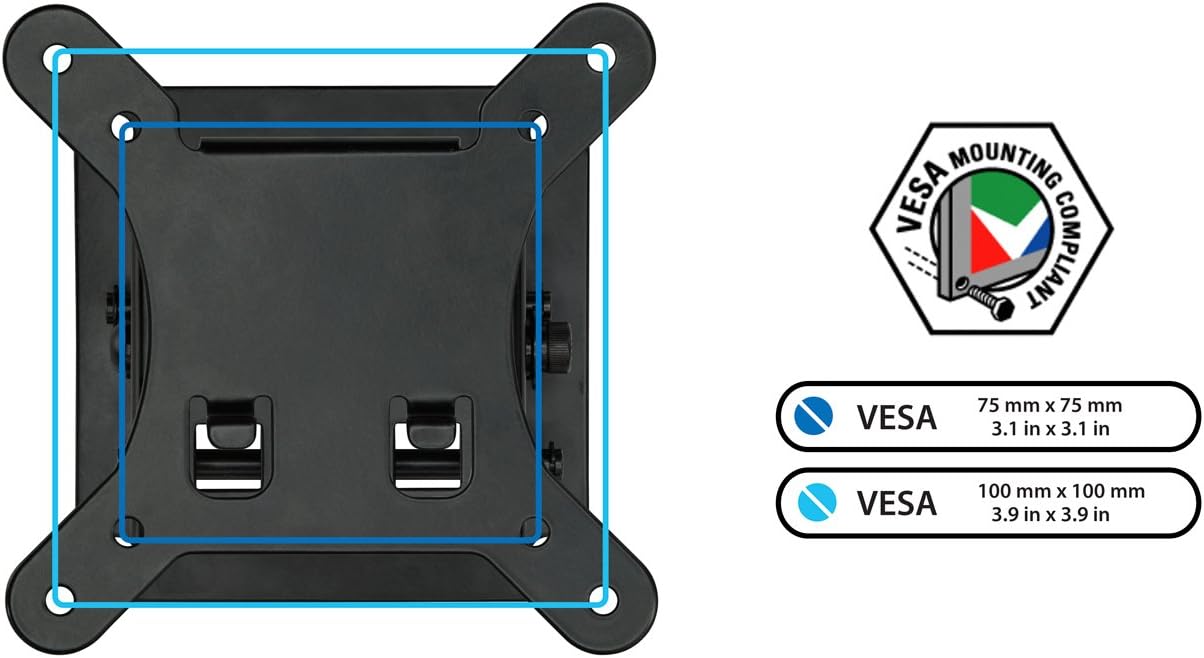
- സാർവത്രിക അനുയോജ്യത: Supports LED/LCD screens from 13 to 32 inches, with a maximum weight capacity of 33 lbs. Compatible with VESA 75x75mm and 100x100mm bolt patterns.
- ദ്രുത റിലീസ് സംവിധാനം: Allows for easy installation and removal of the TV bracket from the wall plate.
- Slim Tilting Design: Positions the screen 1.75 inches from the wall and offers a tilt range of +5 degrees upward to -15 degrees downward.
- എളുപ്പമുള്ള ഇൻസ്റ്റാളേഷൻ: Includes all necessary mounting hardware, tools, and instructions.

2 സുരക്ഷാ വിവരങ്ങൾ
Please read all instructions carefully before installation. If you have any questions, consult a qualified installer. Incorrect installation may result in property damage or personal injury.
- പരമാവധി ഭാര ശേഷി 33 പൗണ്ട് (15 കിലോഗ്രാം) കവിയരുത്.
- മൗണ്ടിംഗ് ഉപരിതലത്തിന് മൗണ്ടിന്റെയും ഡിസ്പ്ലേയുടെയും സംയുക്ത ഭാരം സുരക്ഷിതമായി താങ്ങാൻ കഴിയുമെന്ന് ഉറപ്പാക്കുക.
- Use only the provided mounting hardware or hardware specified in this manual.
- Always use a stud finder to locate wood studs or ensure you are mounting into solid brick/concrete.
- ഇൻസ്റ്റാളേഷൻ സമയത്ത് കുട്ടികളെയും വളർത്തുമൃഗങ്ങളെയും അകറ്റി നിർത്തുക.
3. പാക്കേജ് ഉള്ളടക്കം
Verify that all components are present and undamaged before proceeding with installation. If any parts are missing or defective, contact Mount-It! customer support.
- വാൾ പ്ലേറ്റ് അസംബ്ലി
- TV/Monitor Bracket
- മൗണ്ടിംഗ് ഹാർഡ്വെയർ കിറ്റ് (സ്ക്രൂകൾ, ആങ്കറുകൾ, വാഷറുകൾ)
- ഇൻസ്ട്രക്ഷൻ മാനുവൽ
4. ഇൻസ്റ്റാളേഷൻ ഗൈഡ്
4.1 പ്രീ-ഇൻസ്റ്റലേഷൻ ചെക്ക്ലിസ്റ്റ്
- ഡിസ്പ്ലേ അനുയോജ്യത: Ensure your TV/monitor screen size is between 13 and 32 inches and weighs no more than 33 lbs.
- VESA പാറ്റേൺ: Check the VESA mounting holes on the back of your display. This mount supports VESA 75x75mm and 100x100mm patterns.
- ചുമർ തരം: This mount is designed for installation on solid brick/concrete walls or single wood studs.

4.2 ആവശ്യമായ ഉപകരണങ്ങൾ (ഉൾപ്പെടുത്തിയിട്ടില്ല)
- പെൻസിൽ
- ഡ്രിൽ
- ഫിലിപ്സ് ഹെഡ് സ്ക്രൂഡ്രൈവർ
- ലെവൽ
- സ്റ്റഡ് ഫൈൻഡർ (വുഡ് സ്റ്റഡ് ഇൻസ്റ്റാളേഷനായി)
4.3 ഘട്ടം ഘട്ടമായുള്ള ഇൻസ്റ്റാളേഷൻ
Follow these steps to securely install your wall mount:
- Attach TV Bracket to Display: Align the TV/Monitor Bracket with the VESA mounting holes on the back of your display. Use the appropriate screws and washers from the hardware kit to secure the bracket. Ensure it is tightly fastened.
- ഡ്രിൽ ഹോളുകൾ അടയാളപ്പെടുത്തുക: Hold the Wall Plate Assembly against the wall at your desired mounting height. Use a level to ensure it is perfectly horizontal. Mark the four mounting holes with a pencil.
- ഡ്രിൽ പൈലറ്റ് ദ്വാരങ്ങൾ: For wood stud installation, drill pilot holes into the center of the stud. For brick or concrete walls, drill holes and insert wall anchors (if provided and necessary for your wall type).
- മൗണ്ട് വാൾ പ്ലേറ്റ്: Secure the Wall Plate Assembly to the wall using the provided screws. Ensure it is firmly attached and stable.
- ഹാംഗ് ഡിസ്പ്ലേ: Carefully lift your TV/monitor (with the attached TV bracket) and align the hooks on the TV bracket with the slots on the Wall Plate Assembly. Gently lower the display until it locks into place.
- സുരക്ഷിത ഡിസ്പ്ലേ: Locate the security screws on the bottom of the TV bracket. Tighten these screws to prevent accidental dislodging of the display from the wall plate.

For a visual guide to installation and features, please watch the official product video:
5. ഓപ്പറേഷൻ
5.1 ടിൽറ്റിംഗ് ക്രമീകരണം
The MI-6524 mount allows for vertical tilt adjustment to achieve the best viewing angle. The tilt range is +5 degrees upward and -15 degrees downward.
- To adjust the tilt, loosen the tilt adjustment knob located on the side of the wall plate.
- Carefully tilt the display to the desired angle.
- Tighten the tilt adjustment knob to secure the display in position.

5.2 ക്വിക്ക് റിലീസ് ഫംഗ്ഷൻ
The quick release feature allows for easy detachment of the display from the wall plate for maintenance or repositioning.
- Ensure the display is powered off and all cables are disconnected.
- Loosen the security screws at the bottom of the TV bracket.
- Carefully lift the display upwards to disengage it from the wall plate.
6. പരിപാലനം
പതിവ് അറ്റകുറ്റപ്പണികൾ നിങ്ങളുടെ വാൾ മൗണ്ടിന്റെ ദീർഘായുസ്സും സുരക്ഷിതമായ പ്രവർത്തനവും ഉറപ്പാക്കുന്നു.
- വൃത്തിയാക്കൽ: മൃദുവായതും ഉണങ്ങിയതുമായ തുണി ഉപയോഗിച്ച് മൗണ്ട് തുടയ്ക്കുക. ഉരച്ചിലുകൾ ഉള്ള ക്ലീനറുകളോ ലായകങ്ങളോ ഉപയോഗിക്കുന്നത് ഒഴിവാക്കുക.
- ആനുകാലിക പരിശോധനകൾ: എല്ലാ സ്ക്രൂകളും കണക്ഷനുകളും ഇറുകിയതും സുരക്ഷിതവുമാണെന്ന് ഉറപ്പാക്കാൻ ഇടയ്ക്കിടെ പരിശോധിക്കുക. ആവശ്യമെങ്കിൽ വീണ്ടും മുറുക്കുക.
- നാശനഷ്ട പരിശോധന: Inspect the mount for any signs of damage or wear. If damage is found, discontinue use and contact customer support.
7. പ്രശ്നപരിഹാരം
ഇൻസ്റ്റാളേഷൻ സമയത്തോ അതിനുശേഷമോ എന്തെങ്കിലും പ്രശ്നങ്ങൾ നേരിടുകയാണെങ്കിൽ, ഇനിപ്പറയുന്ന പൊതുവായ ട്രബിൾഷൂട്ടിംഗ് നുറുങ്ങുകൾ പരിശോധിക്കുക:
- ഡിസ്പ്ലേ ലെവൽ അല്ല: Ensure the wall plate was installed level. If not, minor adjustments can sometimes be made by slightly loosening and re-tightening mounting screws, or by shimming if necessary.
- Difficulty Attaching Display to Wall Plate: Ensure the TV bracket is correctly aligned with the wall plate slots. It may require careful maneuvering, especially with larger displays. Ensure no cables are obstructing the connection.
- മൗണ്ട് അസ്ഥിരമായി തോന്നുന്നു: Double-check all mounting screws on both the wall plate and the TV bracket. Ensure they are fully tightened and that the wall anchors (if used) are properly seated. Verify the wall type is appropriate for the installation method used.
8 സ്പെസിഫിക്കേഷനുകൾ
| ഫീച്ചർ | സ്പെസിഫിക്കേഷൻ |
|---|---|
| ഉൽപ്പന്ന അളവുകൾ | 5.6 x 5.5 x 2.7 ഇഞ്ച് |
| ഇനത്തിൻ്റെ ഭാരം | 1.15 പൗണ്ട് |
| ഇനം മോഡൽ നമ്പർ | MI-6524 |
| മൗണ്ടിംഗ് തരം | മതിൽ മൗണ്ട് |
| ചലന തരം | ചരിവ് |
| ബ്രാൻഡ് | Mount-It! |
| മെറ്റീരിയൽ | അലോയ് സ്റ്റീൽ |
| നിറം | കറുപ്പ് |
| അനുയോജ്യമായ ഉപകരണങ്ങൾ | ടെലിവിഷൻ |
| പരമാവധി ടിൽറ്റ് ആംഗിൾ | 15 ഡിഗ്രി |
| VESA അനുയോജ്യത | 75x75mm, 100x100mm |
| സ്ക്രീൻ വലിപ്പം അനുയോജ്യത | 13-32 ഇഞ്ച് |
| പരമാവധി ഭാരം ശേഷി | 33 പൗണ്ട് |

9. വാറൻ്റിയും പിന്തുണയും
Mount-It! provides a ലൈഫ് ടൈം വാറൻ്റി for this product. Our friendly and responsive customer support team is available to answer any questions you may have during normal business hours.
For assistance, please visit the official Mount-It! webസൈറ്റ് അല്ലെങ്കിൽ അവരുടെ ഉപഭോക്തൃ സേവനവുമായി നേരിട്ട് ബന്ധപ്പെടുക.


