1. ആമുഖം
This manual provides detailed instructions for the safe and effective operation of the Lutron FC-2500A Frequency Counter. The FC-2500A is a precision instrument designed for accurate frequency measurement in various industrial and scientific applications. Please read this manual thoroughly before using the device to ensure proper functionality and to prevent damage.
2 സുരക്ഷാ വിവരങ്ങൾ
To ensure safe operation and to avoid personal injury or damage to the instrument, please observe the following safety precautions:
- ഉപകരണം പ്രവർത്തിപ്പിക്കുന്നതിന് മുമ്പ് എല്ലാ നിർദ്ദേശങ്ങളും എപ്പോഴും വായിച്ച് മനസ്സിലാക്കുക.
- വെറ്റ് അല്ലെങ്കിൽ ഡിയിൽ ഉപകരണം പ്രവർത്തിപ്പിക്കരുത്amp വ്യവസ്ഥകൾ.
- Ensure proper battery installation and replacement. Use only the specified battery type.
- ഉപകരണത്തെ തീവ്രമായ താപനില, നേരിട്ടുള്ള സൂര്യപ്രകാശം അല്ലെങ്കിൽ ശക്തമായ വൈബ്രേഷനുകൾ എന്നിവയിൽ ഏൽപ്പിക്കുന്നത് ഒഴിവാക്കുക.
- ഉപകരണം തുറക്കാനോ പരിഷ്ക്കരിക്കാനോ ശ്രമിക്കരുത്. എല്ലാ സേവനങ്ങളും യോഗ്യതയുള്ള ഉദ്യോഗസ്ഥർക്ക് റഫർ ചെയ്യുക.
3. ഉൽപ്പന്നം കഴിഞ്ഞുview
3.1 വിവരണം
The Lutron FC-2500A is a versatile frequency counter manufactured by Lutron Electronic Enterprise Co., Ltd., a recognized leader in test and measurement instruments. This device is engineered for precise frequency measurements across a broad range, making it suitable for various professional applications.
3.2 പ്രധാന സവിശേഷതകൾ
- ഭാരം: Approximately 340 g (0.75 lb) including batteries.
- അളവുകൾ: 173 x 80 x 35 mm (6.8 x 3.1 x 1.4 inches).
- Wide frequency measurement range.
- Multiple input channels for different frequency ranges.
- Adjustable gate time and sensitivity.
- Data hold, record, and recall functions.
- Relative measurement and resolution adjustment capabilities.
3.3 ഘടകങ്ങൾ
The standard package for the Lutron FC-2500A Frequency Counter includes:
- 1 x FC-2500A Frequency Counter unit.
- User Manual (this document).
Note: Additional accessories such as probes, antennas, and batteries may be sold separately.
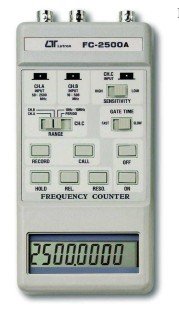
ചിത്രം 1: Front panel of the Lutron FC-2500A Frequency Counter. This image displays the front panel of the FC-2500A, highlighting the digital display, BNC input connectors for different frequency ranges (CHA, CHB, CH.C), and various control buttons for range selection, sensitivity, gate time, record, call, hold, relative measurement, resolution, and power (ON/OFF).
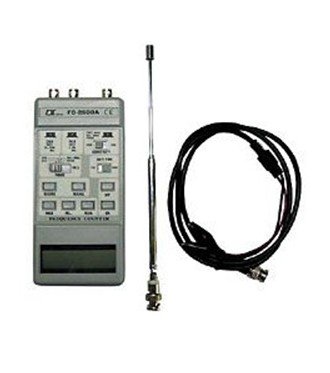
ചിത്രം 2: Lutron FC-2500A Frequency Counter with accessories. This image shows the FC-2500A unit alongside its typical accessories, including a telescopic antenna for signal reception and a BNC coaxial cable for direct signal input.
4. സജ്ജീകരണം
4.1 ബാറ്ററി ഇൻസ്റ്റാളേഷൻ
The FC-2500A requires four (4) 1.5V AA batteries for operation. To install or replace batteries:
- യൂണിറ്റിന്റെ പിൻഭാഗത്ത് ബാറ്ററി കമ്പാർട്ട്മെന്റ് കവർ കണ്ടെത്തുക.
- കമ്പാർട്ട്മെന്റ് തുറക്കാൻ കവർ സ്ലൈഡ് ചെയ്യുകയോ അൺക്ലിപ്പ് ചെയ്യുകയോ ചെയ്യുക.
- Insert four AA batteries, ensuring correct polarity (+ and - terminals match the markings inside the compartment).
- ബാറ്ററി കമ്പാർട്ട്മെന്റ് കവർ സുരക്ഷിതമായി മാറ്റിസ്ഥാപിക്കുക.
Note: Batteries are not included with the device.
4.2 Connecting Probes or Antenna
Connect the appropriate probe, antenna, or BNC cable to the input jacks (CHA, CHB, CH.C) on the top of the unit. Select the input based on the frequency range and signal type you intend to measure.
- CHA Input: Typically for higher frequency ranges (e.g., 50 MHz to 2.5 GHz).
- CHB Input: Typically for mid-range frequencies (e.g., 10 MHz to 100 MHz).
- CH.C Input: Typically for lower frequencies or specific applications.
5. പ്രവർത്തന നിർദ്ദേശങ്ങൾ
5.1 പവർ ഓൺ/ഓഫ്
Press the 'ON' button to power on the device. The LCD will illuminate and display a reading. To power off the device, press the 'OFF' button.
5.2 Input and Range Selection
- Select the appropriate input channel (CHA, CHB, or CH.C) using the dedicated input selection buttons, corresponding to the expected frequency range of your signal.
- Use the 'RANGE' buttons to fine-tune the measurement range for optimal accuracy.
5.3 സെൻസിറ്റിവിറ്റി അഡ്ജസ്റ്റ്മെന്റ്
Adjust the 'SENSITIVITY' switch (HIGH/LOW) to optimize signal reception. Use 'HIGH' for weaker signals and 'LOW' for stronger signals to prevent false triggering or unstable readings.
5.4 Gate Time Selection
Select 'FAST' or 'SLOW' gate time using the 'GATE TIME' switch. A longer gate time ('SLOW') generally provides higher resolution and accuracy but takes longer to update the display. 'FAST' provides quicker updates with potentially lower resolution.
5.5 അളവുകൾ എടുക്കൽ
Once the input, range, sensitivity, and gate time are configured, the frequency of the input signal will be displayed on the LCD. Ensure the probe or antenna is correctly positioned to receive the signal.
5.6 പ്രത്യേക പ്രവർത്തനങ്ങൾ
- ഹോൾഡ്: ഡിസ്പ്ലേയിലെ നിലവിലെ റീഡിംഗ് ഫ്രീസ് ചെയ്യാൻ 'ഹോൾഡ്' ബട്ടൺ അമർത്തുക. റിലീസ് ചെയ്യാൻ വീണ്ടും അമർത്തുക.
- RECORD/CALL: Use the 'RECORD' button to store readings in memory. Press 'CALL' to recall stored data.
- REL (Relative Measurement): Press 'REL' to measure the difference between the current reading and a stored reference value.
- RESO. (Resolution): Adjust the display resolution using the 'RESO.' button to show more or fewer decimal places.
6. പരിപാലനം
6.1 വൃത്തിയാക്കൽ
Clean the device with a soft, dry cloth. Do not use abrasive cleaners, solvents, or harsh chemicals, as these can damage the casing അല്ലെങ്കിൽ ആന്തരിക ഘടകങ്ങൾ.
6.2 ബാറ്ററി മാറ്റിസ്ഥാപിക്കൽ
Replace the batteries when the low battery indicator appears on the display or when the device does not power on. Always replace all four batteries simultaneously with new ones of the same type.
6.3 സംഭരണം
When not in use for extended periods, remove the batteries to prevent leakage. Store the device in a cool, dry place away from direct sunlight, extreme temperatures, and high humidity.
7. പ്രശ്നപരിഹാരം
If you encounter issues with your FC-2500A, refer to the following common troubleshooting steps:
- ഉപകരണം ഓണാക്കുന്നില്ല: Check battery installation and ensure batteries are not depleted. Replace with fresh batteries if necessary.
- കൃത്യമല്ലാത്തതോ അസ്ഥിരമായതോ ആയ വായനകൾ: Verify correct input connection, range selection, and sensitivity settings. Ensure the signal source is stable and within the device's measurement capabilities. Check for strong electromagnetic interference.
- ഡിസ്പ്ലേ ഇല്ല: Check power and battery status. If the display is dim, batteries may be low.
- ബട്ടണുകൾ പ്രതികരിക്കുന്നില്ല: Ensure the device is powered on. If still unresponsive, try replacing batteries or restarting the device.
If the problem persists after attempting these steps, contact customer support or a qualified service technician.
8 സ്പെസിഫിക്കേഷനുകൾ
The following table details the technical specifications for the Lutron FC-2500A Frequency Counter:
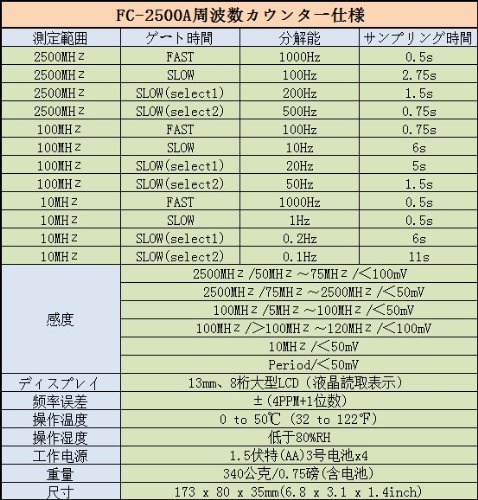
ചിത്രം 3: Technical Specifications for Lutron FC-2500A. This image presents a comprehensive table of technical specifications for the FC-2500A. Key details include measurement ranges up to 2500 MHz, various gate time settings (FAST, SLOW), corresponding resolutions (e.g., 100Hz, 10Hz, 1Hz), sampling times, sensitivity levels (e.g., <50mV, <100mV), an 8-digit LCD display, frequency error of ±(4PPM+1 digit), operating temperature of 0 to 50°C, operating humidity below 80% RH, power supply of 4x AA 1.5V batteries, weight of 340g, and dimensions of 173 x 80 x 35mm.
| പരാമീറ്റർ | സ്പെസിഫിക്കേഷൻ |
|---|---|
| മോഡൽ നമ്പർ | എഫ്സി-2500എ |
| അളക്കൽ ശ്രേണി | 2500 MHz വരെ |
| പ്രദർശിപ്പിക്കുക | 8-അക്ക എൽസിഡി |
| ഫ്രീക്വൻസി പിശക് | ±(4 PPM + 1 digit) |
| പ്രവർത്തന താപനില | 0 മുതൽ 50°C വരെ (32 മുതൽ 122°F) |
| പ്രവർത്തന ഹ്യുമിഡിറ്റി | 80% RH-ൽ താഴെ |
| വൈദ്യുതി വിതരണം | 4 x 1.5V AA ബാറ്ററികൾ |
| ഭാരം | 340 g (0.75 lb) including battery |
| അളവുകൾ (H x W x D) | 173 x 80 x 35 മിമി (6.8 x 3.1 x 1.4 ഇഞ്ച്) |
| ഉൾപ്പെടുത്തിയ ഘടകങ്ങൾ | 1 X Frequency Counter |
| മാതൃരാജ്യം | തായ്വാൻ |
9. വാറൻ്റിയും പിന്തുണയും
For warranty information, technical support, or service inquiries regarding your Lutron FC-2500A Frequency Counter, please refer to the official Lutron website or contact your authorized local distributor. Keep your purchase receipt and product serial number handy for any warranty claims or support requests.


