1. ആമുഖം
This manual provides instructions for the APEX LD200RM remote control, designed for use with various APEX LCD and LED television models. This remote control offers full functionality for your compatible APEX television, ensuring convenient operation of all features.
Compatible APEX TV Models:
- LD3249
- LD3288, LD3288T, LD3288M
- LD4077, LE4077M
- LD4088
- LD4688
- LE3212, LE3212D
- LE4012
- LE4612
- LE3242
- LE3942
- LE40B12
- LE4243
- LE4643
- LE5043
2. സജ്ജീകരണം
2.1 ബാറ്ററി ഇൻസ്റ്റാളേഷൻ
The APEX LD200RM remote control requires two (2) AA batteries for operation. Follow these steps to install the batteries:
- റിമോട്ട് കൺട്രോളിൻ്റെ പിൻഭാഗത്ത് ബാറ്ററി കമ്പാർട്ട്മെൻ്റ് കവർ കണ്ടെത്തുക.
- ടാബിൽ താഴേക്ക് അമർത്തി കവർ നീക്കുക.
- കമ്പാർട്ടുമെന്റിനുള്ളിലെ അടയാളപ്പെടുത്തലുകളുമായി പോസിറ്റീവ് (+), നെഗറ്റീവ് (-) ടെർമിനലുകൾ ശരിയായി വിന്യസിക്കുന്നുണ്ടെന്ന് ഉറപ്പാക്കിക്കൊണ്ട് രണ്ട് AA ബാറ്ററികൾ ഇടുക.
- സുരക്ഷിതമായി ക്ലിക്ക് ചെയ്യുന്നതുവരെ ബാറ്ററി കമ്പാർട്ട്മെന്റ് കവർ തിരികെ സ്ഥലത്തേക്ക് സ്ലൈഡ് ചെയ്യുക.
കുറിപ്പ്: എല്ലായ്പ്പോഴും രണ്ട് ബാറ്ററികളും ഒരേ സമയം മാറ്റിസ്ഥാപിക്കുക. പഴയതും പുതിയതുമായ ബാറ്ററികൾ അല്ലെങ്കിൽ വ്യത്യസ്ത തരം ബാറ്ററികൾ കൂട്ടിക്കലർത്തരുത്.
2.2 പ്രാരംഭ ഉപയോഗം
The APEX LD200RM remote control is an original replacement and typically does not require any programming or pairing. Once batteries are installed, point the remote control towards your compatible APEX television and begin operation.
3. പ്രവർത്തന നിർദ്ദേശങ്ങൾ
This section details the functions of the buttons on your APEX LD200RM remote control.
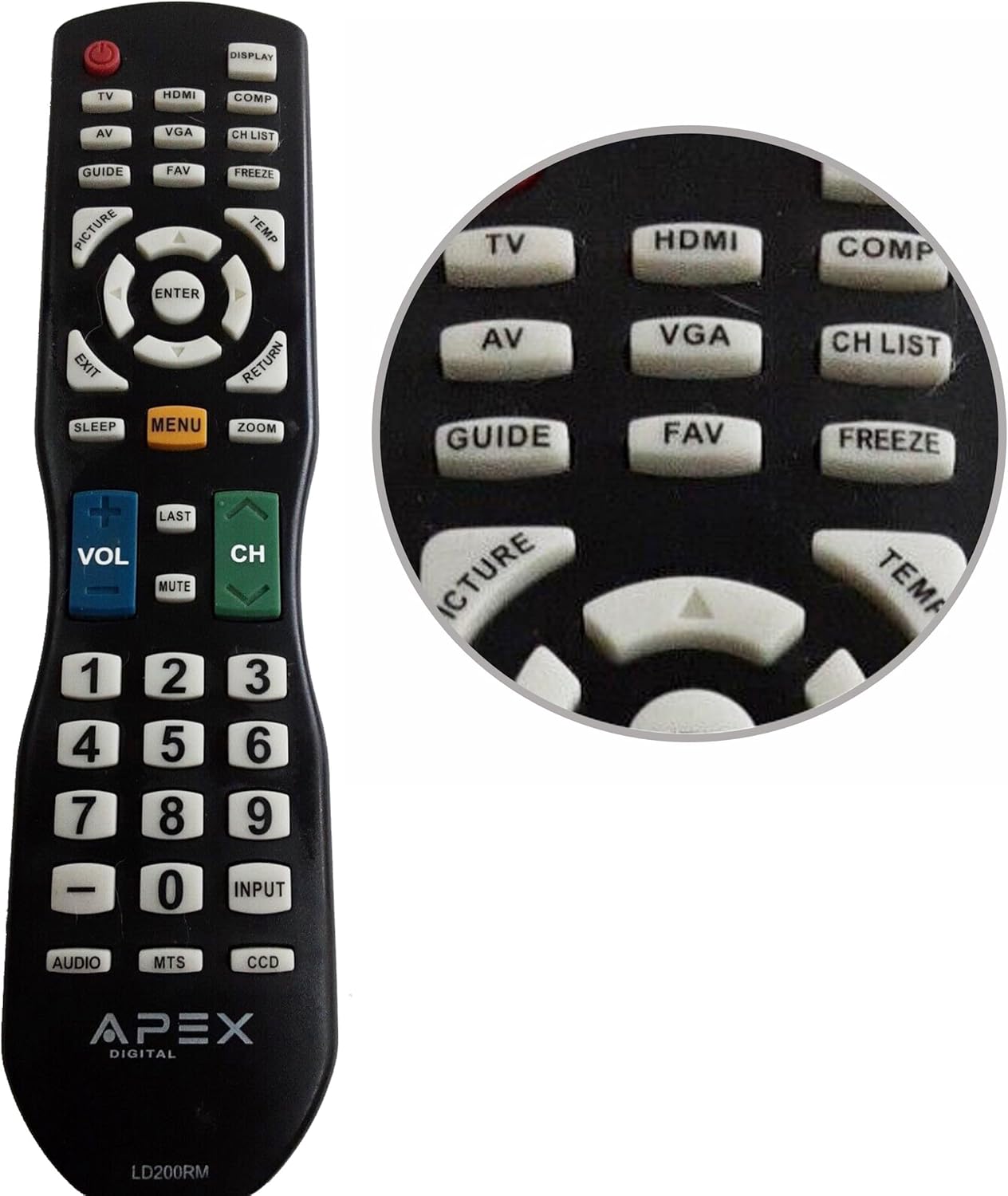
Figure 1: APEX LD200RM Remote Control Layout. This image displays the entire remote control, highlighting the arrangement of its various function buttons, including power, input selection, navigation, volume, channel, and numeric keypad.

Figure 2: Close-up of APEX LD200RM Remote Control Top Buttons. This image provides a detailed view of the upper section of the remote, focusing on buttons such as TV, HDMI, AV, VGA, COMP, CH LIST, DISPLAY, GUIDE, FAV, FREEZE, PICTURE, TEMP, MENU, ENTER, EXIT, RETURN, SLEEP, and ZOOM.
3.1 Power and Input Selection
- പവർ (ചുവപ്പ് ബട്ടൺ): ടെലിവിഷൻ ഓണാക്കുകയോ ഓഫാക്കുകയോ ചെയ്യുന്നു.
- ടിവി: Selects the TV tuner input.
- എച്ച്ഡിഎംഐ: Selects the HDMI input.
- ഓഫ്: Selects the Audio/Video input.
- വി.ജി.എ: Selects the VGA input.
- COMP: Selects the Component video input.
- പ്രദർശിപ്പിക്കുക: Shows on-screen display information.
3.2 Channel and Volume Control
- VOL (+/-): വോളിയം ലെവൽ കൂട്ടുകയോ കുറയ്ക്കുകയോ ചെയ്യുന്നു.
- CH (Up/Down): ടെലിവിഷൻ ചാനൽ മുകളിലേക്കോ താഴേക്കോ മാറ്റുന്നു.
- അവസാനത്തെ: മുമ്പത്തേതിലേക്ക് മടങ്ങുന്നു viewഎഡി ചാനൽ.
- മ്യൂട്ട്: ടെലിവിഷൻ ഓഡിയോ നിശബ്ദമാക്കുകയോ അൺമ്യൂട്ടുചെയ്യുകയോ ചെയ്യുന്നു.
- CH പട്ടിക: ചാനൽ ലിസ്റ്റ് പ്രദർശിപ്പിക്കുന്നു.
3.3 മെനുവും നാവിഗേഷനും
- മെനു: ടെലിവിഷന്റെ പ്രധാന മെനു തുറക്കുന്നു.
- നൽകുക: Confirms a selection within the menu.
- അമ്പടയാള ബട്ടണുകൾ (മുകളിലേക്ക്/താഴേക്ക്/ഇടത്/വലത്): മെനു ഓപ്ഷനുകളിലൂടെ നാവിഗേറ്റ് ചെയ്യുകയും ക്രമീകരണങ്ങൾ ക്രമീകരിക്കുകയും ചെയ്യുന്നു.
- പുറത്ത്: നിലവിലെ മെനുവിൽ നിന്നോ ഓൺ-സ്ക്രീൻ ഡിസ്പ്ലേയിൽ നിന്നോ പുറത്തുകടക്കുന്നു.
- മടക്കം: മുമ്പത്തെ മെനുവിലേക്കോ സ്ക്രീനിലേക്കോ മടങ്ങുന്നു.
3.4 Numeric Keypad and Special Functions
- 0-9 (സംഖ്യാ ബട്ടണുകൾ): ചാനൽ നമ്പറുകൾ നേരിട്ട് നൽകുന്നു.
- ഇൻപുട്ട്: ലഭ്യമായ ഇൻപുട്ട് ഉറവിടങ്ങളിലൂടെ സൈക്കിൾ ചെയ്യുന്നു.
- ഗൈഡ്: Displays the electronic program guide (if available).
- FAV: പ്രിയപ്പെട്ട ചാനലുകൾ ആക്സസ് ചെയ്യുന്നു.
- ഫ്രീസ്: Freezes the current image on the screen.
- ചിത്രം: ചിത്ര ക്രമീകരണങ്ങൾ ക്രമീകരിക്കുന്നു.
- ടെംപ്: (Function may vary by model, often related to picture temperature or a specific mode).
- ഉറക്കം: സ്ലീപ്പ് ടൈമർ സജ്ജമാക്കുന്നു.
- സൂം: സ്ക്രീൻ സൂം ലെവൽ ക്രമീകരിക്കുന്നു.
- ഓഡിയോ: Selects audio modes or tracks.
- MTS: Multi-channel Television Sound (stereo/SAP).
- ഡിസിസി: Closed Captioning Display.
4. പരിപാലനം
4.1 ബാറ്ററി മാറ്റിസ്ഥാപിക്കൽ
When the remote control's performance degrades or it stops responding, it is likely time to replace the batteries. Refer to Section 2.1 for detailed battery installation instructions. Always use fresh AA batteries.
4.2 വൃത്തിയാക്കൽ
റിമോട്ട് കൺട്രോൾ വൃത്തിയാക്കാൻ, മൃദുവായതും ഉണങ്ങിയതുമായ ഒരു തുണി ഉപയോഗിക്കുക. കഠിനമായ അഴുക്കിന്, ചെറുതായി dampതുണിയിൽ വെള്ളം അല്ലെങ്കിൽ നേരിയതും ഉരച്ചിലുകൾ ഇല്ലാത്തതുമായ ഒരു ക്ലീനർ ഉപയോഗിക്കുക. കഠിനമായ രാസവസ്തുക്കളോ ഉരച്ചിലുകളുള്ള വസ്തുക്കളോ ഉപയോഗിക്കുന്നത് ഒഴിവാക്കുക, കാരണം ഇവ റിമോട്ടിന്റെ ഉപരിതലത്തിനോ ആന്തരിക ഘടകങ്ങളോ കേടുവരുത്തും.
4.3 സംഭരണം
Store the remote control in a cool, dry place away from direct sunlight and extreme temperatures. If the remote will not be used for an extended period, it is advisable to remove the batteries to prevent leakage and potential damage.
5. പ്രശ്നപരിഹാരം
- റിമോട്ട് കൺട്രോൾ പ്രതികരിക്കുന്നില്ല:
- Ensure the batteries are correctly installed with the correct polarity (+/-).
- പഴയ ബാറ്ററികൾ പുതിയ AA ബാറ്ററികൾ ഉപയോഗിച്ച് മാറ്റിസ്ഥാപിക്കുക.
- റിമോട്ട് കൺട്രോളിനും ടെലിവിഷന്റെ ഇൻഫ്രാറെഡ് സെൻസറിനും ഇടയിൽ എന്തെങ്കിലും തടസ്സങ്ങളുണ്ടോ എന്ന് പരിശോധിക്കുക.
- Ensure you are within the effective range of the television's IR receiver.
- ചില ബട്ടണുകൾ പ്രവർത്തിക്കുന്നില്ല:
- ഇത് കുറഞ്ഞ ബാറ്ററി പവർ സൂചിപ്പിക്കാം. ബാറ്ററികൾ മാറ്റിസ്ഥാപിക്കുക.
- Ensure the remote is clean and there is no debris lodged under the buttons.
- Verify that the button function is applicable to your specific TV model. Some functions may not be supported by all compatible TVs.
- Television is not turning on/off:
- പ്രവർത്തിക്കുന്ന ഒരു പവർ ഔട്ട്ലെറ്റിലേക്ക് ടെലിവിഷൻ പ്ലഗ് ചെയ്തിട്ടുണ്ടെന്ന് ഉറപ്പാക്കുക.
- Try using the power button directly on the television to rule out a TV issue.
6 സ്പെസിഫിക്കേഷനുകൾ
| ഫീച്ചർ | വിശദാംശങ്ങൾ |
|---|---|
| മോഡൽ നമ്പർ | LD200RM |
| ബ്രാൻഡ് | അപെക്സ് |
| അനുയോജ്യമായ ഉപകരണങ്ങൾ | APEX LCD & LED Televisions |
| പവർ ഉറവിടം | 2 x AA ബാറ്ററികൾ (ഉൾപ്പെടുത്തിയിട്ടില്ല) |
| ഉൽപ്പന്ന അളവുകൾ | 10 x 6 x 2 ഇഞ്ച് (ഏകദേശം) |
| ഇനത്തിൻ്റെ ഭാരം | 3.2 ഔൺസ് (ഏകദേശം) |
| നിറം | കറുപ്പ് |
| പ്രത്യേക ഫീച്ചർ | എർഗണോമിക് ഡിസൈൻ |
7. വാറൻ്റി വിവരങ്ങൾ
This APEX LD200RM remote control typically comes with a 30-day warranty from the date of purchase. This warranty covers manufacturing defects. For specific details regarding warranty claims, returns, or replacements, please refer to your purchase documentation or contact the seller directly.
8. പിന്തുണ
If you encounter issues not covered in this manual or require further assistance, please contact the retailer or the manufacturer's customer support. When contacting support, please have your product model number (LD200RM) and your television model number readily available.


