ആമുഖം
The Behringer Pro Mixer NOX101 is a premium 2-channel DJ mixer designed for demanding turntablists, remixers, and digital DJs. This manual provides comprehensive instructions for setting up, operating, and maintaining your NOX101 mixer to ensure optimal performance and longevity.

ചിത്രം 1: മുകളിൽ view of the Behringer Pro Mixer NOX101, showing main controls and layout.
സുരക്ഷാ വിവരങ്ങൾ
Please read and follow all safety instructions carefully before operating the device. Retain this manual for future reference.
- ഊർജ്ജ സ്രോതസ്സ്: Connect the mixer only to the specified power supply. Ensure the voltagഇ ആവശ്യകതകളുമായി പൊരുത്തപ്പെടുന്നു.
- വെൻ്റിലേഷൻ: വെന്റിലേഷൻ തുറസ്സുകളൊന്നും തടയരുത്. നിർമ്മാതാവിന്റെ നിർദ്ദേശങ്ങൾക്കനുസൃതമായി ഇൻസ്റ്റാൾ ചെയ്യുക.
- ജലവും ഈർപ്പവും: ഈ ഉപകരണം വെള്ളത്തിനടുത്ത് ഉപയോഗിക്കരുത് അല്ലെങ്കിൽ അത് തുള്ളി വീഴുകയോ തെറിക്കുകയോ ചെയ്യരുത്.
- വൃത്തിയാക്കൽ: ഉണങ്ങിയ തുണി ഉപയോഗിച്ച് മാത്രം വൃത്തിയാക്കുക.
- സേവനം: എല്ലാ സേവനങ്ങളും യോഗ്യതയുള്ള സേവന ഉദ്യോഗസ്ഥർക്ക് റഫർ ചെയ്യുക. പവർ സപ്ലൈ കോർഡ് അല്ലെങ്കിൽ പ്ലഗ് കേടാകുക, ദ്രാവകം ഒഴുകുകയോ ഉപകരണങ്ങൾ ഉപകരണത്തിലേക്ക് വീഴുകയോ ചെയ്യുക, ഉപകരണം മഴയോ ഈർപ്പമോ സമ്പർക്കം പുലർത്തുക, സാധാരണയായി പ്രവർത്തിക്കാത്തത് എന്നിങ്ങനെയുള്ള ഏതെങ്കിലും വിധത്തിൽ ഉപകരണത്തിന് കേടുപാടുകൾ സംഭവിക്കുമ്പോൾ സേവനം ആവശ്യമാണ്. , അല്ലെങ്കിൽ ഉപേക്ഷിച്ചു.
സജ്ജമാക്കുക
Follow these steps to set up your Behringer NOX101 mixer:
- അൺപാക്ക് ചെയ്യുന്നു: Carefully remove the mixer from its packaging. Verify that all components listed in the "What's in the Box" section are present.
- പ്ലേസ്മെൻ്റ്: Place the mixer on a stable, flat surface. Ensure adequate ventilation around the unit.
- പവർ കണക്ഷൻ: Connect the provided power cord to the mixer's power input and then to a suitable electrical outlet.
- ഓഡിയോ ഇൻപുട്ട് കണക്ഷനുകൾ:
- Connect your turntables to the PHONO inputs using RCA cables. Ensure the PHONO/LINE switch is set to PHONO.
- Connect CD players, media players, or other line-level devices to the LINE inputs using RCA cables. Ensure the PHONO/LINE switch is set to LINE.
- Connect a microphone to the MIC input (XLR or 1/4" TRS).
- ഓഡിയോ ഔട്ട്പുട്ട് കണക്ഷനുകൾ:
- Connect the MAIN OUTPUTS (RCA or 1/4" TRS) to your ampലൈഫയർ, പവർഡ് സ്പീക്കറുകൾ അല്ലെങ്കിൽ പിഎ സിസ്റ്റം.
- Connect headphones to the HEADPHONE output for monitoring.

ചിത്രം 2: പിൻഭാഗം view of the Behringer Pro Mixer NOX101, showing the crossfader curve adjustment and headphone jack.

ചിത്രം 3: വിശദമായി view of the input and output connections on the Behringer NOX101 mixer, including RCA and TRS options.
പ്രവർത്തന നിർദ്ദേശങ്ങൾ
This section details the functions of the Behringer NOX101 mixer's controls.
Channel Controls (Channels 1 & 2)
- ഗെയിൻ നോബ്: Adjusts the input level for the respective channel. Set to an appropriate level to avoid clipping (indicated by the PEAK LED).
- EQ Knobs (HIGH, MID, LOW): These are 3-band EQs with "full-kill" filters, allowing you to completely remove specific frequency ranges.
- ഉയർന്നത്: ട്രെബിൾ ഫ്രീക്വൻസികൾ ക്രമീകരിക്കുന്നു.
- മിഡ്: മിഡ്-റേഞ്ച് ഫ്രീക്വൻസികൾ ക്രമീകരിക്കുന്നു.
- കുറവ്: ബാസ് ഫ്രീക്വൻസികൾ ക്രമീകരിക്കുന്നു.
- PHONO/LINE Switch: Selects between PHONO (for turntables) and LINE (for CD players/other line-level devices) input for the channel.
- ചാനൽ ഫേഡർ: Controls the volume level of the individual channel.
- PFL/CUE Button: Sends the channel's audio to the headphone output for pre-fader listening.
- CURVE Knob: Adjusts the curve of the channel fader, from a smooth fade to a sharp cut.
മൈക്രോഫോൺ വിഭാഗം
- MIC ഗെയിൻ നോബ്: Adjusts the input level for the microphone.
- MIC ലെവൽ നോബ്: Controls the overall volume of the microphone output.
മാസ്റ്റർ വിഭാഗം
- മാസ്റ്റർ നോബ്: മിക്സറിന്റെ മൊത്തത്തിലുള്ള ഔട്ട്പുട്ട് വോളിയം നിയന്ത്രിക്കുന്നു.
- CUE GAIN Knob: ഹെഡ്ഫോൺ ഔട്ട്പുട്ടിന്റെ വോളിയം ക്രമീകരിക്കുന്നു.
- CUE MIX Slider: Blends between the PFL (Pre-Fader Listen) signal and the Master output in your headphones.
- VU മീറ്ററുകൾ: Displays the output level of the main mix and PFL signal. Aim for levels that are strong but do not consistently peak into the red.
ക്രോസ്ഫേഡർ
- ക്രോസ്ഫേഡർ: Blends between Channel 1 and Channel 2.
- XFADE CURVE Knob: Located on the rear panel, this knob adjusts the curve of the crossfader, from a smooth blend to a sharp cut for scratching.
- REV Button: Reverses the direction of the crossfader.
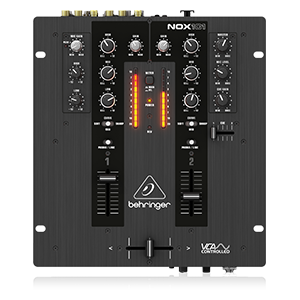
Figure 4: Simplified diagram of the Behringer NOX101 mixer's control layout.
മെയിൻ്റനൻസ്
Proper maintenance ensures the longevity and optimal performance of your NOX101 mixer.
- വൃത്തിയാക്കൽ: Regularly wipe the mixer's surface with a soft, dry, lint-free cloth. Avoid using abrasive cleaners, solvents, or waxes.
- പൊടി സംരക്ഷണം: When not in use, cover the mixer to protect it from dust and debris.
- ഫേഡർ കെയർ: While the faders are designed for durability, excessive force or exposure to liquids can cause damage. Keep them clean and free of foreign particles.
- സംഭരണം: നേരിട്ടുള്ള സൂര്യപ്രകാശവും കടുത്ത താപനിലയും ഏൽക്കാത്ത ഒരു തണുത്ത വരണ്ട സ്ഥലത്ത് മിക്സർ സൂക്ഷിക്കുക.
ട്രബിൾഷൂട്ടിംഗ്
If you encounter issues with your Behringer NOX101 mixer, refer to the following common problems and solutions:
| പ്രശ്നം | സാധ്യമായ കാരണം | പരിഹാരം |
|---|---|---|
| ശബ്ദ ഔട്ട്പുട്ട് ഇല്ല |
|
|
| വികലമായ ശബ്ദം |
|
|
| Crossfader not working smoothly |
|
|
സ്പെസിഫിക്കേഷനുകൾ
| ഫീച്ചർ | വിശദാംശങ്ങൾ |
|---|---|
| മോഡൽ | NOX101 |
| ബ്രാൻഡ് | ബെഹ്രിംഗർ |
| ചാനലുകളുടെ എണ്ണം | 2 |
| EQ | 3-band EQs with "Full-kill" Filters |
| ക്രോസ്ഫേഡർ | VCA-controlled Ultraglide Crossfader with adjustable curve |
| കണക്റ്റിവിറ്റി ടെക്നോളജി | എക്സ്എൽആർ, ടിആർഎസ്, ആർസിഎ |
| പവർ ഉറവിടം | കോർഡഡ് ഇലക്ട്രിക് |
| നിറം | കറുപ്പ് |
| ഇനത്തിൻ്റെ ഭാരം | 4.63 പൗണ്ട് (2.1 കി.ഗ്രാം) |
| ഉൽപ്പന്ന അളവുകൾ (L x W x H) | 10.04 x 10.79 x 3.94 ഇഞ്ച് (25.5 x 27.4 x 10 സെ.മീ) |
| ആദ്യം ലഭ്യമായ തീയതി | മെയ് 1, 2013 |
വാറൻ്റിയും പിന്തുണയും
വാറന്റി വിവരങ്ങൾക്കും സാങ്കേതിക പിന്തുണയ്ക്കും, ദയവായി ഔദ്യോഗിക ബെഹ്രിംഗർ കാണുക. webസൈറ്റിൽ ബന്ധപ്പെടുകയോ അവരുടെ ഉപഭോക്തൃ സേവനവുമായി നേരിട്ട് ബന്ധപ്പെടുകയോ ചെയ്യുക. വാറന്റി ക്ലെയിമുകൾക്കുള്ള വാങ്ങലിന്റെ തെളിവായി നിങ്ങളുടെ വാങ്ങൽ രസീത് സൂക്ഷിക്കുക.
ഈ മാനുവലിൽ ഉൾപ്പെടുത്തുന്നതിനായി വിൽപ്പനക്കാരന്റെ ഔദ്യോഗിക ഉൽപ്പന്ന വീഡിയോകളൊന്നും ലഭ്യമല്ല.


