ആമുഖം
This manual provides essential information for the proper installation, operation, and maintenance of the URMET 1072/19A Digitalizer Module. Please read these instructions carefully before use to ensure safe and efficient operation.
ഉൽപ്പന്നം കഴിഞ്ഞുview
The URMET 1072/19A is a digitalizer module designed for integration into various key panel models. It manages 18 basic keys and can be expanded to up to 82 keys using optional UTD 1038/17 modules. This device is suitable for Bibus II° Edition installations.
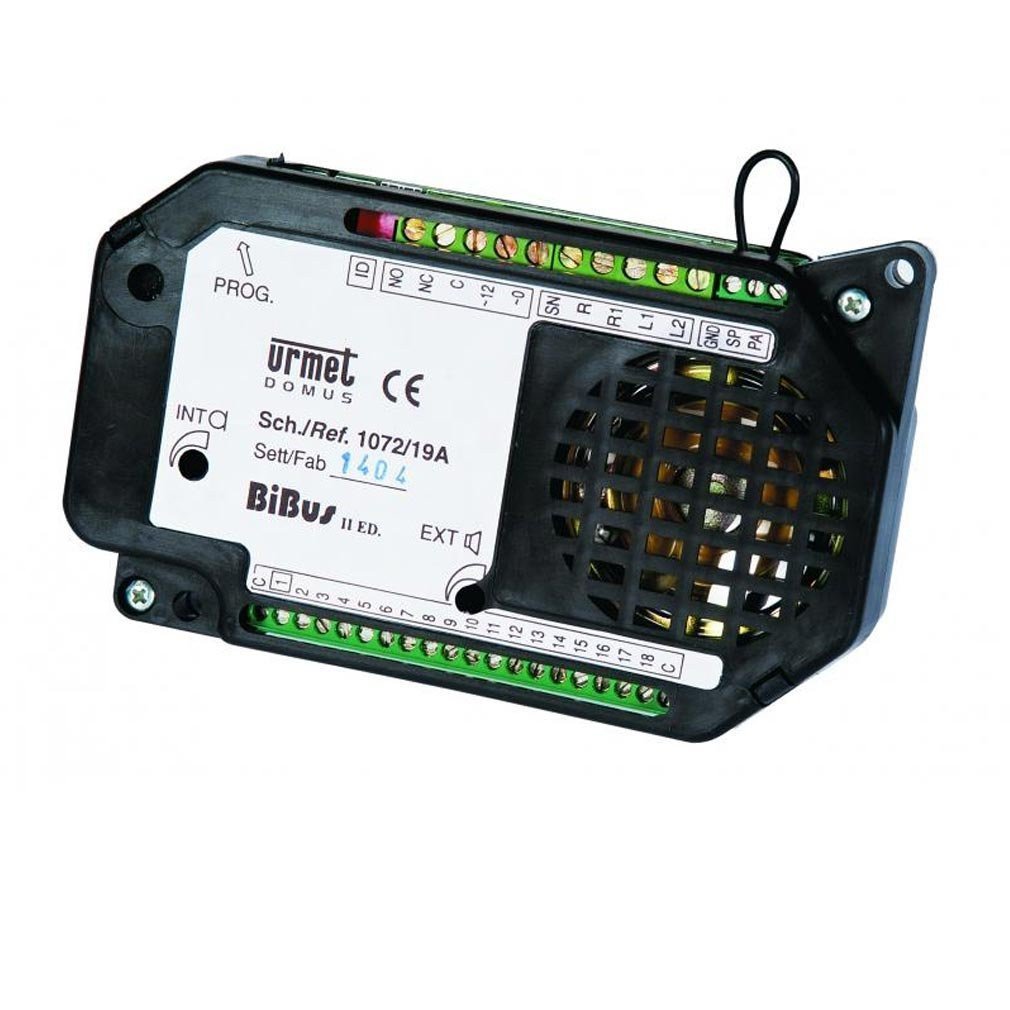
Image 1: URMET 1072/19A Digitalizer Module. This image shows the top-down view of the URMET 1072/19A digitalizer module, highlighting its compact design and connection terminals.
ചിത്രം 2: വിശദമായത് view of the URMET 1072/19A Digitalizer Module. This image provides a closer look at the module's labeling and specific components, including the "URMET" brand and "1072/19A" model number.
സജ്ജീകരണവും ഇൻസ്റ്റാളേഷനും
The 1072/19A module can be installed on various key panel models. Follow these guidelines for proper setup:
- അനുയോജ്യത പരിശോധന: Ensure the module is compatible with your existing key panel system.
- മൗണ്ടിംഗ്: Securely mount the module within the designated space in the key panel. Refer to the key panel's specific instructions for mounting hardware.
- വയറിംഗ്: Connect the module according to the system's wiring diagram. Pay close attention to power supply and data line connections.
- Expansion (Optional): To expand beyond 18 keys, integrate UTD 1038/17 modules as required. Each UTD 1038/17 module adds additional key capacity.
പ്രോഗ്രാമിംഗ്
- For Bibus II° Edition installations with up to 3 main headphone stations, programming can be done without a dedicated programming terminal.
- For installations with more than 3 main locations or with secondary call points, the UTD 1032/65 and UTD 1072/60 programming devices, or the UTD 1072/58 kit, must be used. Consult the respective programming device manuals for detailed instructions.
പ്രവർത്തന നിർദ്ദേശങ്ങൾ
Once installed and programmed, the URMET 1072/19A module operates as an integral part of your intercom system. Key functions include:
- കീ മാനേജുമെന്റ്: The module processes signals from the connected keys, routing calls to the appropriate internal stations.
- സിസ്റ്റം ഇൻ്റഗ്രേഷൻ: It seamlessly integrates with Bibus II° Edition systems, ensuring reliable communication.
Specific operation details will depend on the overall intercom system configuration and the programming performed during setup.
മെയിൻ്റനൻസ്
The URMET 1072/19A Digitalizer Module is designed for long-term reliability with minimal maintenance. Adhere to the following recommendations:
- വൃത്തിയാക്കൽ: Keep the module free from dust and debris. Use a soft, dry cloth for cleaning. Do not use liquid cleaners or solvents.
- പരിസ്ഥിതി വ്യവസ്ഥകൾ: Ensure the module operates within its specified environmental conditions (temperature, humidity) to prevent damage.
- പരിശോധനകൾ: Periodically inspect wiring connections for any signs of wear or looseness.
- ഉപയോക്തൃ-സേവനയോഗ്യമായ ഭാഗങ്ങൾ ഇല്ല: The module contains no user-serviceable parts. Do not attempt to open or repair the unit yourself. Refer all servicing to qualified personnel.
ട്രബിൾഷൂട്ടിംഗ്
If you encounter issues with your URMET 1072/19A module, consider the following common troubleshooting steps:
- പ്രവർത്തനക്ഷമതയില്ല:
- Check all power connections to ensure the module is receiving adequate power.
- Verify data line connections are secure and correctly wired.
- Confirm the module is properly seated in its mounting location.
- Incorrect Key Response:
- Review the programming settings. Incorrect programming can lead to keys not functioning as expected.
- Inspect the wiring from the keys to the module for any faults.
- System Expansion Issues:
- Ensure UTD 1038/17 expansion modules are correctly installed and connected.
- Verify that the system has been reprogrammed to recognize the additional keys.
If problems persist after attempting these steps, contact qualified technical support.
സ്പെസിഫിക്കേഷനുകൾ
| ബ്രാൻഡ് | യുർമെറ്റ് |
| മോഡൽ | 1072/19എ |
| Key Capacity (Basic) | 18 കീകൾ |
| Key Capacity (Expandable) | Up to 82 keys with UTD 1038/17 modules |
| അനുയോജ്യത | Bibus II° Edition systems |
| Programming (Basic) | Without terminal for up to 3 main headphone stations |
| Programming (Advanced) | Requires UTD 1032/65, UTD 1072/60, or UTD 1072/58 kit for larger systems |
| ഇനത്തിൻ്റെ ഭാരം | 150 kg (Note: This weight seems unusually high for a module. Please verify with manufacturer if critical.) |
| ബാറ്ററികൾ ഉൾപ്പെടുത്തിയിട്ടുണ്ട് | ഇല്ല |
വാറൻ്റി വിവരങ്ങൾ
Specific warranty details for the URMET 1072/19A module are typically provided at the point of purchase or can be obtained directly from URMET or an authorized distributor. Please retain your proof of purchase for warranty claims.
Note: The product information does not specify a guaranteed software update period.
ഉപഭോക്തൃ പിന്തുണ
For technical assistance, troubleshooting beyond this manual, or warranty inquiries, please contact your URMET supplier or an authorized URMET service center. Refer to the URMET official webബന്ധപ്പെടാനുള്ള വിവരങ്ങൾക്കും പിന്തുണാ ഉറവിടങ്ങൾക്കുമുള്ള സൈറ്റ്.


