1. ആമുഖം
The Cisco ASR 9000 4-Port 10-Gigabit Ethernet Modular Port Adapter (MPA) is a high-performance networking component designed for the Cisco ASR 9000 Series Modular Line Cards. This port adapter provides four XFP expansion slots, enabling robust 10-Gigabit Ethernet connectivity for data networking and optical network applications. It is engineered to deliver reliable and efficient data transfer rates of up to 10000 Megabits Per Second, making it suitable for demanding enterprise and service provider environments.
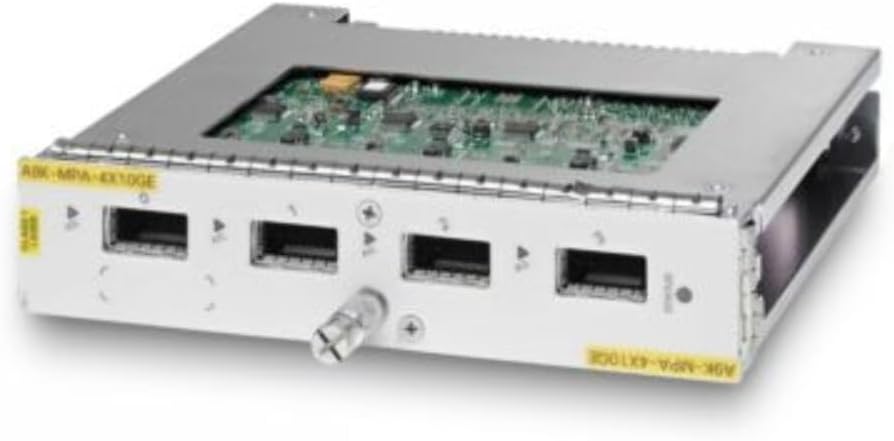
Figure 1: Cisco ASR 9000 4-Port 10-Gigabit Ethernet Modular Port Adapter. This image displays the front view of the module, highlighting its four XFP ports and the model number 'A9K-MPA-4X10GE' on yellow labels. The module features a metallic casing with an exposed circuit board on top.
2. സജ്ജീകരണവും ഇൻസ്റ്റാളേഷനും
Follow these steps for proper installation of the modular port adapter into a compatible Cisco ASR 9000 Series chassis:
- സുരക്ഷ ആദ്യം: Ensure the chassis is powered off and disconnected from the power source before handling any components. Wear an anti-static wrist strap to prevent electrostatic discharge (ESD) damage.
- സ്ലോട്ട് തിരിച്ചറിയുക: Locate an available and compatible modular port adapter slot on your Cisco ASR 9000 Series Line Card. Refer to your chassis documentation for specific slot compatibility.
- Insert MPA: Carefully align the MPA with the chosen slot. Gently slide the MPA into the slot until it is fully seated. Avoid forcing the module.
- സുരക്ഷിത മൊഡ്യൂൾ: Once seated, use the ejector levers or captive screws (if present) to firmly secure the MPA in place. This ensures proper electrical connection and physical stability.
- കേബിളുകൾ ബന്ധിപ്പിക്കുക: Install appropriate XFP transceivers into the four XFP ports and connect the necessary fiber optic cables. Ensure all connections are clean and secure.
- പവർ ഓൺ: Reconnect the chassis to the power source and power it on. Observe the system and module status indicators for proper initialization.
3. ഓപ്പറേഷൻ
Once installed and powered on, the Cisco ASR 9000 4-Port 10-Gigabit Ethernet MPA operates as an integral part of your network infrastructure. Key operational aspects include:
- ലിങ്ക് നില: Monitor the LED indicators on the MPA or through the chassis management interface to confirm link status for each 10-Gigabit Ethernet port. A steady green light typically indicates a healthy link.
- ഡാറ്റ ഫ്ലോ: Verify data traffic flow through the ports using network monitoring tools. Ensure that data is being transmitted and received without errors.
- കോൺഫിഗറേഷൻ: Network configuration, such as IP addressing, VLANs, and routing protocols, is performed at the chassis level through the Cisco IOS XR operating system. Refer to the Cisco ASR 9000 Series documentation for detailed configuration guides.
- ഹോട്ട് സ്വാപ്പിംഗ്: This module may support hot-swapping, allowing replacement without powering down the entire chassis. Consult the chassis documentation to confirm this feature and proper hot-swap procedures.
4. പരിപാലനം
Regular maintenance helps ensure the longevity and optimal performance of your MPA:
- പരിസ്ഥിതി നിയന്ത്രണം: Ensure the operating environment maintains stable temperature and humidity levels as specified by Cisco. Proper airflow within the rack and chassis is crucial.
- പൊടി തടയൽ: Keep the networking environment clean and free of dust. Dust accumulation can lead to overheating and component failure. Use compressed air to gently clean the module's exterior if necessary, ensuring the chassis is powered off.
- കേബിൾ മാനേജുമെന്റ്: Maintain organized and properly routed fiber optic cables to prevent accidental disconnections or damage.
- ഫേംവെയർ അപ്ഡേറ്റുകൾ: Periodically check Cisco's official website for firmware updates for the MPA and the ASR 9000 Series chassis. Applying updates can improve performance, add features, and address security vulnerabilities.
- പരിശോധന: Routinely inspect the module for any signs of physical damage, loose connections, or unusual odors.
5. പ്രശ്നപരിഹാരം
നിങ്ങൾ നേരിട്ടേക്കാവുന്ന പൊതുവായ പ്രശ്നങ്ങൾക്കുള്ള പരിഹാരങ്ങൾ ഈ വിഭാഗം നൽകുന്നു:
| പ്രശ്നം | സാധ്യമായ കാരണം | പരിഹാരം |
|---|---|---|
| Module not recognized by chassis | Improper seating, incompatible slot, or power issue. | Reseat the module firmly. Verify slot compatibility. Check chassis power supply. |
| Link LED is off or amber | No fiber connection, faulty transceiver, or cable issue. | Check fiber optic cable connections. Verify XFP transceiver is properly installed and functional. Test with a known good cable/transceiver. |
| Poor data transfer performance | Cable quality, network congestion, or configuration error. | Inspect fiber optic cables for damage. Check network load. Review chassis and port configuration. |
| മൊഡ്യൂൾ അമിത ചൂടാക്കൽ | Insufficient ventilation or dust accumulation. | Ensure proper airflow in the rack and chassis. Clean dust from the module and chassis vents. |
6 സാങ്കേതിക സവിശേഷതകൾ
Detailed specifications for the Cisco ASR 9000 4-Port 10-Gigabit Ethernet Modular Port Adapter:
| ആട്രിബ്യൂട്ട് | മൂല്യം |
|---|---|
| ബ്രാൻഡ് | സിസ്കോ |
| മോഡൽ നമ്പർ | A9K-MPA-4X10GE= |
| ഉൽപ്പന്ന അളവുകൾ | 7 x 7 x 2 ഇഞ്ച് |
| ഇനത്തിൻ്റെ ഭാരം | 1.92 പൗണ്ട് (870 ഗ്രാം) |
| നിർമ്മാതാവ് | CISCO - ASR9K |
| ഹാർഡ്വെയർ ഇന്റർഫേസ് | ഇഥർനെറ്റ് |
| അനുയോജ്യമായ ഉപകരണങ്ങൾ | Desktop (Cisco ASR 9000 Series Modular Line Cards) |
| ഡാറ്റ ലിങ്ക് പ്രോട്ടോക്കോൾ | ഗിഗാബിറ്റ് ഇഥർനെറ്റ് |
| ഡാറ്റ കൈമാറ്റ നിരക്ക് | സെക്കൻഡിൽ 10000 മെഗാബൈറ്റുകൾ |
| വിപുലീകരണ സ്ലോട്ടുകൾ | 4 x XFP |
| Application/Usage | Data Networking, Optical Network |
| യു.പി.സി | 882658465376, 740616468329 |
7. വാറൻ്റി വിവരങ്ങൾ
This Cisco product is covered by Cisco's standard hardware warranty. For specific details regarding warranty terms, duration, and coverage, please refer to the official Cisco warranty documentation provided with your purchase or visit the Cisco Warranty Information page അവരുടെ ഔദ്യോഗികമായി webസൈറ്റ്. വാറന്റി ക്ലെയിമുകൾക്കായി നിങ്ങളുടെ വാങ്ങലിന്റെ തെളിവ് സൂക്ഷിക്കുക.
8. പിന്തുണ
For technical assistance, product inquiries, or further support, please utilize the following resources:
- സിസ്കോ പിന്തുണ Webസൈറ്റ്: Visit the official Cisco Support website for extensive documentation, downloads, and knowledge base articles.
- Technical Assistance Center (TAC): If you have a service contract, contact Cisco's Technical Assistance Center for expert support.
- അംഗീകൃത റീസെല്ലർമാർ: Your Cisco authorized reseller can also provide support and service for your product.


