നേറ്റീവ് ഇൻസ്ട്രുമെന്റ്സ് ട്രാക്ടർ കൺട്രോൾ X1 MkII DJ കൺട്രോളർ യൂസർ മാനുവൽ
മോഡൽ: 22494
Brand: Native Instruments
1. ആമുഖം
The Native Instruments Traktor Kontrol X1 MkII is a powerful and portable DJ controller designed for seamless integration with Native Instruments Traktor software. It offers intuitive control over essential DJ functions, including cue points, loops, track positioning, and effects, allowing DJs to focus on their performance rather than their laptop screen. Its compact design makes it an ideal companion for any Traktor setup, whether in the studio or on the go.
2 പ്രധാനപ്പെട്ട സുരക്ഷാ വിവരങ്ങൾ
- മഴയോ ഈർപ്പമോ ഉപകരണത്തെ തുറന്നുകാട്ടരുത്.
- റേഡിയേറ്ററുകൾ, ഹീറ്റ് രജിസ്റ്ററുകൾ, സ്റ്റൗകൾ അല്ലെങ്കിൽ മറ്റ് ഉപകരണങ്ങൾ (ഉൾപ്പെടെ) പോലുള്ള താപ സ്രോതസ്സുകൾക്ക് സമീപം ഉപകരണം വയ്ക്കുന്നത് ഒഴിവാക്കുക. ampലൈഫയറുകൾ) ചൂട് ഉത്പാദിപ്പിക്കുന്നത്.
- നിർമ്മാതാവ് വ്യക്തമാക്കിയ അറ്റാച്ച്മെൻ്റുകൾ/ആക്സസറികൾ മാത്രം ഉപയോഗിക്കുക.
- മിന്നൽ കൊടുങ്കാറ്റുകളുടെ സമയത്തോ ദീർഘനേരം ഉപയോഗിക്കാത്ത സമയത്തോ ഉപകരണം അൺപ്ലഗ് ചെയ്യുക.
- യോഗ്യതയുള്ള സേവന ഉദ്യോഗസ്ഥർക്ക് എല്ലാ സേവനങ്ങളും റഫർ ചെയ്യുക. ഉപകരണം ഏതെങ്കിലും വിധത്തിൽ കേടുവരുമ്പോൾ സർവീസ് ആവശ്യമാണ്.
3. പാക്കേജ് ഉള്ളടക്കം
നിങ്ങളുടെ പാക്കേജിൽ എല്ലാ ഇനങ്ങളും ഉണ്ടോ എന്ന് ദയവായി പരിശോധിക്കുക:
- Traktor Kontrol X1 MkII DJ Controller
- USB കേബിൾ
- Traktor Software Suite (download voucher or license information)
4. പ്രാരംഭ സജ്ജീകരണം
4.1 സിസ്റ്റം ആവശ്യകതകൾ
- Compatible Devices: Laptop, Desktop PC, Mac
- Supported Software: Traktor (requires Traktor Pro 2.6.3 or higher)
- Hardware Platform: Windows, macOS
4.2 ഉപകരണം ബന്ധിപ്പിക്കുന്നു
The Traktor Kontrol X1 MkII connects to your computer via a standard USB cable. Ensure your computer meets the minimum system requirements before connecting.
- Install the latest version of Traktor software and any necessary drivers from the Native Instruments webസൈറ്റ്.
- Connect one end of the supplied USB cable to the USB port on the rear of the Traktor Kontrol X1 MkII.
- നിങ്ങളുടെ കമ്പ്യൂട്ടറിൽ ലഭ്യമായ USB പോർട്ടിലേക്ക് USB കേബിളിൻ്റെ മറ്റേ അറ്റം ബന്ധിപ്പിക്കുക.
- The device will power on automatically and be recognized by your operating system and Traktor software.

ഈ ചിത്രം സൈഡ് പ്രോയെ കാണിക്കുന്നുfile of the controller, focusing on the USB port for connectivity and the Kensington lock slot.
5. പ്രവർത്തന നിർദ്ദേശങ്ങൾ
5.1 ഓവർview നിയന്ത്രണങ്ങളുടെ
The Traktor Kontrol X1 MkII features a logical layout designed for efficient workflow. It is divided into sections for effects, browsing, and deck control.
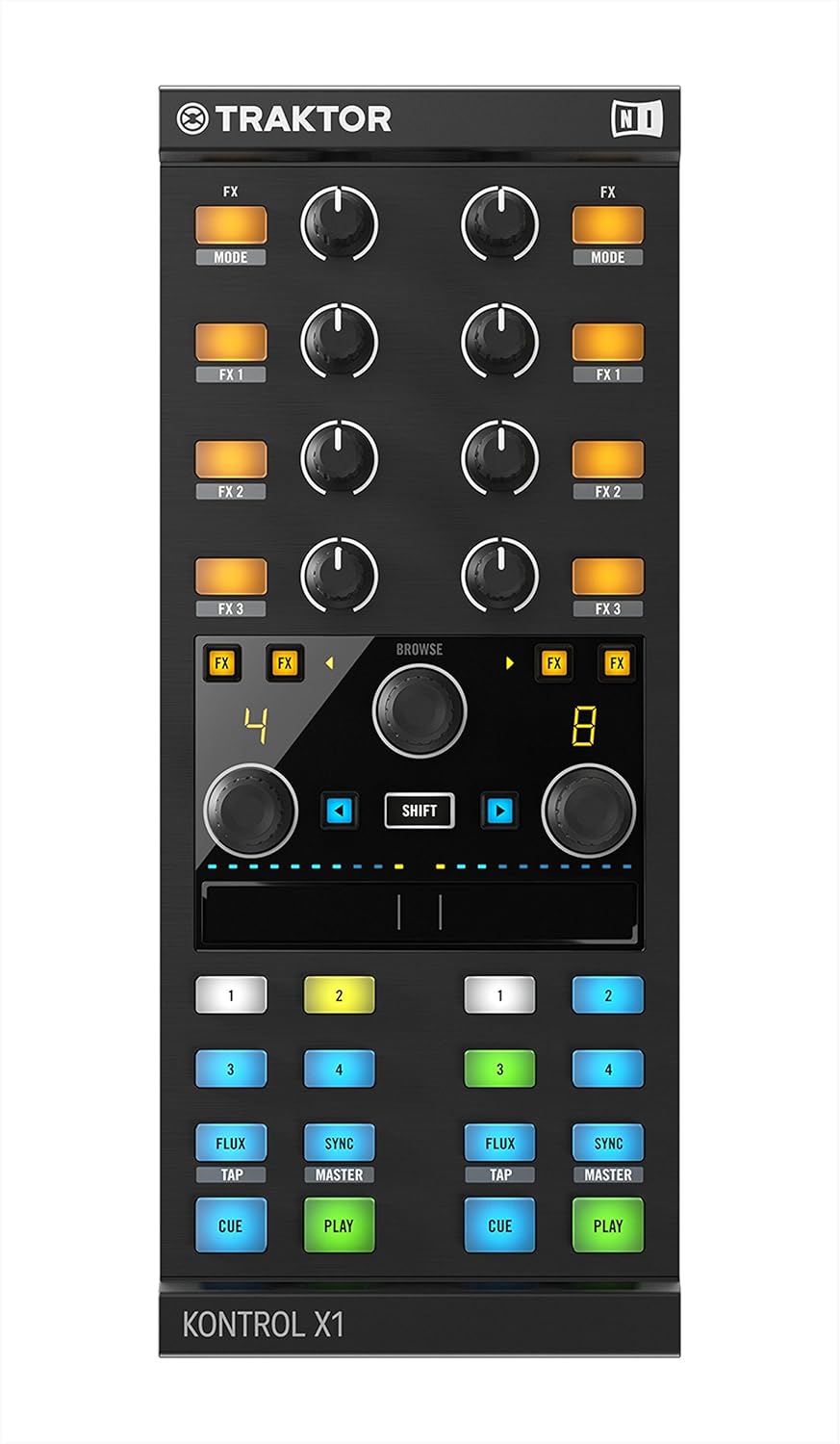
A direct overhead view of the Traktor Kontrol X1 MkII, clearly displaying the layout of all controls, including the FX knobs, browser encoder, touch strip, and performance buttons for two decks.
5.2 Using the Multi-Purpose Touch Strip
The innovative touch strip located in the center of the controller provides direct control without needing to reach for your turntable or CDJ. It can be used for:
- Track Positioning: Quickly navigate through tracks.
- Pitch Bending: Adjust the track's pitch for beatmatching.
- Effects Parameters: Control various parameters of your assigned effects.
5.3 Browser and Loop Controls
The X1 MkII features advanced, touch-sensitive browser and loop controls. The browser knob allows for quick navigation through your music library. Touching the browser knob can automatically maximize the browser window in Traktor, and releasing it returns the browser to its previous size. Dedicated loop controls enable precise loop setting and adjustment.
5.4 Controlling TRAKTOR FX Units
The controller provides comprehensive control over two freely assignable TRAKTOR FX units. Use the dedicated knobs and buttons to activate, adjust, and manipulate effects, adding creative flair to your mixes.
5.5 RGB Cue Point Trigger Buttons
The new RGB cue point trigger buttons help visually identify cue points from loops or load markers. Their color-coding provides clear feedback, enhancing performance in low-light environments.

This image shows the Traktor Kontrol X1 MkII DJ Controller from an elevated, angled perspective, highlighting its compact design and the arrangement of its various buttons, knobs, and the central touch strip.
6. പരിപാലനവും പരിചരണവും
- വൃത്തിയാക്കൽ: Use a soft, dry cloth to clean the surface of the controller. Do not use abrasive cleaners, waxes, or solvents.
- സംഭരണം: നേരിട്ടുള്ള സൂര്യപ്രകാശത്തിൽ നിന്നും കടുത്ത താപനിലയിൽ നിന്നും മാറി തണുത്തതും വരണ്ടതുമായ സ്ഥലത്ത് ഉപകരണം സൂക്ഷിക്കുക.
- കൈകാര്യം ചെയ്യൽ: കൺട്രോളർ താഴെയിടുകയോ ശക്തമായ ആഘാതങ്ങൾക്ക് വിധേയമാക്കുകയോ ചെയ്യുന്നത് ഒഴിവാക്കുക.
7. പ്രശ്നപരിഹാരം
| പ്രശ്നം | സാധ്യമായ പരിഹാരം |
|---|---|
| Device not recognized by computer/Traktor. | Ensure the USB cable is securely connected to both the controller and the computer. Try a different USB port. Verify that Traktor software is updated to version 2.6.3 or higher. Reinstall drivers if necessary. |
| Buttons or knobs are unresponsive. | Check Traktor's Controller Manager settings to ensure the X1 MkII is properly configured and mapped. Restart Traktor and the controller. |
| LED-കൾ പ്രകാശിക്കുന്നില്ല. | Ensure the controller is receiving power via the USB connection. Check USB cable integrity. Verify software connection. |
| Audio issues (e.g., no sound, distorted sound). | This controller does not process audio. Ensure your audio interface and Traktor's audio settings are correctly configured. |
8 സാങ്കേതിക സവിശേഷതകൾ
| ഫീച്ചർ | വിശദാംശങ്ങൾ |
|---|---|
| മോഡലിൻ്റെ പേര് | Traktor Kontrol X1 MkII |
| ഇനം മോഡൽ നമ്പർ | 22494 |
| ഇനത്തിൻ്റെ ഭാരം | 2.64 പൗണ്ട് |
| ഉൽപ്പന്ന അളവുകൾ | 14 x 4 x 7 ഇഞ്ച് |
| കണക്റ്റിവിറ്റി ടെക്നോളജി | USB |
| ഹാർഡ്വെയർ ഇന്റർഫേസ് | USB 2.0 |
| പ്രത്യേക സവിശേഷതകൾ | Backlit, Mute Controls, Compact |
| ആദ്യം ലഭ്യമായ തീയതി | ജൂലൈ 9, 2013 |
9. വാറൻ്റിയും പിന്തുണയും
For warranty information and technical support, please refer to the official Native Instruments webസൈറ്റിൽ ബന്ധപ്പെടുകയോ അവരുടെ ഉപഭോക്തൃ സേവനവുമായി നേരിട്ട് ബന്ധപ്പെടുകയോ ചെയ്യുക. ഏതെങ്കിലും വാറന്റി ക്ലെയിമുകൾക്കായി നിങ്ങളുടെ വാങ്ങലിന്റെ തെളിവ് സൂക്ഷിക്കുക.
Native Instruments Support: സന്ദർശിക്കുക www.native-instruments.com for product registration, software downloads, FAQs, and contact information.


