1. ആമുഖം
This manual provides comprehensive instructions for the installation, operation, and maintenance of the Juniper J2320 Services Router. The J2320 is a high-performance, modular router designed for secure, reliable network connectivity. It features Junos OS, 1GB DRAM, 1GB Flash, and three PIM (Physical Interface Module) slots, suitable for 19-inch rack mounting.
2 സുരക്ഷാ വിവരങ്ങൾ
Always observe the following safety precautions when handling or operating the Juniper J2320 Services Router:
- Ensure the device is properly grounded before connecting power.
- Do not block ventilation openings. Adequate airflow is crucial for cooling.
- Use only the power supply provided or specified by Juniper Networks.
- ഈർപ്പം അല്ലെങ്കിൽ അങ്ങേയറ്റത്തെ താപനിലയിലേക്ക് ഉപകരണം തുറന്നുകാട്ടുന്നത് ഒഴിവാക്കുക.
- യോഗ്യതയുള്ള ഉദ്യോഗസ്ഥർ മാത്രമേ ഇൻസ്റ്റാളേഷനും പരിപാലനവും നടത്താവൂ.
3. പാക്കേജ് ഉള്ളടക്കം
പാക്കേജിൽ എല്ലാ ഇനങ്ങളും ഉണ്ടെന്ന് ഉറപ്പാക്കുക:
- Juniper J2320 Services Router
- Base Memory (256 MB)
- SW Encryption
- എസി പവർ സപ്ലൈ
- Rack-mounting hardware (screws, brackets)
- ഡോക്യുമെന്റേഷൻ (ഈ മാനുവൽ)
4. ഉൽപ്പന്നം കഴിഞ്ഞുview
The Juniper J2320 Services Router is a compact, rack-mountable device. Familiarize yourself with its components:

ചിത്രം 4.1: ഫ്രണ്ട് view of the Juniper J2320 Services Router, showcasing the main unit with its front panel ports and indicators, along with the included power cable and a small bag of mounting screws.

ചിത്രം 4.2: ടോപ്പ് ഡൗൺ view of the Juniper J2320 Services Router, showing the router unit, a coiled power cable, and a light blue network cable in a plastic bag, all laid out on a white surface.
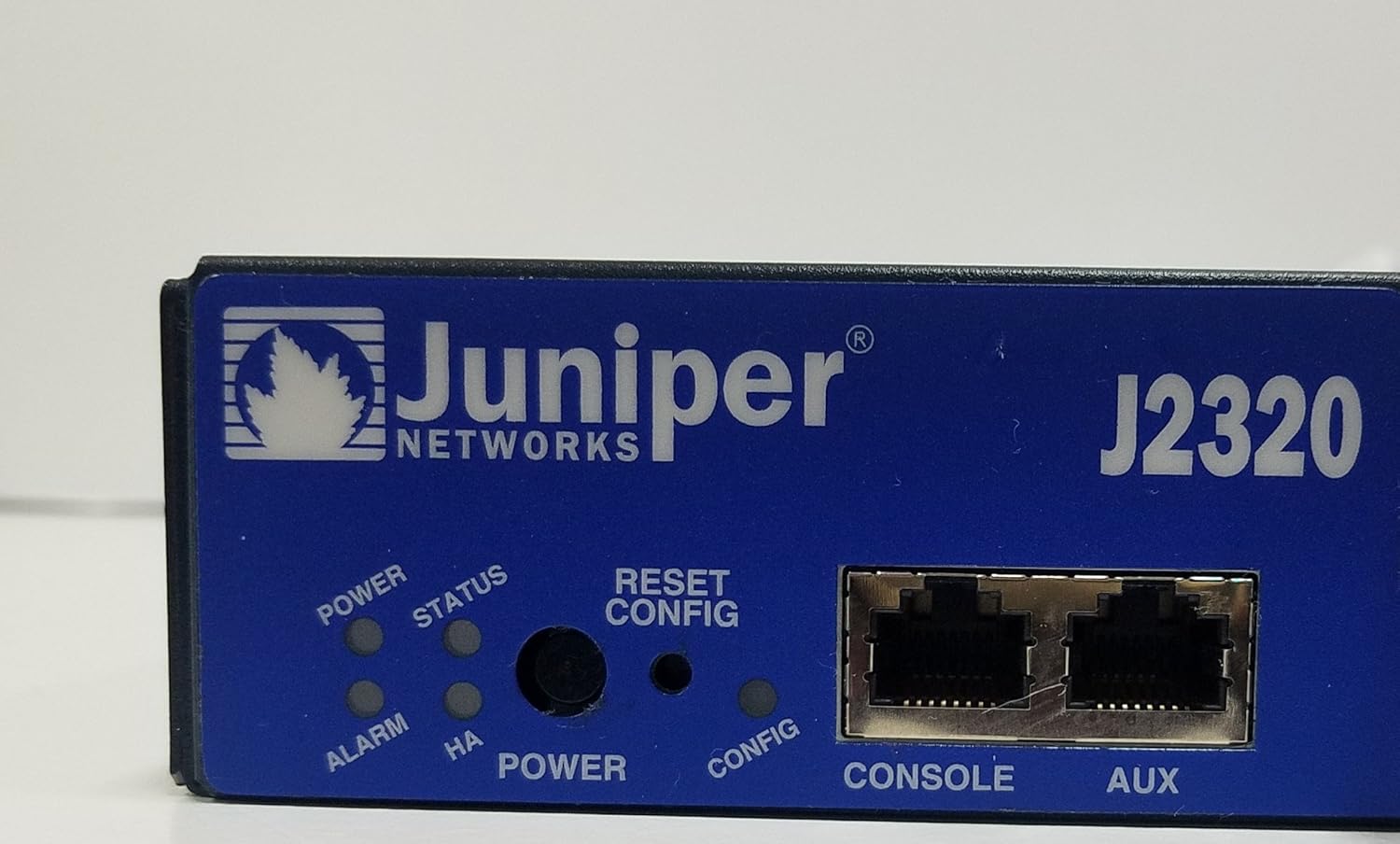
ചിത്രം 4.3: A detailed close-up of the Juniper J2320 router's front panel. Visible elements include the Juniper Networks logo, model number J2320, LED indicators for Power, Status, Alarm, and HA (High Availability), a Reset/Config button, and Console and Aux RJ-45 ports.

ചിത്രം 4.4: സൈഡ് പ്രോfile of the Juniper J2320 Services Router, highlighting the extensive ventilation grilles along the side and rear, essential for heat dissipation during operation.
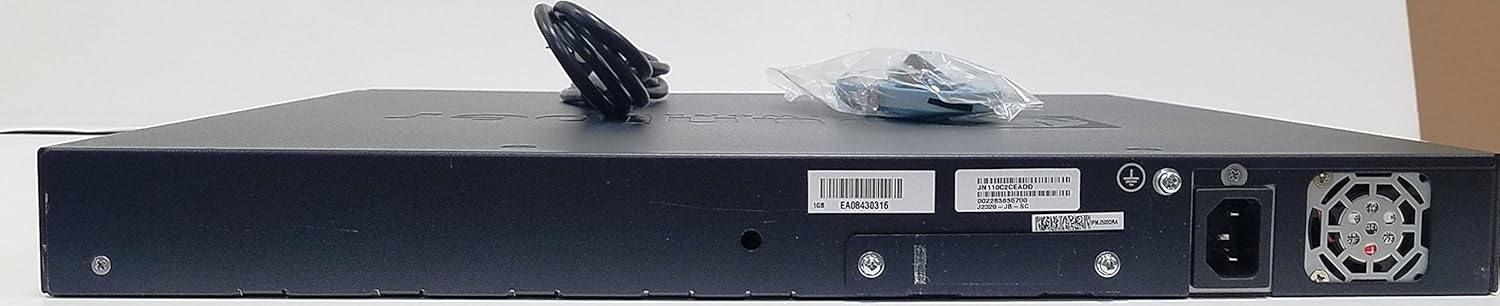
ചിത്രം 4.5: പിൻഭാഗം view of the Juniper J2320 Services Router, displaying the AC power input socket, grounding screw, and various product labels including serial numbers and model information.
ഫ്രണ്ട് പാനൽ ഘടകങ്ങൾ:
- പവർ എൽഇഡി: പവർ സ്റ്റാറ്റസ് സൂചിപ്പിക്കുന്നു.
- സ്റ്റാറ്റസ് LED: സിസ്റ്റം പ്രവർത്തന നില സൂചിപ്പിക്കുന്നു.
- അലാറം LED: Indicates system alarms or errors.
- Reset/Config Button: Used for system reset or configuration mode.
- കൺസോൾ പോർട്ട്: RJ-45 port for local management access.
- ഓക്സ് പോർട്ട്: Auxiliary port for dial-up or other connections.
- Network (RJ-45) Ports: Four 10/100/1000Base-T Gigabit Ethernet ports.
- PIM Slots: Three expansion slots for Physical Interface Modules.
- USB പോർട്ടുകൾ: Two USB 2.0 ports (USB 0, USB 1).
5. സജ്ജീകരണം
5.1 റാക്ക് മൗണ്ടിംഗ്
The J2320 router is designed for 19-inch rack mounting (1U height).
- Attach the provided rack-mounting brackets to the sides of the router using the supplied screws.
- Align the router with the rack posts and secure it using appropriate rack screws.
- Ensure there is adequate space for airflow around the unit.
5.2 പവർ കണക്ഷൻ
- Connect the AC power cord to the power input on the rear of the router.
- പവർ കോർഡിന്റെ മറ്റേ അറ്റം ഗ്രൗണ്ടഡ് ഇലക്ട്രിക്കൽ ഔട്ട്ലെറ്റിലേക്ക് പ്ലഗ് ചെയ്യുക.
- The Power LED on the front panel should illuminate.
5.3 പ്രാരംഭ കോൺഫിഗറേഷൻ
For initial configuration, connect a console cable from your management workstation to the Console port on the router's front panel. Refer to the Junos OS documentation for detailed configuration steps.
6. റൂട്ടർ പ്രവർത്തിപ്പിക്കൽ
6.1 പവർ ഓൺ/ഓഫ്
- പവർ ഓൺ: Connect the AC power cord. The router will automatically power on and begin its boot sequence.
- പവർ ഓഫ്: Disconnect the AC power cord from the electrical outlet. For graceful shutdown, use the appropriate Junos OS command line interface (CLI) commands before disconnecting power.
6.2 LED സൂചകങ്ങൾ
Monitor the front panel LEDs for operational status:
- പവർ എൽഇഡി (പച്ച): Solid green indicates power is on.
- Status LED (Green/Amber): Solid green indicates normal operation. Amber may indicate a warning or degraded state.
- Alarm LED (Red/Amber): Red indicates a critical alarm. Amber indicates a minor alarm.
6.3 നെറ്റ്വർക്ക് കണക്റ്റിവിറ്റി
Connect network devices to the RJ-45 network ports. The ports support 10/100/1000Base-T Ethernet. Ensure proper cabling (straight-through or crossover as required by your network setup).
7. പരിപാലനം
7.1 വൃത്തിയാക്കൽ
- Periodically clean the exterior of the router with a soft, dry cloth.
- Ensure ventilation openings are free from dust and debris. Use compressed air if necessary, but do not spray directly into ports.
- ലിക്വിഡ് അല്ലെങ്കിൽ എയറോസോൾ ക്ലീനർ ഉപയോഗിക്കരുത്.
7.2 ഫേംവെയർ അപ്ഡേറ്റുകൾ
Regularly check the Juniper Networks support website for the latest Junos OS firmware updates. Keeping the firmware updated ensures optimal performance, security, and access to new features. Follow the instructions provided by Juniper Networks for firmware update procedures.
8. പ്രശ്നപരിഹാരം
| പ്രശ്നം | സാധ്യമായ കാരണം | പരിഹാരം |
|---|---|---|
| റൂട്ടർ പവർ ഓൺ ചെയ്യുന്നില്ല. | No power to the unit; faulty power cord or outlet. | പവർ കോർഡ് കണക്ഷൻ പരിശോധിക്കുക. പവർ ഔട്ട്ലെറ്റ് പ്രവർത്തനക്ഷമമാണെന്ന് ഉറപ്പാക്കുക. |
| Alarm LED is red. | Critical system error or hardware failure. | Check system logs via console. Contact Juniper support if unresolved. |
| Cannot access router via network. | Incorrect IP configuration; network cable issue. | Verify IP settings. Check network cable connections and status LEDs on ports. |
9 സ്പെസിഫിക്കേഷനുകൾ
| ഫീച്ചർ | വിശദാംശങ്ങൾ |
|---|---|
| ഉൽപ്പന്ന മോഡൽ | J2320 |
| നിർമ്മാതാവിൻ്റെ ഭാഗം നമ്പർ | J2320-JB-SC |
| ഉൽപ്പന്ന തരം | റൂട്ടർ |
| തുറമുഖങ്ങളുടെ ആകെ എണ്ണം | 4 (RJ-45 Network) + Console/Aux + USB |
| നെറ്റ്വർക്ക് സാങ്കേതികവിദ്യ | 10/100/1000Base-T Gigabit Ethernet |
| സ്റ്റാൻഡേർഡ് മെമ്മറി | 1GB DRAM |
| ഫ്ലാഷ് മെമ്മറി | 1 ജിബി ഫ്ലാഷ് |
| വിപുലീകരണ സ്ലോട്ടുകൾ | 7 total, 3 PIM slots |
| Compatible Rack Unit | 1U |
| ഫോം ഫാക്ടർ | റാക്ക്-മൌണ്ട് ചെയ്യാവുന്ന |
| അളവുകൾ (H x W x D) | 1.8" x 17.5" x 15.1" |
| ഭാരം (ഏകദേശം) | 15.00 പൗണ്ട് |
| ആദ്യ തീയതി ലഭ്യമാണ് | ജൂലൈ 21, 2013 |
Note: Memory and Flash values are based on the product title for this specific model variant.
10. വാറൻ്റിയും പിന്തുണയും
10.1 നിർമ്മാതാവിന്റെ വാറന്റി
The Juniper J2320 Services Router typically comes with a 1-വർഷ പരിമിത വാറൻ്റി from Juniper Networks. Please refer to the official Juniper Networks warranty documentation for full terms and conditions.
10.2 വിപുലീകൃത സംരക്ഷണ പദ്ധതികൾ
Extended protection plans may be available for purchase separately to provide additional coverage beyond the standard manufacturer's warranty. These plans can offer extended service and support for your device.
- 4 വർഷത്തെ സംരക്ഷണ പദ്ധതി: Provides extended coverage for four years.
- പൂർണ്ണ സംരക്ഷണം: A monthly subscription plan covering eligible past and future purchases.
വാങ്ങലിനെക്കുറിച്ചുള്ള വിശദാംശങ്ങൾക്ക്asing or activating these plans, consult your retailer or the plan provider.
10.3 സാങ്കേതിക പിന്തുണ
For technical assistance, software updates, or further documentation, please visit the official Juniper Networks support webസൈറ്റിൽ ബന്ധപ്പെടുക അല്ലെങ്കിൽ അവരുടെ ഉപഭോക്തൃ സേവനവുമായി ബന്ധപ്പെടുക. പിന്തുണ തേടുമ്പോൾ നിങ്ങളുടെ ഉൽപ്പന്ന മോഡലും സീരിയൽ നമ്പറും തയ്യാറാണെന്ന് ഉറപ്പാക്കുക.
നിർമ്മാതാവ് Webസൈറ്റ് വിലാസം: http://www.juniper.net