1. ആമുഖം
റിഗോൾ DG5352 ഫംഗ്ഷൻ/അനിയന്ത്രിതമായ വേവ്ഫോം ജനറേറ്ററിന്റെ സുരക്ഷിതവും ഫലപ്രദവുമായ പ്രവർത്തനത്തിന് ആവശ്യമായ വിവരങ്ങൾ ഈ മാനുവൽ നൽകുന്നു. പരമാവധി 350 MHz ഫ്രീക്വൻസിയിൽ വിവിധ തരംഗരൂപങ്ങൾ സൃഷ്ടിക്കാൻ കഴിവുള്ള ഉയർന്ന പ്രകടനമുള്ള, 2-ചാനൽ ഉപകരണമാണ് DG5352.ampലിംഗ് നിരക്ക് 1 GSa/s. ശരിയായ പ്രവർത്തനക്ഷമത ഉറപ്പാക്കാനും കേടുപാടുകൾ തടയാനും ഉപകരണം ഉപയോഗിക്കുന്നതിന് മുമ്പ് ദയവായി ഈ മാനുവൽ നന്നായി വായിക്കുക.
2 സുരക്ഷാ വിവരങ്ങൾ
പരിക്കുകൾ തടയുന്നതിനും ഉപകരണത്തിനോ ബന്ധപ്പെട്ട ഏതെങ്കിലും ഉൽപ്പന്നങ്ങൾക്കോ കേടുപാടുകൾ സംഭവിക്കാതിരിക്കുന്നതിനും ഇനിപ്പറയുന്ന സുരക്ഷാ മുൻകരുതലുകൾ പാലിക്കുക.
- ഊർജ്ജ സ്രോതസ്സ്: നിർദ്ദിഷ്ട വോളിയം നൽകുന്ന ഒരു പവർ സ്രോതസ്സിലേക്ക് ഉപകരണം ബന്ധിപ്പിക്കുക.tagഇ ശ്രേണി.
- ഗ്രൗണ്ടിംഗ്: വൈദ്യുതാഘാതം തടയാൻ ഉപകരണം ശരിയായി നിലത്തിട്ടിട്ടുണ്ടെന്ന് ഉറപ്പാക്കുക.
- വെൻ്റിലേഷൻ: വെന്റിലേഷൻ ദ്വാരങ്ങൾ തടയരുത്. ഉപകരണത്തിന് ചുറ്റും മതിയായ വായുസഞ്ചാരം ഉറപ്പാക്കുക.
- പരിസ്ഥിതി: ഉപകരണം വരണ്ടതും നന്നായി വായുസഞ്ചാരമുള്ളതുമായ സ്ഥലത്ത് പ്രവർത്തിപ്പിക്കുക, നേരിട്ടുള്ള സൂര്യപ്രകാശം, ഉയർന്ന താപനില, അമിതമായ പൊടി എന്നിവയിൽ നിന്ന് അകന്നുനിൽക്കുക.
- വൃത്തിയാക്കൽ: വൃത്തിയാക്കുന്നതിന് മുമ്പ് വൈദ്യുതി വിച്ഛേദിക്കുക. മൃദുവായ, ഡി ഉപയോഗിക്കുകamp തുണി; ഉരച്ചിലുകൾ ഉണ്ടാക്കുന്ന ക്ലീനറുകളോ ലായകങ്ങളോ ഒഴിവാക്കുക.
- സേവനം: എല്ലാ സേവനങ്ങളും യോഗ്യതയുള്ള സേവന ഉദ്യോഗസ്ഥരെ ഏൽപ്പിക്കുക. ഉപകരണം സ്വയം നന്നാക്കാൻ ശ്രമിക്കരുത്.
3. ഉൽപ്പന്നം കഴിഞ്ഞുview
ഇലക്ട്രോണിക്സ് പരിശോധനയിലും വികസനത്തിലും വിപുലമായ ആപ്ലിക്കേഷനുകൾക്കായി രൂപകൽപ്പന ചെയ്ത ഒരു ബഹുമുഖ ഫംഗ്ഷൻ/അനിയന്ത്രിതമായ വേവ്ഫോം ജനറേറ്ററാണ് റിഗോൾ DG5352. വ്യത്യസ്ത തരംഗരൂപങ്ങളുടെയോ സമന്വയിപ്പിച്ച സിഗ്നലുകളുടെയോ ഒരേസമയം ജനറേഷൻ അനുവദിക്കുന്ന രണ്ട് സ്വതന്ത്ര ഔട്ട്പുട്ട് ചാനലുകൾ ഇതിൽ ഉൾപ്പെടുന്നു.
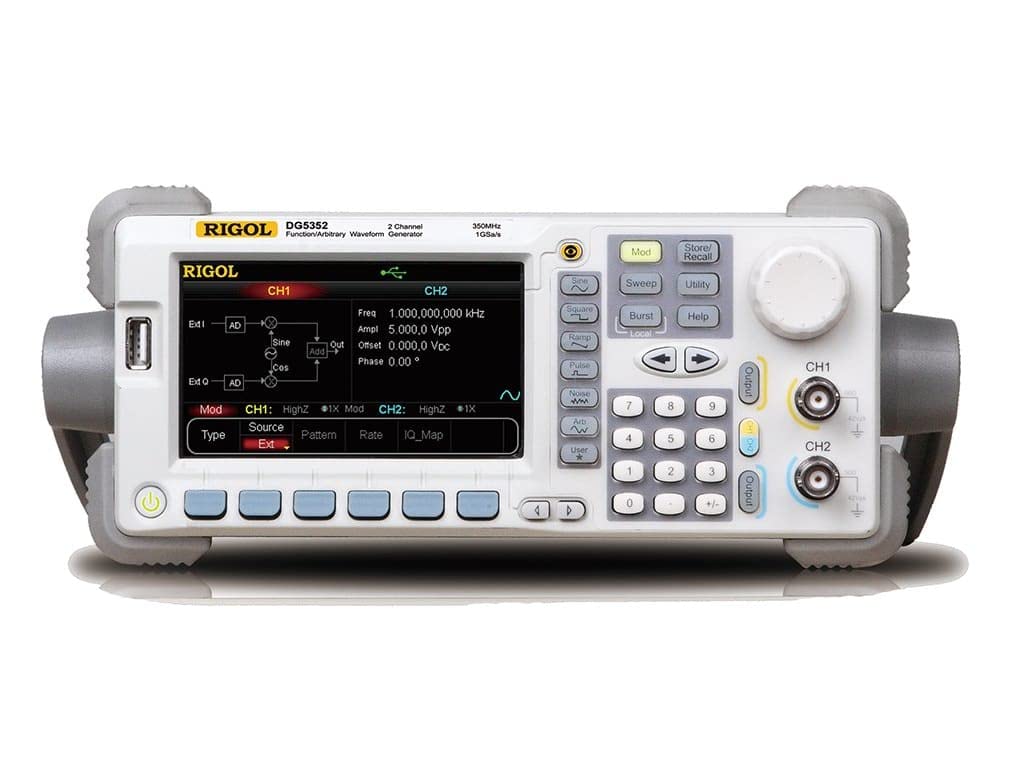
ചിത്രം 3.1: റിഗോൾ DG5352 ന്റെ മുൻ പാനൽ. ഈ ചിത്രം Rigol DG5352 ന്റെ മുൻ പാനൽ പ്രദർശിപ്പിക്കുന്നു, അതിന്റെ പ്രധാന ഡിസ്പ്ലേ, നിയന്ത്രണ ബട്ടണുകൾ, റോട്ടറി നോബ്, ചാനൽ 1 (CH1), ചാനൽ 2 (CH2) എന്നിവയ്ക്കുള്ള ഔട്ട്പുട്ട് കണക്ടറുകൾ എന്നിവ എടുത്തുകാണിക്കുന്നു. ഡിസ്പ്ലേ ഫ്രീക്വൻസിക്കായുള്ള നിലവിലെ ക്രമീകരണങ്ങൾ കാണിക്കുന്നു, ampതരംഗരൂപ തരം, മോഡുലേഷൻ ഓപ്ഷനുകൾക്കൊപ്പം ലിറ്റ്യൂഡ്, ഓഫ്സെറ്റ്, ഘട്ടം എന്നിവ.
പ്രധാന സവിശേഷതകൾ:
- ചാനലുകൾ: 2 സ്വതന്ത്ര ഔട്ട്പുട്ട് ചാനലുകൾ.
- ഫ്രീക്വൻസി ശ്രേണി: 350 MHz വരെ.
- Sampലിംഗ് നിരക്ക്: 1 ജിഎസ്എ/സെ.
- തരംഗരൂപ തരങ്ങൾ: സൈൻ, സ്ക്വയർ, ആർamp, പൾസ്, ശബ്ദം, ഏകപക്ഷീയം, കൂടാതെ മറ്റു പലതും.
- മോഡുലേഷൻ പ്രവർത്തനങ്ങൾ: എഎം, എഫ്എം, പിഎം, എഫ്എസ്കെ, ആസ്ക്, പിഎസ്കെ, പിഡബ്ല്യുഎം, സ്വീപ്പ്, ബർസ്റ്റ്.
- ഉപയോക്തൃ ഇൻ്റർഫേസ്: വ്യക്തമായ ഡിസ്പ്ലേ, സമർപ്പിത ഫംഗ്ഷൻ ബട്ടണുകൾ, കൃത്യമായ ക്രമീകരണങ്ങൾക്കായി ഒരു റോട്ടറി നോബ് എന്നിവയുള്ള അവബോധജന്യമായ ഫ്രണ്ട് പാനൽ.
4. സജ്ജീകരണം
- അൺപാക്ക് ചെയ്യുന്നു: DG5352 അതിന്റെ പാക്കേജിംഗിൽ നിന്ന് ശ്രദ്ധാപൂർവ്വം നീക്കം ചെയ്യുക. പാക്കിംഗ് ലിസ്റ്റിൽ ലിസ്റ്റ് ചെയ്തിരിക്കുന്ന എല്ലാ ആക്സസറികളും അവിടെയുണ്ടെന്ന് ഉറപ്പാക്കുക.
- പവർ കണക്ഷൻ: നൽകിയിരിക്കുന്ന പവർ കോർഡ് ഉപകരണത്തിന്റെ പിൻ പാനലിലുള്ള എസി ഇൻപുട്ടുമായി ബന്ധിപ്പിക്കുക, തുടർന്ന് മറ്റേ അറ്റം ഗ്രൗണ്ടഡ് എസി പവർ ഔട്ട്ലെറ്റിലേക്ക് പ്ലഗ് ചെയ്യുക.
- പവർ ഓൺ: ഉപകരണം ഓണാക്കാൻ മുൻ പാനലിലുള്ള പവർ ബട്ടൺ അമർത്തുക. ഡിസ്പ്ലേ പ്രകാശിക്കും, സിസ്റ്റം സ്വയം പരിശോധന നടത്തും.
- ഔട്ട്പുട്ട് കണക്ഷനുകൾ: നിങ്ങളുടെ ടെസ്റ്റ് ലീഡുകളോ കേബിളുകളോ മുൻ പാനലിലെ ആവശ്യമുള്ള ഔട്ട്പുട്ട് ചാനലുകളിലേക്ക് (CH1 അല്ലെങ്കിൽ CH2) ബന്ധിപ്പിക്കുക. നിങ്ങളുടെ ആപ്ലിക്കേഷന് ശരിയായ ഇംപെഡൻസ് പൊരുത്തം ഉറപ്പാക്കുക.
- USB/LAN കണക്ഷൻ (ഓപ്ഷണൽ): റിമോട്ട് കൺട്രോളിനോ ഡാറ്റാ കൈമാറ്റത്തിനോ വേണ്ടി, USB ഹോസ്റ്റ്/ഉപകരണ പോർട്ടിലേക്ക് ഒരു USB കേബിൾ ബന്ധിപ്പിക്കുക അല്ലെങ്കിൽ പിൻ പാനലിലെ LAN പോർട്ടിലേക്ക് ഒരു ഇതർനെറ്റ് കേബിൾ ബന്ധിപ്പിക്കുക.
5. പ്രവർത്തന നിർദ്ദേശങ്ങൾ
സ്റ്റാൻഡേർഡ് തരംഗരൂപങ്ങൾ സൃഷ്ടിക്കുന്നതിനുള്ള അടിസ്ഥാന പ്രവർത്തന നടപടിക്രമങ്ങൾ ഈ വിഭാഗം വിവരിക്കുന്നു.
5.1. ഒരു സ്റ്റാൻഡേർഡ് വേവ്ഫോം സൃഷ്ടിക്കൽ (ഉദാ: സൈൻ വേവ്)
- ചാനൽ തിരഞ്ഞെടുക്കുക: അമർത്തുക CH1 or CH2 ആവശ്യമുള്ള ഔട്ട്പുട്ട് ചാനൽ തിരഞ്ഞെടുക്കാൻ മുൻ പാനലിലെ ബട്ടൺ അമർത്തുക. സജീവ ചാനൽ ഡിസ്പ്ലേയിൽ ഹൈലൈറ്റ് ചെയ്യപ്പെടും.
- തരംഗരൂപ തരം തിരഞ്ഞെടുക്കുക: അമർത്തുക സൈൻ ബട്ടൺ (അല്ലെങ്കിൽ മറ്റ് തരംഗരൂപ ബട്ടണുകൾ പോലുള്ളവ) സമചതുരം, Ramp, പൾസ്) നിയന്ത്രണ പാനലിന്റെ ഇടതുവശത്ത് സ്ഥിതിചെയ്യുന്നു. ഡിസ്പ്ലേ ഡിഫോൾട്ട് സൈൻ വേവ് പാരാമീറ്ററുകൾ കാണിക്കും.
- ഫ്രീക്വൻസി സജ്ജമാക്കുക: ആവശ്യമുള്ള ഫ്രീക്വൻസി മൂല്യം നൽകുന്നതിന് സംഖ്യാ കീപാഡ് ഉപയോഗിക്കുക, തുടർന്ന് അനുബന്ധ യൂണിറ്റ് ബട്ടൺ അമർത്തുക (ഉദാ. MHz, kHz). പകരമായി, ആവൃത്തി ക്രമീകരിക്കാൻ റോട്ടറി നോബ് ഉപയോഗിക്കുക.
- സജ്ജമാക്കുക Ampലിറ്റ്യൂഡ്: അമർത്തുക Ampl ഡിസ്പ്ലേയിലെ സോഫ്റ്റ്കീ. സംഖ്യാ കീപാഡും യൂണിറ്റ് ബട്ടണുകളും ഉപയോഗിക്കുക (ഉദാ. Vpp) അല്ലെങ്കിൽ പീക്ക്-ടു-പീക്ക് സജ്ജമാക്കുന്നതിനുള്ള റോട്ടറി നോബ് ampലിറ്റ്യൂഡ്.
- ഓഫ്സെറ്റ് സജ്ജമാക്കുക: അമർത്തുക ഓഫ്സെറ്റ് സോഫ്റ്റ്കീ. സംഖ്യാ കീപാഡും യൂണിറ്റ് ബട്ടണുകളും ഉപയോഗിക്കുക (ഉദാ. വി.ഡി.സി) അല്ലെങ്കിൽ DC ഓഫ്സെറ്റ് വോളിയം സജ്ജീകരിക്കുന്നതിനുള്ള റോട്ടറി നോബ്tage.
- ഔട്ട്പുട്ട് പ്രാപ്തമാക്കുക: അമർത്തുക ഔട്ട്പുട്ട് വേവ്ഫോം ഔട്ട്പുട്ട് പ്രാപ്തമാക്കുന്നതിന് തിരഞ്ഞെടുത്ത ചാനലിനായുള്ള (CH1 അല്ലെങ്കിൽ CH2) ബട്ടൺ. സജീവമാകുമ്പോൾ ബട്ടൺ പ്രകാശിക്കും.
5.2. മോഡുലേഷൻ പ്രവർത്തനങ്ങൾ
DG5352 വിവിധ മോഡുലേഷൻ തരങ്ങളെ പിന്തുണയ്ക്കുന്നു. ഇവ ആക്സസ് ചെയ്യാൻ, അമർത്തുക മോഡ് മുൻ പാനലിലെ ബട്ടൺ. ഓൺ-സ്ക്രീൻ പ്രോംപ്റ്റുകൾ പിന്തുടർന്ന് സോഫ്റ്റ് കീകളും റോട്ടറി നോബും ഉപയോഗിച്ച് ആവശ്യമുള്ള മോഡുലേഷൻ പാരാമീറ്ററുകൾ (ഉദാ: AM, FM, PM) കോൺഫിഗർ ചെയ്യുക.
5.3. സജ്ജീകരണങ്ങൾ സംഭരിക്കുകയും തിരിച്ചുവിളിക്കുകയും ചെയ്യുന്നു
നിലവിലെ ഉപകരണ ക്രമീകരണങ്ങൾ സംരക്ഷിക്കാൻ, സംഭരിക്കുക/തിരിച്ചുവിളിക്കുക ബട്ടൺ. സോഫ്റ്റ്കീകളും റോട്ടറി നോബും ഉപയോഗിച്ച് ഒരു മെമ്മറി ലൊക്കേഷൻ തിരഞ്ഞെടുക്കുക, തുടർന്ന് സംരക്ഷിക്കാൻ സ്ഥിരീകരിക്കുക. ക്രമീകരണങ്ങൾ തിരിച്ചുവിളിക്കാൻ, അമർത്തുക സംഭരിക്കുക/തിരിച്ചുവിളിക്കുക വീണ്ടും, ആവശ്യമുള്ള മെമ്മറി ലൊക്കേഷൻ തിരഞ്ഞെടുത്ത് സ്ഥിരീകരിക്കുക.
6. പരിപാലനം
- വൃത്തിയാക്കൽ: മൃദുവായതും ഉണങ്ങിയതുമായ തുണി ഉപയോഗിച്ച് ഉപകരണത്തിന്റെ പുറംഭാഗം പതിവായി വൃത്തിയാക്കുക. കഠിനമായ അഴുക്കിന്, ഒരു തുണി ഉപയോഗിച്ച് നേരിയ തോതിൽ വൃത്തിയാക്കുക.ampവെള്ളം കൊണ്ട് തീർത്തു. കഠിനമായ രാസവസ്തുക്കളോ ലായകങ്ങളോ ഉപയോഗിക്കരുത്.
- വെൻ്റിലേഷൻ: അമിതമായി ചൂടാകുന്നത് തടയാൻ ഉപകരണത്തിലെ വെന്റിലേഷൻ ദ്വാരങ്ങൾ പൊടിയിൽ നിന്നും തടസ്സങ്ങളിൽ നിന്നും മുക്തമാണെന്ന് ഉറപ്പാക്കുക.
- സംഭരണം: ദീർഘകാലത്തേക്ക് ഉപയോഗത്തിലില്ലാത്തപ്പോൾ, DG5352 അതിന്റെ നിർദ്ദിഷ്ട പ്രവർത്തന താപനില പരിധിക്കുള്ളിൽ വൃത്തിയുള്ളതും വരണ്ടതുമായ അന്തരീക്ഷത്തിൽ സൂക്ഷിക്കുക.
- കാലിബ്രേഷൻ: അളവെടുപ്പ് കൃത്യത നിലനിർത്താൻ യോഗ്യതയുള്ള ഉദ്യോഗസ്ഥരുടെ ആനുകാലിക കാലിബ്രേഷൻ ശുപാർശ ചെയ്യുന്നു. കാലിബ്രേഷൻ സേവനങ്ങൾക്കായുള്ള റിഗോളിന്റെ ഔദ്യോഗിക പിന്തുണ കാണുക.
7. പ്രശ്നപരിഹാരം
| പ്രശ്നം | സാധ്യമായ കാരണം | പരിഹാരം |
|---|---|---|
| ഉപകരണം ഓണാക്കുന്നില്ല. | പവർ കോർഡ് ബന്ധിപ്പിച്ചിട്ടില്ല; പവർ ഔട്ട്ലെറ്റ് തകരാറിലായി; ആന്തരിക ഫ്യൂസ് പൊട്ടി. | പവർ കോർഡ് കണക്ഷൻ പരിശോധിക്കുക; പവർ ഔട്ട്ലെറ്റ് പരിശോധിക്കുക; ഫ്യൂസ് മാറ്റിസ്ഥാപിക്കുന്നതിന് സേവനവുമായി ബന്ധപ്പെടുക. |
| ഔട്ട്പുട്ട് സിഗ്നൽ ഇല്ല. | ഔട്ട്പുട്ട് ചാനൽ പ്രവർത്തനക്ഷമമാക്കിയിട്ടില്ല; തെറ്റായ വേവ്ഫോം പാരാമീറ്ററുകൾ; കേബിൾ തകരാറിലാണ്. | അമർത്തുക ഔട്ട്പുട്ട് ചാനലിനായുള്ള ബട്ടൺ; ആവൃത്തി പരിശോധിക്കുക/ampലീറ്റിയൂഡ് ക്രമീകരണങ്ങൾ; കേബിളുകൾ പരിശോധിക്കുക/മാറ്റിസ്ഥാപിക്കുക. |
| ഡിസ്പ്ലേ പിശക് സന്ദേശം കാണിക്കുന്നു. | സിസ്റ്റം പിശക്; തെറ്റായ ഇൻപുട്ട്. | നിർദ്ദിഷ്ട നിർദ്ദേശങ്ങൾക്ക് ഓൺ-സ്ക്രീൻ സന്ദേശം കാണുക; ഉപകരണം പുനരാരംഭിക്കുക; സ്ഥിരമാണെങ്കിൽ പിന്തുണയുമായി ബന്ധപ്പെടുക. |
8 സ്പെസിഫിക്കേഷനുകൾ
റിഗോൾ DG5352 ഫംഗ്ഷൻ/ആർബിട്രറി വേവ്ഫോം ജനറേറ്ററിനായുള്ള പ്രധാന സ്പെസിഫിക്കേഷനുകൾ താഴെ കൊടുക്കുന്നു.
- മോഡൽ നമ്പർ: DG5352
- നിർമ്മാതാവ്: റിഗോൾ
- ചാനലുകൾ: 2
- പരമാവധി ആവൃത്തി: 350 MHz
- Sampലിംഗ് നിരക്ക്: 1 GSa/s
- ASIN: B00EPECMLC
- ആദ്യം ലഭ്യമായത്: സെപ്റ്റംബർ 3, 2014
9. വാറൻ്റിയും പിന്തുണയും
റിഗോൾ ഉൽപ്പന്നങ്ങൾ സാധാരണയായി ഒരു സ്റ്റാൻഡേർഡ് നിർമ്മാതാവിന്റെ വാറണ്ടിയോടെയാണ് വരുന്നത്. വിശദമായ വാറന്റി നിബന്ധനകൾ, സാങ്കേതിക പിന്തുണ അല്ലെങ്കിൽ സേവന അന്വേഷണങ്ങൾ എന്നിവയ്ക്കായി, ദയവായി ഔദ്യോഗിക റിഗോൾ പരിശോധിക്കുക. webനിങ്ങളുടെ റിഗോൾ സൈറ്റിൽ ബന്ധപ്പെടുക അല്ലെങ്കിൽ നിങ്ങളുടെ പ്രാദേശിക വിതരണക്കാരനെ ബന്ധപ്പെടുക. വാറന്റി ക്ലെയിമുകൾക്കുള്ള വാങ്ങലിന്റെ തെളിവായി നിങ്ങളുടെ വാങ്ങൽ രസീത് സൂക്ഷിക്കുക.


