ആമുഖം
This manual provides detailed instructions for the installation, operation, and maintenance of your COMTEC HDR-101 Drive Recorder. Please read this manual thoroughly before using the product to ensure correct usage and optimal performance. Keep this manual for future reference.
സുരക്ഷാ വിവരങ്ങൾ
Always operate the device safely and responsibly. Do not attempt to install or operate the device in a way that obstructs your view of the road or interferes with the safe operation of your vehicle. Ensure all cables are securely routed and do not interfere with driving controls. Avoid exposing the device to extreme temperatures or direct sunlight for prolonged periods, as this may affect its performance and lifespan. Do not disassemble or modify the device, as this will void the warranty and may cause damage.
പാക്കേജ് ഉള്ളടക്കം
താഴെ ലിസ്റ്റ് ചെയ്തിരിക്കുന്ന എല്ലാ ഇനങ്ങളും നിങ്ങളുടെ പാക്കേജിൽ ഉൾപ്പെടുത്തിയിട്ടുണ്ടെന്ന് ഉറപ്പാക്കുക:
- COMTEC HDR-101 Drive Recorder Unit
- മൌണ്ടിംഗ് ബ്രാക്കറ്റ്
- Cigarette Lighter Power Cable (DC12V/24V compatible)
- microSDHC Card (4GB)
- microSD Adapter
- പശ മൗണ്ടിംഗ് ടേപ്പ്
- കേബിൾ ക്ലിപ്പുകൾ
- Hex Wrench (for bracket adjustment)
- ക്ലീനിംഗ് വൈപ്പ്

Image: The package contents include the main drive recorder unit, mounting bracket, power cable, 4GB microSDHC card with adapter, adhesive tape, cable clips, hex wrench, and a cleaning wipe.
ഉൽപ്പന്നം കഴിഞ്ഞുview
The COMTEC HDR-101 is a compact drive recorder designed to capture high-definition video of your journeys. It features a front-facing camera, a rear LCD screen for live view and playback, and intuitive controls.
ഫ്രണ്ട് View

Image: The front of the drive recorder shows the main camera lens and the 'COMTEC Drive Recorder' branding. The AV OUT port and microSD card slot are visible on the left side.
പിൻഭാഗം View നിയന്ത്രണങ്ങളും

Image: The rear of the device features a 2.5-inch TFT LCD screen. To the right of the screen are control buttons: RESET, UP, DOWN, OK, and MENU. These buttons are used for navigation and settings adjustments.
സൈഡ് പോർട്ടുകൾ

Image: One side of the device features the DC12V/24V power input port, used to connect the drive recorder to your vehicle's power supply.

Image: The other side of the device includes the AV OUT port for connecting to an external display and the microSD card slot for inserting the recording media.
സജ്ജമാക്കുക
ഇൻസ്റ്റലേഷൻ
The HDR-101 offers flexible mounting options to suit your vehicle's interior. It can be installed either behind the rearview കണ്ണാടിയിലോ ഡാഷ്ബോർഡിലോ.
- മൗണ്ടിംഗ് സ്ഥലം തിരഞ്ഞെടുക്കുക: Select a position that does not obstruct your view of the road or interfere with airbags. Common locations are behind the rearview mirror for a discreet installation or on the dashboard for easier access.
- ഉപരിതലം വൃത്തിയാക്കുക: Use the provided cleaning wipe to ensure the mounting surface is free of dust and grease.
- മൗണ്ടിംഗ് ബ്രാക്കറ്റ് അറ്റാച്ചുചെയ്യുക: Apply the adhesive mounting tape to the bracket and firmly press it onto the chosen surface.
- Attach the Drive Recorder: Slide the drive recorder onto the mounting bracket. Adjust the camera angle using the hex wrench to ensure a clear view of the road ahead. The device features automatic display inversion, allowing for dashboard mounting without affecting screen orientation.

Image: The drive recorder discreetly mounted behind the rearview mirror, providing an unobstructed view ഡ്രൈവർക്ക്.
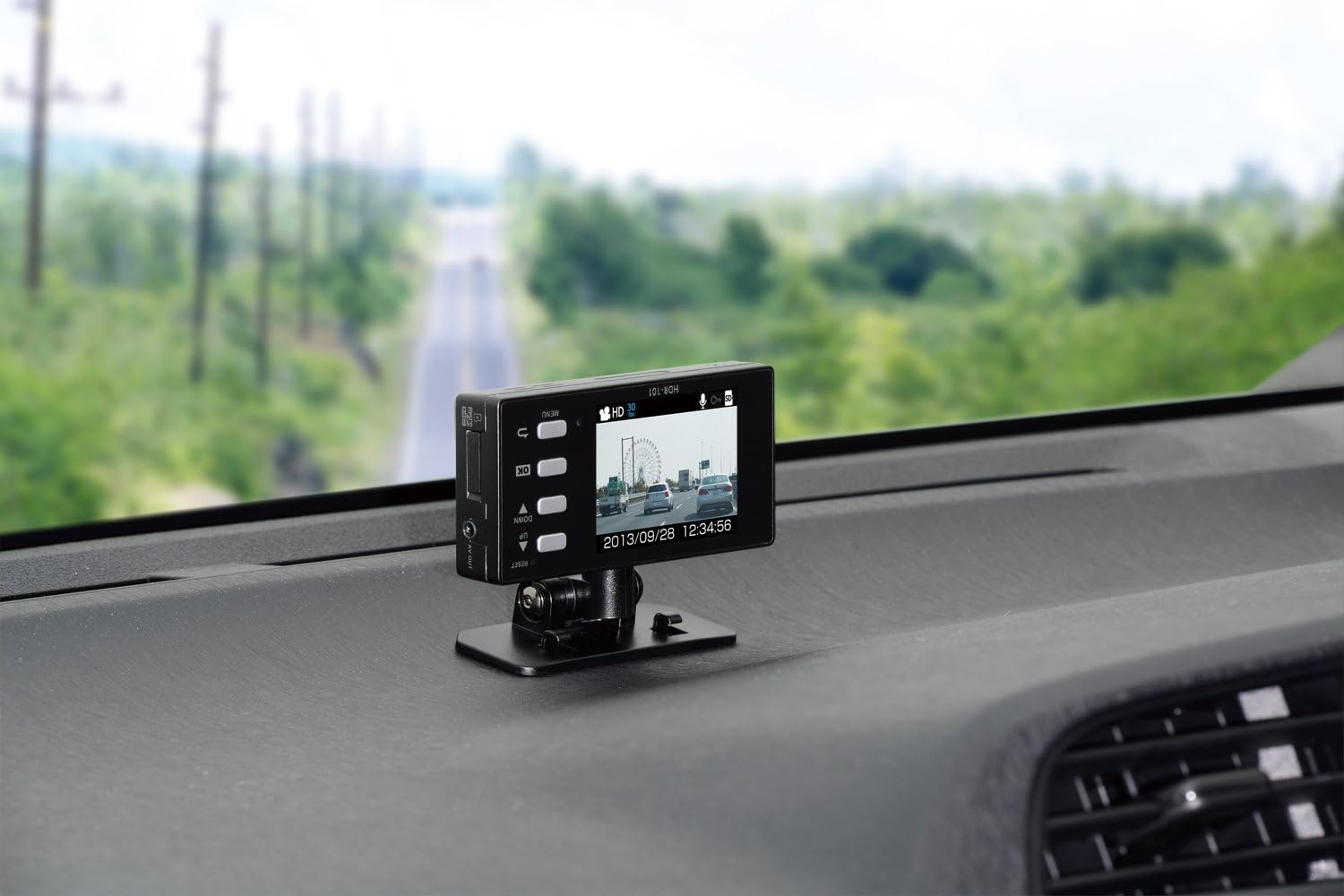
Image: The drive recorder mounted on the dashboard, showing its live view സ്ക്രീനിൽ.
പവർ കണക്ഷൻ
Connect the cigarette lighter power cable to the DC12V/24V port on the drive recorder and plug the other end into your vehicle's cigarette lighter socket. The device will power on automatically when the vehicle's ignition is turned on.
പ്രാരംഭ കോൺഫിഗറേഷൻ
- microSD Card Insertion: Insert the provided microSDHC card into the microSD card slot until it clicks into place. Ensure the card is inserted correctly to prevent recording errors.
- സമയവും തീയതിയും ക്രമീകരണം: Upon first use or after a power reset, you may need to set the correct time and date. Navigate through the menu using the UP/DOWN buttons and confirm with OK.
പ്രവർത്തന നിർദ്ദേശങ്ങൾ
റെക്കോർഡുചെയ്യൽ മോഡുകൾ
The HDR-101 supports multiple recording modes to capture various driving situations:
- തുടർച്ചയായ റെക്കോർഡിംഗ്: The device automatically records video from the moment the power is turned on until it is turned off. When the microSD card is full, the oldest fileകൾ സ്വയമേവ തിരുത്തിയെഴുതപ്പെടുന്നു.
- G-Sensor Impact Recording: In the event of an impact or sudden braking/acceleration, the built-in G-sensor detects the event and automatically saves the corresponding video segment as an impact recording. These files are protected from being overwritten by continuous recording. The G-sensor sensitivity can be adjusted (11 levels, including OFF).
- മാനുവൽ റെക്കോർഡിംഗ്: You can manually initiate a recording by pressing a designated button. This allows you to capture specific events or moments on demand.
Viewing റെക്കോർഡിംഗുകൾ
- On-Device LCD: Recorded videos can be immediately viewed on the device's 2.5-inch LCD screen. This is useful for checking footage on the spot or adjusting the camera angle during installation.
- PC Playback: Remove the microSD card and insert it into a computer (using the adapter if necessary). The COMTEC PC viewer software (usually pre-loaded on the microSD card or available for download) allows for detailed playback, including G-sensor data and other recording information.
- ടിവി ഔട്ട്പുട്ട്: Connect the device to a TV using an optional AV cable to view recordings on a larger screen.

Image: A visual guide illustrating the process of recording (1), selecting a video (2), and viewing it on the device's LCD screen (3).

Image: The PC viewer software interface, showing recorded video footage alongside G-sensor information and other data, accessible via the microSD card.
മറ്റ് പ്രവർത്തനങ്ങൾ
- ഓഡിയോ റെക്കോർഡിംഗ്: The device supports simultaneous audio recording with video.
- ബാക്കപ്പ് പ്രവർത്തനം: In the event of a power interruption (e.g., engine off), the device has a backup power function to save the currently recording file, preventing data loss.
- LED Signal Light Compatibility: Designed to record LED traffic signals accurately.
- Calendar/Clock Display: The LCD screen displays the current date and time.
മെയിൻ്റനൻസ്
microSD Card Management
To ensure reliable recording and prevent data loss, it is recommended to periodically format the microSD card. The device performs a check on the microSDHC card upon startup. If an error is detected, a warning will be displayed on the LCD screen, helping to prevent recording omissions due to card damage.
ട്രബിൾഷൂട്ടിംഗ്
If you encounter issues with your HDR-101, consider the following:
- No Recording/Recording Errors: Check if the microSD card is properly inserted and not damaged. Format the card if necessary.
- Interference with Other Devices (e.g., Digital TV, GPS): The HDR-101 is designed with noise countermeasures to minimize interference. If interference occurs, ensure the power cable is properly routed and not near sensitive antennas.
- തെറ്റായ സമയം/തീയതി: Reset the time and date through the device's menu.
- Poor Video Quality (Night): Night recording quality depends on ambient lighting. In very dark areas, visibility may be limited.
സ്പെസിഫിക്കേഷനുകൾ
| ഫീച്ചർ | സ്പെസിഫിക്കേഷൻ |
|---|---|
| റെക്കോർഡിംഗ് രീതി | Continuous Recording / 3-axis G-sensor / Manual Recording |
| വൈദ്യുതി വിതരണം | 12V / 24V |
| മൗണ്ടിംഗ് സ്ഥാനം | പിൻഭാഗംview Mirror Front Glass / Dashboard |
| ക്യാമറ പിക്സലുകൾ | Approx. 1 Million Pixels CMOS Camera |
| ക്യാമറ ആംഗിൾ | Diagonal 170° (Horizontal 105° / Vertical 80°) |
| Recording Image Size | HD (1280 × 720) / SD (640 × 360) |
| LCD വലിപ്പം | 2.5 ഇഞ്ച് TFT |
| LCD റെസല്യൂഷൻ | 320 × 240 |
| റെക്കോർഡിംഗ് മീഡിയ | microSDHC Card (4GB included) |
| റെക്കോർഡിംഗ് സമയം | 30-360 minutes (with included 4GB microSDHC card) |
| ഫ്രെയിം റേറ്റ് | 30/15/10/5 fps |
| Image Verification Method | Device LCD / PC / TV |
| Body Size (W×H×D) | 102 × 50 × 20 മി.മീ |
| ഭാരം | 95 ഗ്രാം |
| പ്രത്യേക സവിശേഷതകൾ | G-sensor, Noise Countermeasures, Backup Power, Automatic Display Inversion |
വാറൻ്റിയും പിന്തുണയും
This product is manufactured by COMTEC. For official support and inquiries, please refer to the COMTEC official website or contact their customer service. Please note that some repair and maintenance services may be excluded for certain products, as indicated by the manufacturer.


