1. ആമുഖം
The Altronix AL400ULACM is an 8-fused output power supply and access power controller designed to convert a 115V AC 60Hz input into independently controlled 12V DC or 24V DC outputs. It provides a total of 4 amp at 12VDC or 3 amp at 24V DC continuous supply current.
This unit is engineered to route power to various access control hardware devices, including magnetic locks, electric strikes, and magnetic door holders. Outputs can operate in both Fail-Safe and/or Fail-Secure modes, activated by an open collector sink or normally open (NO) dry trigger input from an access control system, card reader, keypad, push button, or PIR sensor.
The AL400ULACM can be powered by a single common power source for both board operation and locking devices, or by two independent power sources for separate board and lock/accessory power.
2 പ്രധാന സവിശേഷതകൾ
- Fire alarm disconnect (latching or non-latching) is individually selectable for any or all of the 8 outputs.
- Short circuit and thermal overload protection for enhanced safety.
- Filtered and electronically regulated outputs provided by the built-in power supply.
- Alarm output relay indicates when the Fire Alarm Control Panel (FACP) input is triggered (form "C" contact rated at 1 amp 28V DC, not evaluated by UL).
- Built-in charger for sealed lead acid or gel type batteries, with a maximum charge current of 0.7 amp for the AL400ULXB Power Supply Board.
- Automatic switch-over to stand-by battery when AC power fails, ensuring continuous operation.
- പൂജ്യം വോള്യംtage drop when the unit switches to battery backup during AC failure.
- Battery fail and battery presence supervision with form "C" contact.
- Wall mount enclosure designed for indoor use, accommodating up to two 12VDC/12AH batteries.
- UL listed, CSFM - California State Fire Marshal Approved, MEA - NYC Department of Buildings Approved.
3. സജ്ജീകരണവും ഇൻസ്റ്റാളേഷനും
Carefully unpack the Altronix AL400ULACM unit and inspect for any shipping damage. Ensure all components are present before proceeding with installation.
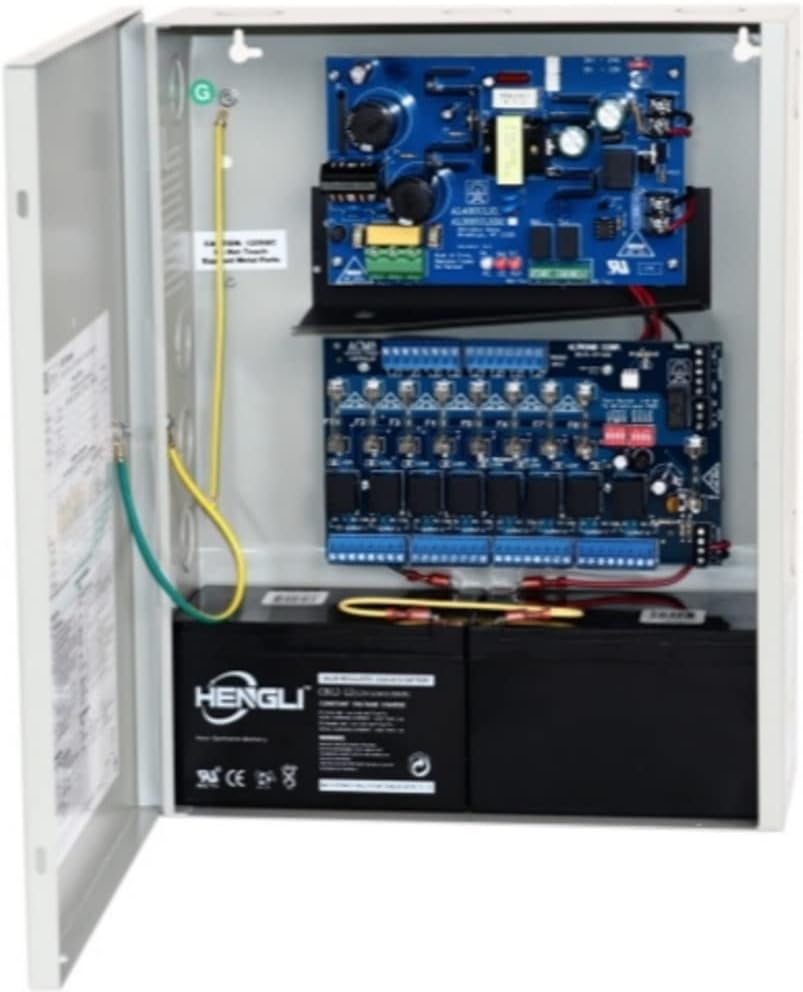
ചിത്രം 3.1: ആന്തരിക view of the Altronix AL400ULACM unit, displaying the power supply board (top), the 8-output distribution board (middle), and two batteries (bottom) within the wall-mountable enclosure. Note the grounding wires connected to the enclosure.
3.1 മൗണ്ടിംഗ്
Mount the unit securely to a wall or suitable surface using appropriate fasteners. The enclosure is designed for indoor use. Ensure adequate ventilation around the unit.
3.2 വയറിംഗ് കണക്ഷനുകൾ
- എസി ഇൻപുട്ട്: Connect the 115V AC 60Hz power source to the designated input terminals on the power supply board. Ensure proper grounding.
- DC ഔട്ട്പുട്ടുകൾ: Connect your access control devices (mag locks, electric strikes, etc.) to the 8 fused DC output terminals. Each output is independently controlled.
- ട്രിഗർ ഇൻപുട്ടുകൾ: Connect your access control system, card reader, keypad, or other trigger devices to the appropriate trigger input terminals (open collector sink or NO dry contact).
- ബാറ്ററി ബാക്കപ്പ്: Install two 12VDC/12AH sealed lead acid or gel type batteries into the designated compartment at the bottom of the enclosure. Connect them according to the polarity markings for battery backup functionality.
- ഫയർ അലാറം വിച്ഛേദിക്കുക: If utilizing, connect the Fire Alarm Control Panel (FACP) signaling circuit to the dedicated input for fire alarm disconnect functionality.
Refer to the wiring diagrams provided with the physical product for detailed connection instructions specific to your application.
4. പ്രവർത്തന നിർദ്ദേശങ്ങൾ
Once properly installed and wired, the Altronix AL400ULACM operates automatically to provide regulated power to connected devices and manage access control functions.
4.1 Power Conversion and Distribution
The unit converts the incoming 115V AC to either 12V DC or 24V DC, depending on the configuration. This DC power is then distributed through the 8 fused outputs to your connected access control devices.
4.2 Access Control Integration
The outputs are controlled by external trigger inputs. When a valid trigger signal is received from your access control system (e.g., card swipe, keypad entry), the corresponding output will activate, powering or de-powering the connected locking device as configured (Fail-Safe or Fail-Secure mode).
4.3 ബാറ്ററി ബാക്കപ്പ് പ്രവർത്തനം
In the event of an AC power failure, the unit will automatically and seamlessly switch to battery backup power, ensuring continuous operation of your access control system without interruption or voltage drop. The built-in charger maintains the batteries when AC power is present.
4.4 Fire Alarm Disconnect
If connected to an FACP, the unit can be configured to disconnect power to specific outputs upon receiving a fire alarm signal, facilitating emergency egress as required by safety regulations.
5. പരിപാലനം
Regular maintenance ensures the longevity and reliable operation of your Altronix AL400ULACM unit.
- വിഷ്വൽ പരിശോധന: Periodically inspect the unit for any signs of physical damage, loose connections, or excessive dust accumulation.
- വൃത്തിയാക്കൽ: Keep the enclosure and internal components clean. Use a soft, dry cloth to wipe down surfaces. Do not use liquid cleaners.
- ബാറ്ററി പരിശോധന: For units utilizing battery backup, regularly check the condition of the batteries. While the unit has battery supervision, it is good practice to visually inspect for swelling or leaks and test battery capacity periodically, especially after prolonged power outages. Replace batteries as needed, typically every 3-5 years.
- ഫ്യൂസ് പരിശോധന: If an output is not functioning, check the corresponding fuse on the 8-fused output board. Replace blown fuses only with fuses of the same type and rating (3.5 amp).
- വെൻ്റിലേഷൻ: അമിതമായി ചൂടാകുന്നത് തടയാൻ വെന്റിലേഷൻ ദ്വാരങ്ങൾ തടസ്സപ്പെടുന്നില്ലെന്ന് ഉറപ്പാക്കുക.
All maintenance should be performed by qualified personnel with the power disconnected from the unit.
6. പ്രശ്നപരിഹാരം
This section provides basic troubleshooting steps for common issues. For more complex problems, contact Altronix technical support.
| പ്രശ്നം | സാധ്യമായ കാരണം | പരിഹാരം |
|---|---|---|
| ബന്ധിപ്പിച്ച ഉപകരണങ്ങളിലേക്ക് വൈദ്യുതിയില്ല. | No AC input power; Blown fuse on output; Faulty wiring; Power supply issue. | Check AC power source and connections. Inspect and replace any blown fuses. Verify all wiring connections are secure. If problem persists, contact support. |
| Unit not switching to battery backup. | Batteries not connected; Dead or faulty batteries; Battery supervision circuit issue. | Ensure batteries are correctly connected with proper polarity. Test batteries and replace if necessary. Check battery supervision contacts. |
| Output not activating from trigger input. | Incorrect trigger wiring; Faulty trigger device; Output configuration issue. | Verify trigger input wiring. Test the trigger device (e.g., card reader). Review output configuration settings (Fail-Safe/Fail-Secure). |
| യൂണിറ്റ് അമിതമായി ചൂടാകുന്നു. | Poor ventilation; Overloaded outputs. | Ensure adequate airflow around the unit. Reduce load on outputs if exceeding specified current limits. |
7 സ്പെസിഫിക്കേഷനുകൾ
| പരാമീറ്റർ | മൂല്യം |
|---|---|
| മോഡൽ നമ്പർ | AL400ULACM |
| ഇൻപുട്ട് വോളിയംtage | 115V AC, 60Hz, 1.9 amp റേറ്റുചെയ്തത് |
| Putട്ട്പുട്ട് വോളിയംtage | 12V DC or 24V DC (selectable) |
| Total Output Current (12V DC) | 4 Amps continuous supply |
| Total Output Current (24V DC) | 3 Amps continuous supply |
| Number of Fused Outputs | 8 |
| ഫ്യൂസ് റേറ്റിംഗ് | 3.5 Amp ഓരോ ഔട്ട്പുട്ടിലും |
| ബാറ്ററി ചാർജർ കറന്റ് | 0.7 Amp (AL400ULXB board) |
| അനുയോജ്യമായ ബാറ്ററികൾ | Two 12VDC/12AH sealed lead acid or gel type |
| എൻക്ലോഷർ അളവുകൾ (W x H x D) | 12.25" x 15.5" x 4.5" (approx. 16.26 x 13.39 x 5.91 inches package dimensions) |
| ഇനത്തിൻ്റെ ഭാരം | 10.09 പൗണ്ട് |
| പ്രവർത്തന താപനില | 0°C മുതൽ 49°C വരെ (32°F മുതൽ 120°F വരെ) |
| സർട്ടിഫിക്കേഷനുകൾ | UL Listed, CSFM Approved, MEA Approved |
8. വാറൻ്റി വിവരങ്ങൾ
Altronix stands behind the quality and reliability of its products. The AL400ULACM Access Power Controller is backed by a ആജീവനാന്ത വാറൻ്റി. For specific terms and conditions of the warranty, please refer to the official Altronix warranty statement or contact Altronix customer service.
9. സാങ്കേതിക പിന്തുണ
Should you require technical assistance or have questions regarding the installation, operation, or maintenance of your Altronix AL400ULACM unit, please contact Altronix technical support directly.
For the most up-to-date contact information, please visit the official Altronix webസൈറ്റ് അല്ലെങ്കിൽ നിങ്ങളുടെ ഉൽപ്പന്നത്തിൽ ഉൾപ്പെടുത്തിയിരിക്കുന്ന ഡോക്യുമെന്റേഷൻ പരിശോധിക്കുക.


