1. ആമുഖം
The Logitech Z150 Stereo PC Speakers are designed to deliver clear acoustic stereo sound for your computer, smartphone, tablet, or MP3 player. With 3 watts RMS power (6 watts peak), these compact speakers feature 5cm drivers, integrated controls for power and volume, a 3.5mm audio input for versatile connectivity, and a convenient headphone jack for private listening.

ചിത്രം 1: മുൻഭാഗം view of the Logitech Z150 Stereo PC Speakers, showcasinഅവയുടെ ഒതുക്കമുള്ള ഡിസൈൻ.
2. ബോക്സിൽ എന്താണുള്ളത്?
എല്ലാ ഇനങ്ങളും ഉണ്ടെന്ന് ഉറപ്പാക്കാൻ പാക്കേജ് ഉള്ളടക്കങ്ങൾ പരിശോധിക്കുക:
- Two Logitech Z150 Speakers
- Power Adapter (UK plug)
- ഉപയോക്തൃ ഡോക്യുമെൻ്റേഷൻ
3. സജ്ജീകരണ ഗൈഡ്
നിങ്ങളുടെ Logitech Z150 സ്പീക്കറുകൾ സജ്ജീകരിക്കാൻ ഈ ഘട്ടങ്ങൾ പാലിക്കുക:
- സ്പീക്കറുകൾ അൺപാക്ക് ചെയ്യുക: പാക്കേജിംഗിൽ നിന്ന് എല്ലാ ഘടകങ്ങളും ശ്രദ്ധാപൂർവ്വം നീക്കം ചെയ്യുക.
- സ്പീക്കറുകൾ ബന്ധിപ്പിക്കുക: The two speakers are connected by a fixed cable. Position them on your desk or desired surface.
- പവർ അഡാപ്റ്റർ ബന്ധിപ്പിക്കുക: Plug the power adapter into the power input port on the back of the main speaker (the one with controls). Then, plug the power adapter into a wall outlet.

Figure 2: The power adapter with a UK plug.
- ഓഡിയോ ഉറവിടത്തിലേക്ക് കണക്റ്റുചെയ്യുക: Plug the 3.5mm audio jack from the speaker cable into the headphone jack or audio output port of your computer, smartphone, tablet, or MP3 player.

Figure 3: The 3.5mm audio jack for connecting to your device.

ചിത്രം 4: പിൻഭാഗം view of the speakers showing the audio input and power ports.
- പവർ ഓൺ: Turn the volume knob on the front of the main speaker clockwise to power on the speakers. A green indicator light will illuminate.
4. പ്രവർത്തന നിർദ്ദേശങ്ങൾ
Once set up, operating your Z150 speakers is straightforward:
- പവർ ഓൺ/ഓഫ്, വോളിയം നിയന്ത്രണം: The large knob on the front of the right speaker controls both power and volume. Turn it clockwise to power on and increase volume, and counter-clockwise to decrease volume and power off.
- ഓഡിയോ ഇൻപുട്ട്: The speakers automatically play audio from the device connected via the 3.5mm audio jack. Ensure your audio source device's volume is also turned up.
- ഹെഡ്ഫോൺ ജാക്ക്: For private listening, plug your headphones into the 3.5mm headphone jack located on the front of the main speaker. This will mute the speakers and redirect audio to your headphones.
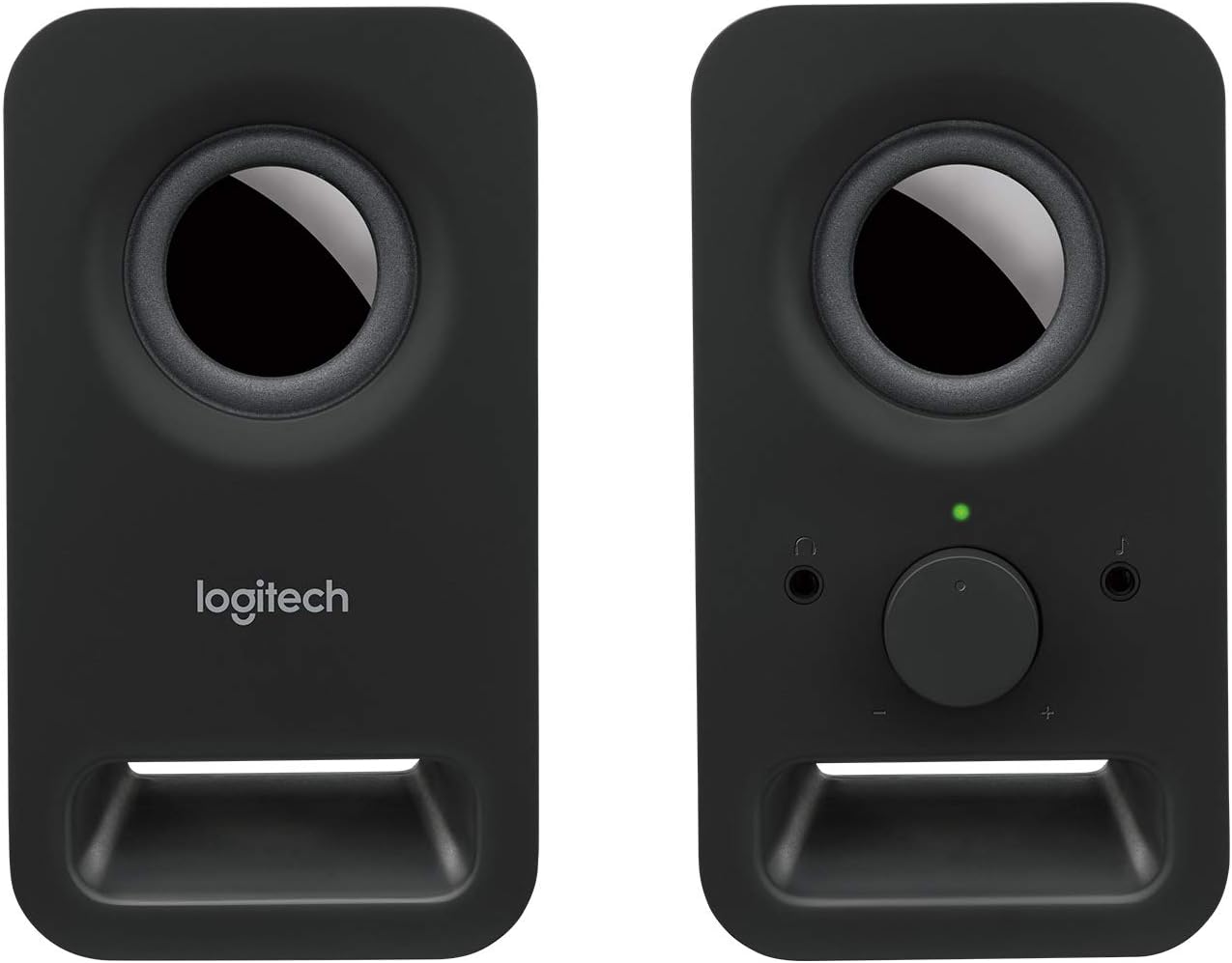
ചിത്രം 5: മുൻഭാഗം view of the main speaker, highlighting the volume control and headphone jack.
5. പരിപാലനം
നിങ്ങളുടെ ലോജിടെക് Z150 സ്പീക്കറുകളുടെ ദീർഘായുസ്സും ഒപ്റ്റിമൽ പ്രകടനവും ഉറപ്പാക്കാൻ, ഈ ലളിതമായ അറ്റകുറ്റപ്പണി മാർഗ്ഗനിർദ്ദേശങ്ങൾ പാലിക്കുക:
- വൃത്തിയാക്കൽ: Use a soft, dry, lint-free cloth to clean the speaker surfaces. Do not use abrasive cleaners, waxes, or solvents.
- ദ്രാവകങ്ങൾ ഒഴിവാക്കുക: Do not expose the speakers to water or other liquids. If liquid spills on the speakers, immediately disconnect them from power and allow them to dry completely before reconnecting.
- പ്ലേസ്മെൻ്റ്: Place the speakers on a stable, flat surface. Avoid placing them in direct sunlight, near heat sources, or in excessively humid environments.
- സംഭരണം: When not in use for extended periods, store the speakers in a cool, dry place.
6. പ്രശ്നപരിഹാരം
If you encounter issues with your Logitech Z150 speakers, refer to the following common problems and solutions:
| പ്രശ്നം | സാധ്യമായ കാരണം | പരിഹാരം |
|---|---|---|
| സ്പീക്കറുകളിൽ നിന്ന് ശബ്ദമില്ല | സ്പീക്കറുകൾ ഓൺ ചെയ്തിട്ടില്ല. | Turn the volume knob clockwise to power on the speakers. Check if the green indicator light is on. |
| ശബ്ദം വളരെ കുറവാണ് അല്ലെങ്കിൽ മ്യൂട്ട് ചെയ്തിരിക്കുന്നു. | Increase the volume using the knob on the speaker and on your audio source device. | |
| ഓഡിയോ കേബിൾ ശരിയായി ബന്ധിപ്പിച്ചിട്ടില്ല. | Ensure the 3.5mm audio jack is fully inserted into both the speaker and your audio source device. | |
| ഹെഡ്ഫോണുകൾ പ്ലഗിൻ ചെയ്തിരിക്കുന്നു. | സ്പീക്കറിന്റെ ഹെഡ്ഫോൺ ജാക്കിൽ നിന്ന് ഹെഡ്ഫോണുകൾ ഊരിമാറ്റുക. | |
| ശബ്ദം വികലമാണ് അല്ലെങ്കിൽ അവ്യക്തമാണ് | വോളിയം വളരെ കൂടുതലാണ്. | Reduce the volume on both the speakers and your audio source device. |
| ഓഡിയോ ഉറവിട നിലവാരം മോശമാണ്. | മറ്റൊരു ഉറവിടത്തിൽ നിന്ന് ഓഡിയോ പ്ലേ ചെയ്യാൻ ശ്രമിക്കുക അല്ലെങ്കിൽ file to determine if the issue is with the source. | |
| Only one speaker is working | Loose connection between speakers. | Ensure the fixed cable connecting the two speakers is not damaged. |
| Audio source output issue. | Test with another audio source or check your device's audio settings for balance. |
7 സ്പെസിഫിക്കേഷനുകൾ
| ഫീച്ചർ | വിശദാംശങ്ങൾ |
|---|---|
| മോഡലിൻ്റെ പേര് | Z150 |
| ഇനം മോഡൽ നമ്പർ | 980-000816 |
| സ്പീക്കർ തരം | മൾട്ടിമീഡിയ |
| ഓഡിയോ put ട്ട്പുട്ട് മോഡ് | സ്റ്റീരിയോ (2.0 ചാനൽ) |
| പരമാവധി സ്പീക്കർ ഔട്ട്പുട്ട് പവർ | 6 വാട്ട്സ് പീക്ക് / 3 വാട്ട്സ് ആർഎംഎസ് |
| സ്പീക്കർ വലിപ്പം | 5 Centimeters (drivers) |
| കണക്റ്റിവിറ്റി ടെക്നോളജി | AUX (3.5mm audio input) |
| നിയന്ത്രണ രീതി | Rotary Knob (Power/Volume) |
| പ്രത്യേക സവിശേഷതകൾ | Plug and Play, Volume Control, Headphone Jack |
| അനുയോജ്യമായ ഉപകരണങ്ങൾ | Desktop computer, MP3 player, Mac, Smartphone, Tablet |
| ഉൽപ്പന്ന അളവുകൾ (D x W x H) | 7.6 x 8.5 x 15.2 സെ.മീ |
| ഇനത്തിൻ്റെ ഭാരം | 583 ഗ്രാം |
| നിറം | Black (Night) |
| ഉൾപ്പെടുത്തിയ ഘടകങ്ങൾ | Two speakers, Power adapter (UK plug), User documentation |
| പവർ ഉറവിടം | എസി പവർ അഡാപ്റ്റർ |
| മൗണ്ടിംഗ് തരം | ടേബിൾടോപ്പ് മൗണ്ട് |
8. വാറൻ്റിയും പിന്തുണയും
Your Logitech Z150 speakers come with a പരിമിത വാറൻ്റി. For specific details regarding the warranty period and terms, please refer to the user documentation included in the box or visit the official Logitech support webസൈറ്റ്.
For technical support, troubleshooting beyond this manual, or warranty claims, please visit the Logitech support webസൈറ്റ് support.logi.com. You may need your product model number (980-000816) when contacting support.
Please note that return policies may vary based on your point of purchase. For purchases made on Amazon, a 30-day return period typically applies if you change your mind, and specific assistance is available for defective or damaged products.


