1. ആമുഖം
This manual provides detailed instructions for the proper installation, operation, and maintenance of your JVC KD-X380BTS Digital Media Receiver. Please read this manual thoroughly before using the product to ensure correct usage and to prevent damage. Keep this manual accessible for future reference.
2 സുരക്ഷാ വിവരങ്ങൾ
Observe the following safety precautions to prevent accidents, injury, or damage to the unit.
- ഡ്രൈവിംഗ് സുരക്ഷ: Do not operate the unit in a way that distracts you from safe driving. Always keep your attention on the road.
- വോളിയം നില: Keep the volume at a level where you can still hear outside sounds, such as emergency vehicle sirens. Prolonged exposure to loud sounds can cause hearing damage.
- ഇൻസ്റ്റലേഷൻ: Ensure proper installation by a qualified technician. Incorrect wiring can cause fire or damage to the vehicle's electrical system.
- വൈദ്യുതി വിതരണം: നെഗറ്റീവ് ഗ്രൗണ്ടുള്ള ഒരു 12V DC കാർ ബാറ്ററിയിലേക്ക് മാത്രം യൂണിറ്റ് ബന്ധിപ്പിക്കുക.
- ഫ്യൂസ് മാറ്റിസ്ഥാപിക്കൽ: When replacing a fuse, use only a fuse of the specified rating. Using an incorrect fuse can cause fire or damage.
- ഈർപ്പം ഒഴിവാക്കുക: തീയോ വൈദ്യുതാഘാതമോ തടയാൻ യൂണിറ്റ് മഴയിലോ ഈർപ്പത്തിലോ തുറന്നുകാട്ടരുത്.
3. പാക്കേജ് ഉള്ളടക്കം
പാക്കേജിൽ എല്ലാ ഇനങ്ങളും ഉണ്ടെന്ന് ഉറപ്പാക്കുക:
- JVC KD-X380BTS Digital Media Receiver Unit
- വയറിംഗ് ഹാർനെസ്
- Microphone (for Hands-Free Calling)
- Mounting Hardware (screws, trim ring, sleeve)
- നിർദ്ദേശ മാനുവൽ (ഈ പ്രമാണം)
4. സജ്ജീകരണവും ഇൻസ്റ്റാളേഷനും
4.1 വയറിംഗ് കണക്ഷനുകൾ
Proper wiring is crucial for optimal performance and safety. Refer to the wiring diagram provided with your unit for specific connections. Below is a general overview of typical connections:
- മഞ്ഞ വയർ: കോൺസ്റ്റന്റ് 12V (ബാറ്ററി)
- റെഡ് വയർ: 12V സ്വിച്ച്ഡ് (ആക്സസറി)
- ബ്ലാക്ക് വയർ: ഗ്രൗണ്ട്
- സ്പീക്കർ വയറുകൾ: Connect to vehicle speakers (e.g., White/White-Black for Front Left, Gray/Gray-Black for Front Right, Green/Green-Black for Rear Left, Purple/Purple-Black for Rear Right).
- നീല/വെള്ള വയർ: Remote Turn-On (for external amplifier or power antenna)
- RCA Pre-Outs: ബാഹ്യമായി ബന്ധിപ്പിക്കുക amplifiers for front, rear, and subwoofer channels.
- മൈക്രോഫോൺ ഇൻപുട്ട്: Connect the supplied microphone for hands-free calling.
- ആന്റിന ഇൻപുട്ട്: നിങ്ങളുടെ വാഹനത്തിന്റെ റേഡിയോ ആന്റിന ബന്ധിപ്പിക്കുക.
കുറിപ്പ്: If you are unsure about any wiring connections, consult a professional car audio installer.
4.2 യൂണിറ്റ് മൌണ്ട് ചെയ്യുന്നു
The KD-X380BTS is designed for standard DIN-sized openings. Secure the unit using the supplied mounting sleeve and hardware. Ensure the unit is firmly seated and does not obstruct any vehicle controls or airbags.
4.3 പ്രാരംഭ പവർ ഓൺ
ഇൻസ്റ്റാളേഷന് ശേഷം, നിങ്ങളുടെ വാഹനത്തിന്റെ ഇഗ്നിഷൻ ഓണാക്കുക. യൂണിറ്റ് പവർ ഓൺ ചെയ്യണം. ഭാഷ തിരഞ്ഞെടുക്കൽ അല്ലെങ്കിൽ ക്ലോക്ക് സജ്ജീകരണം പോലുള്ള പ്രാരംഭ സജ്ജീകരണത്തിനായി ഏതെങ്കിലും ഓൺ-സ്ക്രീൻ നിർദ്ദേശങ്ങൾ പാലിക്കുക.
5. പ്രവർത്തന നിർദ്ദേശങ്ങൾ
5.1 ഫ്രണ്ട് പാനൽ നിയന്ത്രണങ്ങൾ
The front panel provides access to all primary functions. Familiarize yourself with the buttons and their functions.
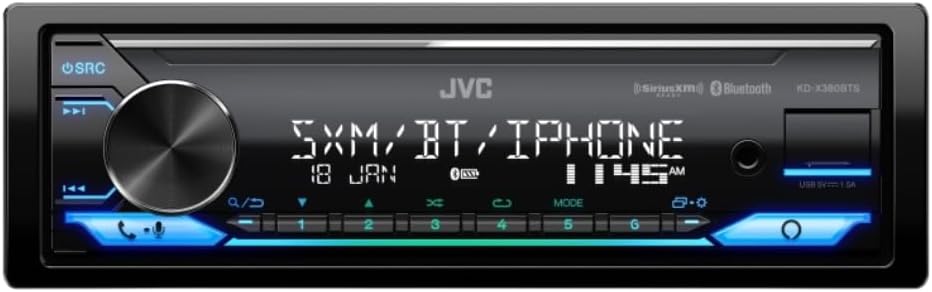
Image: Front panel of the JVC KD-X380BTS Digital Media Receiver, showing the main rotary knob, source button, track skip buttons, call buttons, and numeric preset buttons with blue illumination.
- SRC (ഉറവിടം) ബട്ടൺ: Press to cycle through available audio sources (Tuner, USB, Bluetooth, AUX).
- വോളിയം നോബ്: Rotate to adjust the volume level. Press to access menu options.
- Track Skip Buttons (◀◀/►►): Skip tracks in media playback or tune radio stations.
- Call Buttons (☎/☏): Answer or end Bluetooth phone calls.
- പ്രീസെറ്റ് ബട്ടണുകൾ (1-6): Store and recall radio station presets.
5.2 ഓഡിയോ സോഴ്സ് തിരഞ്ഞെടുക്കൽ
അമർത്തുക SRC button repeatedly to switch between different audio sources such as FM/AM radio, USB, Bluetooth Audio, and AUX input.
5.3 റേഡിയോ പ്രവർത്തനം
- ട്യൂണിംഗ്: Use the track skip buttons (◀◀/►►) to manually tune or seek for stations.
- പ്രീസെറ്റുകൾ: To store a station, tune to the desired frequency, then press and hold one of the numeric preset buttons (1-6) until you hear a beep. To recall a preset, simply press the corresponding button.
5.4 യുഎസ്ബി പ്ലേബാക്ക്
Connect a USB storage device to the front USB port. The unit will automatically detect the device and begin playback of compatible audio files (MP3, WMA, WAV, AAC, FLAC). Use the track skip buttons to navigate through files.
5.5 ബ്ലൂടൂത്ത് കണക്റ്റിവിറ്റി
5.5.1 Pairing Your Device
To pair your smartphone or other Bluetooth device:
- നിങ്ങളുടെ മൊബൈൽ ഉപകരണത്തിൽ ബ്ലൂടൂത്ത് പ്രവർത്തനക്ഷമമാക്കിയിട്ടുണ്ടെന്ന് ഉറപ്പാക്കുക.
- On the KD-X380BTS, select the Bluetooth source.
- ഇതിനായി തിരയുക available Bluetooth devices on your mobile phone. Select "KD-X380BTS" from the list.
- ആവശ്യപ്പെടുകയാണെങ്കിൽ ജോടിയാക്കൽ കോഡ് സ്ഥിരീകരിക്കുക.
iPhone Bluetooth Automatic Pairing: Connect your iPhone via USB, and the unit will automatically initiate Bluetooth pairing, simplifying the process.
5.5.2 ബ്ലൂടൂത്ത് ഓഡിയോ സ്ട്രീമിംഗ് (A2DP)
Once paired, you can stream audio from your device to the receiver. Use the receiver's controls to play, pause, and skip tracks.
5.5.3 Hands-Free Calling (HFP)
When a call comes in, the audio will mute, and the caller ID will display. Press the ☎ button to answer, and the ☏ button to end the call. Use the supplied microphone for clear communication.
5.5.4 JVC Streaming DJ
This feature allows up to 5 Bluetooth devices to be connected simultaneously, enabling multiple users to take turns streaming music. To activate, ensure all devices are paired and connected.
5.6 ആമസോൺ അലക്സാ ഇന്റഗ്രേഷൻ
With Alexa on your JVC KD-X380BTS, you can use voice commands to control music, get news, check weather, and more. Simply press the dedicated Alexa button (if available) or activate voice control through the unit and speak your command. A compatible smartphone with the Alexa app is required.
5.7 Display and Illumination Settings
The 2-Line VA LCD Display offers excellent visibility. You can customize the illumination with 2-Zone Variable-Color Illumination. Access the menu settings to choose from 50 preset patterns or manually set RGB colors for each zone, offering 32,768 different color combinations. Moving illumination patterns are also available.
6. സവിശേഷതകൾ കഴിഞ്ഞുview
The JVC KD-X380BTS is equipped with a range of features designed to enhance your in-car audio experience:
- ആമസോൺ അലക്സ അനുയോജ്യമാണ്: Voice control for music and information.
- 4.0V ഹൈ-വോളിയംtage 3 Pre-Outs: Reduces transmission noise and distortion when connected to external ampജീവപര്യന്തം.
- 2-Line VA LCD Display: വിശാലമായ viewing angle and improved visibility with animation effects.
- 2-Zone Variable-Color Illumination: Customizable display and key lighting with a wide range of colors.
- Spanish Text Display Compatible: On-screen menu available in Spanish.
- SiriusXM Radio Ready: Requires an optional SiriusXM tuner (sold separately) for access to satellite radio channels.
- JVC Streaming DJ: Connect up to 5 Bluetooth devices simultaneously for shared music streaming.
- വിപുലമായ ഓഡിയോ പ്രോസസ്സിംഗ്: Includes 13-Band Graphic EQ, Preset EQ, Bass Boost, Loudness Control, High-Pass Filter/Low-Pass Filter, K2 Technology, Time Alignment, Space Enhancement, Sound Response, Sound Lift, and Volume Link EQ for precise sound customization.
- USB കണക്റ്റിവിറ്റി: Front USB port with 1.5A power supply, compatible with MP3, WMA, WAV, AAC, and FLAC audio formats.
- ബ്ലൂടൂത്ത് 4.2: Built-in Bluetooth with HFP 1.7.1 (Hands-Free Profile) and A2DP/AVRCP 1.6.1 (Audio Streaming & Control). Supports 2 phones full-time connection.
- Short Chassis: Compact design for easier installation in various vehicles.
- Detachable Face Panel: For security.
- Steering Remote Control Ready: Compatible with optional steering wheel control interfaces.
7. പരിപാലനം
7.1 യൂണിറ്റ് വൃത്തിയാക്കൽ
Wipe the front panel with a soft, dry cloth. For stubborn dirt, dampen the cloth with water. Avoid using harsh chemicals, abrasive cleaners, or solvents as they can damage the finish.
7.2 ഫ്യൂസ് മാറ്റിസ്ഥാപിക്കൽ
If the unit does not power on, check the fuse located on the rear of the unit. Replace it with a new fuse of the same amperage rating (e.g., 10A). Never use a fuse with a higher rating.
8. പ്രശ്നപരിഹാരം
If you encounter issues with your KD-X380BTS, refer to the table below for common problems and solutions.
| പ്രശ്നം | സാധ്യമായ കാരണം | പരിഹാരം |
|---|---|---|
| ശക്തിയില്ല | Blown fuse; incorrect wiring; vehicle ignition off. | Check and replace fuse; verify wiring connections; turn vehicle ignition on. |
| ശബ്ദമില്ല | Volume too low; Mute activated; speaker wires disconnected; incorrect source selected. | ശബ്ദം കൂട്ടുക; മ്യൂട്ട് നിർജ്ജീവമാക്കുക; സ്പീക്കർ കണക്ഷനുകൾ പരിശോധിക്കുക; ശരിയായ ഓഡിയോ ഉറവിടം തിരഞ്ഞെടുക്കുക. |
| ബ്ലൂടൂത്ത് കണക്റ്റ് ചെയ്യുന്നില്ല | Bluetooth off on device; device not in pairing mode; interference. | Ensure Bluetooth is on and discoverable; re-initiate pairing process; move device closer. |
| USB ഉപകരണം തിരിച്ചറിഞ്ഞില്ല. | പൊരുത്തമില്ലാത്തത് file format; damaged USB device; device requires too much power. | ഉറപ്പാക്കുക files are compatible; try a different USB device; use a USB device with lower power requirements. |
| Display issues (e.g., dim, incorrect color) | Brightness settings; illumination settings. | Adjust brightness and illumination settings in the menu. |
If the problem persists after trying these solutions, contact JVC customer support or a qualified service technician.
9 സ്പെസിഫിക്കേഷനുകൾ
Below are the technical specifications for the JVC KD-X380BTS Digital Media Receiver:
- ഡിസ്പ്ലേ: 2-Line VA LCD Display, Variable Color Illumination (2-Zone)
- Audio Formats (USB): MP3, WMA, WAV, AAC, FLAC
- ബ്ലൂടൂത്ത്: Version 4.2 (HFP 1.7.1, A2DP, AVRCP 1.6.1), 2 Phones Full-Time Connection, JVC Streaming DJ (up to 5 devices)
- USB: Front USB (1.5A power supply), Mass Storage Class support
- Pre-Outs: 3 Pairs (Front + Rear + Subwoofer), 4.0V Output Level
- പരമാവധി പവർ ഔട്ട്പുട്ട്: 50W x 4 ചാനലുകൾ
- Full Bandwidth Power (at <1% THD): 22W x 4 ചാനലുകൾ
- സമനില: 13-Band Graphic EQ, 11 Preset EQs
- ട്യൂണർ: RBDS (Radio Data Broadcast System), 18 FM + 6 AM Presets
- അളവുകൾ (പാക്കേജ്): 8.9 x 7.7 x 4 ഇഞ്ച്
- ഇനത്തിൻ്റെ ഭാരം: 1.8 പൗണ്ട്
- കണക്റ്റിവിറ്റി ടെക്നോളജി: USB
- കൺട്രോളർ തരം: ആമസോൺ അലക്സ, ആൻഡ്രോയിഡ്
- അനുയോജ്യമായ ഉപകരണങ്ങൾ: സ്മാർട്ട്ഫോൺ, സ്പീക്കർ
- ഓഡിയോ putട്ട്പുട്ട് മോഡ്: സ്റ്റീരിയോ, സറൗണ്ട്
- ചാനലുകളുടെ എണ്ണം: 4
10. വാറൻ്റിയും പിന്തുണയും
JVC products are manufactured with high-quality components and undergo rigorous quality control. This product is covered by a limited warranty. Please refer to the warranty card included with your product or visit the official JVC webനിങ്ങളുടെ പ്രദേശത്തിന് പ്രത്യേകമായുള്ള വിശദമായ വാറന്റി നിബന്ധനകൾക്കും വ്യവസ്ഥകൾക്കും സൈറ്റ് സന്ദർശിക്കുക.
For technical support, troubleshooting assistance, or service inquiries, please visit the official JVC support website or contact their customer service department. Have your model number (KD-X380BTS) and purchase information ready when contacting support.


