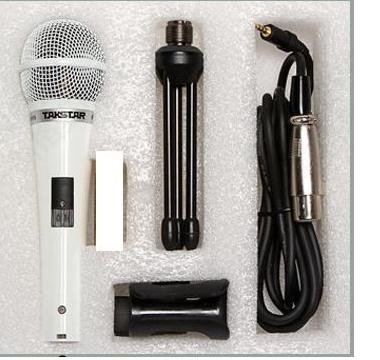
ടാക്സ്റ്റാർ പിസിഎം-5550

Takstar PCM-5550 Condenser KTV Microphone User Manual

Model: PCM-5550

ആമുഖം

This manual provides comprehensive instructions for the proper use and maintenance of your Takstar PCM-5550 Condenser KTV Microphone. Please read this manual thoroughly before operating the microphone to ensure optimal performance and longevity.

പ്രധാന സവിശേഷതകൾ

  • Excellent audio processing circuitry for natural and smooth sound reproduction.
  • High sensitivity and low output impedance for clear recording performance.
  • Integrated windscreen to minimize plosives and wind noise.
  • Operates on 1.5V AA batteries, providing extended playtime.
  • Stylish ivory design.
  • Suitable for internet karaoke and PC recording applications.

പാക്കേജ് ഉള്ളടക്കം

അൺപാക്ക് ചെയ്യുമ്പോൾ, ഇനിപ്പറയുന്ന എല്ലാ ഇനങ്ങളും ഉൾപ്പെടുത്തിയിട്ടുണ്ടെന്ന് ദയവായി ഉറപ്പാക്കുക:

  • Takstar PCM-5550 Condenser Microphone
  • Microphone Stand (mini tripod)
  • മൈക്രോഫോൺ കേബിൾ
  • Microphone Clip/Holder
Takstar PCM-5550 microphone and accessories laid out
Image: The Takstar PCM-5550 microphone shown with its included accessories, which typically comprise a mini tripod stand, a microphone cable, and a microphone clip. Please note that AA batteries are generally not included.

സജ്ജീകരണ നിർദ്ദേശങ്ങൾ

  1. ബാറ്ററി ഇൻസ്റ്റാൾ ചെയ്യുക: Locate the battery compartment on the microphone handle. Insert one 1.5V AA battery, ensuring correct polarity (+/-).
  2. മൈക്രോഫോൺ ക്ലിപ്പ് അറ്റാച്ചുചെയ്യുക: Secure the microphone clip to the included mini tripod stand or a compatible microphone stand.
  3. Mount Microphone: Carefully place the Takstar PCM-5550 microphone into the clip.
  4. കേബിൾ ബന്ധിപ്പിക്കുക: Plug one end of the microphone cable into the microphone's output port (usually at the bottom). Connect the other end to your audio interface, mixer, or computer's microphone input.
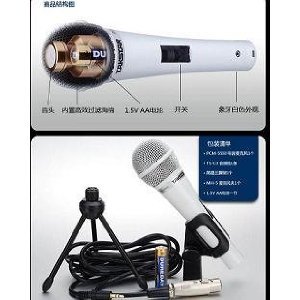
Diagram showing internal components and battery installation for Takstar PCM-5550
Image: An internal diagram illustrating the microphone's components, including the battery compartment for a 1.5V AA battery and the power switch. This helps visualize battery installation.
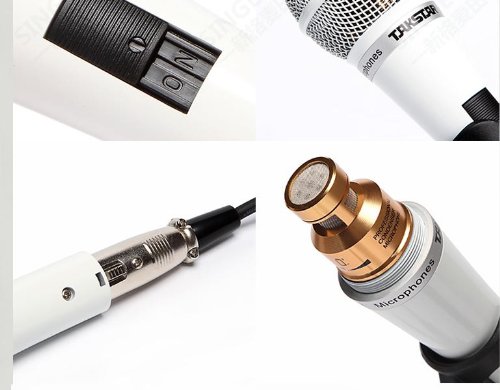
Close-up of Takstar PCM-5550 microphone switch and cable connection
ചിത്രം: വിശദമായത് view of the microphone's power switch and the XLR output connector, demonstrating where the audio cable should be attached.

പ്രവർത്തന നിർദ്ദേശങ്ങൾ

  1. പവർ ഓൺ: Locate the ON/OFF switch on the microphone handle and slide it to the "ON" position.
  2. സ്ഥാനനിർണ്ണയം: For optimal sound quality, position the microphone approximately 5-15 cm (2-6 inches) from the sound source (e.g., your mouth for vocals).
  3. ലെവലുകൾ ക്രമീകരിക്കുക: Adjust the input gain on your connected audio device (mixer, computer) to achieve a clear signal without distortion. Avoid setting the gain too high, which can lead to clipping.
  4. പവർ ഓഫ്: When not in use, slide the ON/OFF switch to the "OFF" position to conserve battery life.
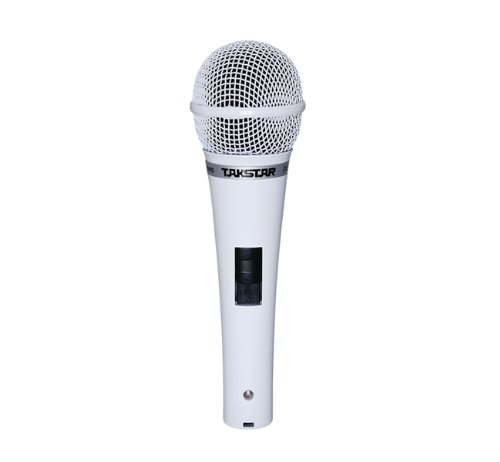
ഫ്രണ്ട് view of the Takstar PCM-5550 Condenser KTV Microphone
ചിത്രം: വ്യക്തമായ ഒരു മുൻഭാഗം view of the Takstar PCM-5550 microphone, highlighting the grille and the power switch on the handle.
Takstar PCM-5550 microphone on a stand, angled view
Image: The Takstar PCM-5550 microphone mounted on a stand, illustrating a typical setup for use in KTV or recording environments.

മെയിൻ്റനൻസ്

  • വൃത്തിയാക്കൽ: Use a soft, dry cloth to wipe the microphone body. Do not use liquid cleaners or solvents, as they may damage the finish or internal components.
  • സംഭരണം: Store the microphone in a dry, cool place, away from direct sunlight and extreme temperatures. If storing for an extended period, remove the AA battery to prevent leakage.
  • കൈകാര്യം ചെയ്യൽ: Avoid dropping the microphone or subjecting it to strong impacts, which can damage the sensitive condenser capsule.

ട്രബിൾഷൂട്ടിംഗ്

പ്രശ്നംസാധ്യമായ കാരണംപരിഹാരം
ശബ്ദ ഔട്ട്പുട്ട് ഇല്ല
  • Microphone switch is OFF.
  • ബാറ്ററി തീർന്നു അല്ലെങ്കിൽ തെറ്റായി ഇൻസ്റ്റാൾ ചെയ്തിട്ടുണ്ട്.
  • Cable is loose or faulty.
  • Input device (PC, mixer) volume is too low or muted.
  • ഓണിലേക്ക് സ്ലൈഡ് സ്വിച്ച്.
  • ബാറ്ററി മാറ്റിസ്ഥാപിക്കുക അല്ലെങ്കിൽ പോളാരിറ്റി പരിശോധിക്കുക.
  • Ensure cable is securely connected; try a different cable.
  • Check volume and mute settings on your device.
കുറഞ്ഞ അല്ലെങ്കിൽ വികലമായ ശബ്ദം
  • ബാറ്ററി കുറവാണ്.
  • മൈക്രോഫോൺ ശബ്ദ സ്രോതസ്സിൽ നിന്ന് വളരെ അകലെയാണ്.
  • Input gain on device is too high (distortion) or too low (low volume).
  • ബാറ്ററി മാറ്റിസ്ഥാപിക്കുക.
  • Move microphone closer to the sound source.
  • Adjust input gain on your device.
അമിതമായ പശ്ചാത്തല ശബ്ദം
  • പാരിസ്ഥിതിക ശബ്ദം.
  • കേബിളോ കണക്ഷനോ തകരാറാണ്.
  • Reduce ambient noise in the recording environment.
  • Check cable connections; try a different cable.

സ്പെസിഫിക്കേഷനുകൾ

മോഡൽPCM-5550
ടൈപ്പ് ചെയ്യുകകണ്ടൻസർ മൈക്രോഫോൺ
പോളാർ പാറ്റേൺഓമ്നിഡയറക്ഷണൽ
ഫ്രീക്വൻസി പ്രതികരണം30Hz-20kHz
സംവേദനക്ഷമത-38 ± 3 ദി ബി
ഔട്ട്പുട്ട് ഇംപെഡൻസ്350Ω±30%
ലോഡ് ഇംപെഡൻസ്>1000Ω
പവർ ആവശ്യകതകൾ1.5V AA ബാറ്ററി
മൊത്തം ഭാരം300 ഗ്രാം
നിറംവെള്ള
അനുയോജ്യമായ ഉപകരണങ്ങൾKaraoke Machine, Personal Computer

വാറൻ്റിയും പിന്തുണയും

For warranty information and technical support, please refer to the official Takstar webനിങ്ങളുടെ സൈറ്റിൽ ബന്ധപ്പെടുക അല്ലെങ്കിൽ നിങ്ങളുടെ പ്രാദേശിക വിതരണക്കാരനെ ബന്ധപ്പെടുക. ഏതെങ്കിലും വാറന്റി ക്ലെയിമുകൾക്ക് വാങ്ങിയതിന്റെ തെളിവായി നിങ്ങളുടെ വാങ്ങൽ രസീത് സൂക്ഷിക്കുക.

കൂടുതൽ സഹായത്തിന്, നിങ്ങൾക്ക് സന്ദർശിക്കാവുന്നതാണ് Takstar Store on Amazon.

അനുബന്ധ രേഖകൾ - PCM-5550

പ്രീview Takstar PCM-5600(GEN 2) Handheld Condenser Microphone User Manual
Comprehensive user manual for the Takstar PCM-5600(GEN 2) handheld condenser microphone, detailing its features, technical specifications, operation, and safety guidelines for optimal performance.
പ്രീview Takstar PCM-5600(GEN 2) Handheld Condenser Microphone User Manual
Comprehensive user manual for the Takstar PCM-5600(GEN 2) handheld condenser microphone, detailing features, specifications, operation, safety guidelines, and environmental compliance.
പ്രീview Takstar SGC-598 മൈക്രോഫോൺ ഉപയോക്തൃ മാനുവലും സ്പെസിഫിക്കേഷനുകളും
Takstar SGC-598 ഷോട്ട്ഗൺ മൈക്രോഫോണിനായുള്ള സമഗ്രമായ ഉപയോക്തൃ ഗൈഡും സാങ്കേതിക സവിശേഷതകളും, അതിൽ സവിശേഷതകൾ, പ്രവർത്തനം, സുരക്ഷാ മുൻകരുതലുകൾ, EU അനുരൂപീകരണ പ്രഖ്യാപനം എന്നിവ ഉൾപ്പെടുന്നു.
പ്രീview Takstar DM-2300 Dynamic Microphone - User Manual and Specifications
Detailed user manual and specifications for the Takstar DM-2300 dynamic microphone, designed for KTV and karaoke. Learn about its features, setup, usage, and maintenance.
പ്രീview Takstar MS-189D കോൺഫറൻസ് മൈക്രോഫോൺ ഉപയോക്തൃ മാനുവലും സ്പെസിഫിക്കേഷനുകളും
Takstar MS-189D കോൺഫറൻസ് മൈക്രോഫോണിന്റെ സവിശേഷതകൾ, സാങ്കേതിക സവിശേഷതകൾ, ഉപയോഗ നിർദ്ദേശങ്ങൾ, സുരക്ഷാ മുൻകരുതലുകൾ, വാറന്റി വിവരങ്ങൾ എന്നിവ ഉൾക്കൊള്ളുന്ന സമഗ്രമായ ഗൈഡ്.
പ്രീview TAKSTAR PC-K750 പ്രൊഫഷണൽ റെക്കോർഡിംഗ് മൈക്രോഫോൺ ഉപയോക്തൃ മാനുവൽ
TAKSTAR PC-K750 സൈഡ്-അഡ്രസ് കണ്ടൻസർ മൈക്രോഫോണിനായുള്ള സമഗ്രമായ ഉപയോക്തൃ മാനുവൽ, അതിന്റെ സവിശേഷതകൾ, സാങ്കേതിക സവിശേഷതകൾ, അസംബ്ലി, പ്രവർത്തന നിർദ്ദേശങ്ങൾ, സുരക്ഷാ മുൻകരുതലുകൾ, വാറന്റി വിവരങ്ങൾ എന്നിവ ഉൾക്കൊള്ളുന്നു.