1. ആമുഖം
വാങ്ങിയതിന് നന്ദി.asing the BigBen TD99 USB Turntable. This device allows you to enjoy your vinyl record collection, listen to FM radio, and connect via USB. This manual provides essential information for safe operation, setup, and maintenance of your turntable.
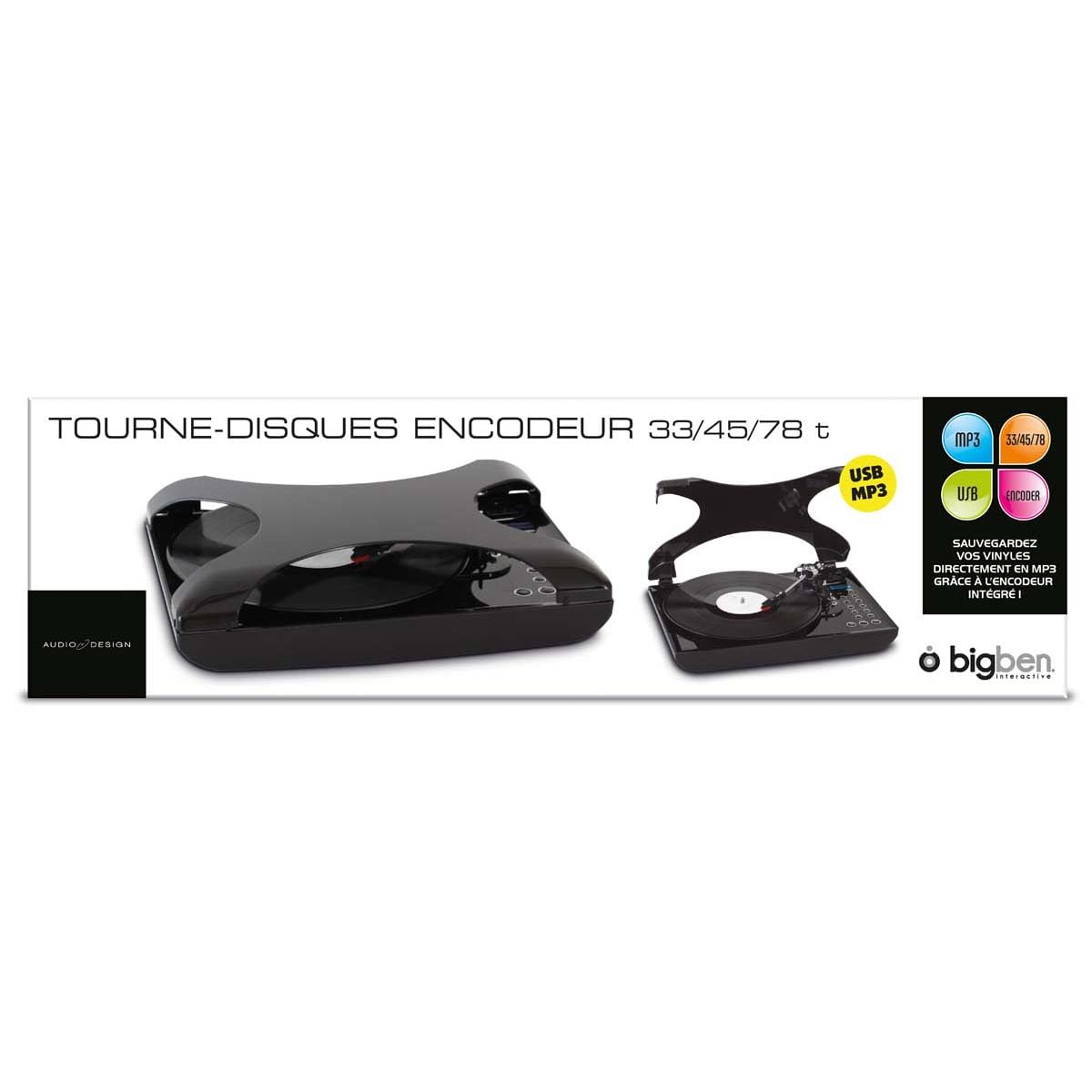
ചിത്രം 1.1: മുൻഭാഗം view of the BigBen TD99 USB Turntable. This image shows the main unit with the platter, tone arm, and control panel.
2. പ്രധാന സുരക്ഷാ നിർദ്ദേശങ്ങൾ
Please read these instructions carefully before using the device and retain them for future reference. Failure to follow these instructions may result in electric shock, fire, or other hazards.
- ഊർജ്ജ സ്രോതസ്സ്: Connect the device only to an AC power outlet with the specified voltagഇ (220 വോൾട്ട്).
- ജലവും ഈർപ്പവും: Do not expose the device to rain, moisture, or place objects filled with liquids, such as vases, on or near the device.
- വെൻ്റിലേഷൻ: ശരിയായ വായുസഞ്ചാരം ഉറപ്പാക്കുക. വായുസഞ്ചാര ദ്വാരങ്ങളൊന്നും തടയരുത്.
- ചൂട്: റേഡിയറുകൾ, ഹീറ്റ് രജിസ്റ്ററുകൾ, സ്റ്റൗകൾ അല്ലെങ്കിൽ മറ്റ് ഉപകരണങ്ങൾ (ഉൾപ്പെടെ) പോലുള്ള താപ സ്രോതസ്സുകൾക്ക് സമീപം ഉപകരണം സ്ഥാപിക്കരുത്. ampലൈഫയറുകൾ) ചൂട് ഉത്പാദിപ്പിക്കുന്നത്.
- വൃത്തിയാക്കൽ: Unplug the device from the wall outlet before cleaning. Use a dry cloth for cleaning.
- സേവനം: ഈ ഉൽപ്പന്നം സ്വയം സേവിക്കാൻ ശ്രമിക്കരുത്. യോഗ്യതയുള്ള സേവന ഉദ്യോഗസ്ഥർക്ക് എല്ലാ സേവനങ്ങളും റഫർ ചെയ്യുക.
- കുട്ടികൾ: ഉപകരണവും അതിന്റെ അനുബന്ധ ഉപകരണങ്ങളും കുട്ടികൾക്ക് ലഭ്യമാകാതെ സൂക്ഷിക്കുക.
3. പാക്കേജ് ഉള്ളടക്കം
Carefully unpack your BigBen TD99 Turntable and ensure all items are present and in good condition. If any items are missing or damaged, contact your retailer.
- BigBen TD99 USB Turntable Unit
- പവർ അഡാപ്റ്റർ
- റിമോട്ട് കൺട്രോൾ
- ഉപയോക്തൃ മാനുവൽ (ഈ പ്രമാണം)
4. ഉൽപ്പന്നം കഴിഞ്ഞുview
Familiarize yourself with the components of your BigBen TD99 Turntable:
4.1 Front Panel / Top View
- പൊടി കവർ: Protects the platter and tone arm from dust.
- പ്ലേറ്റർ: Where the record is placed.
- സ്പിൻഡിൽ: Holds the record in place on the platter.
- ടോൺ ആം: കാട്രിഡ്ജും സ്റ്റൈലസും പിടിക്കുന്നു.
- സ്റ്റൈലസ് (സൂചി): റെക്കോർഡിന്റെ ആഴങ്ങൾ വായിക്കുന്നു.
- ക്യൂ ലിവർ: Lifts and lowers the tone arm.
- സ്പീഡ് സെലക്ടർ: Allows selection of 33, 45, or 78 RPM.
- ഫംഗ്ഷൻ ബട്ടണുകൾ: For mode selection (Phono, FM, USB) and playback control.
- ഡിസ്പ്ലേ: നിലവിലെ മോഡ്, ട്രാക്ക് നമ്പർ അല്ലെങ്കിൽ എഫ്എം ഫ്രീക്വൻസി കാണിക്കുന്നു.
- വോളിയം നിയന്ത്രണം: ഓഡിയോ ഔട്ട്പുട്ട് ലെവൽ ക്രമീകരിക്കുന്നു.
- ബാസ് ബൂസ്റ്റ് ബട്ടൺ: Activates or deactivates the bass enhancement feature.
4.2 പിൻ പാനൽ
- പവർ ഇൻപുട്ട്: പവർ അഡാപ്റ്ററുമായി ബന്ധിപ്പിക്കുന്നു.
- USB പോർട്ട്: For connecting to a computer or USB storage device.
- ഓഡിയോ ഔട്ട്പുട്ട് (RCA): For connecting to external speakers or an ampലൈഫയർ (ലഭ്യമെങ്കിൽ).
- എഫ്എം ആന്റിന: മെച്ചപ്പെട്ട എഫ്എം റേഡിയോ സ്വീകരണത്തിനായി.
5. സജ്ജീകരണം
5.1 അൺപാക്കിംഗും പ്ലേസ്മെന്റും
- Remove all packaging materials and protective inserts.
- നേരിട്ടുള്ള സൂര്യപ്രകാശം, താപ സ്രോതസ്സുകൾ, അമിതമായ പൊടി അല്ലെങ്കിൽ വൈബ്രേഷനുകൾ എന്നിവയിൽ നിന്ന് അകലെ സ്ഥിരതയുള്ളതും നിരപ്പായതുമായ ഒരു പ്രതലത്തിൽ ടേൺടേബിൾ സ്ഥാപിക്കുക.
- യൂണിറ്റിന് ചുറ്റും വായുസഞ്ചാരത്തിനായി മതിയായ ഇടം ഉറപ്പാക്കുക.
5.2 പവർ കണക്ഷൻ
- Connect the power adapter cable to the Power Input port on the rear of the turntable.
- പവർ അഡാപ്റ്റർ ഒരു സ്റ്റാൻഡേർഡ് 220V AC വാൾ ഔട്ട്ലെറ്റിലേക്ക് പ്ലഗ് ചെയ്യുക.
5.3 Initial Tone Arm Setup
- Remove the stylus protector from the needle.
- ടോൺ ആം ലോക്ക് റിലീസ് ചെയ്യുക.
6. പ്രവർത്തന നിർദ്ദേശങ്ങൾ
6.1 ഒരു വിനൈൽ റെക്കോർഡ് പ്ലേ ചെയ്യുന്നു
- പൊടി കവർ തുറക്കുക.
- പ്ലേറ്ററിൽ ഒരു റെക്കോർഡ് സ്ഥാപിക്കുക.
- Select the appropriate speed (33, 45, or 78 RPM) using the speed selector switch. For 45 RPM records, place the included adapter on the spindle first.
- Press the "MODE" button until "PHONO" is displayed.
- Lift the tone arm using the cue lever.
- Manually position the tone arm over the desired starting groove of the record.
- Gently lower the tone arm onto the record using the cue lever. The record will begin to play.
- വോളിയം കൺട്രോൾ നോബ് ഉപയോഗിച്ച് വോളിയം ക്രമീകരിക്കുക.
- To stop playing, lift the tone arm using the cue lever, return it to its rest, and engage the tone arm lock.
6.2 എഫ്എം റേഡിയോ ഉപയോഗം
- Press the "MODE" button until "FM" is displayed.
- Extend the FM antenna for better reception.
- Use the "TUNE" buttons (or corresponding buttons on the remote control) to scan for radio stations.
- The display will show the current frequency.
- ആവശ്യാനുസരണം വോളിയം ക്രമീകരിക്കുക.
- The device supports program and repeat functions for FM radio, allowing you to save favorite stations or repeat playback. Refer to the remote control section for specific button functions.
6.3 USB കണക്റ്റിവിറ്റി
The BigBen TD99 features a USB port for various functions, including playback from USB storage devices or connecting to a computer for recording (software not included).
- യുഎസ്ബി പ്ലേബാക്ക്: Insert a USB flash drive into the USB port. Press the "MODE" button until "USB" is displayed. Use the playback controls (Play/Pause, Next/Previous) to navigate and play audio files.
- USB റെക്കോർഡിംഗ്: Connect the turntable to a computer using a USB cable (not included). You will need third-party audio recording software on your computer to digitize your vinyl records. Follow the instructions provided with your chosen software.
6.4 റിമോട്ട് കൺട്രോൾ ഉപയോഗിക്കുന്നു
The included remote control allows for convenient operation of the turntable from a distance. Functions typically include:
- പവർ ഓൺ/ഓഫ്
- Mode Selection (Phono, FM, USB)
- വോളിയം കൂട്ടുക/താഴ്ത്തുക
- Play/Pause, Stop, Next/Previous Track (for USB)
- Tuning/Scanning (for FM radio)
- Program/Repeat functions
- Bass Boost activation
6.5 ബാസ് ബൂസ്റ്റ് ഫംഗ്ഷൻ
Press the "BASS BOOST" button on the unit or remote control to enhance the low-frequency audio output. Press it again to deactivate the function.
7. പരിപാലനവും പരിചരണവും
7.1 യൂണിറ്റ് വൃത്തിയാക്കൽ
- വൃത്തിയാക്കുന്നതിന് മുമ്പ് എല്ലായ്പ്പോഴും പവർ ഔട്ട്ലെറ്റിൽ നിന്ന് യൂണിറ്റ് അൺപ്ലഗ് ചെയ്യുക.
- പുറംഭാഗങ്ങൾ തുടയ്ക്കാൻ മൃദുവായതും ഉണങ്ങിയതുമായ തുണി ഉപയോഗിക്കുക. അബ്രസീവ് ക്ലീനറുകൾ, മെഴുക് അല്ലെങ്കിൽ ലായകങ്ങൾ ഉപയോഗിക്കരുത്.
- The dust cover can be cleaned with a soft, damp തുണി.
7.2 സ്റ്റൈലസ് കെയർ
- സ്റ്റൈലസ് അതിലോലമാണ്. ശ്രദ്ധയോടെ കൈകാര്യം ചെയ്യുക.
- മൃദുവായ ബ്രഷ് ഉപയോഗിച്ച് സ്റ്റൈലസ് ഇടയ്ക്കിടെ വൃത്തിയാക്കുക, പിന്നിൽ നിന്ന് മുന്നിലേക്ക് സൌമ്യമായി ബ്രഷ് ചെയ്യുക.
- A worn stylus can damage records and degrade sound quality. Replace the stylus when necessary.
7.3 റെക്കോർഡ് കെയർ
- റെക്കോർഡുകൾ വൃത്തിയായും പൊടി രഹിതമായും സൂക്ഷിക്കുക. ഓരോ കളിക്കും മുമ്പ് ഒരു റെക്കോർഡ് ബ്രഷ് ഉപയോഗിക്കുക.
- Store records vertically in their sleeves, away from heat and direct sunlight.
8. പ്രശ്നപരിഹാരം
If you experience problems with your turntable, consult the following table for possible solutions:
| പ്രശ്നം | സാധ്യമായ കാരണം | പരിഹാരം |
|---|---|---|
| ശക്തിയില്ല | പവർ കോർഡ് ബന്ധിപ്പിച്ചിട്ടില്ല; ഔട്ട്ലെറ്റ് സജീവമല്ല. | പവർ കോർഡ് സുരക്ഷിതമായി പ്ലഗ് ഇൻ ചെയ്തിട്ടുണ്ടെന്ന് ഉറപ്പാക്കുക; മറ്റൊരു ഉപകരണം ഉപയോഗിച്ച് ഔട്ട്ലെറ്റ് പരിശോധിക്കുക. |
| സ്പീക്കറുകളിൽ നിന്ന് ശബ്ദമില്ല | Volume too low; incorrect mode selected; external speakers not connected/powered. | Increase volume; select correct mode (PHONO, FM, USB); check external speaker connections and power. |
| ടേൺടേബിൾ വേഗത തെറ്റാണ് | തെറ്റായ വേഗത തിരഞ്ഞെടുത്തു. | Adjust the speed selector to match the record's RPM (33, 45, or 78). |
| ശബ്ദം ഒഴിവാക്കൽ അല്ലെങ്കിൽ വികലമാക്കൽ | Dirty record; worn stylus; turntable not level. | Clean record; replace stylus; ensure turntable is on a level surface. |
| മോശം എഫ്എം സ്വീകരണം | ആന്റിന നീട്ടിയിട്ടില്ല; ദുർബലമായ സിഗ്നൽ. | Fully extend the FM antenna; try repositioning the unit or antenna. |
9 സ്പെസിഫിക്കേഷനുകൾ
- ബ്രാൻഡ്: ബിഗ്ബെൻ
- മോഡലിൻ്റെ പേര്: TD99
- മോഡൽ നമ്പർ: AU313635
- നിറം: കറുപ്പ്
- മെറ്റീരിയൽ: പ്ലാസ്റ്റിക്
- ഇനത്തിൻ്റെ ഭാരം: 2 കിലോഗ്രാം
- വാല്യംtage: 220 വോൾട്ട്
- കണക്ഷനുകൾ: USB (1 port)
- റെക്കോർഡ് വേഗത: 33, 45, 78 ആർപിഎം
- ഫീച്ചറുകൾ: FM Radio, Program/Repeat Function, Bass Boost, Remote Control
- അന്താരാഷ്ട്ര ആർട്ടിക്കിൾ കോഡ് (EAN/UPC): 03499550313635
10. വാറൻ്റിയും പിന്തുണയും
This BigBen TD99 USB Turntable comes with a 1 വർഷത്തെ നിർമ്മാതാവിന്റെ വാറന്റി വാങ്ങിയ തീയതി മുതൽ. സാധാരണ ഉപയോഗത്തിലുള്ള നിർമ്മാണ വൈകല്യങ്ങൾ ഈ വാറന്റി ഉൾക്കൊള്ളുന്നു.
വാറൻ്റി ഉൾപ്പെടുന്നില്ല:
- Damage caused by misuse, accident, modification, or unauthorized repair.
- Normal wear and tear, including stylus wear.
- Damage caused by improper installation or operation.
For warranty claims or technical support, please contact your retailer or the Bigben customer service department. Please have your proof of purchase and model number (AU313635) ready.


