1. ആമുഖം
Welcome to the user manual for your Nokia 8800 Sirocco Edition mobile phone. This guide provides essential information on how to set up, operate, and maintain your device, ensuring optimal performance and longevity. Please read this manual carefully before using your phone.
2. ഉൽപ്പന്നം കഴിഞ്ഞുview
The Nokia 8800 Sirocco Edition is a premium mobile phone featuring a distinctive slider design and robust construction. Its display is protected by sapphire-coated glass, enhancing durability. The phone integrates a 2-megapixel camera and supports various connectivity options.
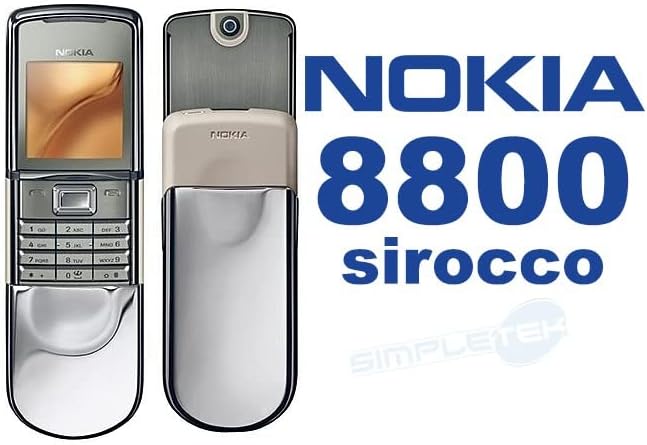
ചിത്രം 2.1: ഫ്രണ്ട് view of the Nokia 8800 Sirocco Edition in its closed position, showcasing the display and keypad.
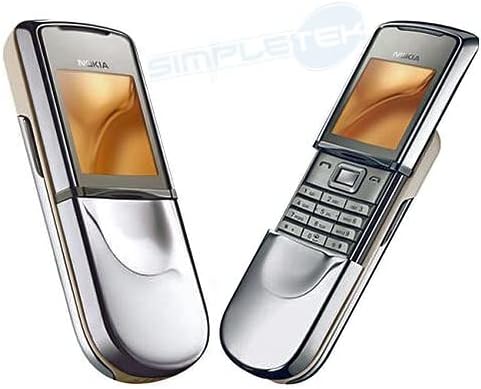
ചിത്രം 2.2: സൈഡ്-ബൈ-സൈഡ് view of the Nokia 8800 Sirocco Edition, illustrating both the closed and open slider positions.
പ്രധാന ഘടകങ്ങൾ:
- ഡിസ്പ്ലേ: 262K colors TFT screen, protected by sapphire-coated glass.
- കീപാഡ്: Standard alphanumeric keypad for navigation and input.
- Slider Mechanism: Smooth sliding action to reveal the keypad.
- ക്യാമറ: Integrated 2.0 MP camera on the rear.
- സ്പീക്കർ: കോളുകൾക്കും ഓഡിയോ പ്ലേബാക്കിനും.
- ചാർജിംഗ് പോർട്ട്: ഉപകരണത്തിൻ്റെ അടിയിൽ സ്ഥിതിചെയ്യുന്നു.
3. സജ്ജീകരണം
3.1. സിം കാർഡ് ഇടുന്നു
- ഫോൺ ഓഫാണെന്ന് ഉറപ്പാക്കുക.
- ഫോണിൻ്റെ പിൻ കവർ നീക്കം ചെയ്യുക.
- സിം കാർഡ് സ്ലോട്ട് കണ്ടെത്തുക.
- Insert your SIM card with the gold contacts facing down and the cut corner aligned as indicated.
- പുറംചട്ട മാറ്റിസ്ഥാപിക്കുക.
3.2. ബാറ്ററി ഇൻസ്റ്റാളേഷനും ചാർജിംഗും
The Nokia 8800 Sirocco Edition uses a BP-6X battery with a capacity of 700 mAh.
- ഫോൺ ഓഫാണെന്ന് ഉറപ്പാക്കുക.
- പിൻ കവർ നീക്കം ചെയ്യുക.
- Insert the BP-6X battery into its compartment, aligning the contacts.
- പുറംചട്ട മാറ്റിസ്ഥാപിക്കുക.
- Connect the charger to the phone's charging port and then to a power outlet.
- Allow the battery to fully charge before initial use. A full charge provides approximately 2.75 hours of talk time.

ചിത്രം 3.1: The Nokia 8800 Sirocco Edition retail package, including the phone, charger, and other accessories.
4. പ്രവർത്തന നിർദ്ദേശങ്ങൾ
4.1. പവർ ഓൺ/ഓഫ്
- പവർ ഓണാക്കാൻ: Press and hold the power key (usually the red 'End Call' key) until the phone vibrates and the screen lights up.
- പവർ ഓഫ് ചെയ്യാൻ: Press and hold the power key until the power-off options appear, then select 'Power off'.
4.2. അടിസ്ഥാന നാവിഗേഷൻ
Use the navigation keys (up, down, left, right) and the center selection key to browse menus and select options. The soft keys below the display perform functions indicated on the screen.
4.3. കോളുകൾ ചെയ്യലും സ്വീകരിക്കലും
- ഒരു കോൾ ചെയ്യുന്നു: Enter the phone number using the keypad and press the green 'Call' key.
- ഒരു കോളിന് മറുപടി നൽകുന്നു: Press the green 'Call' key when the phone rings.
- ഒരു കോൾ അവസാനിപ്പിക്കുന്നു: Press the red 'End Call' key.
4.4. ഡിസ്പ്ലേ സവിശേഷതകൾ
The phone features a 1.7-inch TFT display with 262K colors and a resolution of 320 x 240 pixels. You can customize themes and wallpapers to personalize your device's appearance.
5. ക്യാമറ സവിശേഷതകൾ
The Nokia 8800 Sirocco Edition is equipped with a 2.0-megapixel camera, allowing you to capture photos. The camera is located on the rear of the device, visible when the slider is open.

ചിത്രം 5.1: വശം view of the Nokia 8800 Sirocco Edition with the slider open, highlighting the rear camera lens.
5.1. ഫോട്ടോ എടുക്കൽ
- Open the phone's slider to reveal the camera lens.
- Navigate to the Camera application from the main menu.
- Frame your shot using the display as a viewഫൈൻഡർ.
- Press the dedicated camera key or the center selection key to capture the image.
- Photos are saved to the phone's internal memory (128 MB storage capacity).
6. സന്ദേശമയയ്ക്കൽ
The phone supports standard SMS (Short Message Service) and MMS (Multimedia Messaging Service) for text and multimedia messages. It supports sending messages in 47 languages, including major European, African, Asia-Pacific, and American languages.
6.1. Sending a Text Message (SMS)
- Go to the 'Messages' menu.
- 'പുതിയ സന്ദേശം സൃഷ്ടിക്കുക' അല്ലെങ്കിൽ 'പുതിയ SMS' തിരഞ്ഞെടുക്കുക.
- കീപാഡ് ഉപയോഗിച്ച് നിങ്ങളുടെ സന്ദേശം നൽകുക.
- Enter the recipient's phone number or select from your contacts.
- Select 'Send'.
6.2. Sending a Multimedia Message (MMS)
MMS allows you to send messages containing text, images, audio, and video clips.
- Go to the 'Messages' menu.
- Select 'Create new message' or 'New MMS'.
- Add text, attach an image or video from your gallery, or record new media.
- Enter the recipient's phone number or select from your contacts.
- Select 'Send'.
7. കണക്റ്റിവിറ്റി
The Nokia 8800 Sirocco Edition offers various connectivity options for data transfer and communication.
7.1. ബ്ലൂടൂത്ത്
Bluetooth allows for wireless connection to compatible devices such as headsets, car kits, and other mobile phones for data exchange.
- Go to 'Menu' > 'Settings' > 'Connectivity' > 'Bluetooth'.
- ബ്ലൂടൂത്ത് 'ഓൺ' ചെയ്യുക.
- Select 'Paired devices' or 'New device' to search for and connect to other Bluetooth devices.
- ജോടിയാക്കൽ പ്രക്രിയ പൂർത്തിയാക്കാൻ ഓൺ-സ്ക്രീൻ നിർദ്ദേശങ്ങൾ പാലിക്കുക.
7.2. ഇൻ്റർനെറ്റ് ആക്സസ്
The phone supports internet access via EDGE / EGPRS / GPRS / GSM network technology. It includes a built-in internet browser and supports email access.
- Ensure your network operator provides data services and your SIM card is configured for internet access.
- Go to 'Menu' > 'Internet' or 'Web'.
- ആവശ്യമുള്ളത് നൽകുക web address or select a bookmark.
8. പരിപാലനം
Proper care and maintenance will extend the life of your Nokia 8800 Sirocco Edition.
8.1. ഉപകരണം വൃത്തിയാക്കൽ
- ഫോണിന്റെ സ്ക്രീനും ബോഡിയും തുടയ്ക്കാൻ മൃദുവായ, ലിന്റ് രഹിത തുണി ഉപയോഗിക്കുക.
- കഠിനമായ രാസവസ്തുക്കൾ, ക്ലീനിംഗ് ലായകങ്ങൾ, അല്ലെങ്കിൽ ശക്തമായ ഡിറ്റർജന്റുകൾ എന്നിവ ഉപയോഗിക്കുന്നത് ഒഴിവാക്കുക.
- ഫോണിൽ അമിതമായ ഈർപ്പം ഏൽക്കരുത്.
8.2. ബാറ്ററി പരിചരണം
- അങ്ങേയറ്റത്തെ താപനിലയിലേക്ക് ബാറ്ററി തുറന്നുകാട്ടരുത്.
- ബാറ്ററി ഇടയ്ക്കിടെ പൂർണ്ണമായും ഡിസ്ചാർജ് ചെയ്യുന്നത് ഒഴിവാക്കുക.
- Use only Nokia-approved chargers and batteries.
8.3. സോഫ്റ്റ്വെയർ അപ്ഡേറ്റുകൾ
Periodically check for software updates from Nokia (if available) to ensure your phone has the latest features and performance enhancements. Refer to the phone's settings menu for update options.
9. പ്രശ്നപരിഹാരം
If you encounter issues with your phone, try the following solutions before seeking professional assistance.
| പ്രശ്നം | സാധ്യമായ പരിഹാരം |
|---|---|
| ഫോൺ ഓൺ ആകുന്നില്ല. | ബാറ്ററി ചാർജ്ജ് ചെയ്തിട്ടുണ്ടെന്ന് ഉറപ്പാക്കുക. ബാറ്ററി ശരിയായി ചേർത്തിട്ടുണ്ടോയെന്ന് പരിശോധിക്കുക. |
| നെറ്റ്വർക്ക് സിഗ്നൽ ഇല്ല | Check SIM card insertion. Ensure you are in an area with network coverage. Restart the phone. |
| ബാറ്ററി ചാർജ് ചെയ്യുന്നില്ല | Verify the charger is properly connected to the phone and power outlet. Try a different charger if available. Check for damage to the charging port. |
| കോളുകൾ വിളിക്കാനോ സ്വീകരിക്കാനോ കഴിയില്ല | Check network signal. Ensure your SIM card is active. Verify call barring settings. |
| Phone freezes or is unresponsive | ഹാർഡ് റീസെറ്റ് നടത്താൻ ബാറ്ററി നീക്കം ചെയ്ത് വീണ്ടും ചേർക്കുക. |
10 സ്പെസിഫിക്കേഷനുകൾ
Detailed technical specifications for the Nokia 8800 Sirocco Edition.
| ഫീച്ചർ | വിശദാംശങ്ങൾ |
|---|---|
| മോഡൽ | Nokia 8800 Sirocco Edition |
| ഓപ്പറേറ്റിംഗ് സിസ്റ്റം | സിംബിയൻ |
| പ്രദർശിപ്പിക്കുക | 1.7-inch TFT, 262K colors, 320 x 240 resolution |
| ക്യാമറ | 2.0 എം.പി |
| ആന്തരിക സംഭരണം | 128 MB |
| ബാറ്ററി ശേഷി | 700 mAh (BP-6X) |
| സംസാര സമയം | 2.75 മണിക്കൂർ വരെ |
| നെറ്റ്വർക്ക് സാങ്കേതികവിദ്യ | GSM 900/1800/1900 (Tri-Band), EDGE / EGPRS / GPRS |
| കണക്റ്റിവിറ്റി | ബ്ലൂടൂത്ത് |
| സന്ദേശമയയ്ക്കൽ | SMS, MMS (supports 47 languages) |
| ഫോം ഫാക്ടർ | സ്ലൈഡർ |
| ഭാരം | 0.01 ഔൺസ് |
11. വാറൻ്റിയും പിന്തുണയും
For warranty information and customer support, please refer to the documentation provided at the time of purchase or contact your retailer. Nokia's official website may also provide support resources for legacy devices.
This product was manufactured by Nokia.