
ചിത്രം 1.0: The Apogee JAM 96k Guitar and Instrument Interface.
1. ആമുഖം
The Apogee JAM 96k is a high-quality digital audio interface designed for connecting guitars and other instruments directly to your Apple iPhone, iPad, or Mac. It allows users to capture the rich tone of their instrument with digital clarity, supporting recording resolutions up to 24-bit/96 kHz. The JAM 96k is optimized for use with music creation applications like GarageBand and Logic Pro, providing an inspiring tone for practicing, recording, or jamming.
2. പാക്കേജ് ഉള്ളടക്കം
Verify that all items are present in your JAM 96k package:
- Apogee JAM 96k Interface
- Lightning Cable (for iOS devices)
- USB Cable (for Mac)
- ദ്രുത ആരംഭ ഗൈഡ് (ഈ മാനുവലിൽ ഉൾപ്പെടുത്തിയിട്ടില്ല)
3. സിസ്റ്റം ആവശ്യകതകൾ
To ensure optimal performance, your device must meet the following minimum requirements:
iOS ഉപകരണങ്ങൾ:
- iOS പതിപ്പ്: 6.1 ഉം അതിനുശേഷവും
- അനുയോജ്യമായ ഉപകരണങ്ങൾ: iPhone 7 Plus, iPhone 7, iPhone SE, iPhone 6s Plus, iPhone 6s, iPhone 6 Plus, iPhone 6, iPhone 5s, iPhone 5c, iPhone 5, iPad Pro (9.7-inch), iPad Pro (12.9-inch), iPad Air 2, iPad Air, iPad (4th generation), iPad mini 4, iPad mini 3, iPad mini 2, iPad mini, iPad (4th generation), iPod touch (6th generation), iPad touch (5th generation)
മാക് ഒഎസ്:
- കമ്പ്യൂട്ടർ: Mac with an Intel processor
- മെമ്മറി: 1 GB minimum of installed RAM, 2 GB recommended
- Mac OS Version: 10.7.5 അല്ലെങ്കിൽ പിന്നീട്
- കണക്ഷൻ: Any available USB port
സോഫ്റ്റ്വെയർ അനുയോജ്യത:
- ഗാരേജ്ബാൻഡ്
- ലോജിക് പ്രോ
- മെയിൻഎസ്tage
- Pro Tools (v. 9 or higher)
- Any Core Audio compatible application
4. സജ്ജീകരണം
Follow these steps to connect your Apogee JAM 96k and begin using it:
4.1 Connecting to an iOS Device (iPhone/iPad)
- Locate the Lightning cable provided with your JAM 96k.
- Connect the small end of the Lightning cable to the പുറത്ത് port on the JAM 96k.
- Connect the other end of the Lightning cable to your iPhone or iPad. The JAM 96k is bus-powered and will draw power directly from your iOS device.
- Connect your instrument (guitar, bass, or acoustic instrument with a pickup) to the IN jack on the JAM 96k using a standard 1/4-inch instrument cable.
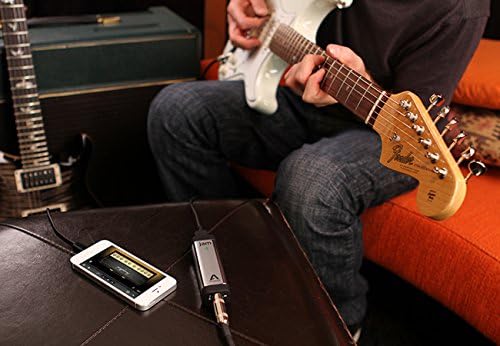
ചിത്രം 4.1: The Apogee JAM 96k connected to an iPhone, with a guitar cable plugged into the interface. This image illustrates the typical setup for mobile recording.
4.2 Connecting to a Mac
- Locate the USB cable provided with your JAM 96k.
- യുഎസ്ബി കേബിളിന്റെ ചെറിയ അറ്റം പുറത്ത് port on the JAM 96k.
- Connect the other end of the USB cable to an available USB port on your Mac. The JAM 96k is bus-powered and will draw power directly from your Mac.
- Connect your instrument (guitar, bass, or acoustic instrument with a pickup) to the IN jack on the JAM 96k using a standard 1/4-inch instrument cable.

ചിത്രം 4.2: ഒരു ക്ലോസപ്പ് view of the Apogee JAM 96k's output port, labeled "OUT", where the Lightning or USB cable connects.
4.3 ഇൻപുട്ട് ഗെയിൻ ക്രമീകരിക്കൽ
The JAM 96k features a gain control wheel on its side to adjust the input level of your instrument. This is crucial for achieving optimal sound quality and preventing clipping.
- പച്ച LED: Indicates an optimal input level.
- ചുവന്ന LED: Indicates that the input signal is too hot and clipping is occurring. Reduce the gain immediately.
While playing your instrument at its loudest, adjust the gain wheel until the LED indicator is consistently green, occasionally flickering red only on the loudest peaks. Avoid sustained red illumination.

ചിത്രം 4.3: ഒരു കോണാകൃതിയിലുള്ള view of the Apogee JAM 96k, highlighting the side-mounted gain control wheel and the LED indicator light.

ചിത്രം 4.4: എ വിശദമായി view of the Apogee JAM 96k's input jack, labeled "IN" with a guitar icon, where the instrument cable connects.
5. Operating the JAM 96k
Once connected, the JAM 96k acts as an audio input for your chosen music application. It is automatically recognized by Core Audio compatible applications on iOS and Mac.
5.1 Using with Music Applications
- Open your preferred music creation application (e.g., GarageBand, Logic Pro, MainStagഒപ്പം).
- Ensure that the JAM 96k is selected as the audio input device within the application's audio settings.
- Create a new track and select an instrument input.
- Monitor your sound through headphones or speakers connected to your iOS device or Mac. The JAM 96k does not have a direct headphone output.
- Adjust the input gain on the JAM 96k as described in Section 4.3 to achieve a strong, clean signal without distortion.
5.2 റെക്കോർഡിംഗ് നിലവാരം
The JAM 96k supports high-definition recording up to 24-bit/96 kHz. This provides excellent fidelity for capturing the nuances of your instrument. The actual recording quality will also depend on the settings within your music application.
6. പരിപാലനം
To ensure the longevity and optimal performance of your Apogee JAM 96k, follow these simple maintenance guidelines:
- വൃത്തിയാക്കൽ: Use a soft, dry cloth to clean the exterior of the device. Avoid using liquid cleaners or solvents, as these can damage the finish or internal components.
- സംഭരണം: When not in use, store the JAM 96k in a cool, dry place, away from direct sunlight and extreme temperatures.
- കൈകാര്യം ചെയ്യൽ: ഉപകരണം ശ്രദ്ധയോടെ കൈകാര്യം ചെയ്യുക. അത് താഴെയിടുകയോ ശക്തമായ ആഘാതങ്ങൾക്ക് വിധേയമാക്കുകയോ ചെയ്യരുത്.
- കേബിളുകൾ: Inspect cables regularly for any signs of wear or damage. Replace damaged cables immediately to prevent connectivity issues.
7. പ്രശ്നപരിഹാരം
If you encounter issues with your Apogee JAM 96k, refer to the following common problems and solutions:
7.1 ശബ്ദമില്ല അല്ലെങ്കിൽ കുറഞ്ഞ ശബ്ദം
- കണക്ഷനുകൾ പരിശോധിക്കുക: Ensure all cables (instrument, Lightning/USB) are securely connected to the JAM 96k and your device.
- നേട്ടം ക്രമീകരിക്കുക: Verify that the gain wheel on the JAM 96k is adjusted appropriately. The LED should be green during playing.
- സോഫ്റ്റ്വെയർ ക്രമീകരണങ്ങൾ: Confirm that the JAM 96k is selected as the input device in your music application's audio settings. Check the input level within the application.
- ഉപകരണ വോളിയം: Ensure the master volume on your iOS device or Mac is not muted or set too low.
- Instrument Check: Test your instrument directly with an amplifier to ensure it is functioning correctly.
7.2 Distorted or Clipping Sound
- നേട്ടം കുറയ്ക്കുക: If the LED on the JAM 96k is consistently red, the input signal is too strong. Turn the gain wheel down until the LED remains green, only occasionally flickering red on the loudest peaks.
- Software Input Level: Check the input level within your music application and reduce it if necessary.
7.3 Latency (Delay in Sound)
- സോഫ്റ്റ്വെയർ ബഫർ വലുപ്പം: In your music application's audio settings, try reducing the buffer size. Lower buffer sizes reduce latency but may require more processing power from your device.
- മറ്റ് ആപ്ലിക്കേഷനുകൾ അടയ്ക്കുക: Close any unnecessary applications running in the background on your iOS device or Mac to free up system resources.
7.4 ഉപകരണം തിരിച്ചറിഞ്ഞിട്ടില്ല
- വീണ്ടും ബന്ധിപ്പിക്കുക: Disconnect and reconnect the JAM 96k.
- Restart Application/Device: Close and reopen your music application, or restart your iOS device/Mac.
- കേബിളുകൾ പരിശോധിക്കുക: Ensure the Lightning or USB cable is not damaged and is fully inserted. Try a different port if available.
- സിസ്റ്റം അനുയോജ്യത: Verify that your operating system and device meet the minimum system requirements listed in Section 3.
8 സ്പെസിഫിക്കേഷനുകൾ
| മോഡൽ നമ്പർ | JAM 96k |
| ബ്രാൻഡ് | അപ്പോജി |
| ഇനത്തിൻ്റെ ഭാരം | 1.6 ഔൺസ് |
| ഉൽപ്പന്ന അളവുകൾ | 3.75 x 0.9 x 1.2 ഇഞ്ച് |
| അനുയോജ്യമായ ഉപകരണങ്ങൾ | iPhone, iPad, iPod Touch, Mac |
| കണക്റ്റർ തരം | USB (Lightning and USB cables included) |
| ഹാർഡ്വെയർ ഇന്റർഫേസ് | USB |
| പിന്തുണയ്ക്കുന്ന സോഫ്റ്റ്വെയർ | Core Audio compliant iOS apps, Core Audio compatible applications for Mac (e.g., GarageBand, Logic Pro, MainStage, Pro Tools v.9+) |
| ഔട്ട്പുട്ട് വാട്ട്tage | 5 Watts (Bus-powered) |
| ഓപ്പറേറ്റിംഗ് സിസ്റ്റം | iOS, macOS |
| പവർ ഉറവിടം | Bus Powered (from connected iOS device or Mac) |
| കണക്റ്റിവിറ്റി ടെക്നോളജി | USB |
| ചാനലുകളുടെ എണ്ണം | 1 |
| റെക്കോഡിംഗ് റെസല്യൂഷൻ | 24-ബിറ്റ്/96 kHz വരെ |
9. വാറൻ്റിയും പിന്തുണയും
Apogee provides a limited warranty for the JAM 96k. For detailed warranty information, including terms and conditions, please refer to the official Apogee webസൈറ്റ് അല്ലെങ്കിൽ നിങ്ങളുടെ ഉൽപ്പന്നത്തിൽ ഉൾപ്പെടുത്തിയിരിക്കുന്ന വാറന്റി കാർഡ്.
For technical assistance, troubleshooting beyond this manual, or warranty claims, please contact Apogee customer support directly through their official website. Ensure you have your product model and any relevant purchase information available when contacting support.
Official Apogee Webസൈറ്റ്: apogeedigital.com/support


