ആമുഖം
The Maximum IRB-100 IR Bender, Model 1262, is an infrared (IR) remote control extender designed to allow you to control up to three IR-controlled devices that are out of sight or located in a cabinet. It receives IR signals from your remote control and re-transmits them via three included IR emitting probes to your target devices. This manual provides detailed instructions for setup, operation, maintenance, and troubleshooting to ensure optimal performance of your device.
സജ്ജമാക്കുക
പാക്കേജ് ഉള്ളടക്കം
- 1 x Maximum IRB-100 IR Bender Main Unit
- 3 x IR Emitting Probes
- 1 x AC Adapter (230V)
- 1 x Mounting Set
പവർ കണക്ഷൻ
The IRB-100 can be powered using either the included 230V AC adapter or a 5V USB power source. Connect the appropriate power cable to the power input port on the main unit. Ensure the power source is stable and provides the correct voltage.
Connecting IR Emitting Probes
Connect each of the three IR emitting probes to the designated output ports on the IRB-100 main unit. These probes will transmit the IR signals to your devices. Each probe has a 2-meter cable length for flexible placement.
പ്ലെയ്സ്മെൻ്റും മൗണ്ടിംഗും
Position the IRB-100 main unit in a location where it can easily receive IR signals from your remote control. The unit features LED indicators to confirm signal reception. Place the IR emitting probes directly over the IR receiver window of each device you wish to control. The included mounting set can be used to secure the main unit or probes if desired, ensuring optimal signal transmission and reception.
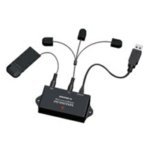
This image shows the Maximum IRB-100 IR Bender main unit, demonstrating the connection points for the power supply and the three IR emitting probes. The compact design allows for discreet placement near your entertainment system.
പ്രവർത്തന നിർദ്ദേശങ്ങൾ
അടിസ്ഥാന പ്രവർത്തനം
Once the IRB-100 is powered on and the IR emitting probes are correctly positioned, simply point your remote control at the main unit. The IRB-100 will receive the IR signal and instantly re-transmit it through the connected probes to control your hidden devices. The system supports controlling up to three devices simultaneously.
LED സൂചകങ്ങൾ
The IRB-100 unit is equipped with LED indicators. These LEDs illuminate to confirm that the unit is powered on and actively receiving IR signals from your remote control. If the LEDs do not light up when a remote signal is sent, refer to the Troubleshooting section.
ശ്രേണിയും പ്രകടനവും
The IRB-100 offers a maximum reception range of 5 meters (approximately 16 feet) for your remote control. It operates within a working frequency of 433.92MHz and an IR frequency range of 30-60kHz, ensuring compatibility with a wide array of standard IR remote controls.
മെയിൻ്റനൻസ്
To ensure the longevity and optimal performance of your Maximum IRB-100 IR Bender, follow these simple maintenance guidelines:
- വൃത്തിയാക്കൽ: Use a soft, dry cloth to clean the main unit and probes. Avoid using liquid cleaners, solvents, or abrasive materials, as these can damage the device.
- സംഭരണം: ദീർഘനേരം ഉപയോഗിക്കാത്തപ്പോൾ, നേരിട്ടുള്ള സൂര്യപ്രകാശത്തിൽ നിന്നും കടുത്ത താപനിലയിൽ നിന്നും മാറി തണുത്തതും വരണ്ടതുമായ സ്ഥലത്ത് ഉപകരണം സൂക്ഷിക്കുക.
- കൈകാര്യം ചെയ്യൽ: Handle the unit and probes with care. Avoid dropping or subjecting them to strong impacts.
ട്രബിൾഷൂട്ടിംഗ്
If you encounter issues with your IRB-100 IR Bender, please consult the following troubleshooting steps:
പവർ ഇല്ല
- പവർ കണക്ഷൻ പരിശോധിക്കുക: Ensure the AC adapter or USB power cable is securely connected to the IRB-100 and the power outlet/USB port.
- പവർ സ്രോതസ്സ് പരിശോധിക്കുക: Confirm that the power outlet or USB port is functional. Try plugging in another device to test it.
- കേബിളുകൾ പരിശോധിക്കുക: പവർ കേബിളിൽ എന്തെങ്കിലും കേടുപാടുകൾ സംഭവിച്ചിട്ടുണ്ടോ എന്ന് പരിശോധിക്കുക.
ഉപകരണങ്ങൾ പ്രതികരിക്കുന്നില്ല
- പ്രോബ് പ്ലേസ്മെൻ്റ്: Ensure each IR emitting probe is positioned directly over the IR receiver window of the target device. Slight adjustments may be necessary.
- IR Bender Reception: Confirm that the IRB-100 main unit is receiving signals from your remote control (check LED indicators). Ensure there are no obstructions between your remote and the main unit.
- റിമോട്ട് കൺട്രോൾ പ്രവർത്തനം: Test your remote control with the device directly to ensure it is working correctly.
- ഉപകരണങ്ങളുടെ എണ്ണം: The unit supports up to 3 devices. Ensure you are not attempting to control more than this.
പരിമിതമായ ശ്രേണി
- തടസ്സങ്ങൾ: Ensure there is a clear line of sight between your remote control and the IRB-100 main unit.
- ഇടപെടൽ: Minimize potential sources of IR interference, such as direct sunlight or strong fluorescent lighting, near the main unit.
സാങ്കേതിക സവിശേഷതകൾ
| ഫീച്ചർ | വിശദാംശങ്ങൾ |
|---|---|
| മോഡൽ നമ്പർ | 1262 |
| ബ്രാൻഡ് | പരമാവധി |
| ഉൽപ്പന്ന അളവുകൾ (L x W x H) | 0.79 x 3.94 x 1.77 ഇഞ്ച് (20 x 100 x 45 മിമി) |
| ഇനത്തിൻ്റെ ഭാരം | 6.4 ഔൺസ് (180 ഗ്രാം) |
| വൈദ്യുതി വിതരണം | AC 230V, DC 5V (USB) |
| എസി അഡാപ്റ്റർ ഉൾപ്പെടുത്തിയിട്ടുണ്ട് | അതെ |
| Maximum IR Reception Range | 5 മീറ്റർ |
| USB 2.0 പോർട്ടുകളുടെ എണ്ണം | 1 (for power) |
| ഉൽപ്പന്ന നിറം | കറുപ്പ് |
| പ്രവർത്തന ആവൃത്തി | 433.92MHz |
| LED സൂചകങ്ങൾ | അതെ |
| ഇൻ്റർഫേസ് | Wireless IR |
| Mounting Set Included | അതെ |
| Cable Length (Probes) | 2 മീറ്റർ |
| Number of Supported Devices | 3 |
| ബിൽറ്റ്-ഇൻ സ്ക്രീൻ | ഇല്ല |
| Frequency Range (IR) | 30-60kHz |
| അനുയോജ്യമായ ഉപകരണങ്ങൾ | IR-controlled devices |
വാറൻ്റി വിവരങ്ങൾ
വിശദമായ വാറന്റി നിബന്ധനകൾക്കും വ്യവസ്ഥകൾക്കും, ദയവായി ഔദ്യോഗിക വെബ്സൈറ്റ് സന്ദർശിക്കുക. website of Maximum or the product packaging. It is recommended to retain your proof of purchase for any potential warranty claims.
ഉപഭോക്തൃ പിന്തുണ
Should you require technical assistance, have questions regarding setup or operation, or need further support, please contact Maximum customer support. Contact details, including phone numbers and email addresses, can typically be found on the manufacturer's official webസൈറ്റ് അല്ലെങ്കിൽ ഉൽപ്പന്ന ഡോക്യുമെന്റേഷനിൽ.


