ആമുഖം
IMPINJ സ്പീഡ്വേ റെവല്യൂഷൻ R420 UHF RFID റീഡറിന്റെ സജ്ജീകരണം, പ്രവർത്തനം, പരിപാലനം, ട്രബിൾഷൂട്ടിംഗ് എന്നിവയ്ക്കുള്ള അവശ്യ നിർദ്ദേശങ്ങൾ ഈ മാനുവൽ നൽകുന്നു. ശരിയായ പ്രവർത്തനക്ഷമതയും സുരക്ഷയും ഉറപ്പാക്കാൻ ഉപകരണം ഉപയോഗിക്കുന്നതിന് മുമ്പ് ദയവായി ഈ പ്രമാണം നന്നായി വായിക്കുക.
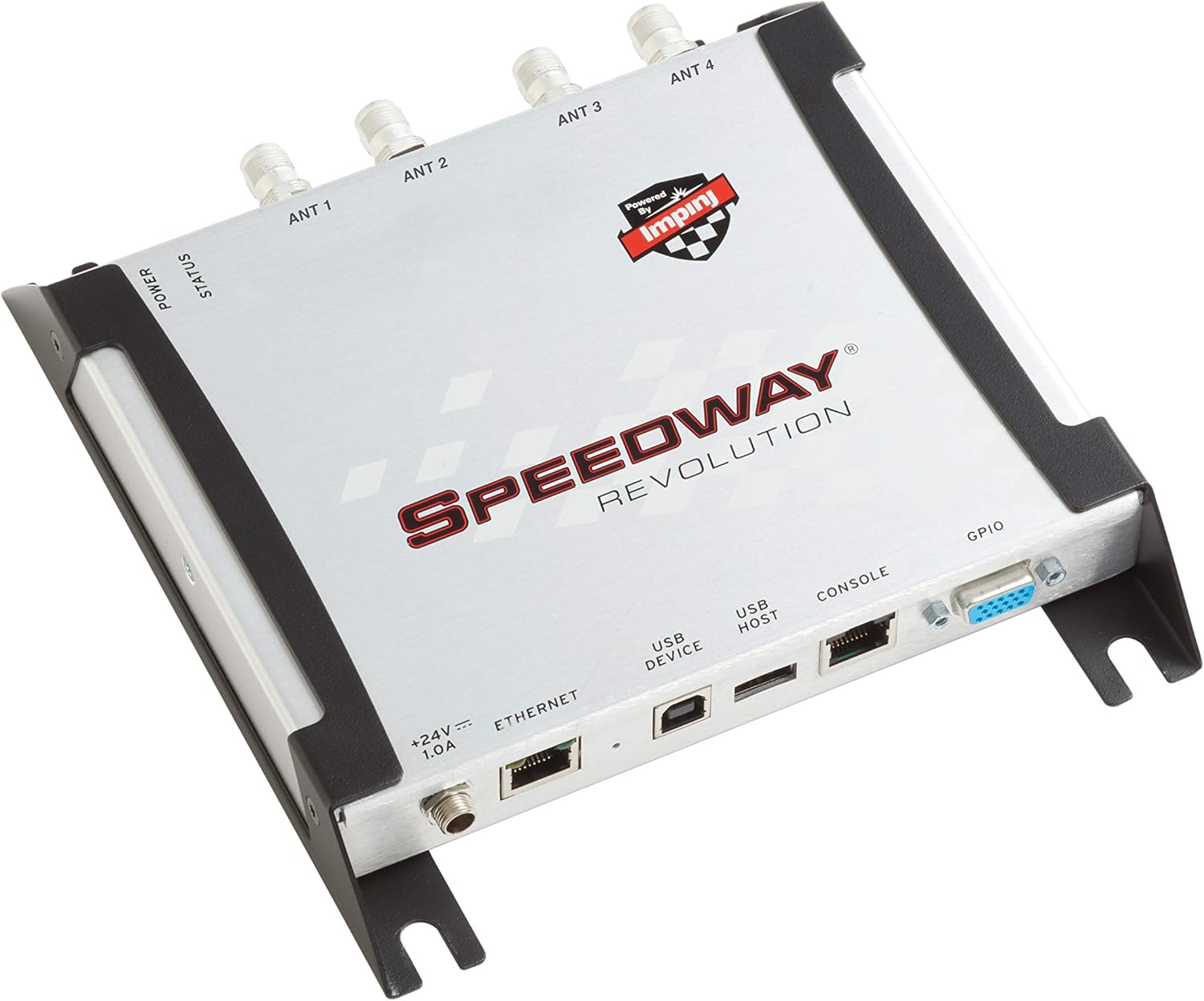
ചിത്രം 1: IMPINJ സ്പീഡ്വേ റെവല്യൂഷൻ R420 UHF RFID റീഡർ. ഈ ചിത്രം മുകളിൽ നിന്ന് താഴേക്ക് പ്രദർശിപ്പിക്കുന്നു. view RFID റീഡറിന്റെ, അതിന്റെ ഒതുക്കമുള്ള രൂപകൽപ്പനയും വിവിധ പോർട്ടുകളും എടുത്തുകാണിക്കുന്നു.
സജ്ജീകരണ നിർദ്ദേശങ്ങൾ
നിങ്ങളുടെ സ്പീഡ്വേ റെവല്യൂഷൻ R420 RFID റീഡർ ശരിയായി സജ്ജീകരിക്കാൻ ഈ ഘട്ടങ്ങൾ പാലിക്കുക.
1. പവർ കണക്ഷൻ
R420 റീഡർ പവർ ഓവർ ഇതർനെറ്റ് (PoE) അല്ലെങ്കിൽ ഒരു ബാഹ്യ 24V, 1.0A പവർ സപ്ലൈ പിന്തുണയ്ക്കുന്നു. ഉചിതമായ പവർ സ്രോതസ്സ് ഉപയോഗിക്കുന്നുണ്ടെന്ന് ഉറപ്പാക്കുക.
- PoE: ഒരു PoE- പ്രാപ്തമാക്കിയ സ്വിച്ചിൽ നിന്നോ ഇൻജക്ടറിൽ നിന്നോ റീഡറിലെ ഇതർനെറ്റ് പോർട്ടിലേക്ക് ഒരു ഇതർനെറ്റ് കേബിൾ ബന്ധിപ്പിക്കുക.
- ബാഹ്യ ശക്തി: PoE ഉപയോഗിക്കുന്നില്ലെങ്കിൽ, '+24V === 1.0A' പവർ ഇൻപുട്ട് പോർട്ടിലേക്ക് അനുയോജ്യമായ ഒരു 24V, 1.0A പവർ അഡാപ്റ്റർ ബന്ധിപ്പിക്കുക.
2. നെറ്റ്വർക്ക് കണക്ഷൻ
ഒരു സ്റ്റാൻഡേർഡ് ഇതർനെറ്റ് കേബിൾ ഉപയോഗിച്ച് റീഡറിനെ നിങ്ങളുടെ നെറ്റ്വർക്കിലേക്ക് ബന്ധിപ്പിക്കുക. ഇതർനെറ്റ് പോർട്ട് ഒരു RJ45 തരമാണ്.
3. ആന്റിന കണക്ഷൻ
R420-ൽ നാല് ആന്റിന പോർട്ടുകൾ (ANT 1, ANT 2, ANT 3, ANT 4) ഉണ്ട്. നിങ്ങളുടെ UHF RFID ആന്റിനകളെ ഈ പോർട്ടുകളിലേക്ക് ബന്ധിപ്പിക്കുക. ഒപ്റ്റിമൽ പ്രകടനത്തിനായി സുരക്ഷിത കണക്ഷനുകൾ ഉറപ്പാക്കുക.
4. പെരിഫറൽ കണക്ഷനുകൾ
- USB ഹോസ്റ്റ്: യുഎസ്ബി പെരിഫറലുകൾ ബന്ധിപ്പിക്കുന്നതിന്.
- USB ഉപകരണം: ഒരു ഹോസ്റ്റ് കമ്പ്യൂട്ടറിലേക്ക് റീഡർ ബന്ധിപ്പിക്കുന്നതിന്.
- കൺസോൾ: സീരിയൽ ആശയവിനിമയത്തിനും കോൺഫിഗറേഷനും.
- GPIO: ബാഹ്യ ഉപകരണ നിയന്ത്രണത്തിനും സെൻസിംഗിനുമുള്ള പൊതു ആവശ്യത്തിനുള്ള ഇൻപുട്ട്/ഔട്ട്പുട്ട്.

ചിത്രം 2: IMPINJ സ്പീഡ്വേ റെവല്യൂഷൻ R420 പോർട്ടുകളുടെ ലേബൽ ചെയ്ത ഡയഗ്രം. ഈ ചിത്രം പവർ LED, സ്റ്റാറ്റസ് LED, ആന്റിന പോർട്ടുകൾ (ANT 1-4), പവർ സപ്ലൈ ഇൻപുട്ട്, ഇതർനെറ്റ് പോർട്ട്, USB ഡിവൈസ് പോർട്ട്, USB ഹോസ്റ്റ് പോർട്ട്, കൺസോൾ പോർട്ട്, GPIO പോർട്ട് എന്നിവയുടെ സ്ഥാനം വ്യക്തമായി സൂചിപ്പിക്കുന്നു.

ചിത്രം 3: പിൻഭാഗം view പവർ ഇൻപുട്ട്, ഇതർനെറ്റ്, യുഎസ്ബി, കൺസോൾ, ജിപിഐഒ പോർട്ടുകൾ എന്നിവ കാണിക്കുന്ന IMPINJ സ്പീഡ്വേ റെവല്യൂഷൻ R420 ന്റെ ചിത്രം. റീഡറിന്റെ ഒരു വശത്തുള്ള കണക്റ്റിവിറ്റി ഓപ്ഷനുകളെക്കുറിച്ച് ഈ ചിത്രം വിശദമായ ഒരു കാഴ്ച നൽകുന്നു.

ചിത്രം 4: ഫ്രണ്ട് view നാല് ആന്റിന പോർട്ടുകൾ പ്രദർശിപ്പിക്കുന്ന IMPINJ സ്പീഡ്വേ റെവല്യൂഷൻ R420 ന്റെ. ഈ ചിത്രം ഉപകരണത്തിന്റെ ആന്റിന കണക്റ്റിവിറ്റി വശം എടുത്തുകാണിക്കുന്നു.
പ്രവർത്തന നിർദ്ദേശങ്ങൾ
IMPINJ സ്പീഡ്വേ റെവല്യൂഷൻ R420 എന്നത് വിവിധ ആപ്ലിക്കേഷനുകൾക്കായി രൂപകൽപ്പന ചെയ്തിരിക്കുന്ന ഉയർന്ന പ്രകടനമുള്ള UHF RFID റീഡറാണ്.
1. പവർ ഓൺ
എല്ലാ കണക്ഷനുകളും സുരക്ഷിതമായിക്കഴിഞ്ഞാൽ, റീഡറിൽ പവർ പ്രയോഗിക്കുക. പവർ LED ഇൻഡിക്കേറ്റർ പ്രകാശിക്കും, കൂടാതെ സ്റ്റാറ്റസ് LED പ്രവർത്തന നിലയെ സൂചിപ്പിക്കും.
2. സോഫ്റ്റ്വെയർ കോൺഫിഗറേഷൻ
നിർദ്ദിഷ്ട RFID-യ്ക്കായി റീഡറിന് സോഫ്റ്റ്വെയർ കോൺഫിഗറേഷൻ ആവശ്യമാണ് tag വായനാ പ്രവർത്തനങ്ങൾ. ഇതിൽ സാധാരണയായി ഇംപിൻജിന്റെ റീഡർ മാനേജ്മെന്റ് സോഫ്റ്റ്വെയർ ഉപയോഗിക്കുന്നതോ അതിന്റെ API വഴി കസ്റ്റം ആപ്ലിക്കേഷനുകളുമായി സംയോജിപ്പിക്കുന്നതോ ഉൾപ്പെടുന്നു. C# ആപ്ലിക്കേഷനുകൾക്ക് ഉപയോഗിക്കാൻ എളുപ്പമുള്ള ഒരു API ലഭ്യമാണ്, ഇത് കസ്റ്റം ബിസിനസ്സ് ലോജിക് നടപ്പിലാക്കാൻ അനുവദിക്കുന്നു.
3. അപേക്ഷകൾ
R420 വിവിധ ആപ്ലിക്കേഷനുകൾക്ക് അനുയോജ്യമാണ്, അവയിൽ ചിലത് ഇവയാണ്:
- ഇൻവെൻ്ററി മാനേജ്മെൻ്റ്
- അസറ്റ് ട്രാക്കിംഗ്
- സപ്ലൈ ചെയിൻ മാനേജ്മെന്റ്
- റീട്ടെയിൽ പ്രവർത്തനങ്ങൾ
- നിർമ്മാണ പ്രക്രിയകൾ
- ആരോഗ്യ സംരക്ഷണ സംവിധാനങ്ങൾ
- ലോജിസ്റ്റിക്സ്
ശരിയായ ആന്റിന കോൺഫിഗറേഷൻ ഉപയോഗിച്ച്, റീഡറിന് സ്റ്റാൻഡേർഡ് UHF കണ്ടെത്താനാകും tags 30-50 അടി ഉയരത്തിൽ.
മെയിൻ്റനൻസ്
നിങ്ങളുടെ IMPINJ സ്പീഡ്വേ റെവല്യൂഷൻ R420 റീഡറിന്റെ ദീർഘായുസ്സും ഒപ്റ്റിമൽ പ്രകടനവും ഉറപ്പാക്കാൻ, ഈ പൊതുവായ അറ്റകുറ്റപ്പണി മാർഗ്ഗനിർദ്ദേശങ്ങൾ പാലിക്കുക:
- വൃത്തിയാക്കൽ: ഉപകരണം വൃത്തിയായി സൂക്ഷിക്കുക, പൊടിയും അവശിഷ്ടങ്ങളും ഇല്ലാതെ സൂക്ഷിക്കുക. വൃത്തിയാക്കാൻ മൃദുവായതും ഉണങ്ങിയതുമായ തുണി ഉപയോഗിക്കുക. ആന്തരിക ഘടകങ്ങൾക്ക് കേടുവരുത്തുന്ന ലിക്വിഡ് ക്ലീനറുകൾ ഒഴിവാക്കുക.
- പരിസ്ഥിതി വ്യവസ്ഥകൾ: കേടുപാടുകൾ തടയുന്നതിന് റീഡർ അതിന്റെ നിർദ്ദിഷ്ട പാരിസ്ഥിതിക സാഹചര്യങ്ങളിൽ (താപനില, ഈർപ്പം) പ്രവർത്തിപ്പിക്കുക.
- കണക്ഷൻ പരിശോധനകൾ: എല്ലാ കേബിൾ കണക്ഷനുകളും (പവർ, ഇതർനെറ്റ്, ആന്റിനകൾ, യുഎസ്ബി, കൺസോൾ, ജിപിഐഒ) സുരക്ഷിതമാണെന്നും കേടുപാടുകൾ ഇല്ലാത്തതാണെന്നും ഉറപ്പാക്കാൻ ഇടയ്ക്കിടെ പരിശോധിക്കുക.
- ഫേംവെയർ അപ്ഡേറ്റുകൾ: നിർമ്മാതാവ് പരിശോധിക്കുക webലഭ്യമായ ഏതെങ്കിലും ഫേംവെയർ അപ്ഡേറ്റുകൾക്കായി സൈറ്റ്. ഫേംവെയർ കാലികമായി നിലനിർത്തുന്നത് പ്രകടനം മെച്ചപ്പെടുത്താനും പുതിയ സവിശേഷതകൾ ചേർക്കാനും സഹായിക്കും.
ട്രബിൾഷൂട്ടിംഗ്
നിങ്ങളുടെ സ്പീഡ്വേ റെവല്യൂഷൻ R420-ൽ പ്രശ്നങ്ങൾ നേരിടുകയാണെങ്കിൽ, ഇനിപ്പറയുന്ന ട്രബിൾഷൂട്ടിംഗ് ഘട്ടങ്ങൾ പരിഗണിക്കുക:
- ശക്തിയില്ല: പവർ സപ്ലൈ ശരിയായി ബന്ധിപ്പിച്ചിട്ടുണ്ടെന്നും നിർദ്ദിഷ്ട വോളിയം നൽകുന്നുണ്ടെന്നും ഉറപ്പാക്കുക.tage (24V, 1.0A) അല്ലെങ്കിൽ PoE ഉറവിടം സജീവമാണോ എന്ന് പരിശോധിക്കുക. പവർ LED സൂചകം.
- നെറ്റ്വർക്ക് കണക്റ്റിവിറ്റി ഇല്ല: റീഡറിലേക്കും നെറ്റ്വർക്ക് സ്വിച്ച്/റൂട്ടറിലേക്കും ഇതർനെറ്റ് കേബിൾ സുരക്ഷിതമായി ബന്ധിപ്പിച്ചിട്ടുണ്ടെന്ന് ഉറപ്പാക്കുക. നെറ്റ്വർക്ക് ക്രമീകരണങ്ങളും ഐപി കോൺഫിഗറേഷനും പരിശോധിക്കുക.
- വായിക്കാൻ കഴിയുന്നില്ല Tags:
- നാല് പോർട്ടുകളിലേക്കും ആന്റിനകൾ ശരിയായി ബന്ധിപ്പിച്ചിട്ടുണ്ടെന്ന് ഉറപ്പാക്കുക.
- ആന്റിന കേബിളുകൾക്ക് കേടുപാടുകൾ സംഭവിച്ചിട്ടില്ലെന്ന് ഉറപ്പാക്കുക.
- ആന്റിന പവർ ലെവലുകൾക്കും റീഡ് സെറ്റിംഗുകൾക്കുമായി സോഫ്റ്റ്വെയർ കോൺഫിഗറേഷൻ പരിശോധിക്കുക.
- ഉറപ്പാക്കുക tags വായനാ ശ്രേണിയിലും ഓറിയന്റേഷനിലും ഉള്ളവയാണ്.
- സ്റ്റാറ്റസ് LED പ്രശ്നങ്ങൾ: നിർദ്ദിഷ്ട കാര്യങ്ങൾക്ക് ഇംപിഞ്ച് ഡോക്യുമെന്റേഷൻ പരിശോധിക്കുക. സ്റ്റാറ്റസ് പ്രവർത്തന പ്രശ്നങ്ങൾ നിർണ്ണയിക്കുന്നതിനുള്ള LED പാറ്റേണുകളും അവയുടെ അർത്ഥങ്ങളും.
- സോഫ്റ്റ്വെയർ ആശയവിനിമയ പ്രശ്നങ്ങൾ: USB അല്ലെങ്കിൽ കൺസോൾ കണക്ഷനുകൾക്കായി ശരിയായ ഡ്രൈവറുകൾ ഇൻസ്റ്റാൾ ചെയ്തിട്ടുണ്ടെന്ന് ഉറപ്പാക്കുക. ഇതർനെറ്റ് ആശയവിനിമയത്തിനുള്ള നെറ്റ്വർക്ക് ക്രമീകരണങ്ങൾ പരിശോധിക്കുക.
വിപുലമായ ട്രബിൾഷൂട്ടിംഗ് അല്ലെങ്കിൽ സ്ഥിരമായ പ്രശ്നങ്ങൾക്ക്, ഔദ്യോഗിക ഇംപിഞ്ച് ഡോക്യുമെന്റേഷൻ പരിശോധിക്കുകയോ സാങ്കേതിക പിന്തുണയുമായി ബന്ധപ്പെടുകയോ ചെയ്യുക.
സ്പെസിഫിക്കേഷനുകൾ
| ഫീച്ചർ | വിശദാംശങ്ങൾ |
|---|---|
| ബ്രാൻഡ് | ഇംപിഞ്ച് |
| മോഡൽ നമ്പർ | R420 (LYSB00KHR41CY-ഇലക്ട്രൺസിഎസ്) |
| കണക്റ്റർ തരം | RJ45 (ഇഥർനെറ്റ്) |
| കേബിൾ തരം | ഇഥർനെറ്റ് |
| അനുയോജ്യമായ ഉപകരണങ്ങൾ | നെറ്റ്വർക്ക് ഉപകരണം, പേഴ്സണൽ കമ്പ്യൂട്ടർ, റൂട്ടർ, സെർവർ |
| പ്രത്യേക ഫീച്ചർ | PoE (പവർ ഓവർ ഇഥർനെറ്റ്) |
| ശുപാർശ ചെയ്യുന്ന ഉപയോഗങ്ങൾ | ഇൻവെന്ററി മാനേജ്മെന്റ്, അസറ്റ് ട്രാക്കിംഗ്, സപ്ലൈ ചെയിൻ മാനേജ്മെന്റ്, റീട്ടെയിൽ, നിർമ്മാണം, ആരോഗ്യ സംരക്ഷണം, ലോജിസ്റ്റിക്സ് |
| കണക്റ്റർ ലിംഗഭേദം | പെൺ-പെൺ |
| പിന്നുകളുടെ എണ്ണം | 8 (RJ45-ന്) |
| യൂണിറ്റ് എണ്ണം | 1 എണ്ണം |
| സ്പെസിഫിക്കേഷൻ മെറ്റ് | FCC |
| ഇനത്തിൻ്റെ ഭാരം | 2.29 പൗണ്ട് |
| പാക്കേജ് അളവുകൾ | 12.3 x 9.5 x 2.9 ഇഞ്ച് |
| യു.പി.സി | 754235664055, 633131662788 |
| ആദ്യ തീയതി ലഭ്യമാണ് | 20 മാർച്ച് 2013 |
വാറൻ്റി വിവരങ്ങൾ
IMPINJ സ്പീഡ്വേ റെവല്യൂഷൻ R420 RFID റീഡർ ഒരു പുതിയ യൂണിറ്റായി വിൽക്കുന്നു, കൂടാതെ പൂർണ്ണ നിർമ്മാതാവിന്റെ വാറണ്ടിയും ഇതിൽ ഉൾപ്പെടുന്നു. വാറണ്ടിയുടെ നിർദ്ദിഷ്ട നിബന്ധനകൾക്കും വ്യവസ്ഥകൾക്കും, ദയവായി ഔദ്യോഗിക ഇംപിൻജ് വാറന്റി ഡോക്യുമെന്റേഷൻ പരിശോധിക്കുകയോ ഇംപിഞ്ചിനെ നേരിട്ട് ബന്ധപ്പെടുകയോ ചെയ്യുക.
പിന്തുണയും കോൺടാക്റ്റും
സാങ്കേതിക സഹായത്തിനോ, ഉൽപ്പന്ന അന്വേഷണങ്ങൾക്കോ, അല്ലെങ്കിൽ ഇംപിൻജ് ഉൽപ്പന്നങ്ങളുടെ പൂർണ്ണ ശ്രേണി പര്യവേക്ഷണം ചെയ്യുന്നതിനോ, ദയവായി നിങ്ങളുടെ അംഗീകൃത ഇംപിൻജ് റീസെല്ലറെ ബന്ധപ്പെടുക അല്ലെങ്കിൽ ഔദ്യോഗിക ഇംപിൻജ് സന്ദർശിക്കുക. webസൈറ്റ്. നിങ്ങൾ ഈ ഉൽപ്പന്നം ഒരു റീസെല്ലറിൽ നിന്ന് വാങ്ങിയതാണെങ്കിൽ പിന്തുണ ആവശ്യമുണ്ടെങ്കിൽ, സഹായത്തിനായി അവരെ നേരിട്ട് ബന്ധപ്പെടുക.


