ആമുഖം
This manual provides essential instructions for the safe and efficient operation of your Muse M-28 VF Portable CD/MP3 Radio with USB Player. Please read this manual thoroughly before using the device and retain it for future reference.
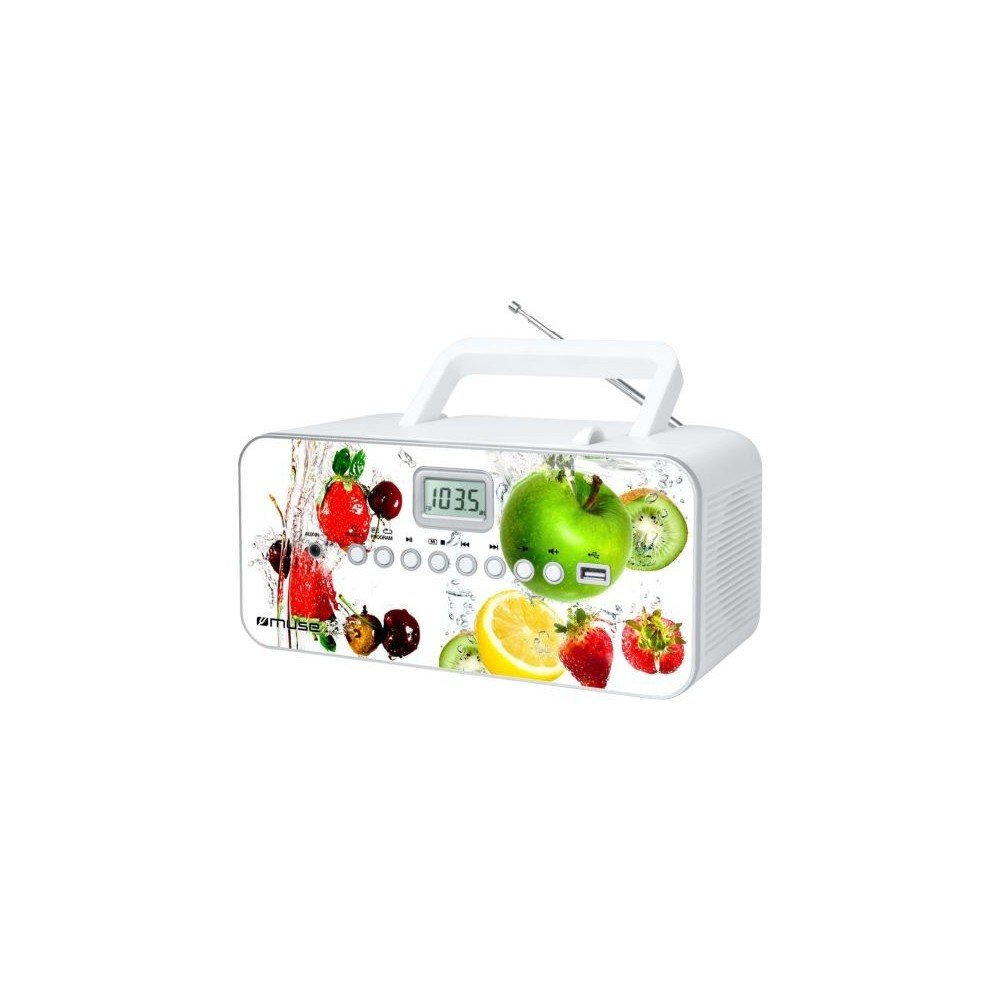
ഫ്രണ്ട് view of the Muse M-28 VF portable CD/MP3 radio, showing the CD compartment, display, and control buttons.
സുരക്ഷാ വിവരങ്ങൾ
- മഴയോ ഈർപ്പമോ യൂണിറ്റ് തുറന്നുകാട്ടരുത്.
- വെൻ്റിലേഷൻ ഓപ്പണിംഗുകളൊന്നും തടയരുത്.
- യൂണിറ്റിന് ചുറ്റും ശരിയായ വായുസഞ്ചാരം ഉറപ്പാക്കുക.
- നിർമ്മാതാവ് വ്യക്തമാക്കിയ അറ്റാച്ച്മെൻ്റുകൾ/ആക്സസറികൾ മാത്രം ഉപയോഗിക്കുക.
- മിന്നൽ കൊടുങ്കാറ്റുകളുടെ സമയത്തോ ദീർഘകാലത്തേക്ക് ഉപയോഗിക്കാത്ത സമയത്തോ യൂണിറ്റ് അൺപ്ലഗ് ചെയ്യുക.
- എല്ലാ സേവനങ്ങളും യോഗ്യതയുള്ള സേവന ഉദ്യോഗസ്ഥർക്ക് റഫർ ചെയ്യുക.
സജ്ജമാക്കുക
1. പവർ കണക്ഷൻ
- എസി പവർ കോർഡ് കണ്ടെത്തുക.
- Insert the small end of the power cord into the AC IN jack on the back of the unit.
- Plug the other end of the power cord into a standard wall outlet.
2. ആന്റിന ക്രമീകരണം
For optimal FM radio reception, fully extend the telescopic antenna. For MW (AM) reception, the unit has a built-in antenna; rotate the unit for best reception.
പ്രവർത്തന നിർദ്ദേശങ്ങൾ
1. പവർ ഓൺ/ഓഫ്
അമർത്തുക പവർ യൂണിറ്റ് ഓണാക്കാനോ ഓഫാക്കാനോ ഉള്ള ബട്ടൺ.
2. മോഡ് തിരഞ്ഞെടുക്കൽ
അമർത്തുക മോഡ് button repeatedly to switch between CD, USB, FM Radio, MW Radio, and AUX modes.
3. സിഡി പ്ലേബാക്ക്
- സിഡി കമ്പാർട്ട്മെന്റിന്റെ വാതിൽ തുറക്കുക.
- Place a CD (CD/CD-R/CD-RW/MP3 compatible) with the label side facing up.
- സിഡി കമ്പാർട്ട്മെന്റ് വാതിൽ അടയ്ക്കുക.
- ഉപയോഗിച്ച് സിഡി മോഡ് തിരഞ്ഞെടുക്കുക മോഡ് ബട്ടൺ.
- അമർത്തുക പ്ലേ/താൽക്കാലികമായി നിർത്തുക പ്ലേബാക്ക് ആരംഭിക്കുന്നതിനുള്ള ബട്ടൺ.
- ഉപയോഗിക്കുക ഒഴിവാക്കുക ബട്ടണുകൾ (<< / >>) to navigate tracks.
- അമർത്തുക നിർത്തുക പ്ലേബാക്ക് അവസാനിപ്പിക്കാൻ ബട്ടൺ.
- The unit features a full or partial repeat function. Refer to the display for repeat mode indicators.
4. USB പ്ലേബാക്ക്
- USB പോർട്ടിൽ ഒരു USB ഫ്ലാഷ് ഡ്രൈവ് ചേർക്കുക.
- ഉപയോഗിച്ച് USB മോഡ് തിരഞ്ഞെടുക്കുക മോഡ് ബട്ടൺ.
- Playback will start automatically or by pressing the പ്ലേ/താൽക്കാലികമായി നിർത്തുക ബട്ടൺ.
- ഉപയോഗിക്കുക ഒഴിവാക്കുക ബട്ടണുകൾ (<< / >>) to navigate tracks.
5. FM/MW Radio Operation
- Select FM or MW mode using the മോഡ് ബട്ടൺ.
- അമർത്തിപ്പിടിക്കുക ട്യൂൺ +/- ലഭ്യമായ അടുത്ത സ്റ്റേഷനായി യാന്ത്രികമായി സ്കാൻ ചെയ്യുന്നതിനുള്ള ബട്ടണുകൾ.
- അമർത്തുക ട്യൂൺ +/- buttons briefly to fine-tune the frequency.
- To store a station: Tune to the desired station, then press and hold the പ്രോഗ്രാം ബട്ടൺ. ഉപയോഗിക്കുക ഒഴിവാക്കുക ഒരു പ്രീസെറ്റ് നമ്പർ തിരഞ്ഞെടുക്കാൻ ബട്ടണുകൾ, തുടർന്ന് അമർത്തുക പ്രോഗ്രാം again to confirm. The unit supports 20 FM and 10 MW storable stations.
- To recall a stored station: Press the മെമ്മറി or പ്രീസെറ്റ് ബട്ടൺ, തുടർന്ന് ഉപയോഗിക്കുക ഒഴിവാക്കുക ആവശ്യമുള്ള പ്രീസെറ്റ് തിരഞ്ഞെടുക്കാൻ ബട്ടണുകൾ.
6. Auxiliary Input (AUX IN)
- Connect an external audio device (e.g., smartphone, MP3 player) to the AUX IN jack using a 3.5mm audio cable (not supplied).
- ഉപയോഗിച്ച് AUX മോഡ് തിരഞ്ഞെടുക്കുക മോഡ് ബട്ടൺ.
- ബന്ധിപ്പിച്ച ബാഹ്യ ഉപകരണത്തിൽ നിന്ന് പ്ലേബാക്ക് നിയന്ത്രിക്കുക.
7. വോളിയം നിയന്ത്രണം
തിരിക്കുക വോളിയം ശബ്ദ നില ക്രമീകരിക്കുന്നതിനുള്ള നോബ്.
മെയിൻ്റനൻസ്
1. യൂണിറ്റ് വൃത്തിയാക്കൽ
- വൃത്തിയാക്കുന്നതിനുമുമ്പ്, യൂണിറ്റ് പവർ ഓഫ് ചെയ്തിട്ടുണ്ടെന്നും മതിൽ ഔട്ട്ലെറ്റിൽ നിന്ന് അൺപ്ലഗ് ചെയ്തിട്ടുണ്ടെന്നും ഉറപ്പാക്കുക.
- പുറംഭാഗങ്ങൾ തുടയ്ക്കാൻ മൃദുവായതും ഉണങ്ങിയതുമായ തുണി ഉപയോഗിക്കുക.
- മുരടിച്ച പാടുകൾക്ക്, ചെറുതായി ഡിampen the cloth with water. Do not use abrasive cleaners, waxes, or solvents.
- Clean the CD lens periodically with a specialized CD lens cleaner disc (not supplied).
2. സംഭരണം
ദീർഘനേരം ഉപയോഗിക്കാത്തപ്പോൾ, യൂണിറ്റ് തണുത്തതും വരണ്ടതുമായ സ്ഥലത്ത് സൂക്ഷിക്കുക, നേരിട്ടുള്ള സൂര്യപ്രകാശത്തിൽ നിന്നും കടുത്ത താപനിലയിൽ നിന്നും അകറ്റി നിർത്തുക.
ട്രബിൾഷൂട്ടിംഗ്
| പ്രശ്നം | സാധ്യമായ കാരണം | പരിഹാരം |
|---|---|---|
| ശക്തിയില്ല | പവർ കോർഡ് ശരിയായി ബന്ധിപ്പിച്ചിട്ടില്ല. | Check if the power cord is securely plugged into the unit and the wall outlet. |
| ശബ്ദമില്ല | വോളിയം വളരെ കുറവാണ് അല്ലെങ്കിൽ മ്യൂട്ട് ചെയ്തിരിക്കുന്നു. തെറ്റായ മോഡ് തിരഞ്ഞെടുത്തു. | Increase the volume. Ensure the correct playback mode (CD, USB, Radio, AUX) is selected. |
| സിഡി പ്ലേ ചെയ്യുന്നില്ല | CD inserted incorrectly. CD is dirty or scratched. Incorrect mode. | Insert CD with label side up. Clean or replace the CD. Select CD mode. |
| യുഎസ്ബി പ്ലേ ചെയ്യുന്നില്ല | USB drive not inserted correctly. Incompatible file ഫോർമാറ്റ്. | Ensure USB drive is fully inserted. Check if fileകൾ MP3 ഫോർമാറ്റിലാണ്. |
| മോശം റേഡിയോ സ്വീകരണം | Antenna not extended/positioned correctly. Interference. | Fully extend and adjust the FM telescopic antenna. Rotate the unit for MW reception. Move away from other electronic devices. |
സ്പെസിഫിക്കേഷനുകൾ
- മോഡൽ: M-28 VF
- ബ്രാൻഡ്: മ്യൂസ്
- അനുയോജ്യമായ ഡിസ്ക് തരങ്ങൾ: സിഡി, സിഡി-ആർ, സിഡി-ആർഡബ്ല്യു, എംപി 3
- റേഡിയോ ട്യൂണർ: പിഎൽഎൽ എഫ്എം/മെഗാവാട്ട്
- പ്രീസെറ്റ് സ്റ്റേഷനുകൾ: 20 FM, 10 MW
- കണക്റ്റിവിറ്റി: USB Port (1), Auxiliary Input (3.5mm)
- സ്പീക്കർ തരം: സ്റ്റീരിയോ
- ഊർജ്ജ സ്രോതസ്സ്: എസി കേബിൾ
- ഔട്ട്പുട്ട് പവർ: 14 വാട്ട്സ്
- അളവുകൾ (L x W x H): 17 x 26 x 13 സെ.മീ (ഏകദേശം 6.7 x 10.2 x 5.1 ഇഞ്ച്)
- ഭാരം: 1.4 കിലോഗ്രാം (ഏകദേശം 3.1 പൗണ്ട്)
- ബ്ലൂടൂത്ത് അനുയോജ്യമാണ്: ഇല്ല
വാറൻ്റി വിവരങ്ങൾ
This product comes with a manufacturer's warranty of 1 വർഷം from the date of purchase. Please retain your proof of purchase for warranty claims. The warranty covers defects in materials and workmanship under normal use. It does not cover damage caused by misuse, accident, unauthorized modification, or external causes.
ഉപഭോക്തൃ പിന്തുണ
For further assistance, technical support, or warranty inquiries, please refer to the contact information provided with your product packaging or visit the official MUSE webസൈറ്റ്. യൂണിറ്റ് സ്വയം നന്നാക്കാൻ ശ്രമിക്കരുത്.


