ആമുഖം
This manual provides comprehensive instructions for the installation, operation, and maintenance of your Lowrance ELITE-3X DSI Color Sonar 455/800kHz Fishfinder. The ELITE-3X DSI is a compact and affordable fishfinder featuring DownScan Imaging for photo-like underwater detail and a water-temperature sensor. Its LED-backlit color display allows for quick and easy identification of fishing-holding structures and fish targets using dual-frequency 455 or 800 kHz DownScan Imaging capability.
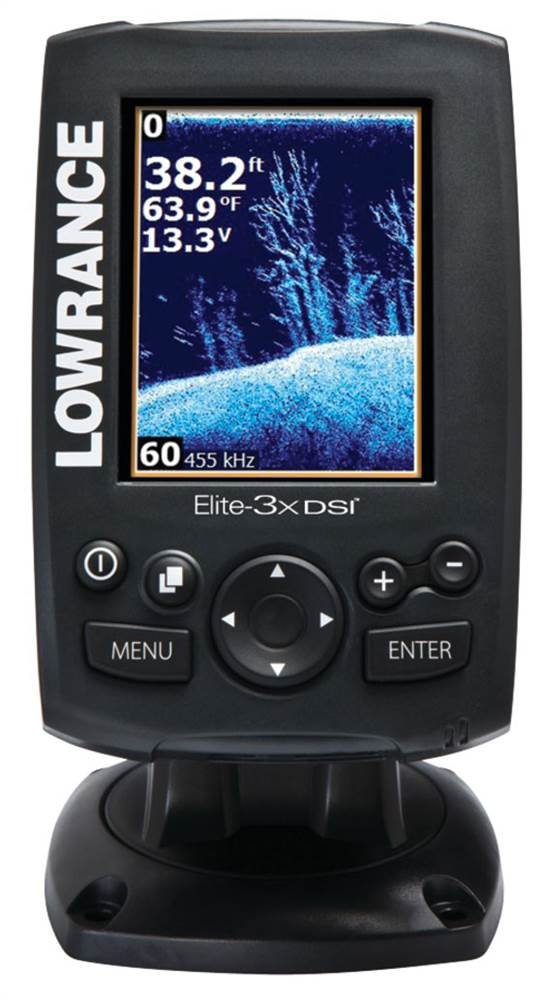
ചിത്രം 1: The Lowrance ELITE-3X DSI Fishfinder unit. The screen shows sonar data with depth, temperature, and voltage readings. Below the screen are control buttons including Power, Page, Menu, Enter, and a directional pad, along with plus and minus buttons for zoom.
സജ്ജീകരണവും ഇൻസ്റ്റാളേഷനും
Proper installation is crucial for optimal performance of your ELITE-3X DSI Fishfinder. This section outlines the steps for mounting the unit and connecting the transducer.
1. Mounting the Display Unit
- Choose a location that is easily visible from your operating position and protected from excessive spray or direct sunlight.
- Ensure there is sufficient space behind the unit for cable connections and ventilation.
- Use the provided mounting bracket and hardware to securely attach the display unit to a flat surface. Drill pilot holes as necessary.
- Angle the unit for best viewing and tighten the mounting knobs.
2 ട്രാൻസ്ഡ്യൂസർ ഇൻസ്റ്റാളേഷൻ
The ELITE-3X DSI comes with a Skimmer transducer. Proper placement of the transducer is critical for accurate sonar readings.
- Transom Mount: For most small to medium-sized boats, a transom mount is recommended. Mount the transducer on the transom where it will be in clean, undisturbed water flow at all speeds.
- In-Hull Mount: For fiberglass hulls, an in-hull mount may be an option. Consult a professional installer for this method.
- Ensure the transducer face is parallel to the waterline and free from obstructions.
- Route the transducer cable away from engine noise and other electrical interference. Secure the cable to prevent damage.
3. പവർ കണക്ഷൻ
- Connect the red wire from the power cable to the positive (+) terminal of a 12V DC power source (e.g., boat battery).
- കറുത്ത വയർ നെഗറ്റീവ് (-) ടെർമിനലിലേക്കോ അനുയോജ്യമായ ഒരു ഗ്രൗണ്ട് പോയിന്റിലേക്കോ ബന്ധിപ്പിക്കുക.
- Install an appropriate fuse (typically 3A) in the positive line, close to the battery, to protect the unit.
- Plug the power cable into the back of the ELITE-3X DSI unit.
പ്രവർത്തന നിർദ്ദേശങ്ങൾ
This section details the basic operation of your Lowrance ELITE-3X DSI Fishfinder.
1. പവർ ഓൺ/ഓഫ്
- പവർ ഓണാക്കാൻ, അമർത്തിപ്പിടിക്കുക ശക്തി button (marked with a circle and vertical line) until the Lowrance logo appears.
- പവർ ഓഫ് ചെയ്യുന്നതിന്, അമർത്തിപ്പിടിക്കുക ശക്തി ഷട്ട്ഡൗൺ പ്രോംപ്റ്റ് ദൃശ്യമാകുന്നതുവരെ ബട്ടൺ അമർത്തിപ്പിടിക്കുക, തുടർന്ന് സ്ഥിരീകരിക്കുക.
2. അടിസ്ഥാന നാവിഗേഷൻ
- ഉപയോഗിക്കുക ദിശാസൂചന പാഡ് (up, down, left, right arrows) to navigate through menus and adjust settings.
- അമർത്തുക പ്രവേശിക്കുക button to confirm selections or open sub-menus.
- അമർത്തുക മെനു button to access the main menu or return to the previous screen.
3. Sonar Display
The ELITE-3X DSI features a color LED display for clear sonar imaging.
- DownScan Imaging: Provides photo-like views of structure and fish below your boat.
- ആവൃത്തി തിരഞ്ഞെടുക്കൽ: The unit operates at 455 kHz or 800 kHz.
- 455 kHz offers wider coverage and is generally better for deeper water.
- 800 kHz provides higher detail and is ideal for shallower water or identifying specific structures.
- ഉപയോഗിക്കുക പേജുകൾ button (marked with a square icon) to toggle between available sonar frequency views (e.g., 455 kHz, 800 kHz, or split-screen viewഎസ്).
- ഉപയോഗിക്കുക + ഒപ്പം - buttons for quick zoom adjustments on the sonar screen.
4. ക്രമീകരണങ്ങൾ ക്രമീകരിക്കുന്നു
അമർത്തി പ്രധാന മെനു ആക്സസ് ചെയ്യുക മെനു button to adjust various settings such as:
- സംവേദനക്ഷമത: Adjusts how much detail the sonar displays. Higher sensitivity shows more, but can also show more noise.
- വർണ്ണ പാലറ്റ്: Change the color scheme of the sonar display.
- ആഴത്തിലുള്ള പരിധി: Manually set the maximum depth displayed.
- യൂണിറ്റുകൾ: Change units for depth (feet/meters), temperature (Fahrenheit/Celsius), etc.
മെയിൻ്റനൻസ്
Regular maintenance ensures the longevity and optimal performance of your Lowrance ELITE-3X DSI Fishfinder.
- ഡിസ്പ്ലേ വൃത്തിയാക്കുന്നു: ഒരു സോഫ്റ്റ് ഉപയോഗിക്കുക, ഡിamp cloth to clean the screen. Avoid abrasive cleaners or solvents that could damage the display.
- ട്രാൻസ്ഡ്യൂസർ പരിചരണം: Periodically inspect the transducer for marine growth or damage. Clean it gently with a soft brush and mild soap if necessary. Ensure the transducer cable is not kinked or frayed.
- കണക്ഷനുകൾ: Check all electrical connections regularly to ensure they are secure and free from corrosion. Apply dielectric grease to connections in marine environments to prevent corrosion.
- സംഭരണം: When not in use for extended periods, store the unit in a dry, cool place, away from direct sunlight and extreme temperatures. Disconnect power if storing for a long time.
ട്രബിൾഷൂട്ടിംഗ്
This section addresses common issues you might encounter with your ELITE-3X DSI Fishfinder.
| പ്രശ്നം | സാധ്യമായ കാരണം | പരിഹാരം |
|---|---|---|
| പവർ ഇല്ല | അയഞ്ഞ പവർ കണക്ഷൻ, ഫ്യൂസ് പൊട്ടി, ബാറ്ററി ഡെഡ്. | Check power cable connections. Inspect and replace fuse if blown. Check battery voltage. |
| സോണാർ റീഡിംഗ് / എറാറ്റിക് റീഡിംഗ് ഇല്ല | Transducer not in water, transducer cable damaged, air bubbles under transducer, incorrect frequency. | Ensure transducer is submerged. Check cable for damage. Reposition transducer to avoid turbulence. Try switching sonar frequencies (455/800 kHz). |
| സ്ക്രീൻ മരവിക്കുന്നു / പ്രതികരിക്കുന്നില്ല | സോഫ്റ്റ്വെയർ തകരാർ, വൈദ്യുതിയിലെ ഏറ്റക്കുറച്ചിലുകൾ. | Perform a soft reset by powering off and on. If issue persists, consult manufacturer support for a hard reset procedure. |
| മോശം ഇമേജ് ക്വാളിറ്റി | Incorrect sensitivity, dirty transducer, electrical interference. | Adjust sensitivity settings. Clean transducer face. Check for other electronics causing interference and re-route cables if possible. |
If the problem persists after attempting these solutions, please contact Lowrance customer support.
സ്പെസിഫിക്കേഷനുകൾ
| ഫീച്ചർ | വിശദാംശങ്ങൾ |
|---|---|
| മോഡലിൻ്റെ പേര് | Lowrance ELITE-3X DSI Color Sonar 455/800kHz Fishfinder |
| ഭാഗം നമ്പർ | 000-11449-001 |
| ഡിസ്പ്ലേ വലിപ്പം | 3 ഇഞ്ച് |
| ഡിസ്പ്ലേ തരം | LED നിറം |
| ഡിസ്പ്ലേ റെസല്യൂഷൻ | 320 x 240 പിക്സലുകൾ |
| സോണാർ ഫ്രീക്വൻസികൾ | 455 kHz, 800 kHz (DownScan Imaging) |
| ട്രാൻസ്ഫ്യൂസർ തരം | Skimmer Transducer (with water-temperature sensor) |
| പവർ ഔട്ട്പുട്ട് | RMS (Root Mean Square) power not specified, typical for compact units. |
| ഓപ്പറേറ്റിംഗ് വോളിയംtage | 12V DC |
| ഇനത്തിൻ്റെ ഭാരം | 1 പൗണ്ട് |
| മെറ്റീരിയൽ | പ്ലാസ്റ്റിക് |
| അളവുകൾ (LxWxH) | 10.7 x 9 x 4.4 inches (approximate, based on package dimensions) |
വാറൻ്റിയും പിന്തുണയും
For detailed warranty information, please refer to the warranty card included with your product or visit the official Lowrance website. Lowrance provides customer support for technical assistance, troubleshooting, and service inquiries.
Official Lowrance Webസൈറ്റ്: www.lowrance.com
It is recommended to register your product on the Lowrance webഅപ്ഡേറ്റുകളും പിന്തുണയും ലഭിക്കുന്നതിനുള്ള സൈറ്റ്.


